Install DSH plugins from the plugin market on any OS
Installing a DSH plugin uses the same command on all three platforms — dsh plugin --profile web add <package-or-repo> — and what really differs is shell syntax, directory ownership and write permission. This guide walks through the two install paths, the per-platform differences, and one verification method that works everywhere; each platform's failure mode links to its own troubleshooting article.
Two install paths: the plugin market and the CLI
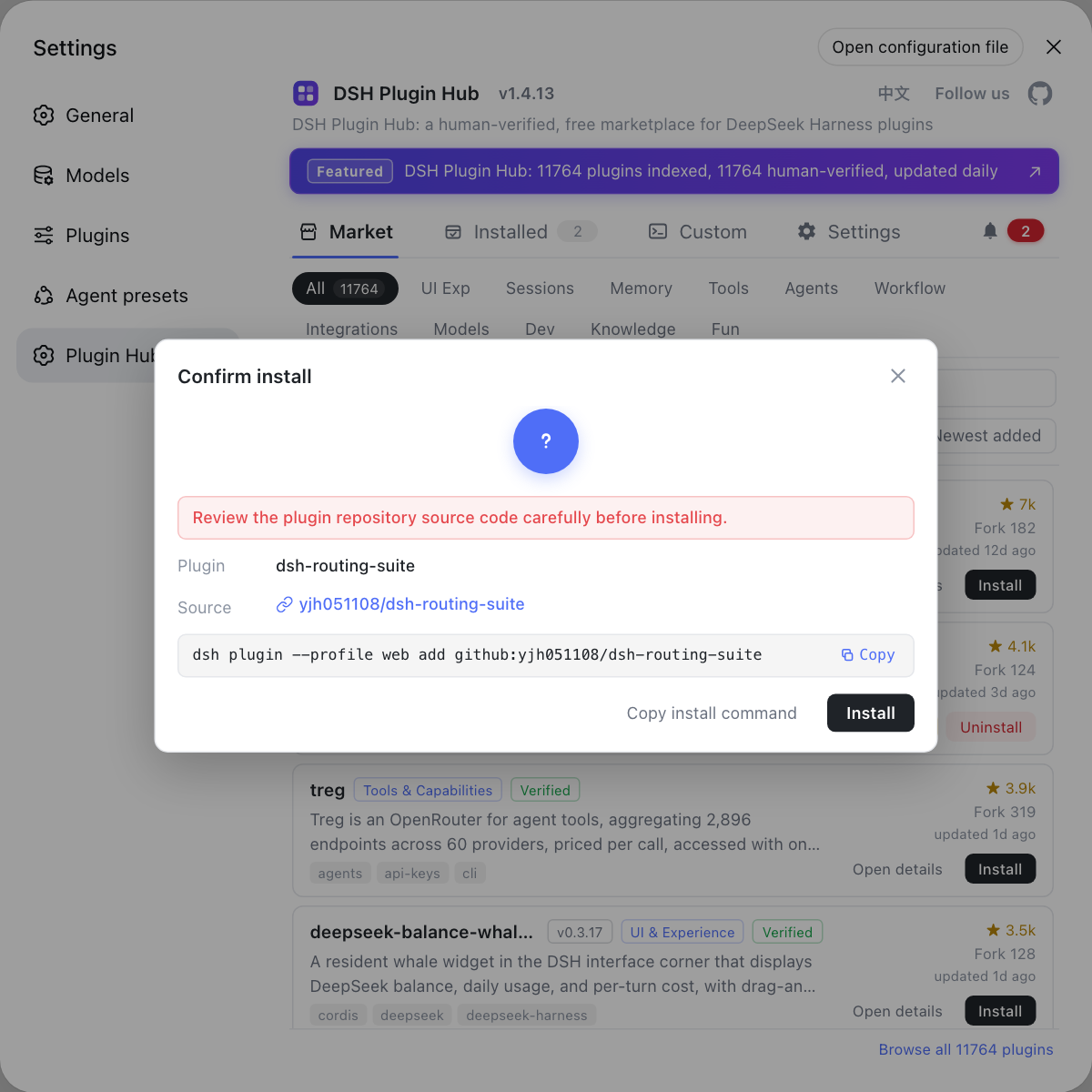
There are only two ways to install a DSH plugin, and both work on every platform: click Install in the plugin market, or run add on the command line (source). Both end up running the same command:
| Path | How | Best for | Platform difference |
|---|---|---|---|
| Plugin market | Settings → Plugin Market → pick → Install | Day-to-day use, first install | None (browser UI) |
| CLI add | dsh plugin --profile web add <package-or-repo> | Batches, scripts, remote hosts | Shell syntax only |
Install DSH Plugin Hub first (dsh plugin --profile web add dsh-plugin) and the plugin market appears in Settings; it keeps search, categories, versions and updates on one page so you do not have to drop back to the terminal.
Platform difference 1: DSH plugin paths and permissions
The command writes to the same layout everywhere — $DSH_HOME/profiles/<name>/node_modules — but who may write that directory depends on the platform. Platform by platform:
- Windows — PATH and non-ASCII paths — if the globally installed
dshis not on PATH the command never resolves, and install or data directories containing spaces or non-ASCII characters may be truncated. Expected: add the npm global prefix to your user PATH and keep install paths pure ASCII; see dsh command not found. - macOS — directory ownership, not permission bits — DSH plugins install into
~/.dsh, which you already own; a singlesudoinstall turns that directory into root's, after which ordinary plugin installs fail. Expected: never use sudo, and restore ownership of~/.dshif it already happened. - Linux — global write access and toolchain — a system-wide Node needs elevated rights for the global directory and reports EACCES, while minimal containers may lack the toolchain needed to compile native modules, failing during the build step. Expected: use nvm or set the npm prefix to a user directory rather than forcing sudo.
For what lands on disk and how .pnpm is organised, see where DSH plugins are installed.
Platform difference 2: DSH plugin install commands and shell syntax
The install command itself is identical across platforms; what you adapt is quoting, path separators and line continuation (source). Three differences cover almost everything:
- Package names and repo references paste as-is —
dsh plugin --profile web add <package>andadd github:owner/repowork unchanged on every platform, with no separator rewrites. Expected: the command enters the install flow instead of reporting an unknown command. - On Windows use PowerShell, not legacy cmd — cmd handles quotes and line continuation differently and can split arguments apart. Expected: run it in PowerShell and double-quote any target containing spaces.
~is not expanded by PowerShell — paths like~/.dshonly work in Unix-style shells; on Windows use$env:DSH_HOMEor%USERPROFILE%. Expected: query the right variable rather than mistaking a missing path for a failed plugin install.
For every flag and exit code of the command itself, see the dsh plugin add command.
Verification: one command for DSH plugins on all three platforms
Verification is identical everywhere: if dsh plugin --profile web list shows the plugin, the install succeeded. Four steps:
- List installed plugins — run
dsh plugin --profile web list. Expected: the package you just installed appears in the output, on any platform. - Check the plugin market — open the Web UI → Settings → Plugin Market → Installed. Expected: the plugin is listed with a normal status, which also proves the host and catalog endpoint are reachable.
- Confirm the on-disk location — inspect
$DSH_HOME/profiles/web/node_modules(by default~/.dsh/profiles/web/node_modules). Expected: the top-level directory name matches the plugin package name. - Route failures by error text — a stall during download points at mirror and proxy settings, a permission error points at the platform list above. Expected: the error text maps directly to the right article instead of guesswork.
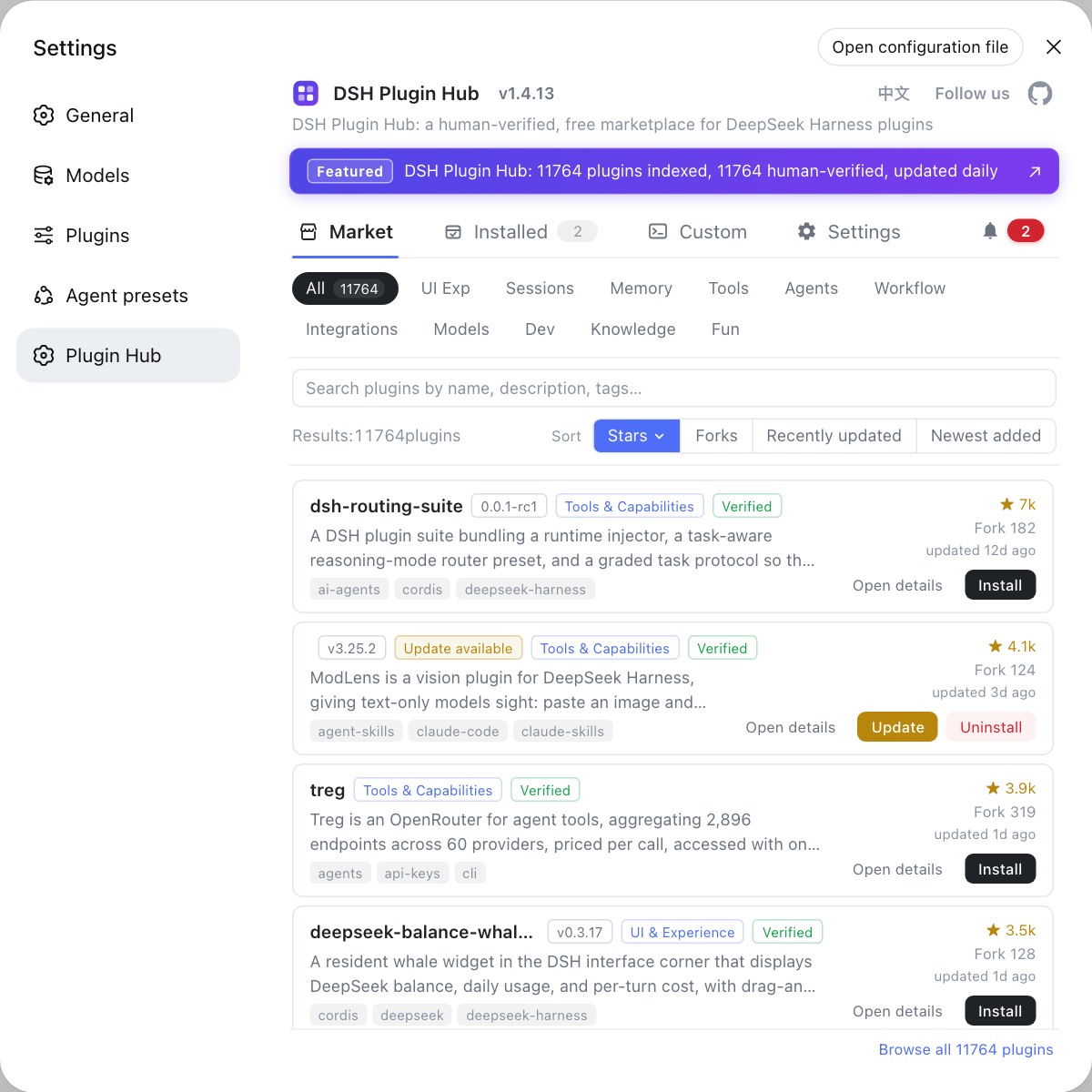
The plugin market doubles as the management surface: installed list, update checks and logs all live there. See using the plugin market.
Notes and limits for installing a DSH plugin by platform
- The difference is the OS, not the dsh command — installs fail on PATH, ownership, write permission or shell syntax far more often than on the plugin itself, so classify the platform first.
- Never paper over permissions with sudo — on macOS and Linux a sudo install rewrites directory ownership and makes every later install harder to fix.
- Keep Windows paths ASCII — truncation affects the profile directory too, not just the host install.
- Plugins are isolated per profile — omit
--profileor target the wrong one and a correctly installed plugin still appears missing. - A broken host blocks every plugin — platform differences when installing the host itself, via npx, a global npm install or a source build, are covered in installing DeepSeek Harness on Windows, macOS and Linux.
Sources: dsh CLI README, Packaging and installing plugins (official docs), dshplugin/dsh-plugin-hub
FAQ
**The DSH plugin install command is identical on all three platforms; only the environment differs.** The DeepSeek Harness plugin install command is dsh plugin --profile web add <package-or-repo> everywhere, and the plugin market runs the very same command behind its Install button; what changes per platform is shell syntax, directory ownership and write permission.
**A DSH plugin install rarely fails on the plugin itself; the dsh command is simply not on PATH.** On Windows, run npm config get prefix to find the global prefix directory, add it to your user PATH and reopen the terminal. Once the command resolves, plugin installs behave exactly as they do on macOS and Linux.
**Never install a DSH plugin with sudo.** Plugins install into the profile directory under ~/.dsh, which the current user already owns. If you install once with sudo the directory becomes root-owned, and every later plugin install fails with a permission error. Fix it by restoring ownership of ~/.dsh to your own account and reinstalling.
**A DSH plugin install that reports EACCES means the target directory is not writable, not that the package is broken.** On Linux, a system-wide Node needs elevated rights for the global directory; the right fix is to manage Node with nvm or point the npm prefix at a user directory instead of running every install with sudo.
**Verifying a DSH plugin uses the same check on all three platforms.** Run dsh plugin --profile web list and confirm the plugin appears in the output, or open Settings → Plugin Market in the DeepSeek Harness Web UI and find it in the installed list. To confirm the on-disk location, inspect $DSH_HOME/profiles/web/node_modules.
Related Terms
- --profile
- --profile is the dsh flag that selects which runtime stack a command acts on, such as web or headless. DSH plugin add, list and remove all take it, because plugins are isolated per profile and profiles never share them.— dsh CLI README
- plugin market
- The plugin market is the plugin catalog and install entry built into the DeepSeek Harness Web UI at Settings → Plugin Market. It combines search, categories and an Install button on one page, and clicking Install runs a dsh plugin add command in the background.— dshplugin/dsh-plugin-hub GitHub repository
- $DSH_HOME
- $DSH_HOME is the data root environment variable for DeepSeek Harness; profiles and DSH plugins live under it, and it defaults to ~/.dsh when unset. The path syntax differs per platform while the directory layout stays the same.— dsh CLI README
- PATH
- PATH is the environment variable that tells the operating system where to look for executables. Whether a globally installed dsh command resolves depends on its directory being on PATH, the first cause of command-not-found errors on Windows and macOS.— dsh CLI README
Sources
- dsh CLI README· deepseek-ai
- DeepSeek Harness Docs - Packaging and installing plugins· deepseek-ai
- dshplugin/dsh-plugin-hub GitHub repository· GitHub