DSH Plugin Hub: The Community Plugin Marketplace for DeepSeek Harness
Community Officialdshplugin/dsh-plugin-hub
DSH Plugin Hub is a community plugin marketplace for DeepSeek Harness (DSH plugin), built to the official plugin spec and embedded in Settings → Plugin Market. Browse, search and one-click install human-curated community plugins without leaving the app, synced daily with dsh-plugin.org.
DSH Plugin Hub is a community plugin marketplace DSH plugin for DeepSeek Harness, built by the dsh-plugin.org team to the official plugin spec and embedded in Settings → Plugin Market. Browse, search and one-click install human-curated community plugins without leaving the app, with data synced daily from dsh-plugin.org.
How to Install
dsh plugin --profile web add dsh-plugin- Category
- UI & Experience
- Platform
- DSH Plugin
- Author
- dshplugin
- Distribution
- Bundle
dsh-plugin-hub Key Features

DSH Plugin Hub Repo Summary
DSH Plugin Hub is a community plugin marketplace DSH plugin for DeepSeek Harness (DSH), built by the dsh-plugin.org team to the official plugin spec. Once installed, it embeds in Settings → Plugin Market, letting you browse, search, and one-click install community plugins without leaving the app. It solves the "installed DSH but don't know what to add, or where to manage it" problem with native Plugin Market integration, fully visualized one-click install / upgrade / uninstall, centralized management of installed plugins, custom install through three channels (npm / GitHub / DSH command), categorized system logs, a notification center that traces every task, and a lightweight browser-only design. This is an independent community project with no affiliation with DeepSeek Harness, released under the MIT license, last updated 2026-10, and currently supports the DSH 0.1.0 series.
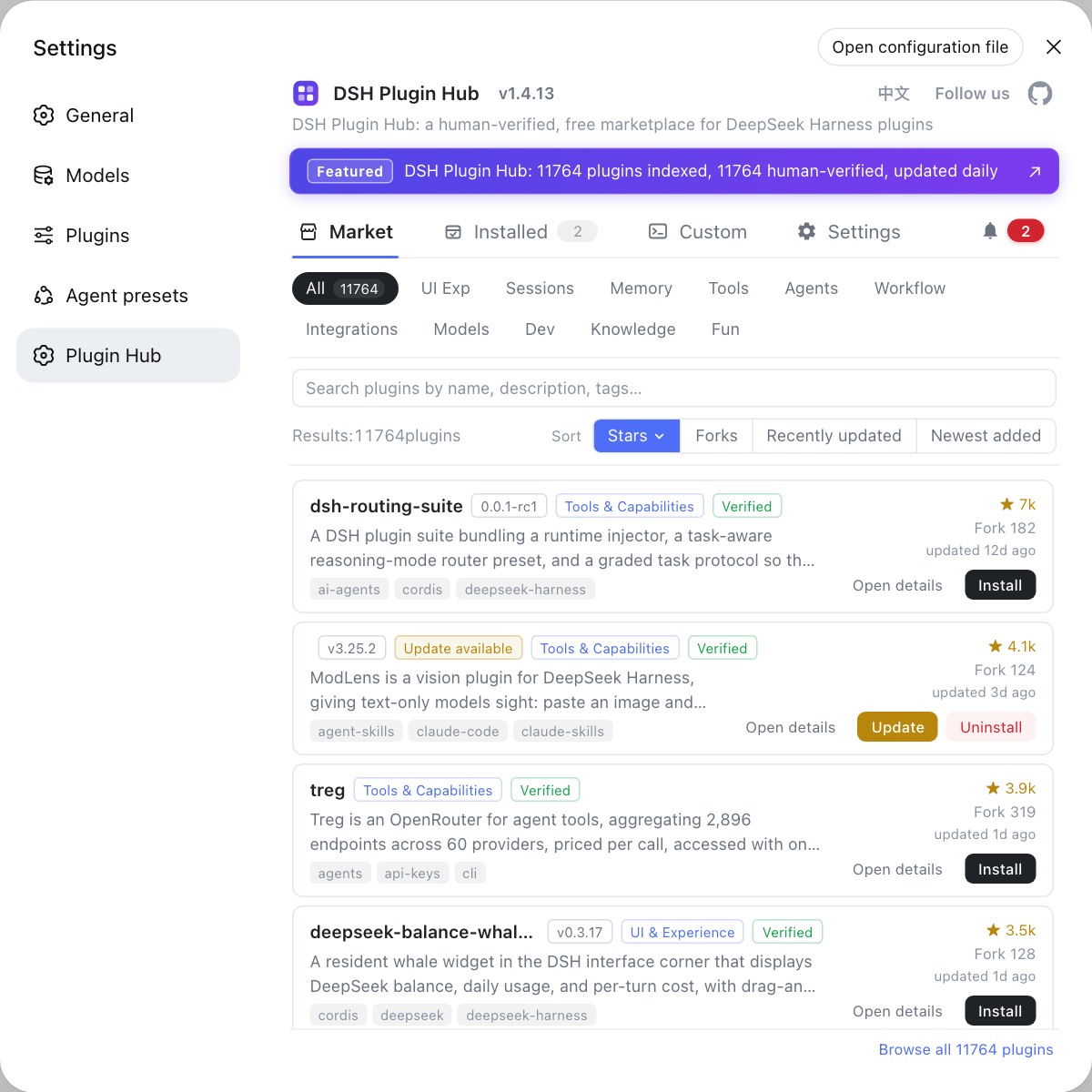
What core features does DSH Plugin Hub support as a DSH plugin?
One-click everything · fully visualized
- One-click install — click and done: a serial background queue with live progress in the dialog, cancellable anytime; most plugins take effect on page refresh, no restart needed
- One-click upgrade — new versions are detected automatically; the card button turns into "Update" and overwrite-installs in one click after confirmation
- One-click uninstall — fully visualized with live progress; changes take effect immediately
- Full trace — every install / upgrade / uninstall, success or failure, is recorded in the notification center for later review
Installed plugins · centralized management
- Search, source filters (All / Catalog / Custom install) and a sort button group (Name / Recent / Stars / Forks, toggleable asc/desc)
- Each row shows the plugin name, source tag (catalog / manual), version and update time, with update, uninstall and reveal-in-Finder at the row end
Notification center
- Live progress and cancel for running tasks, pending restarts, and full success / failure history in one place
- Copy the full log, delete a single entry or clear all; failed installs can be filed as a GitHub Issue in one click
Custom install · three channels
- Three install cards — npm package, GitHub source and DSH command — each with an example syntax line and format validation; pasting a valid address starts the install
- Installed plugins land in the Installed list and are tagged by source (catalog / manual)
Settings · five sections
- Update settings: check-on-start toggle, npm mirror dropdown and proxy address input
- Security & trust: two toggles — enable npm install and enable GitHub source install — that independently gate the command-line install channels
- System diagnostics, System logs and Restore defaults managed in one place
System logs · category × level
- Records operation trails such as installs, uninstalls, settings changes and diagnostics; filter by category and level with a built-in log viewer
- Copy all, export the log or reveal the file in your file manager; the log location is configurable
Rich catalog · human-curated
- Indexes 10000+ community plugins, 10000+ of which are hand-verified and published daily by dsh-plugin.org
- Covers UI & experience, sessions & messages, memory & context, tooling and more — browse by category or search straight to it
- Every plugin shows its verification status (verified), star / fork ratings, version and last-update time — fully sourced
Bilingual · easy to filter
- The UI follows your system language by default and switches manually anytime from the top-right; copy and plugin data switch together
- Sort by the Name / Recent / Stars / Forks button group and filter by installed / not installed, with full-text search across names, descriptions and tags
- Bilingual descriptions and capability tags at a glance
Always in sync · lightweight & private
- Same data source as the website; the catalog updates automatically, no manual upgrade needed
- Browser-side only, no host dependencies, no telemetry, no data collection
Open Settings → Plugin Market and you'll land on the DSH Plugin Hub marketplace home — browse 10000+ community plugins by category, with name, description, stars and last-update time on each card:
How to install DSH Plugin Hub?
The recommended way is the official command — the plugin ships with a built-in browser bundle, so a single command installs and enables it:
dsh plugin --profile web add dsh-plugin
Install from GitHub (no build or authorization needed):
dsh plugin --profile web add git+https://github.com/dshplugin/dsh-plugin-hub.git
After installation, restart dsh web and open Settings → Plugin Market to use it.
How to update DSH Plugin Hub?
The plugin market detects new versions and prompts a one-click update; if an older version cannot pull the latest release due to an update defect, upgrade from the command line instead:
dsh plugin --profile web update dsh-plugin
If update is blocked by an old-version defect, force a reinstall of the latest release with an explicit version:
dsh plugin --profile web add dsh-plugin@latest
Restart dsh web after the update for the change to take effect.
DSH Plugin Hub feature overview
Installed plugins · Custom install
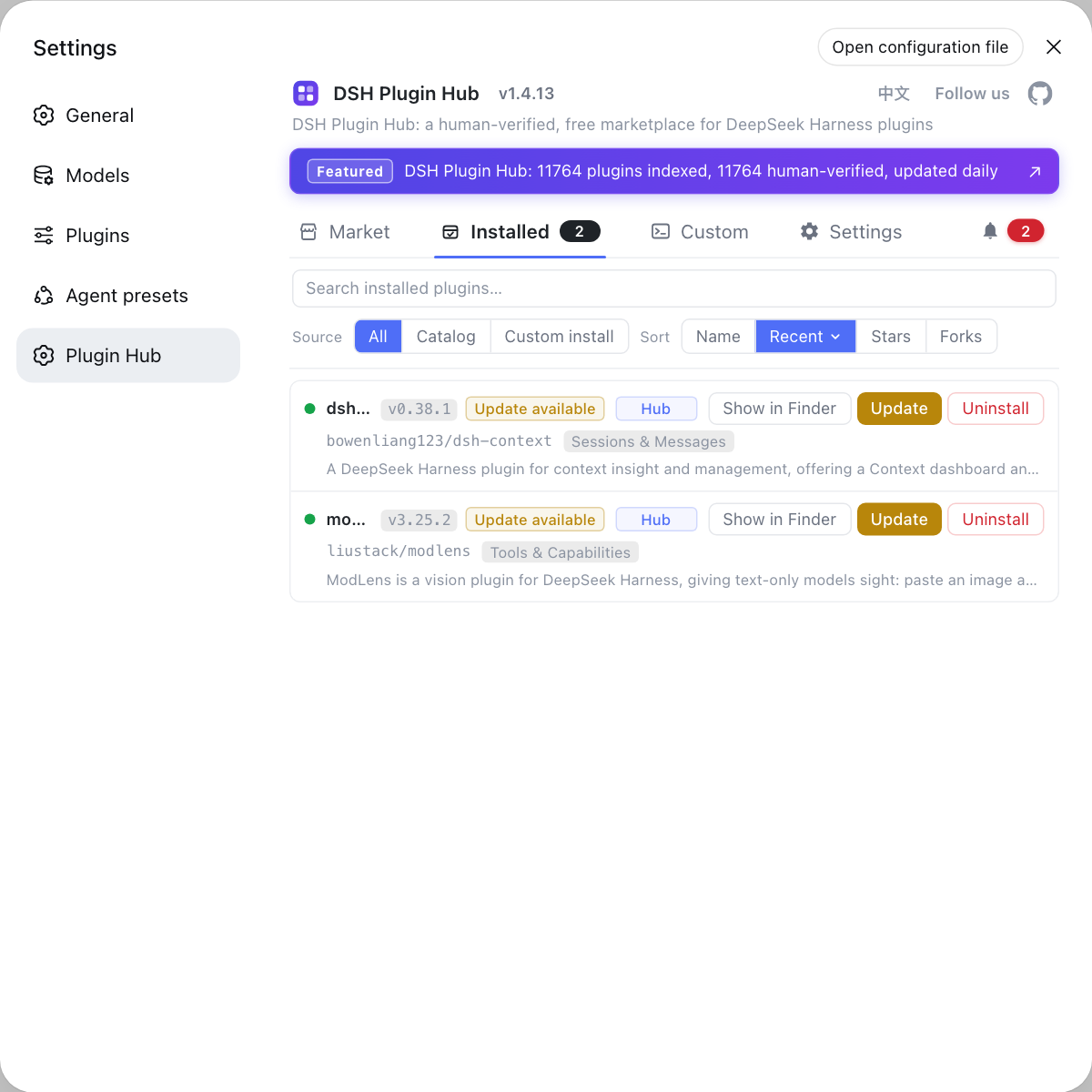
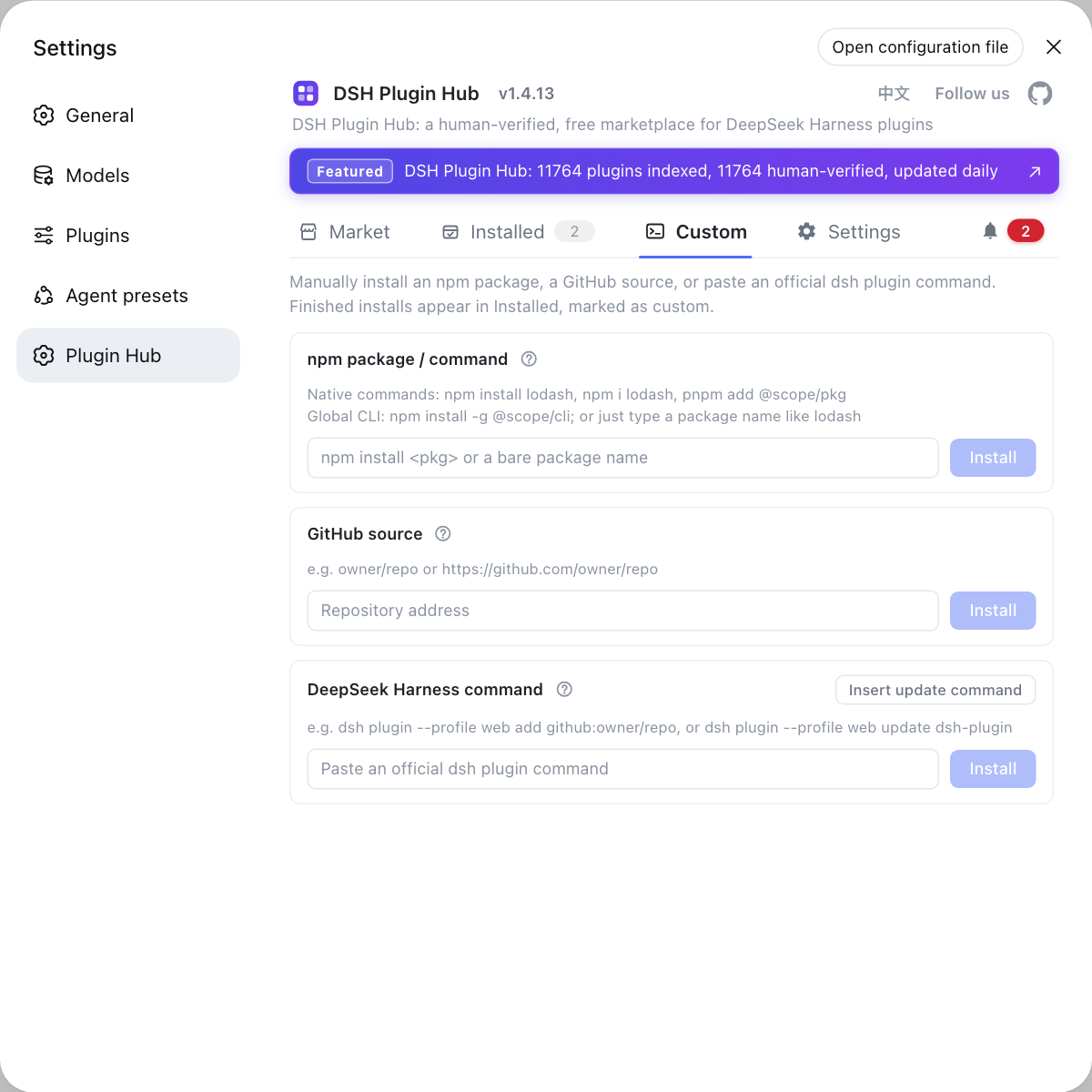
Manage every plugin currently installed, with search, source filters and sorting, plus update, uninstall and reveal-in-Finder per row; install any plugin outside the catalog manually through three channels — npm package, GitHub source or a DSH command.
Settings · System logs
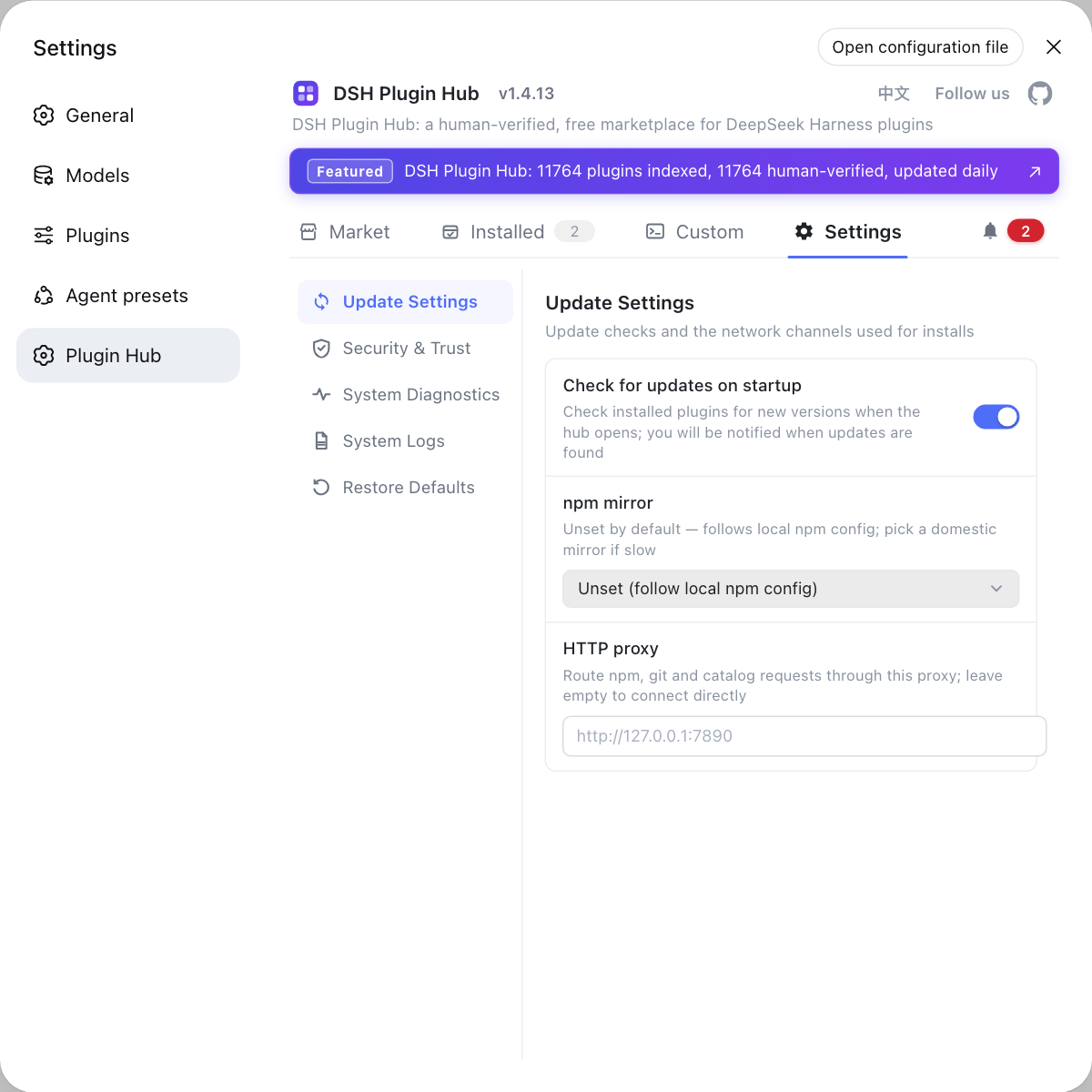
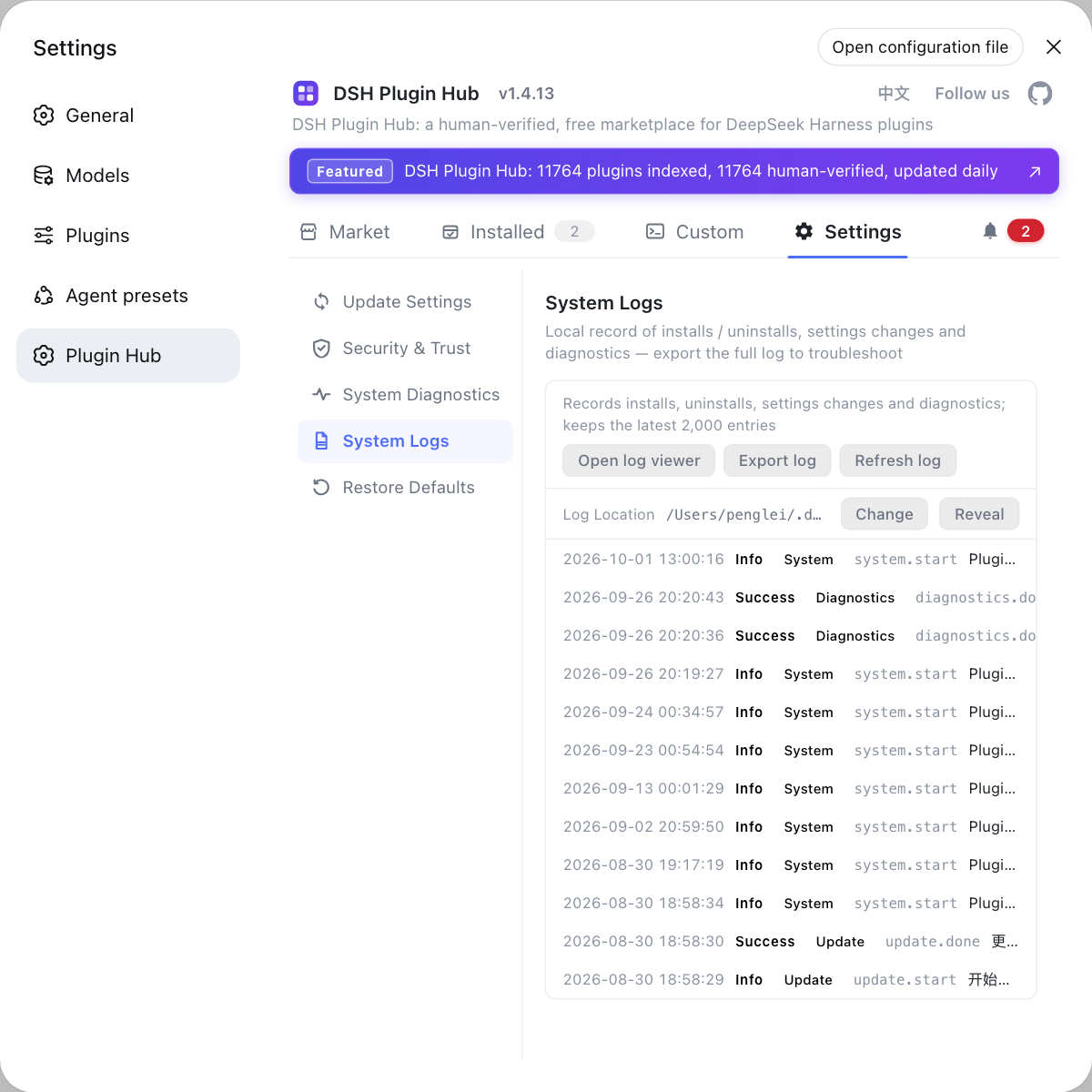
Configure update checks, npm mirror, proxy channel, security & trust and log location; review install / uninstall / settings-change / diagnostics trails, filtered by category and level, with a built-in log viewer.
Confirm install · Confirm uninstall
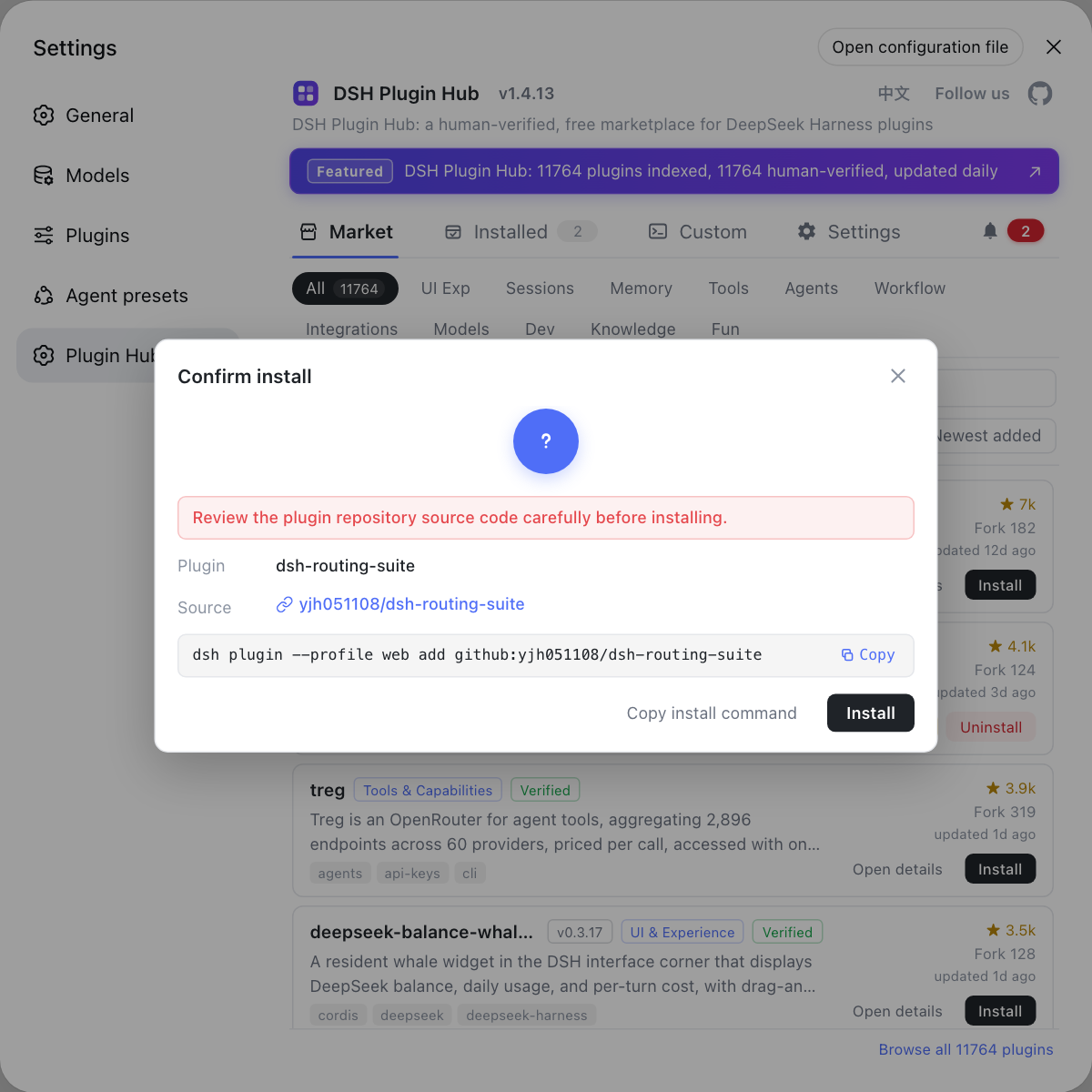
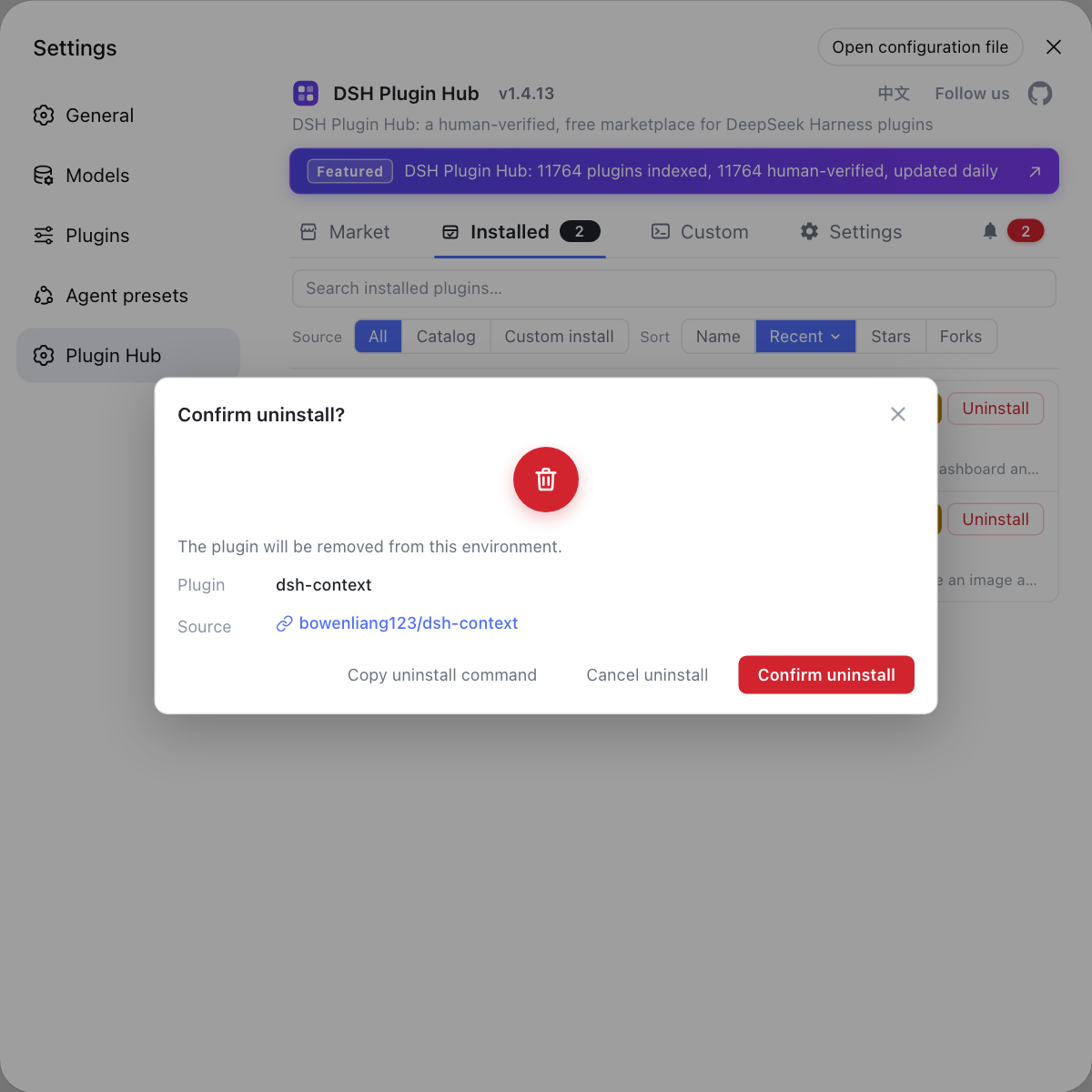
The install confirmation shows the plugin name, source repo and the command that will run; the uninstall confirmation shows what will be removed — nothing happens until you confirm, preventing accidental changes.
Confirm update · Notifications
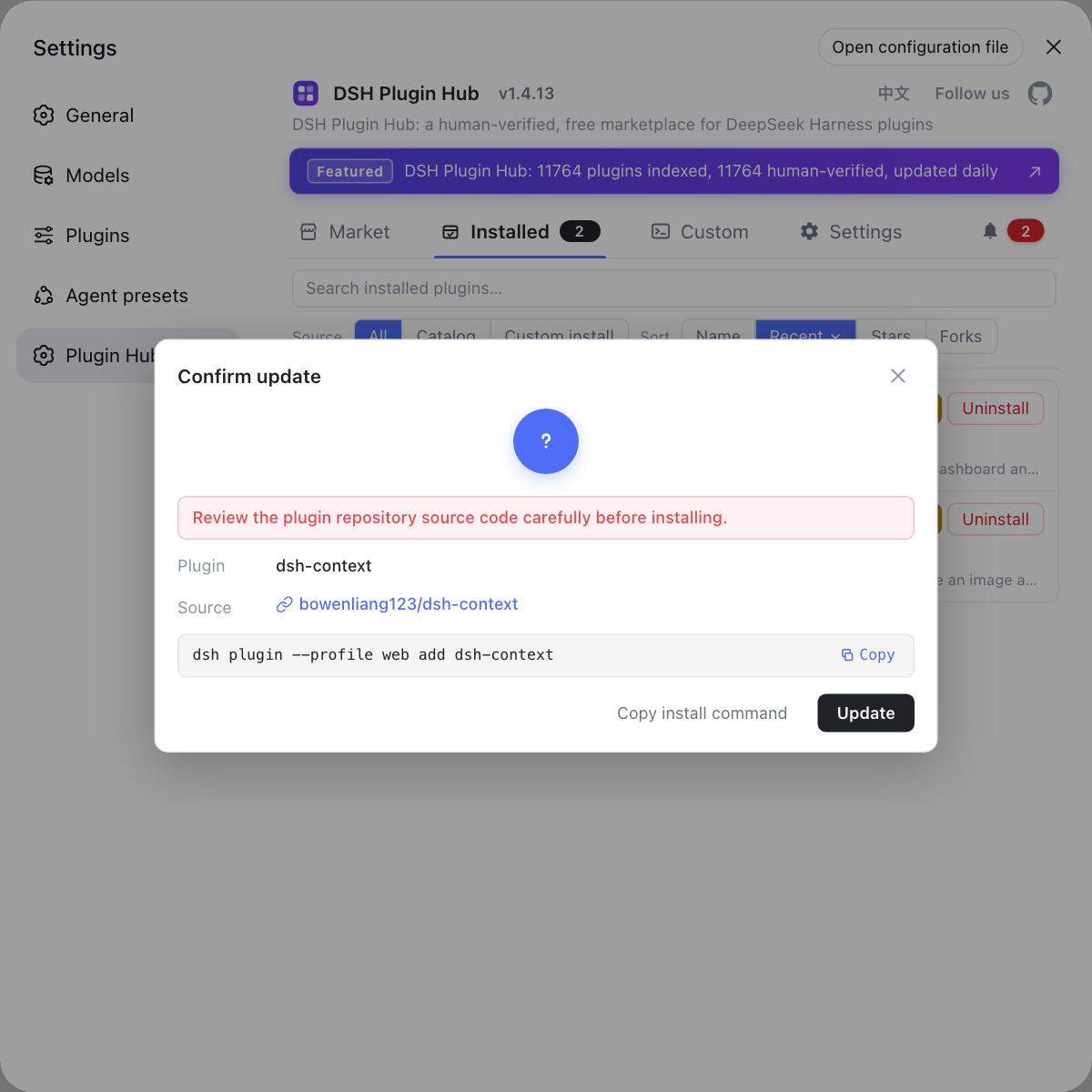
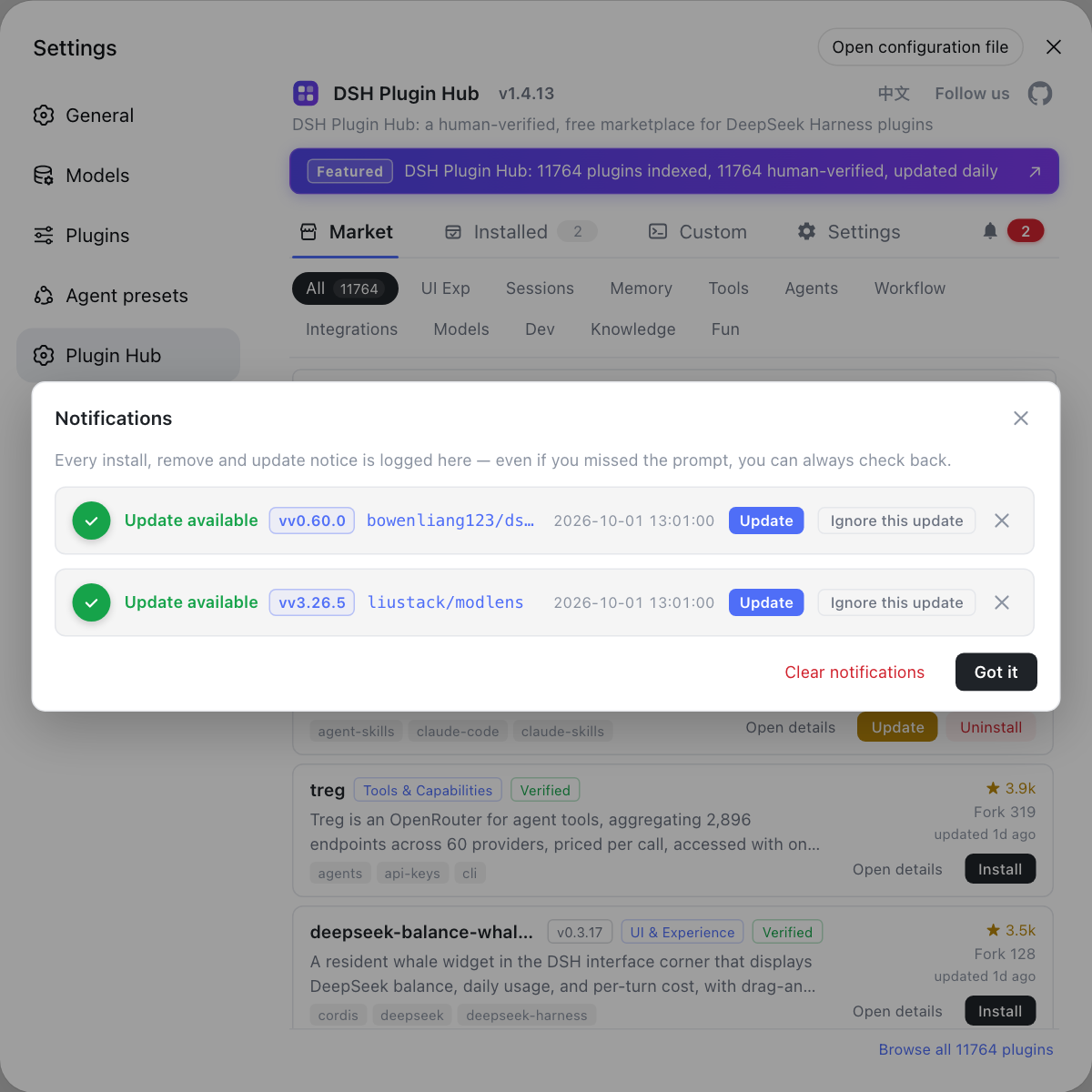
The update confirmation appears when a newer version exists and reinstalls in place to the latest release; the notification center gathers install / remove / update history, live progress and pending-restart reminders, with full-log copy, per-item delete and clear-all.
Which DeepSeek Harness versions and platforms are compatible with DSH Plugin Hub?
It currently supports the DSH 0.1.0 series (0.1.0-rc.6 and same-series versions), declares the official dsh.bundle manifest, and requires dsh-client-modules in the web profile. As a pure browser-side injection, it is platform-agnostic across macOS, Windows, and Linux.
What is the relationship between DSH Plugin Hub and dsh-plugin.org?
DSH Plugin Hub shares the exact same data source as dsh-plugin.org: the website collects, human-reviews, and publishes community plugins daily, and the installed plugin pulls the latest catalog from the same source, so both sides always show identical information. The website also offers search, category browsing, and a plugin submission entry.
How do I submit my own DSH plugin to DSH Plugin Hub?
Publish your plugin to GitHub and add the dsh-plugin topic — it will be automatically discovered and indexed by the DSH Plugin directory. See the submit page for requirements and the submission flow.
This page is an independent rewrite of the plugin's official README — for authoritative documentation and the latest changes, refer to the source: dshplugin/dsh-plugin-hub. The plugin is third-party code that runs on your machine once installed; inclusion does not imply endorsement — please review the source before installing.
More DSH Plugin articles
View all 3 articlesWhat's New in DSH Plugin Hub v1.2.1? Command-Line Install, Update Alerts, Log Viewer
2026-08-25DSH Plugin Hub v1.2.1: command-line install for any npm package, GitHub source or DSH command, update alerts in the notification center, and a built-in log viewer — with all plugin data served from the dedicated API center. Mandatory update.
What's New in DSH Plugin Hub v1.1.1? Stable Plugin Management
2026-08-23DSH Plugin Hub v1.1.1: stable one-click install, uninstall, and update — failed installs surface the command, UI plugins vanish, updates checked in-app.
Use DSH Plugin Hub: Plugin Marketplace in DeepSeek Harness
2026-08-20DSH Plugin Hub is a community plugin marketplace for DeepSeek Harness: install with one command, then browse and install 10000+ curated DSH plugins in Settings.
DSH Plugin FAQ
