Use DSH Plugin Hub: Plugin Marketplace in DeepSeek Harness
Community OfficialDSH Plugin Hub is a community plugin marketplace DSH plugin for DeepSeek Harness, built by the dsh-plugin.org team to the official plugin spec: once installed into Settings → Plugin Market, you can browse, search, and one-click install community plugins without leaving the app.
DSH Plugin Hub is maintained by the dsh-plugin.org team under the MIT license and currently lists 10000+ community DSH plugins, 10000+ of them human-curated and verified (source). It is an independent community project with no affiliation to DeepSeek Harness.
What problem does DSH Plugin Hub solve?
"Installed DSH but don't know what to install, and no idea where to manage plugins" is the core problem DSH Plugin Hub addresses. DeepSeek Harness ships without an in-app store, so community plugins live scattered across GitHub repos — finding one, checking compatibility, and copying the install command all take manual back-and-forth.
DSH Plugin Hub gathers them behind a single entry inside the app: 10000+ community plugins are sorted by capability, each marked with its compatibility status (verified / unconfirmed) and target DSH version, and every detail page hands you a copyable install command (source).
How to install DSH Plugin Hub?
The recommended path is a one-line npm install; the plugin ships a prebuilt browser bundle, so no build or authorization is needed.
dsh plugin --profile web add dsh-plugin
To install from GitHub:
dsh plugin --profile web add github:dshplugin/dsh-plugin-hub
After installing, restart dsh web and open Settings → Plugin Market to start using it (source).
How to use DSH Plugin Hub: Settings → Plugin Market
The entry lives in Settings → Plugin Market, with a bilingual UI that follows your system language. Open it to browse categories or search by name, then open a detail page to check the description, compatibility status, stars, forks, and last-updated time. Copy the install command back to your terminal, or use "Open in browser" to share and bookmark.
Installed plugins are ready to use in your conversations — the whole flow stays inside DSH (source).
Open Settings → Plugin Market and you'll land on the DSH Plugin Hub marketplace home — browse 10000+ community plugins by category, with name, description, stars and last-update time on each card:
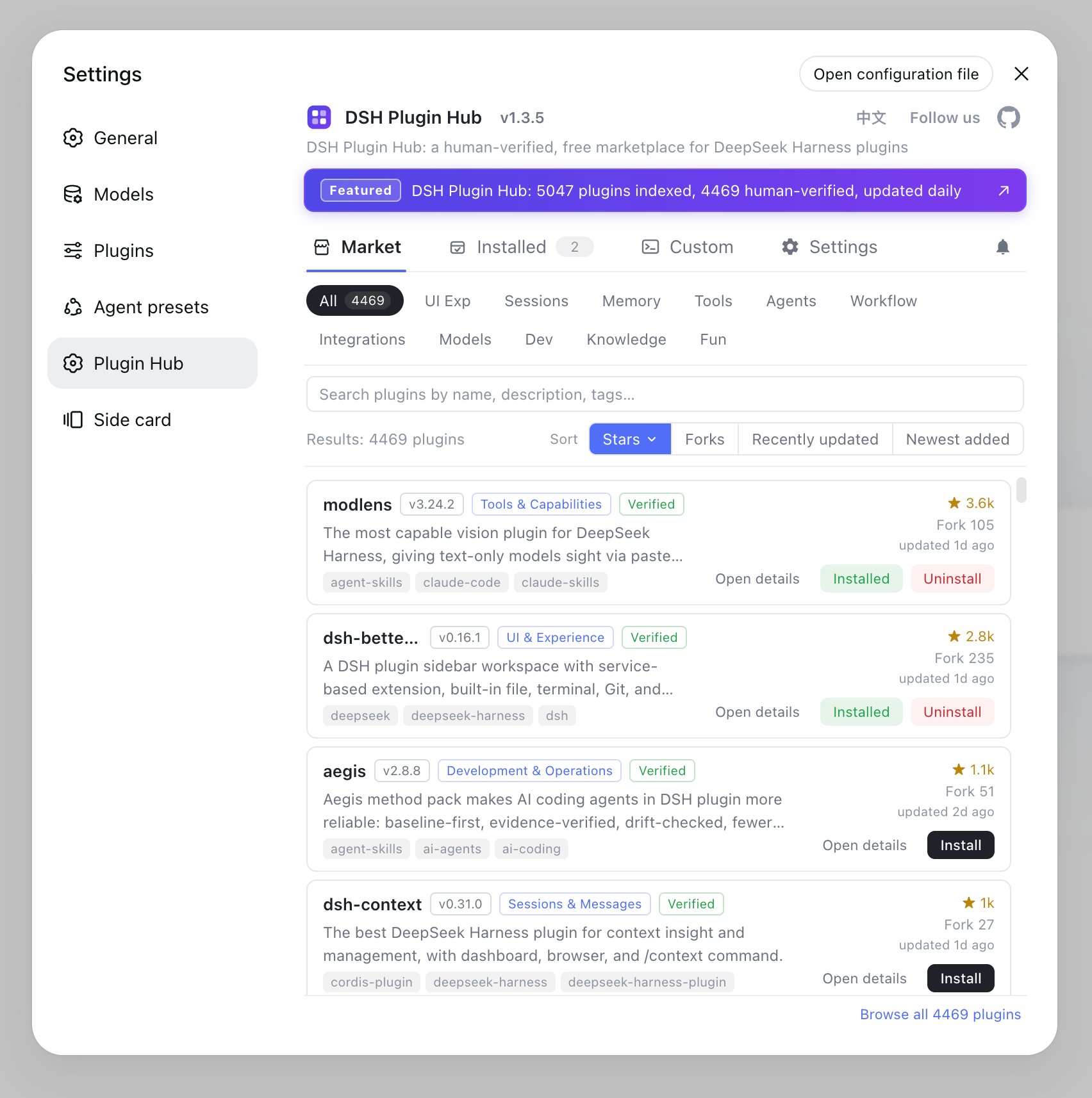
You can sort by popularity / newest / earliest indexed, filter by installed / not installed, and search straight to a plugin by name, description or tag. The UI follows your system language by default and can be toggled between Chinese and English anytime from the top-right — copy and plugin data switch together.
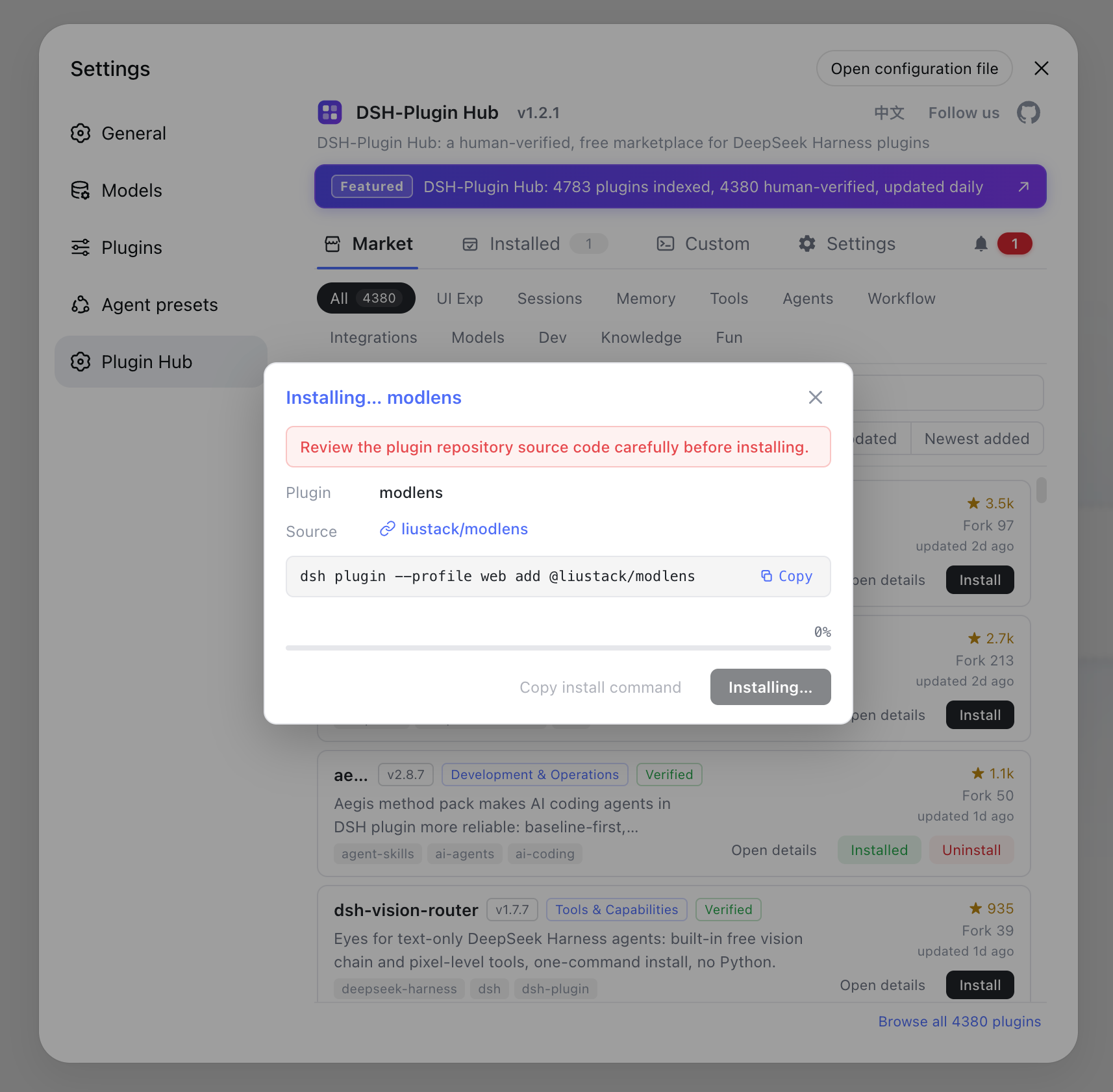
Install, upgrade and uninstall all happen inside the interface: a serial background queue runs them one by one, the dialog shows live progress and is cancellable anytime, and most plugins take effect on page refresh without a restart:
One-click install — a serial background queue with live progress in the dialog, cancellable anytime; most plugins take effect on page refresh, no restart needed:
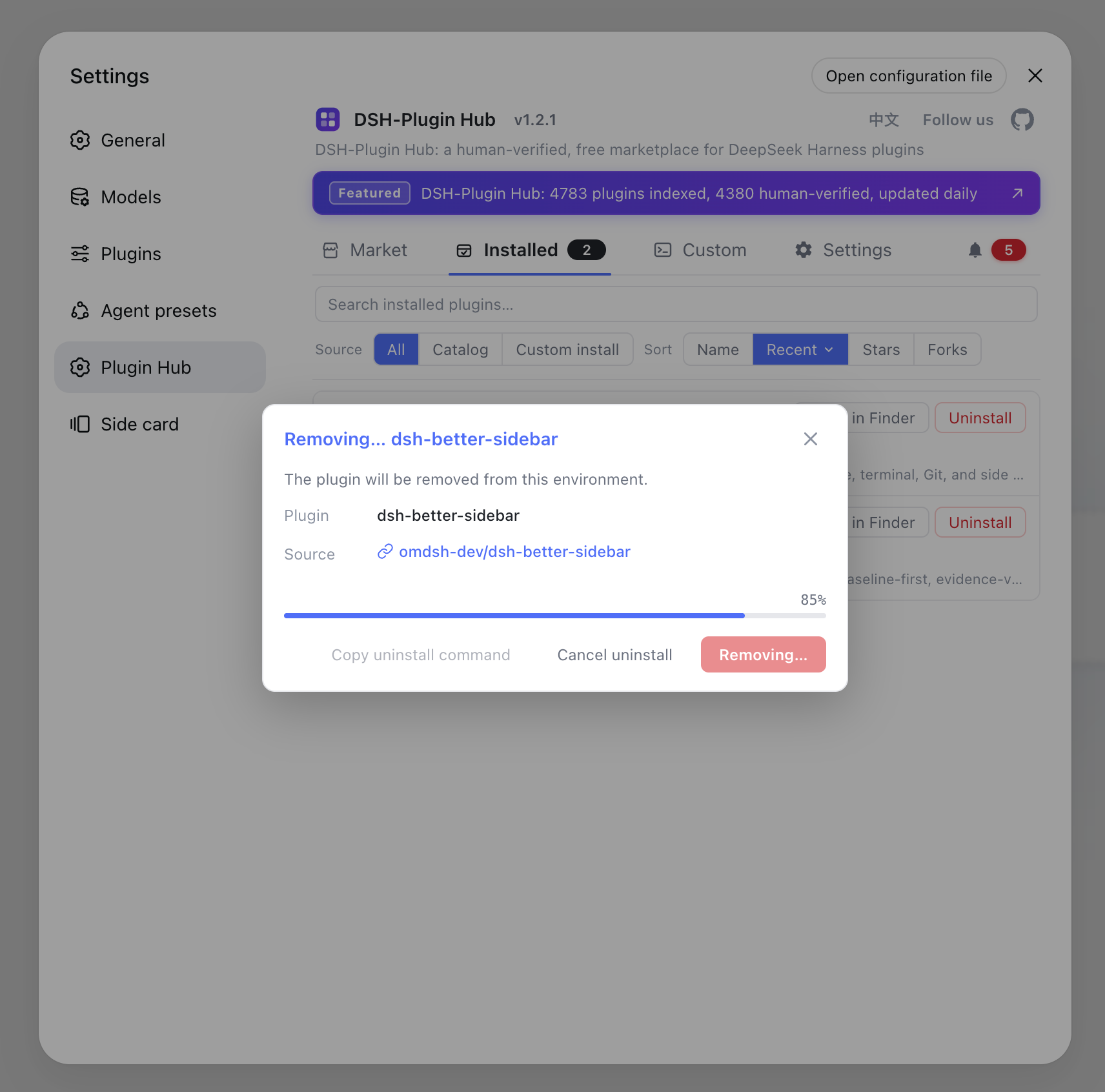
One-click uninstall — fully visualized with live progress; changes take effect immediately:
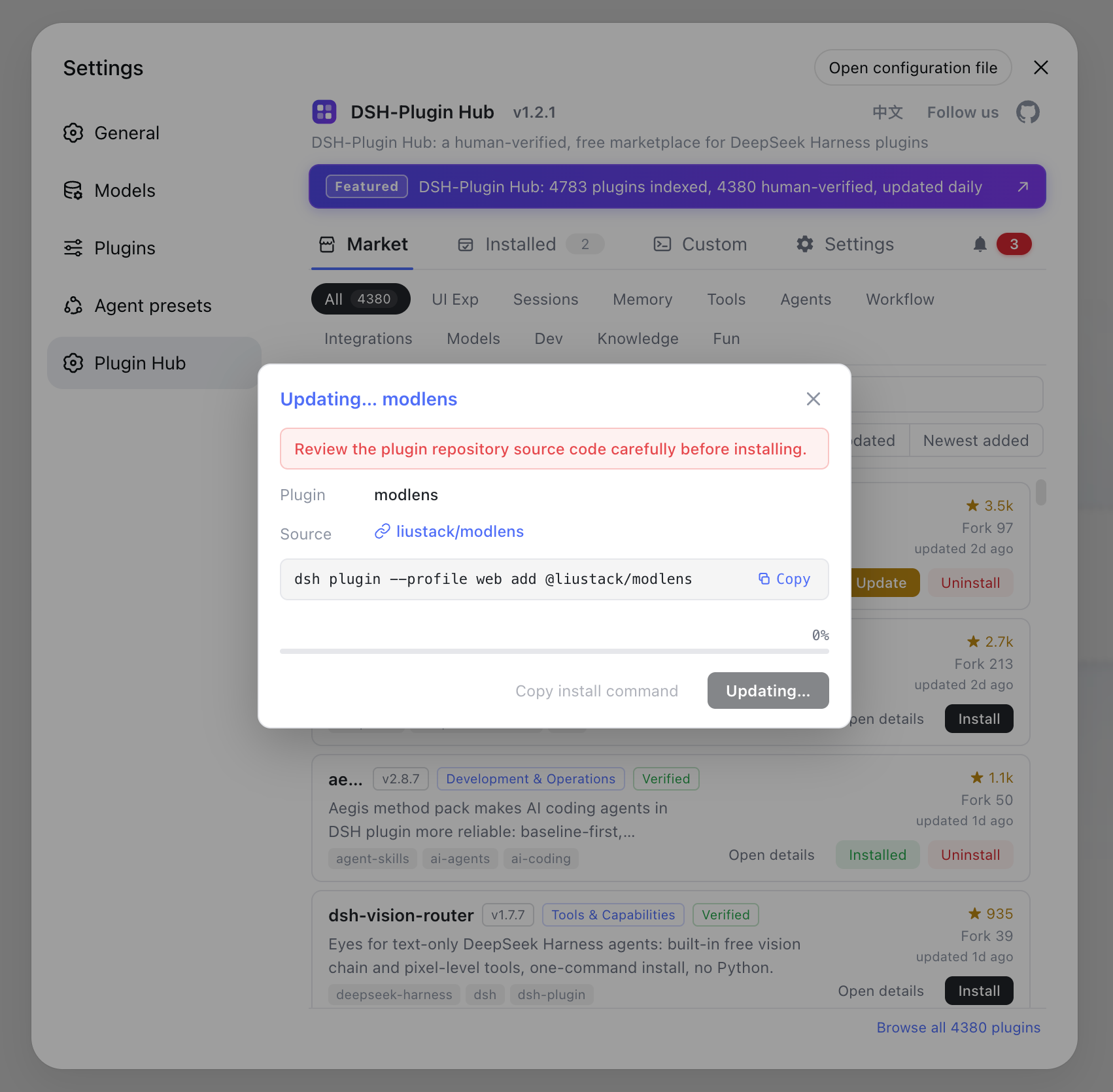
One-click update — new versions are detected automatically; the card button turns into "Update" and overwrite-installs in one click:
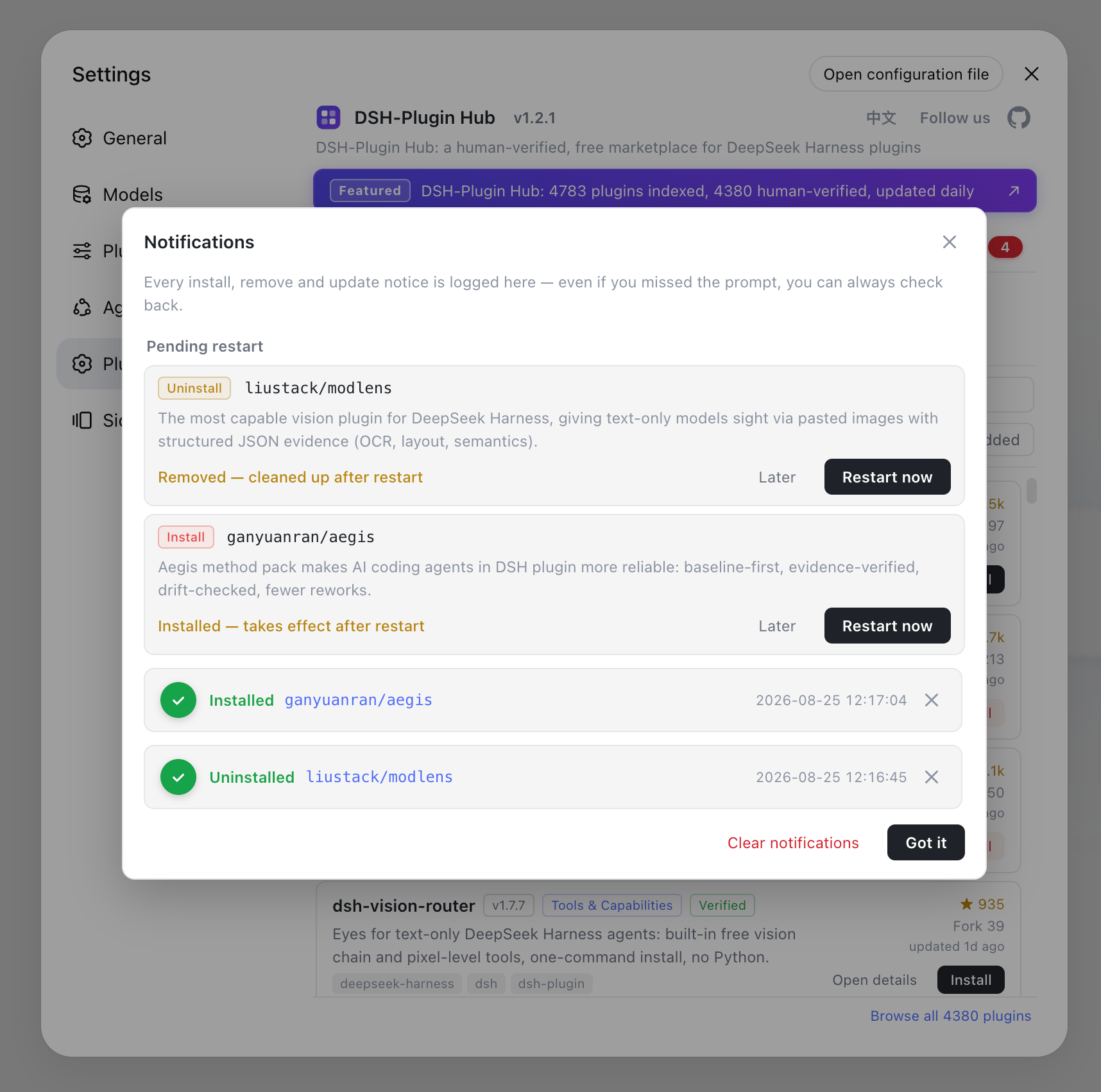
Notification center — every install / upgrade / uninstall, success or failure, is recorded here; failed installs can be filed as a GitHub Issue in one click, and pending restarts offer "later" or "restart now":
Where does the data come from: the dsh-plugin.org website
The marketplace shares the exact same data source as dsh-plugin.org: collected daily, human-reviewed, and auto-synced. The website handles collection and review of community plugins, and DSH Plugin Hub pulls the latest catalog from that same source after install — no manual upgrades, and both sides always match (source). The website also offers search, category browsing, and a submission entry, so switching to the web later feels just as familiar.
What is the dsh-plugin.org website plugin hub?
The website plugin hub is dsh-plugin.org's web entry — open it in your browser and start browsing: it collects, categorizes, human-verifies, and updates community plugins daily, with free browsing, search, and copy-ready install commands. Besides DSH Plugin Hub in the app, you can do all of this in a browser:
- Categories & search: browse by category — UI & experience, conversations & messages, memory & context, tools & capabilities, and more — with full-text search and popularity / newest / earliest-indexed sorting;
- Human verification: every plugin shows its compatibility status (
verified/unconfirmed) and target DSH version, along with its source (npm or GitHub), stars, forks, and last-updated time, so you can judge before installing; - Copy-ready install commands: the detail page hands you a copyable
dsh plugininstall command — after installing, most plugins take effect on page refresh; - Bilingual: plugin descriptions, tutorials, and FAQs ship in Chinese and English, with a language toggle.
The website hub and DSH Plugin Hub share the same data source: no need to install the app to browse or compare plugins — bookmark and share via your browser; when you're ready to install, just click inside the app. Entry: the plugin hub; to submit, use the submit page.
How to submit your own DSH plugin
Publish your plugin to GitHub and add the dsh-plugin topic, and it will be automatically discovered and listed by the DSH Plugin directory. Submissions enter the daily collection and human-review pipeline; once approved, your plugin becomes searchable in the directory (source). Requirements and the submission flow are on the submit page.
DSH Plugin Hub: Notes and Limitations
- Compatibility: currently supports the DSH 0.1.0 series (e.g.
0.1.0-rc.6) and requires the web profile to includedsh-client-modules. It is browser-only injection and works on macOS, Windows, and Linux. - Community project: the marketplace is not an official DeepSeek product; data is compiled from official repositories and docs. Verify the source, permissions, and compatible DSH version of any third-party plugin before installing.
- Feedback and contribution: report data errors or feature requests via GitHub Issues, and open a Pull Request to contribute.
See the plugin page for DSH Plugin Hub, and browse more DSH plugins in the plugin hub.
FAQ
Restart the dsh web service and refresh the browser. If it still doesn't appear, confirm the install command succeeded and the web profile includes dsh-client-modules — the entry mounts on the Plugin Market slot of the settings page, so both prerequisites are required.
No. It injects only on the browser side with no host-service dependency, no telemetry, and no privacy collection. The catalog comes from the same source as dsh-plugin.org, and browsing locally sends nothing.
No. It is an independent community project built by the dsh-plugin.org team, with no affiliation to DeepSeek Harness, under the MIT license. Site data is compiled from official repositories, the official architecture docs, and public repo information.
The catalog is collected, human-reviewed, and published daily; the README badge is a snapshot at fetch time. After install, the plugin pulls the latest catalog from the same source on each use, so the in-app count is the live number.
Sources
- dshplugin/dsh-plugin-hub GitHub repository· GitHub
- dsh-plugin.org plugin hub· dsh-plugin.org