Where DSH plugins are installed in DeepSeek Harness
DeepSeek Harness installs plugins with pnpm into $DSH_HOME/profiles/<name>/node_modules, one set per profile and isolated from one another; the real files sit in node_modules/.pnpm while the top level only holds symlinks. DSH plugins follow exactly the same on-disk rule. The built-in base, web and headless bundles are the exception: they resolve from the dsh installation itself and never land in a profile. This article covers where plugins go, what the directory looks like, and how to confirm a given plugin's location.
Where DeepSeek Harness installs plugins: the profile and its node_modules
Plugins are written to the node_modules of the current profile, at $DSH_HOME/profiles/<name>/node_modules; when $DSH_HOME is not set, the root defaults to ~/.dsh (source). Five steps pin the location down:
- Check the root — run
echo $DSH_HOME. Expect: if it prints a path, use that value; if it prints nothing, the root is the default~/.dsh. - List the profiles — run
ls "$DSH_HOME/profiles"(orls ~/.dsh/profilesby default). Expect: entries such asweb,headless, plus any profile name you created. - Enter the target profile — run
ls "$DSH_HOME/profiles/web". Expect:package.json,cordis.patch.ymlandnode_modulesside by side, and thatnode_modulesis the plugin directory. - See what is installed — run
ls "$DSH_HOME/profiles/web/node_modules". Expect: top-level folder names, including@scopedirectories, map to the installed plugin package names. - Read the manifest — open that profile's
package.json. Expect: plugins appear as ordinary entries underdependencies, whiledsh.profile.bundleslists the bundles to activate.
That profile's package.json looks roughly like this (illustrative):
{
  "dependencies": {
    "@dshplugin/dsh-plugin-hub": "^1.4.2"
  },
  "dsh": {
    "profile": {
      "bundles": ["@deepseek-ai/dsh-base", "@dshplugin/dsh-plugin-hub"]
    }
  }
}
The key distinction: dependencies answers what is installed, dsh.profile.bundles answers which are loaded, and the two are not always equal. That is why a package can be present yet never take effect. For the full reconciliation of all three signals, see dsh plugin list: installed plugins and profile scope.
Inside a DSH plugin's node_modules: the .pnpm virtual store and symlinks
pnpm does not flatten packages into the top level. Every package lives in node_modules/.pnpm/<name>@<version>/node_modules/<name>, with a single symlink at the top level pointing to it; the real content is hard-linked from the global store (source). Understanding this layer explains two things:
- Inspect the links — run
ls -l "$DSH_HOME/profiles/web/node_modules" | head. Expect: lines containing->are symlinks, and the right-hand side is their real path inside.pnpm. - Open the real directory — run
ls "$DSH_HOME/profiles/web/node_modules/.pnpm" | grep <name>. Expect: directories named<name>@<version>, and drilling in reveals the plugin's actualpackage.json,lib/and the rest. - Find the global store — run
pnpm store path. Expect: a platform-specific path (on macOS typically something under~/Library/pnpm/store); installing the same package in several profiles stores its content only once.
This is also why deleting node_modules is not an uninstall: the files disappear, but the package.json dependency entry and the dsh.profile.bundles declaration remain, so the host keeps resolving a package that is gone. Use the uninstall channel so both manifests stay in sync: dsh plugin remove: uninstall a DSH plugin cleanly.
What is missing from this directory: DeepSeek Harness built-in bundles
Built-in bundles such as @deepseek-ai/dsh-base, dsh-web-app and dsh-headless are always resolved from the dsh installation and never appear in a profile's node_modules (source). Three consequences follow:
- Not finding base, web or headless in a profile's
node_modulesis not a broken install; they simply never land there. - Conversely, a package that loads while sitting outside
node_modulesis most likely of this kind. The rule stays the same: resolve from the dsh installation first, then the profile'snode_modules. - A plain library package without a
dsh.bundledeclaration does get installed intonode_modulesbut never becomes a layer, anddsh pluginprints a warning. Its path is right while its behavior differs from expectations, so do not troubleshoot it as a wrong path.
Confirming where a DeepSeek Harness plugin's files actually are
Narrow it down layer by layer, from manifest to loaded layer to real file; four commands are enough (source).
- Read the dependency list — from the profile directory, run
pnpm list --depth 0. Expect: the direct dependencies of that profile, answering what is installed. - Read the loaded layers — run
dsh --profile web --dump-config | grep -n "^# ==". Expect: one line per active bundle, answering which are actually loaded. - Compare the two — present only in the first list means installed but inactive; present only in the second means a built-in bundle or pulled in by another package. Expect: a clear classification instead of guesswork.
- Locate the file — go back to
node_modules/.pnpmand search by package name, or use Reveal in Finder in the DSH Plugin Hub installed list.
DSH plugin install location: things to watch out for
- Do not run
npm installorpnpm addby hand in the profile directory: dependency records drift away from the profile manifest, and the host still loads whateverdsh pluginwrote down, so the package will not take effect. - Do not copy
node_modulesbetween profiles: link relationships and lockfile state are bound to the directory, so a copy leaves a batch of links pointing elsewhere. $DSH_HOMEis an environment variable: if you customized it, the real path is not under~/.dsh, and looking there will always come up empty.- For disk usage, look at the store rather than deleting profile folders: package content is deduplicated globally, so removing links inside profiles frees little and tends to break the dependency structure.
- The full list of config files and directories is out of scope here:
settings.yaml,.credentials.yamland the three-layer patch order are a separate topic; see Where DeepSeek Harness keeps its config files when you need it.
Use DSH Plugin Hub to jump straight to a plugin's files
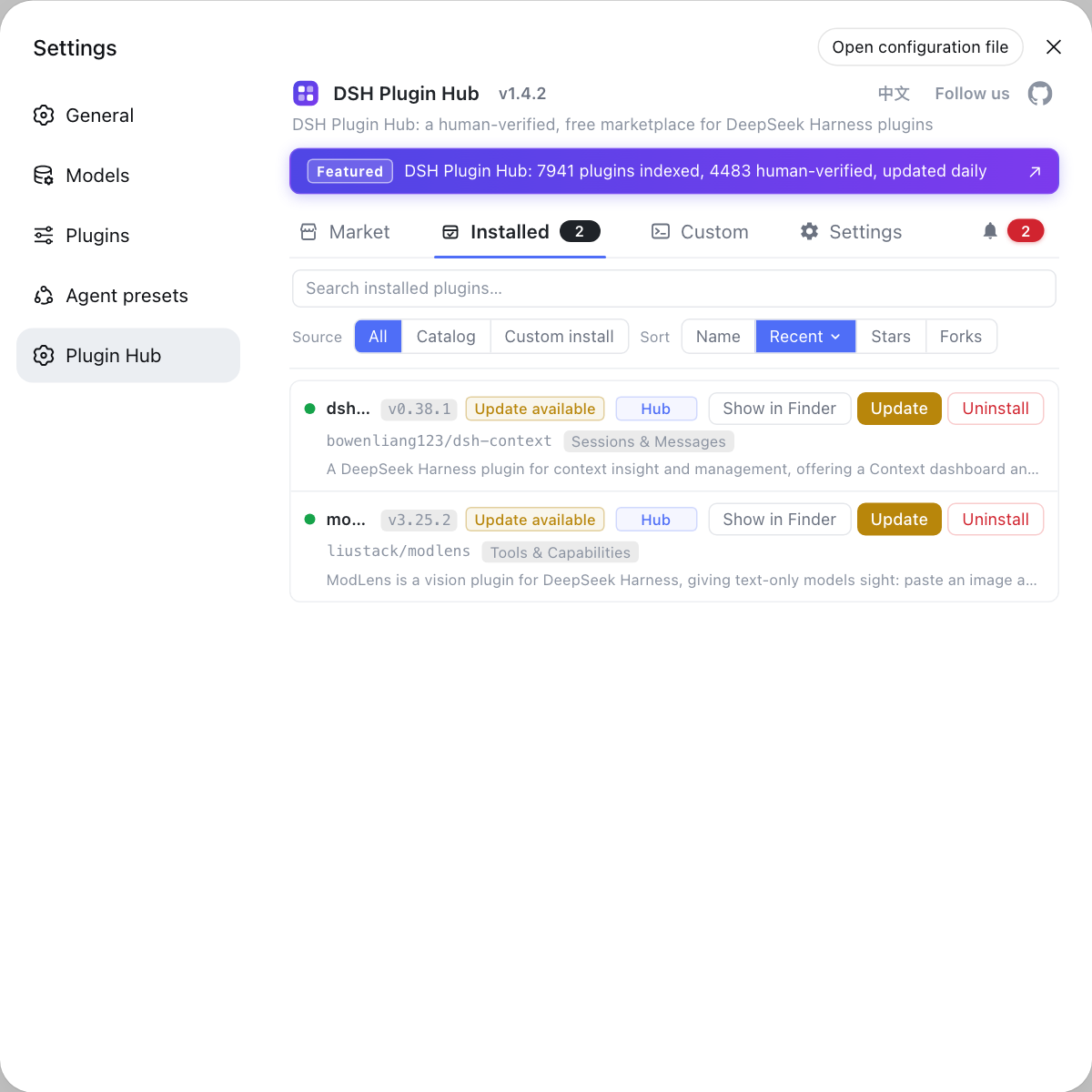
DSH Plugin Hub is the official plugin market built into DeepSeek Harness, and every plugin row in the installed list offers Reveal in Finder, so you can jump to the plugin directory without memorizing $DSH_HOME. Once installed: open the Installed page, find the plugin, and click Reveal in Finder at the end of the row. The file manager opens directly at that plugin's on-disk location inside the profile, which is faster than typing the path and avoids looking in the wrong place when $DSH_HOME has been changed.
Sources: dsh CLI README, DeepSeek Harness Docs - Packaging and installing plugins, pnpm Docs - Symlinked node_modules structure
FAQ
DeepSeek Harness plugins go into the node_modules of the profile you installed them in, at $DSH_HOME/profiles/<name>/node_modules. When $DSH_HOME is not set the root defaults to ~/.dsh, so the real path looks like ~/.dsh/profiles/web/node_modules. If you set $DSH_HOME yourself, follow that value instead.
That is the normal pnpm layout inside a DSH plugin directory. Every package's real content lives in node_modules/.pnpm/<name>@<version>/node_modules/<name>, and the top level keeps a single symlink pointing to it. So top-level folder names tell you what is installed, while the .pnpm directory holds the files you can open.
No — the DSH plugin install did not fail. DeepSeek Harness built-in bundles such as @deepseek-ai/dsh-base, dsh-web-app and dsh-headless are always resolved from the dsh installation itself and never enter a profile's node_modules. Only out-of-tree packages, meaning the community plugins you install, land in the profile directory.
No — deleting node_modules does not uninstall a DSH plugin. Deleting a DSH plugin's node_modules folder only removes files, while the profile's package.json dependencies and the dsh.profile.bundles declarations stay in place. On the next start the host still resolves a package that is no longer there. Use the uninstall command so both manifests are updated together.
No content is duplicated when the same DSH plugin is installed in several profiles. pnpm keeps packages in one global store, and each profile's node_modules references those same files through hard links; only the link entries and metadata are per profile. To reclaim space, watch the store directory rather than deleting node_modules folder by folder.
Related Terms
- profile directory
- A profile directory is the on-disk home of a single DeepSeek Harness runtime stack, located at $DSH_HOME/profiles/<name>. It holds package.json, cordis.patch.yml and node_modules, and out-of-tree plugins install into that node_modules, which is why profiles do not share plugins.— dsh CLI README
- node_modules/.pnpm
- node_modules/.pnpm is pnpm's virtual store directory. Package content is laid out per <name>@<version> inside it, while the top level of node_modules keeps only symlinks. When an edit seems to have no effect, this is the directory holding the real path to inspect.— pnpm Docs
- dsh.profile.bundles
- dsh.profile.bundles is the activation list in a profile's package.json, naming the bundles to load in order. It answers which bundles are loaded, whereas dependencies answers what is installed, and the two are not always the same.— dsh CLI README
- built-in bundle
- A built-in bundle ships with the dsh installation itself, such as @deepseek-ai/dsh-base, @deepseek-ai/dsh-web-app and @deepseek-ai/dsh-headless. Built-in bundles are always resolved from the dsh installation and never pass through a profile's node_modules.— DeepSeek Harness Docs - Packaging and installing plugins
Sources
- dsh CLI README· deepseek-ai
- DeepSeek Harness Docs - Packaging and installing plugins· deepseek-ai
- pnpm Docs - Symlinked node_modules structure· pnpm