dsh plugin remove: uninstall a DSH plugin cleanly
The full form of dsh plugin remove is dsh plugin --profile <name> remove <package>, and it removes both the pnpm dependency and the corresponding configuration layer — the official example, dsh plugin --profile demo remove dsh-hello-plugin, drops the dependency and the layer together (source). A DeepSeek Harness plugin is uninstalled through this one channel no matter where it came from, so the same rules cover all DSH plugins. --profile is required, the aliases rm and uninstall work, and you should confirm the layer is gone in both package.json and --dump-config.
DSH plugin uninstall overview: two things to delete, not a folder
Uninstalling a DSH plugin means clearing two things: the profile's pnpm dependency and that plugin's entry in dsh.profile.bundles — clearing only one leaves a trap behind. Keep the conclusions:
dsh plugin removeclears both at once, which is why it is the recommended path;- Deleting the folder under
node_modulesby hand touches files only;dependenciesandbundlesstay as they were, so the profile still resolves a package that is no longer there; - In-box bundles are outside pnpm's remit — packages such as
@deepseek-ai/dsh-basealways resolve from the dsh installation, soremovenever applies to them (source).
DSH plugin remove syntax: one command clears dependency and layer
dsh plugin --profile <name> remove <package> deletes the dependency and drops the package from the profile's bundle manifest at the same time, which is the essential difference from hand-deleting a directory (source). The standard flow:
- Get the exact package name from the installed list:
dsh plugin --profile web list
A wrong name makes pnpm raise an error and exit nonzero, so do not type package names from memory; see dsh plugin list: installed plugins and profile scope for how to read that output.
- Run the removal:
dsh plugin --profile web remove <package>
-
Confirm the output shows both the dependency removal and the layer being dropped, rather than a bare "done".
-
Remove in bulk or by group when needed — the flags are still pnpm's:
# Remove several packages at once
dsh plugin --profile web remove <packageA> <packageB>

# Only remove it from dependencies
dsh plugin --profile web remove <package> -P
pnpm remove takes the package out of node_modules and the project's package.json, and -D, -O and -P restrict it to the matching dependency group (source).
DSH plugin remove: which profile, and the rm/uninstall aliases
--profile is required with no short form and decides which manifest gets edited, while remove is just one of pnpm's verbs — rm, uninstall and un are equivalent (source). Three points:
-
Plugins belong to a profile, not to the machine.
dsh plugin --profile web remove <package>only touches$DSH_HOME/profiles/web; the same plugin in another profile is unaffected.dsh webboots the profile namedweb, so aim at it before removing. -
Four equivalent spellings (everything after
--profilegoes to pnpm):
dsh plugin --profile web remove <package>
dsh plugin --profile web rm <package>
dsh plugin --profile web uninstall <package>
dsh plugin --profile web un <package>
- On a machine with several profiles, confirm them first and then decide which one to clean:
ls ~/.dsh/profiles
DSH plugin remove verification: package.json and --dump-config
The acceptance bar is two clean places: in the profile's package.json the package must disappear from both dependencies and dsh.profile.bundles, and dsh --profile web --dump-config must no longer print a # == <package> layer (source). Four steps in order:
- Check the manifest:
cat ~/.dsh/profiles/web/package.json
The name in neither dependencies nor dsh.profile.bundles means dsh's bookkeeping is clean too.
- Check the composed tree, which shows the layers that actually load without booting:
dsh --profile web --dump-config | grep -n "<package>"
No output means the layer is gone; remaining output means the manifest still carries the entry.
- Check that pnpm dropped it as well:
dsh plugin --profile web list | grep -n "<package>"
- Check your own overlay layer. If the profile's
cordis.patch.ymlhas a hand-written row referencing that plugin, clear it too — that overlay is yours and is not managed on your behalf by pnpm or by the bundle manifest (source).
DSH plugin uninstall: things to watch out for
In short: --profile picks the manifest, remove clears dependency and layer together, and verification covers two places. Five reminders:
- Do not hand-delete plugin folders under
node_modules. The files vanish but the manifests remain, and the profile still resolves a package that no longer exists. - Stop the app before removing. Deleting files while a plugin is loaded can leave a half-written state; quit
dsh webfirst. - In-box bundles cannot and should not be removed.
@deepseek-ai/dsh-base,@deepseek-ai/dsh-web-appand@deepseek-ai/dsh-headlessresolve from the dsh installation, and pnpm only manages out-of-tree packages (source). - Prefer the full
removespelling in scripts. Short aliases such asunhurt readability; use the complete verb for anything shared. - Plugin data does not leave with the plugin.
removeclears the dependency and the load layer, but data a plugin wrote elsewhere is not deleted automatically — see how to clean up DSH plugin leftovers for a full sweep.
Rather not memorize the command? Uninstall from DSH Plugin Hub
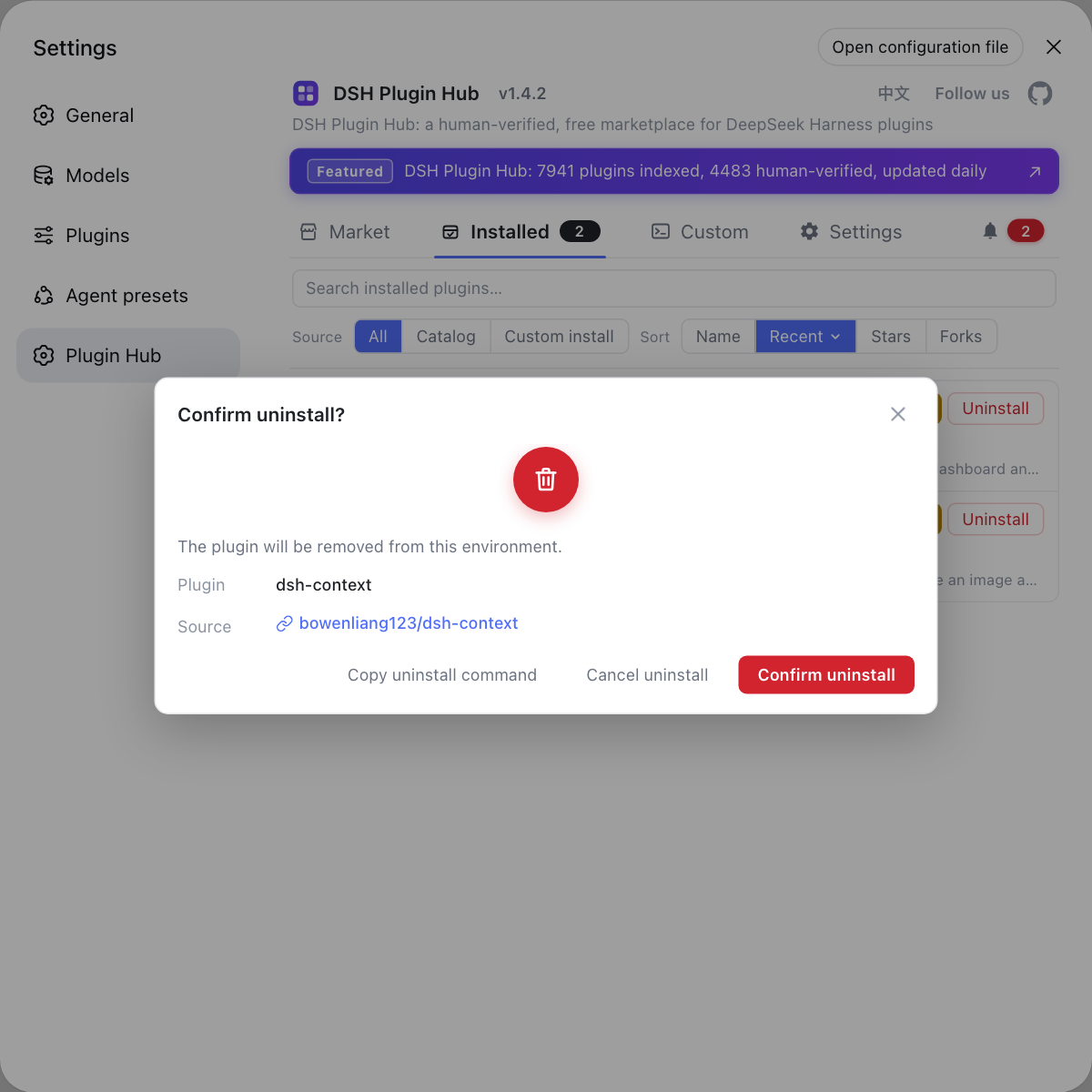
All the complexity of uninstalling is "clear both manifests", and the graphical flow does that for you. Once DSH Plugin Hub is installed, open Settings → Installed, find the plugin and click Uninstall at the end of its row. A confirmation dialog listing the plugin and its source repo appears, and only after you confirm is it removed — dependency and load layer cleared in one go, with no empty shell left behind. Compared with matching package names and diffing two manifests in a terminal, one click is harder to get wrong.
Sources: DeepSeek Harness docs - Package and install a plugin, dsh CLI README, pnpm remove (pnpm rm / uninstall) command reference
FAQ
No — dsh plugin remove does not leave the plugin loading. In the official example, dsh plugin --profile demo remove dsh-hello-plugin removes both the dependency and that configuration layer, so no empty shell keeps loading. That is exactly the difference from deleting the node_modules folder by hand: hand-deletion touches files only, while both manifests stay untouched.
DeepSeek Harness provides no short form for it: the full command is dsh plugin --profile <name> remove <package>, and --profile is required — omitting it exits nonzero. It picks which profile directory the command runs in, so dsh plugin --profile web remove <package> removes from the web profile, not globally.
Yes — DeepSeek Harness forwards everything after --profile to pnpm, and pnpm remove has the aliases rm, uninstall and un, so dsh plugin --profile web rm <package> and dsh plugin --profile web uninstall <package> are equivalent. Any of the three spellings goes through the same channel.
Confirming that DeepSeek Harness no longer loads it takes two places. In the profile's package.json the package should be gone from both dependencies and dsh.profile.bundles; then run dsh --profile web --dump-config and confirm the previous # == <package> layer no longer appears. Both clean means the removal is complete.
DeepSeek Harness can reference a plugin in more than one place, so first check whether the profile's own cordis.patch.yml still has a hand-written row referencing that plugin — that overlay is not managed by pnpm, so remove will not clear it. Also confirm you removed from the right profile: dsh web boots the web profile, and plugins installed elsewhere are unaffected by the command.
Related Terms
- dsh plugin remove
- dsh plugin remove is the DeepSeek Harness command that uninstalls a plugin from a named profile, written in full as dsh plugin --profile <name> remove <package>. It removes both the pnpm dependency and the matching entry in the profile's bundle manifest, equivalent to running pnpm remove in the profile directory plus maintaining the load layer.— DeepSeek Harness docs - Package and install a plugin
- pnpm remove
- pnpm remove is the pnpm command that deletes a dependency, removing the package from node_modules and from the project's package.json, with the aliases rm, uninstall and un. The dsh plugin channel forwards to it, which is why those aliases work under dsh plugin too.— pnpm remove (pnpm rm / uninstall) command reference
- dsh.profile.bundles
- dsh.profile.bundles is the ordered bundle array inside a profile's dsh.profile manifest in package.json, defining which plugin layers are applied, in what order, at boot. Uninstalling a plugin must clear it alongside dependencies, or the manifest keeps pointing at a package that is no longer present.— DeepSeek Harness docs - Package and install a plugin
- in-box bundle
- An in-box bundle is a bundle shipped with the dsh installation itself, such as @deepseek-ai/dsh-base, @deepseek-ai/dsh-web-app and @deepseek-ai/dsh-headless. These always resolve from the dsh installation rather than the profile's node_modules, so they are not pnpm-managed out-of-tree packages and remove does not apply to them.— DeepSeek Harness docs - Package and install a plugin
Sources
- DeepSeek Harness docs - Package and install a plugin· deepseek-harness
- dsh CLI README· deepseek-ai
- pnpm remove (pnpm rm / uninstall) command reference· pnpm