Reset dsh in DeepSeek Harness: delete this, keep that
Resetting dsh does not require uninstalling anything: the program lives in the npm global directory or a source clone, while config, credentials, plugins and sessions all live under $DSH_HOME (default ~/.dsh), so a reset is really about deleting the right things inside that data root. Every DeepSeek Harness plugin and the whole DSH plugins set live under that same root, so the choice is only about granularity: four layers, from clearing sessions to wiping everything, each one's deletions and survivors spelled out below.
Before resetting DeepSeek Harness: four layers and what each keeps
Decide what you are resetting before touching files: dsh has a single data root, and the finer the granularity the more settings and records survive (source). Compare them:
| Goal | What to delete or edit | What survives |
|---|---|---|
| Clear chat history only | $DSH_HOME/sessions | Config, credentials and all installed plugins |
| Clear one profile's plugins | $DSH_HOME/profiles/<name> | Global settings, credentials, sessions |
| Return to default config | Empty or remove both cordis.patch.yml files | Plugins and sessions; the config layers return to defaults |
| Return to a pristine state | The whole $DSH_HOME | Nothing (the program itself still needs no reinstall) |
Do the same two things before any of them: stop the process, then back up. The commands are:
- Stop the running dsh — press
Ctrl+Cin the terminal running it; stop the background service first if you host one. Expect:lsof -i :3080shows no listener. - Back up the whole data root — run
cp -r ~/.dsh ~/.dsh.bakon macOS and Linux, orxcopy /E /I %USERPROFILE%\.dsh %USERPROFILE%\.dsh.bakon Windows. Expect: the backup directory containssettings.yaml,profilesandsessions.
Layer one: clear DeepSeek Harness chat history only
Session data lives separately in $DSH_HOME/sessions, so deleting it clears only conversation history while config, credentials and installed plugins stay intact (source). Three steps:
- Confirm the path — run
echo $DSH_HOME, thenls "$DSH_HOME/sessions". Expect: session files; if the variable is empty, read it as the default~/.dsh/sessions. - Delete the sessions directory — run
rm -rf "$DSH_HOME/sessions"(Windows:rd /s /q "%USERPROFILE%\.dsh\sessions"). Expect: the directory is gone while the others remain. - Restart and confirm — start dsh again. Expect: history is empty while settings and installed plugins are intact, which is exactly what this layer should produce.
Layer two: clear DSH plugins only, keeping settings and history
Deleting a single profile directory clears that profile's plugins: built-in profiles such as web and headless are reinitialized from the shipped template on the next start, while global settings and sessions live a level above and are not carried away (source). Four steps:
- See which profile you are deleting — run
ls "$DSH_HOME/profiles". Expect: names such aswebandheadless; confirm which one you mean to reset. - Delete that profile directory — run
rm -rf "$DSH_HOME/profiles/web". Expect: the directory is removed along with itsnode_modules,package.jsonandcordis.patch.yml. - Restart to trigger reinitialization — run
dsh webagain. Expect: the profile directory is recreated, the plugin list is empty, and the first start is slower than usual, since reinitialization installs dependencies (see Slow dsh startup). - Confirm the plugins are gone — open the Installed page in DSH Plugin Hub after startup. Expect: an empty list, proving the plugins were reset.
Do not use this layer to remove one or two plugins: that is a precise uninstall, covered in dsh plugin remove: uninstall a DSH plugin cleanly.
Layer three: restore DeepSeek Harness default config, keeping plugins and sessions
When the config is misbehaving there is no need to wipe data: emptying or deleting the two cordis.patch.yml files removes your override layers and returns the config to the bundle defaults (source). Three steps:
- Clear the profile-level layer — remove what you later added to
$DSH_HOME/profiles/<name>/cordis.patch.yml, or remove the file entirely. Expect: that profile no longer carries your hand-written overrides. - Clear the home-level layer — do the same for
$DSH_HOME/cordis.patch.yml. Expect: no profile under this home is affected by your layer anymore. - Verify with dump, not by looking at the file — run
dsh --profile web --dump-config. Expect: only the bundles' own layers remain; for the layer order, see Where DeepSeek Harness keeps its config files.
One more case: if the symptom is "models stopped connecting after a config edit", the fix is often just credentials. Delete $DSH_HOME/.credentials.yaml, restart, and enter the API key again when prompted; see DeepSeek Harness API key configuration errors.
Layer four: return DeepSeek Harness to a pristine state, keeping the program
Delete or rename the whole $DSH_HOME and the next start behaves like a fresh install; the program itself is untouched, so there is nothing to uninstall or reinstall (source). Three steps:
- Delete or rename the data root — the safer route is to rename first and keep a way back:
mv ~/.dsh ~/.dsh.old(Windows:ren "%USERPROFILE%\.dsh" .dsh.old). Expect: the original directory is gone and a fallback exists under a new name. - Start again — run the command you normally use (for example
dsh web). Expect:$DSH_HOMEis recreated, the built-in profile initializes, and models and credentials must be configured again. - Verify, then decide the fallback's fate — open the Installed page in DSH Plugin Hub to confirm plugins are cleared and the Settings page to confirm config was reset. Expect: everything as on a first install; delete
~/.dsh.oldonly after you are satisfied.
State the cost up front: this layer clears credentials, sessions and plugins together. If you are chasing one specific fault, prefer layer two or three instead of wiping the data root.
Five reminders apply to all four layers:
- Always stop the process before resetting: a live instance writes its in-memory state back to disk, which can look like "I deleted it and it grew back".
- If you customized
$DSH_HOME, do not look under the default path: runecho $DSH_HOMEfirst to confirm the real location. - A reset is not an uninstall: none of these operations touch the program itself; to clean up the program too, see Uninstalling and reinstalling DeepSeek Harness.
- The first start after a reset is always slower: reinitializing a profile installs dependencies, so do not misread it as a fault.
- Your backup must cover the whole data root: backing up only a profile misses credentials and sessions, leaving you unable to restore fully.
Use DSH Plugin Hub to confirm the reset took effect
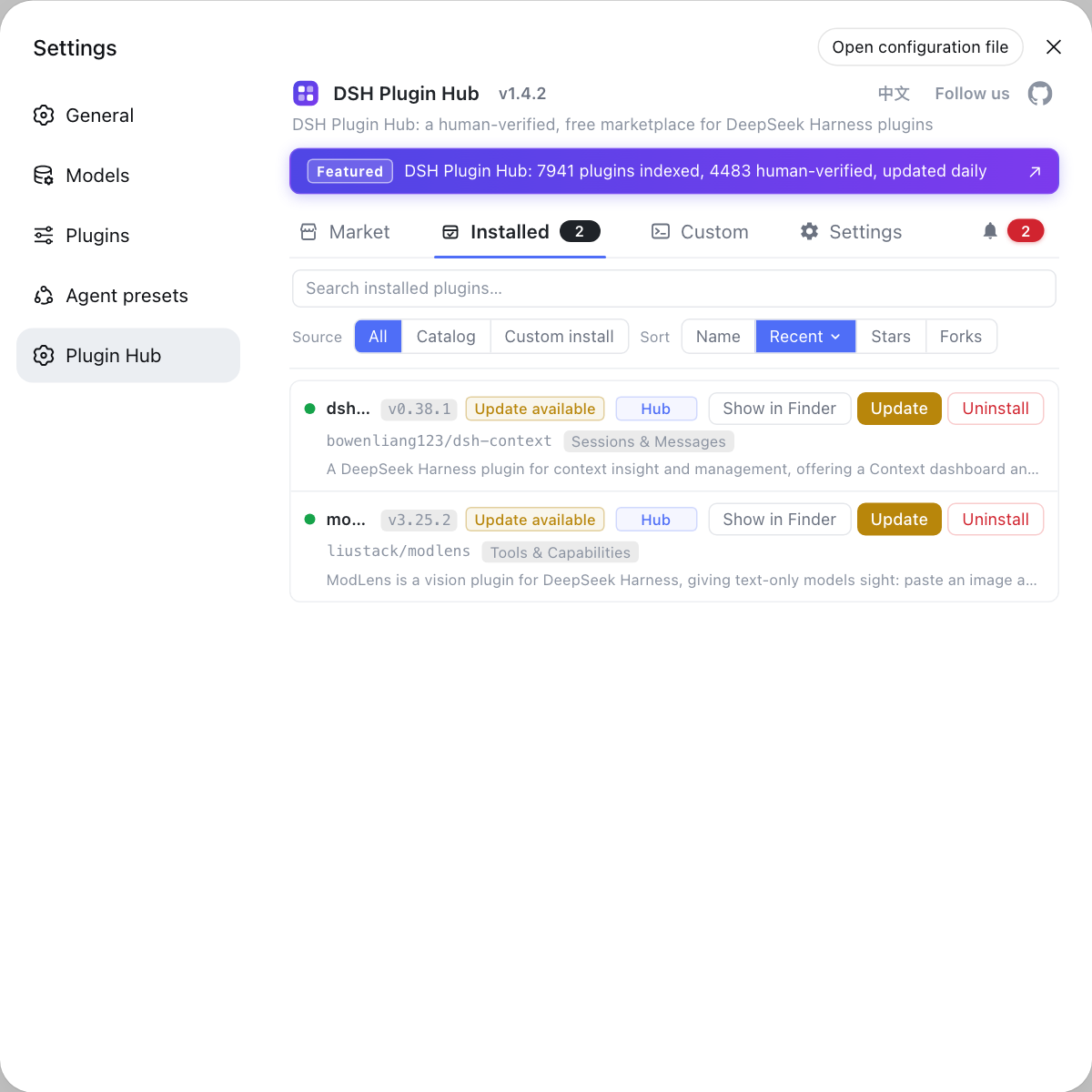
To verify a reset, the UI is faster than the filesystem: DSH Plugin Hub is the official plugin market built into DeepSeek Harness, so an empty Installed list means the plugins really were cleared, and the Settings page shows whether configuration is back to defaults. Check the Installed page after the restart, then reinstall only the plugins you still need; it is far more reliable than counting files directory by directory.
Sources: dsh CLI README, DeepSeek Harness Docs - Packaging and installing plugins, DeepSeek Harness Docs - Configuring providers
FAQ
Resetting DeepSeek Harness does not require uninstalling: the program lives in the npm global directory or a source clone, while data lives in $DSH_HOME (default ~/.dsh). Delete or rename that data root and the next start reinitializes the profiles, which is equivalent to a fresh install while the program itself stays put.
To clear DSH plugins only, delete that profile's directory, for example $DSH_HOME/profiles/web. DeepSeek Harness reinitializes built-in profiles such as web and headless from the shipped template on the next start, which clears the plugins, while the global settings.yaml and the sibling sessions directory both live in $DSH_HOME and stay untouched.
Before resetting DeepSeek Harness, back up the whole $DSH_HOME rather than a single profile, because config, credentials, sessions and plugin records all live inside it. On macOS and Linux run cp -r ~/.dsh ~/.dsh.bak; on Windows run xcopy /E /I %USERPROFILE%\.dsh %USERPROFILE%\.dsh.bak. Copying it back restores everything if the reset goes wrong.
DeepSeek Harness keeps session data in $DSH_HOME/sessions, so deleting it clears only the conversation history while config, credentials and installed plugins stay intact. Stop the running dsh process first so the live instance cannot write data back in.
To return DeepSeek Harness to defaults, empty or remove $DSH_HOME/cordis.patch.yml (home level) and the profile-level $DSH_HOME/profiles/<name>/cordis.patch.yml, then restart dsh. To confirm you really are back at defaults, check the composed result with dsh --dump-config rather than trusting an empty file.
Related Terms
- DSH_HOME
- DSH_HOME is the user-level data root of DeepSeek Harness, defaulting to ~/.dsh when the variable is unset. It holds settings.yaml, .credentials.yaml, profiles/, sessions/ and skills/, which makes it both the smallest unit of reset and the smallest unit of backup.— dsh CLI README
- layered reset
- A layered reset means choosing how much to reset: sessions only, one profile, the config overrides, or the whole data root. The finer the granularity the more you keep, at the cost of knowing exactly which directory holds each kind of data.— dsh CLI README
- sessions directory
- The sessions directory is $DSH_HOME/sessions and holds conversation history. It is independent of profiles/ and settings.yaml, so deleting it clears only chat history without affecting config or installed plugins.— DeepSeek Harness Docs
- profile reinitialization
- Profile reinitialization is what happens when a built-in profile directory (web, headless and so on) is deleted: on next use it is regenerated from the shipped template, including package.json, cordis.patch.yml and dependencies. It is the mechanism behind clearing plugins while keeping global settings.— DeepSeek Harness Docs - Packaging and installing plugins
Sources
- dsh CLI README· deepseek-ai
- DeepSeek Harness Docs - Packaging and installing plugins· deepseek-ai
- DeepSeek Harness Docs - Configuring providers· deepseek-harness