DeepSeek Harness slow startup: causes and fixes for dsh
Slow dsh startup falls into three distinct cases: the first start is initializing a profile, every later cold start is composing plugin layers, and an apparent hang is usually a wait on a network timeout. Every DeepSeek Harness plugin is composed inside the dsh process, so the same three cases apply to all DSH plugins, yet the remedies differ completely. This article gives a measurable sequence: time it, count the layers, then bisect.
DeepSeek Harness slow startup, case one: first-run init, per-start composition, or a hang
The three causes leave completely different evidence: a slow first start comes with a profile directory being built from scratch; a slow start every time means the fixed composition workload is large; and a process sitting at idle CPU without ever opening a port is usually waiting on a timeout rather than computing (source). Four steps settle which one it is:
- Check whether this is the first run — run
ls "$DSH_HOME/profiles/web"before startup, then again while it starts. Expect: on first use the directory is filled in during startup (package.jsonandnode_modulesappear progressively); after several runs it is complete from the outset. - Check whether every start is slow — start three times and record the time from issuing the command to the browser opening
http://127.0.0.1:3080. Expect: only the first being slow means initialization cost; all three being slow means workload or disk. - Check whether the process is working — in another terminal run
top -pid <PID>(on Windows, watch the process CPU in Task Manager). Expect: CPU near zero with no new log lines means it is waiting, not being slow. - Check whether the port is listening — run
lsof -i :3080(Windows:netstat -ano | findstr 3080). Expect: no listener while the process still exists means it has not reached the listening stage yet.
If it turns out the process never starts rather than starts slowly, take the other path: DeepSeek Harness won't start: layered diagnosis for dsh startup errors.
DeepSeek Harness slow on every start: time config composition, then count the layers
The most controllable part of startup is config composition, which stacks each bundle's patch into the final config tree; it can be timed without starting the server, so it makes the best baseline (source). Four steps narrow the slowness down to specific plugins:
- Time composition — run
time dsh --profile web --dump-config > /dev/null. Expect: a baseline in seconds; run it three times and keep the stable value rather than a lucky fast one. - Count the loaded layers — run
dsh --profile web --dump-config | grep -c "^# ==". Expect: the number printed is the active bundle layer count, and it grows with what you installed. - Compare against a minimal profile — run
time dsh --profile headless --dump-config > /dev/null. Expect: a clear gap between the two baselines means the slowness sits in what thewebprofile has installed rather than in dsh itself; both being slow points at the environment. - Bisect — first run
pnpm list --depth 0in the profile directory to note the list, then remove only the few most recently installed plugins and time again. Expect: if the time drops, the culprit is among those packages; change one plugin at a time and converge.
Why the layer count equals the workload: in --dump-config output every active bundle appears as a line # == <name>, so the layer count equals the number of packages composed and resolved at startup. That is a number you can count, not a vague sense that a lot got installed.
DeepSeek Harness slow only the first time: profile initialization and dependency install
When a built-in profile such as web or headless is used for the first time, it initializes its directory layout from the shipped template and installs dependencies; that step is the slowest one in the whole lifecycle and never repeats (source). Three things to keep straight:
- What initialization covers: generating the profile directory and
package.json, writingcordis.patch.yml, and installing dependencies into that profile'snode_modules. For where those files land, see Where DSH plugins are installed in DeepSeek Harness. - What normal looks like: if the terminal or log keeps producing output during the wait, it is making progress; only silence combined with an idle CPU warrants a hang investigation.
- How to confirm this is the cause: start the same profile once more after initialization completes. Expect: noticeably faster, which proves the earlier run was a one-time initialization rather than an anomaly.
Slow first downloads and first installs are a separate topic; see Installing DeepSeek Harness for the first time.
DeepSeek Harness environment-level slowness: proxy waits and disk I/O
Once workload is ruled out, the remaining slowness comes from external waits: plugins that talk to the network during startup (update checks, fetching the available model list) each wait until timeout when the proxy is unreachable, and putting $DSH_HOME on a network or external drive slows down resolving a large number of link paths. Four steps to verify:
- Retry with a proxy — start once more using the same proxy configuration as your install channel. Expect: a clear speedup means the delay is network waiting, so fix the proxy instead of removing plugins.
- Move to a local disk and compare — back up
$DSH_HOME, then point it at a directory on a local SSD and start once. Expect: a clear speedup means I/O is the bottleneck, and keeping the data directory local is the fix. - Read the startup log timestamps — find the pair with the largest gap. Expect: that gap is the real waiting point, which is far more effective than reading the whole log.
- Do not confuse many plugins with a slow environment — keep using the
headlessbaseline to separate them. Expect:headlessalso slow means environment; onlywebslow means plugins.
DSH plugin slow startup: things to watch out for
- Do not delete
node_modulesto speed things up: the dependency manifest is still there, so startup resolves a package that no longer exists and gets slower or errors out. Use the uninstall channel instead: dsh plugin remove: uninstall a DSH plugin cleanly. - Change one variable at a time: bisect by removing a single plugin per round. Touching several at once makes attribution impossible and forces you to start over.
--dump-configdoes not start the server: it measures the composition stage, which is not the same as server startup time. Treat the two stages separately.- Compare timings under the same cold or warm conditions: the second start hits the system file cache, so comparing a warm run against a cold one produces a wrong conclusion.
- Restarting repeatedly will not make it faster: if the time is stable and large, it is a fixed workload or a fixed wait, and only locating that stage will help.
Use DSH Plugin Hub to keep the plugin count in check
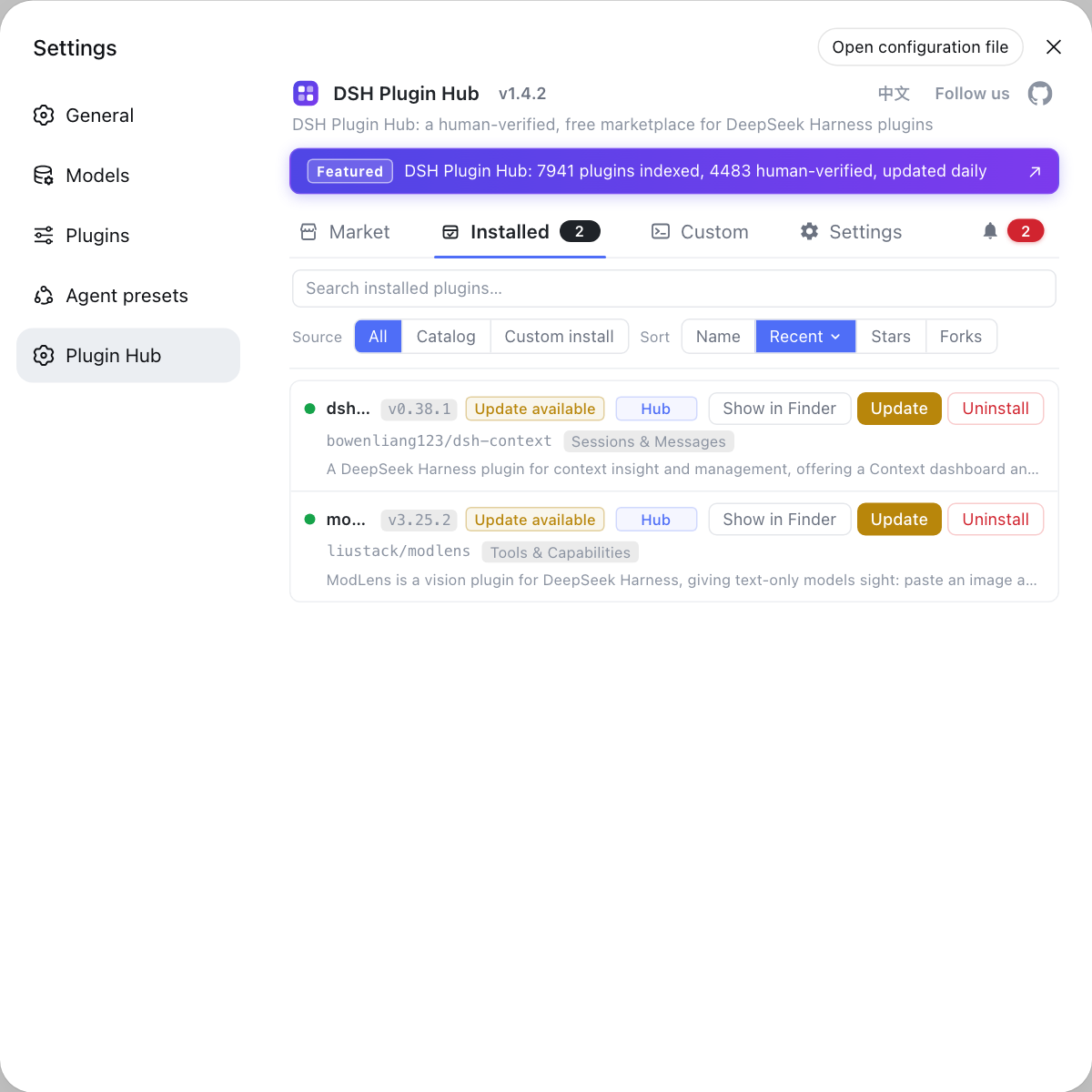
The most controllable cause of slow startup is having too many plugins, and DSH Plugin Hub is the official plugin market built into DeepSeek Harness: its installed list shows at a glance what is installed and whether each plugin came from the catalog or a manual install, making it easy to remove what you no longer use. Open the Installed page, use search and sorting to find unused plugins, and click Uninstall at the end of a row. Fewer layers means less composition work; when you suspect a newly installed plugin of slowing startup, remove it here first to verify.
Sources: dsh CLI README, DeepSeek Harness Docs - Packaging and installing plugins, deepseek-ai/deepseek-harness GitHub repository
FAQ
DeepSeek Harness startup slowness is usually not the same problem. A slow first start is profile initialization: generating the directory layout, writing the manifest and installing dependencies, a cost you pay once. A slow start every time points to the number of bundle layers being composed or to disk I/O. Time three consecutive starts to tell the two apart.
Judging whether DeepSeek Harness is slow or hanging takes two signals: run top -pid <PID> in another terminal to watch the process CPU, and watch whether the startup log still gains new lines. CPU near zero with no new log lines means it is waiting on a timeout rather than computing; if the port is not listened on either, it has not reached that stage at all.
It does — the more DSH plugins you install, the slower startup gets: startup composes the final config tree by stacking each bundle's patch in order, and every active bundle is one layer, so the layer count directly drives the composition and resolution work. Run dsh --profile web --dump-config and count the lines starting with '# ==' to see how many layers you stack.
The DeepSeek Harness --dump-config flag only composes the config and does not start the server, so it measures the most controllable part of startup, which makes it a good baseline rather than the whole answer. To measure the server-facing part instead, use the gaps between consecutive timestamps in the startup log.
Yes — putting $DSH_HOME on an external or network drive slows DeepSeek Harness startup down noticeably: a profile's node_modules holds a large number of symlinks and hard links, and startup resolves those paths repeatedly, so the random-read latency of a network or external spinning drive multiplies that cost. Point $DSH_HOME at a local SSD and compare once to confirm.
Related Terms
- config composition
- Config composition is the first stage of DeepSeek Harness startup: starting from an empty root, it stacks each bundle's own patch, the profile's cordis.patch.yml, the home-level patch and the --patch override to produce the final config tree. It can run and be timed without starting the server.— dsh CLI README
- bundle layer
- A bundle layer is the layer each active bundle contributes to the config tree, shown as # == <name> in --dump-config output. The layer count equals the number of bundles composed and resolved at startup, making it a direct measure of startup work.— dsh CLI README
- profile initialization
- Profile initialization is the first-use preparation of a built-in profile such as web or headless: it generates the profile directory and package.json from the shipped template, writes cordis.patch.yml and installs dependencies into node_modules. It happens once, which is why the first start is much slower than later ones.— dsh CLI README
- cold start
- A cold start is a start where neither the process nor the operating system file cache is warm. Consecutive starts of the same profile hit the system file cache from the second run on and are usually faster, so startup timings must be compared under the same cold or warm conditions.— dsh CLI README
Sources
- dsh CLI README· deepseek-ai
- DeepSeek Harness Docs - Packaging and installing plugins· deepseek-ai
- deepseek-ai/deepseek-harness GitHub repository· GitHub