dsh plugin list: installed plugins and profile scope
The full form of dsh plugin list is dsh plugin --profile <name> list, which forwards its arguments to the pnpm in the profile directory and is equivalent to running pnpm list there. But "installed plugins" has two answers: list reports pnpm dependencies, while the profile's dsh.profile.bundles decides which plugin layers actually load — and the two counts frequently disagree (source).
DSH plugin overview: two counts to read
In DSH, "which plugins are installed" has two answers: one from pnpm dependencies (dsh plugin list) and one from the profile's bundle manifest (dsh.profile.bundles), and they do not answer the same question. Keep three things straight:
dsh plugin listreports the npm dependencies in$DSH_HOME/profiles/<name>— it answers "is the package on this machine";dsh.profile.bundlesrecords which plugin layers are applied, in order, when the profile boots — it answers "what actually loads at runtime";- They are not equivalent: in-box bundles are absent from the first, and packages without a
dsh.bundledeclaration are absent from the second.
Hold onto that distinction and every "why don't the numbers match" question answers itself.
How dsh plugin list works: forwarded to pnpm, flags unchanged
dsh plugin --profile <name> <args...> forwards everything after --profile to the pnpm in that profile's directory, so list is pnpm's list (alias ls) and every pnpm flag applies (source). Three steps to start:
-
Get the profile name.
dsh webboots the built-inwebprofile;webandheadlessauto-initialize from shipped templates on first use, and any other profile must be created through thedsh pluginchannel. -
Run the default query, which lists direct dependencies only:
# --depth 0 is the default; direct dependencies only
dsh plugin --profile web list
pnpm list defaults to --depth 0, so the plain command already returns direct dependencies rather than a full tree (source).
- Switch output shape as needed:
# Full dependency tree
dsh plugin --profile web list --depth Infinity

# dependencies only, skipping devDependencies
dsh plugin --profile web list --prod

# JSON, handy for scripts
dsh plugin --profile web list --json

# Filter by a positional name pattern
dsh plugin --profile web list "dsh-*"
Installing plugins goes through the same channel; see dsh plugin add: --profile, targets and verification for the full add syntax and target formats.
Reading the DeepSeek Harness installed list: pnpm deps vs dsh.profile.bundles
dsh plugin list and the length of the profile's dsh.profile.bundles regularly disagree for two reasons: in-box bundles resolve from the dsh installation and never enter the profile's node_modules (so list cannot see them), while packages without a dsh.bundle declaration install but activate no layer (so list shows them anyway) (source). Read them in this order:
- See what pnpm has installed:
dsh plugin --profile web list
- Read the profile's dependencies and bundle manifest — same file, two owners:
dependenciesis pnpm's business,dsh.profile.bundlesis dsh's:
cat ~/.dsh/profiles/web/package.json
The shape is:
{
  "dependencies": { "<third-party plugin>": "…" },
  "dsh": {
    "profile": {
      "bundles": ["@deepseek-ai/dsh-base", "<third-party plugin>"]
    }
  }
}
-
Reconcile the two counts. In-box bundles such as
@deepseek-ai/dsh-base,@deepseek-ai/dsh-web-appand@deepseek-ai/dsh-headlessalways resolve from the dsh installation itself; pnpm only manages out-of-tree packages (source) — sobundlescontaining more entries thanlistis expected. -
Confirm the inverse case: installed but inactive. If a package is in
listbut not inbundles, it is a plain dependency with nodsh.bundledeclaration.dsh pluginwarns about this at install time and activates no configuration layer (source). -
Settle it without booting, using the composed tree:
dsh --profile web --dump-config
Every active bundle prints a # == <package> layer, and that output is the final word on what actually loads at runtime (source).
Listing DeepSeek Harness plugins per profile: a different name, a different list
Plugins are installed onto a profile, not globally — dsh plugin --profile <name> list runs pnpm list inside $DSH_HOME/profiles/<name>, so changing the name shows a completely different set. The order to work in on a multi-profile machine:
- See which profiles exist:
ls ~/.dsh/profiles
- Query each candidate profile to find where the plugin actually landed:
dsh plugin --profile web list
dsh plugin --profile headless list
-
Debug "it has no effect" in the right direction: first confirm the plugin is in the profile you actually boot (
dsh webusesweb), otherwise you installed it into a different one. -
Do not confuse app arguments with profile selection. The launcher parses only its own flags, so in
dsh --profile web --port 8080the--portbelongs to the web app; the first token the launcher does not recognize starts the app's arguments (source).
DSH plugin list: things to watch out for
In short: list shows dependencies, bundles shows loading, mismatched counts are normal, and --dump-config settles the argument. Four reminders:
- Do not use the
listcount as "active plugins". It omits in-box bundles and includes library packages that activate nothing. - Parse
--jsonin scripts, not tree text. Indentation and glyphs change between versions; the JSON flag stays stable. - Be careful with large
--depthvalues. Profile dependency trees can get deep, and--depth Infinityproduces very long output;--depth 0is usually enough for debugging. listis read-only. It will not touchpackage.jsonorpnpm-lock.yaml, so run it freely.
Skip the reconciliation? Let DSH Plugin Hub show you one answer
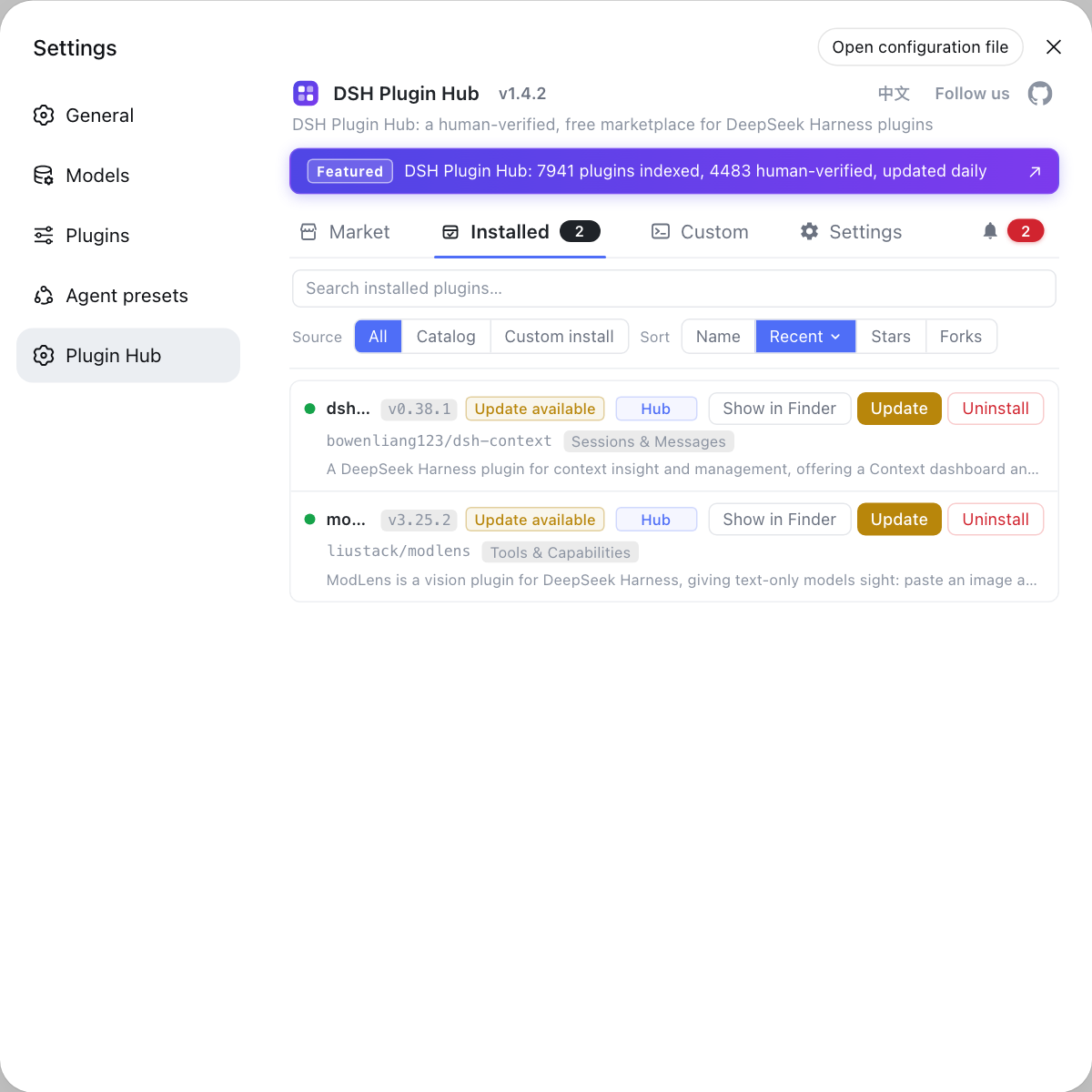
All that triangle-checking between pnpm dependencies, the bundles manifest and dump-config collapses into one screen. Once DSH Plugin Hub is installed, open Settings → Installed: it shows the current environment's plugin list with source tags (catalog / manual), version and update time, plus update and uninstall actions at the end of each row. Search, source filters and sorting by name or stars are built in. Rather than diffing two lists in a terminal, let the market put "what is installed and what can be updated" on a single screen.
Sources: dsh CLI README, DeepSeek Harness docs - Package and install a plugin, pnpm list (pnpm ls) command reference
FAQ
They answer different questions about DSH plugin state. dsh plugin list reports the pnpm dependencies in the profile directory, while dsh.profile.bundles records which plugin layers actually load. In-box bundles resolve from the dsh installation and never enter the profile's node_modules, so they are missing from list; packages without a dsh.bundle declaration show up in list but activate no layer.
dsh plugin list already defaults to pnpm's --depth 0, which lists direct dependencies only, so the plain command usually gives you what you want. For the full tree use dsh plugin --profile web list --depth Infinity, and to filter by name pass a positional pattern such as dsh plugin --profile web list "dsh-*".
Change the value of --profile: dsh plugin --profile <name> list runs pnpm list inside $DSH_HOME/profiles/<name>. The built-in web profile is the one dsh web boots, so if a plugin seems missing, compare list output across each candidate profile to find where it actually landed.
Yes, dsh plugin --profile web list --json emits JSON, because everything after --profile is forwarded to pnpm and pnpm list's --json flag applies as-is. Pair it with --depth 0 when writing checks so you parse a stable direct-dependency list instead of indented tree text.
A plugin that shows up in dsh plugin list but never takes effect is a package with no dsh.bundle declaration: it installed as a plain dependency, dsh plugin printed a warning, and no configuration layer was activated. Run dsh --profile web --dump-config and look for a # == <package> layer; if there is none, nothing was composed into the tree.
Related Terms
- dsh plugin list
- dsh plugin list is the DSH command that reports the plugin dependencies of a profile, written in full as dsh plugin --profile <name> list. It forwards its arguments to pnpm in the profile directory, making it equivalent to running pnpm list (alias pnpm ls) there, and it accepts pnpm list's flags.— dsh CLI README
- dsh.profile.bundles
- dsh.profile.bundles is the ordered bundle array inside a profile's dsh.profile manifest in package.json, defining which plugin layers are applied, and in what order, when the profile boots. It is maintained by dsh plugin rather than by pnpm, so it is not equivalent to pnpm list output.— DeepSeek Harness docs - Package and install a plugin
- in-box bundle
- An in-box bundle is a bundle shipped with the dsh installation itself, such as @deepseek-ai/dsh-base, @deepseek-ai/dsh-web-app and @deepseek-ai/dsh-headless. In-box bundle names always resolve from the dsh installation rather than the profile's node_modules, so they never appear in pnpm list output.— DeepSeek Harness docs - Package and install a plugin
- profile
- A profile is a runnable plugin composition in $DSH_HOME/profiles/<name>, whose package.json carries both the pnpm-managed out-of-tree plugin dependencies and the dsh.profile manifest. It is what dsh --profile <name> boots.— DeepSeek Harness docs - Package and install a plugin
Sources
- dsh CLI README· deepseek-ai
- DeepSeek Harness docs - Package and install a plugin· deepseek-harness
- pnpm list (pnpm ls) command reference· pnpm