DSH plugin 装在哪个目录?DeepSeek Harness 插件安装位置与文件结构
DeepSeek Harness 的插件由 pnpm 装进 $DSH_HOME/profiles/<name>/node_modules,一个 profile 一份、互不干扰;真实文件藏在 node_modules/.pnpm 里、顶层看到的只是符号链接。 内置的 base / web / headless 组合包例外,它们从 dsh 安装本体解析、不落 profile 目录——无论你叫它 DSH插件、DeepSeek插件还是 DeepSeek Harness plugin,这篇都讲清「装在哪 → 目录长什么样 → 怎么确认某个插件的位置」。
DeepSeek Harness 插件安装位置:$DSH_HOME 下的 profile 与 node_modules
插件的落盘位置是当前 profile 的 node_modules,完整路径为 $DSH_HOME/profiles/<name>/node_modules;$DSH_HOME 取不到该环境变量时默认 ~/.dsh(来源)。 五步把位置定死:
- 确认根目录 — 终端执行
echo $DSH_HOME。预期:有输出就用这个值,没有输出说明落在默认的~/.dsh。 - 列出 profile — 执行
ls "$DSH_HOME/profiles"(默认时即ls ~/.dsh/profiles)。预期:能看到web、headless,以及你自己创建过的 profile 名字。 - 进到目标 profile — 执行
ls "$DSH_HOME/profiles/web"。预期:同时看到package.json、cordis.patch.yml与node_modules三样东西,其中node_modules就是插件目录。 - 看装了什么 — 执行
ls "$DSH_HOME/profiles/web/node_modules"。预期:顶层目录名(含@scope形式的组织目录)就对应已装的插件包名。 - 看依赖记录 — 打开该 profile 的
package.json。预期:插件作为普通依赖写在dependencies里,同时dsh.profile.bundles列出要激活的组合包。
该 profile 的 package.json 大致长这样(示意):
{
  "dependencies": {
    "@dshplugin/dsh-plugin-hub": "^1.4.2"
  },
  "dsh": {
    "profile": {
      "bundles": ["@deepseek-ai/dsh-base", "@dshplugin/dsh-plugin-hub"]
    }
  }
}
关键区别:dependencies 回答「装了什么」,dsh.profile.bundles 回答「加载哪几个」——两者并不总是相等,这也解释了为什么有的包装了却没生效。三个口径的完整对账办法见《dsh plugin list 怎么用?》。
DSH plugin 的 node_modules 内部结构:.pnpm 虚拟存储与符号链接
pnpm 不把文件平铺在顶层,而是把所有包放进 node_modules/.pnpm/<包名>@<版本>/node_modules/<包名>,顶层只留一个符号链接指过去;真实内容以硬链接方式共享自全局 store(来源)。 看懂这一层,两件事就通了:
- 看链接指向 — 执行
ls -l "$DSH_HOME/profiles/web/node_modules" | head。预期:带->的行就是符号链接,箭头右侧是它在.pnpm里的真实路径。 - 进真实目录 — 执行
ls "$DSH_HOME/profiles/web/node_modules/.pnpm" | grep 插件名。预期:能看到<包名>@<版本>形式的目录名,逐级打开才是插件的package.json、lib/等实际文件。 - 查全局 store 位置 — 执行
pnpm store path。预期:输出一个平台相关的路径(macOS 一般在~/Library/pnpm/store一类目录下),多个 profile 装同一个包时磁盘上只存一份内容。
这也是「手删 node_modules 不等于卸载」的根因:文件没了,但 package.json 的依赖记录与 dsh.profile.bundles 里的加载声明都还留着,宿主仍会照着清单去解析。要走卸载通道让两份清单同步,见《dsh plugin remove 怎么卸载插件?》。
哪些 DeepSeek Harness 插件不在这个目录里:内置组合包从 dsh 本体解析
@deepseek-ai/dsh-base、dsh-web-app、dsh-headless 这类内置组合包始终从 dsh 安装本体解析,不会出现在任何 profile 的 node_modules 里(来源)。 由此派生出三个正常现象:
- 在 profile 的
node_modules里找不到 base / web / headless,不是装坏了,是它们本来就不落这里。 - 反过来,某个包不在
node_modules里却被加载了,多半就属于这一类——判断办法仍是那句「先 dsh 安装目录、再 profile 的 node_modules」的解析顺序。 - 另外,没声明
dsh.bundle的普通库包会被装进node_modules,但不成为加载层,dsh plugin会打警告。这类包位置正确、行为却不符预期,别按「路径写错了」去排查。
怎么确认某个 DSH plugin 的文件到底在哪
从「清单 → 加载层 → 真实文件」逐层收敛,四条命令足够定位(来源)。
- 看依赖清单 — 在 profile 目录里执行
pnpm list --depth 0。预期:列出该 profile 的直接依赖,即「装了什么」。 - 看加载层 — 执行
dsh --profile web --dump-config | grep -n "^# =="。预期:每个生效的组合包一行,就是「实际加载了哪几个」。 - 比对两处 — 只在前者出现 = 装了但没激活;只在后者出现 = 内置组合包或由其他包带入。预期:能给出一个明确归类,而不是靠猜。
- 定位文件 — 回到
node_modules/.pnpm按包名找,或用 DSH Plugin Hub 已安装列表里的「在 Finder 中显示」直接跳过去。
DSH plugin 安装位置注意事项
- 别手动往 profile 目录里
npm install/pnpm add:依赖记录会与 profile manifest 脱节,宿主仍按dsh plugin写下的清单去加载,装了也不生效。 - 别在 profile 之间复制
node_modules:链接关系与锁文件状态跟目录绑定,复制过去会留下一批指向别处的损坏链接。 $DSH_HOME是环境变量:自定义过它的人,真实路径不在~/.dsh,照默认路径找必然找不到。- 磁盘占用看 store、不要逐个 profile 删目录:包内容全局去重共享,删 profile 里的链接省不了多少空间,反而会把依赖结构弄坏。
- 配置文件与目录的完整清单不在本篇:
settings.yaml、.credentials.yaml、三层 patch 顺序属于另外的话题,需要时看《dsh 配置文件在哪?》。
用 DSH Plugin Hub 直接跳到插件的文件位置
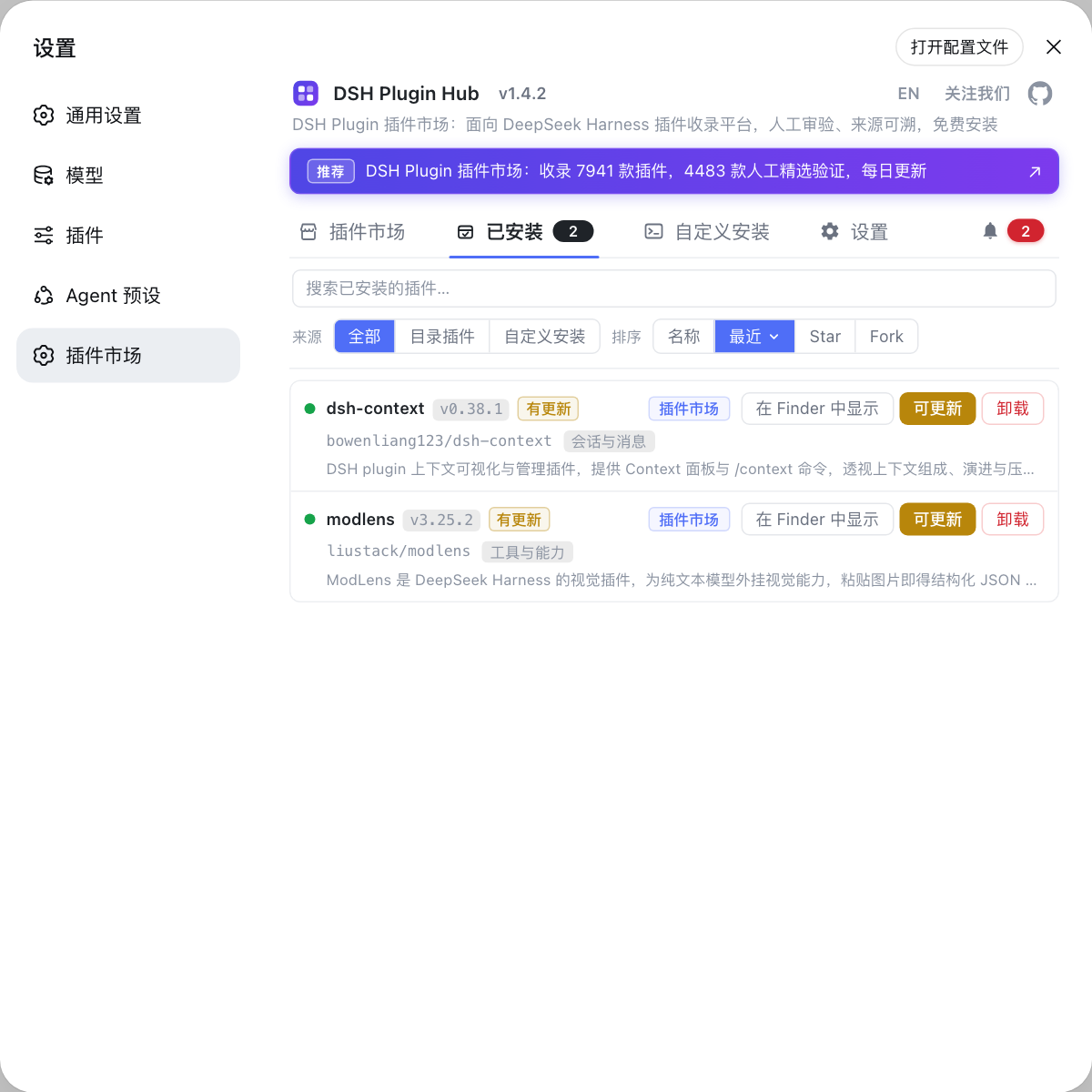
DSH Plugin Hub 是 DeepSeek Harness 内置的官方插件市场,已安装列表里每个插件都带「在 Finder 中显示」,不用背 $DSH_HOME 路径也能一步跳到插件目录。 装好后:打开「已安装」页 → 找到目标插件 → 点行尾的「在 Finder 中显示」,文件管理器会直接定位到该插件在 profile 里的落盘位置——比手敲路径快,也避免了 $DSH_HOME 被改过时找错地方。
来源:dsh CLI README、DeepSeek Harness 官方文档 - 打包与安装插件、pnpm 官方文档 - 符号链接的 node_modules 结构
常见问题
DSH plugin 装在该 profile 的 node_modules 里,完整路径是 $DSH_HOME/profiles/<name>/node_modules。$DSH_HOME 取不到时就落在默认的 ~/.dsh,所以实际路径是 ~/.dsh/profiles/web/node_modules 这一类;如果你自定义过 $DSH_HOME,就要按环境变量的值去找。
这是 DSH plugin 目录的正常 pnpm 结构:所有包的真实内容放在 node_modules/.pnpm/<包名>@<版本>/node_modules/<包名>,顶层只放一个符号链接指过去。所以顶层目录名能对出装了什么,要逐级打开看内容就进 .pnpm 目录。
不是——DSH plugin 的安装并没有失败:DeepSeek Harness 的内置组合包 @deepseek-ai/dsh-base、dsh-web-app、dsh-headless 这类始终从 dsh 安装本体解析,不会进入任何 profile 的 node_modules。只有树外插件(你自己装的社区插件)才落进 profile 目录,因此前者缺席是设计如此。
不等于——删掉 node_modules 并不等于卸载 DSH plugin:直接删只动了文件,profile 的 package.json 依赖记录与 dsh.profile.bundles 加载声明都还在,下次启动宿主仍会照着清单去解析一个已经不存在的包。正确做法是执行卸载命令,让两份清单同步更新。
不会——DSH plugin 装在多个 profile 不会重复占用空间:pnpm 把包统一收在全局 store 里,各 profile 的 node_modules 通过硬链接引用同一份文件,只有链接关系和元数据是各自一份。所以想回收空间该看的是 store 目录,而不是逐个 profile 删 node_modules。
相关术语
- profile 目录
- profile 目录是 DeepSeek Harness 中单个运行栈的落盘位置,位于 $DSH_HOME/profiles/<name>,内含 package.json、cordis.patch.yml 与 node_modules。树外插件就装在这个 node_modules 里,因此不同 profile 的插件互不影响。— dsh CLI README
- node_modules/.pnpm
- node_modules/.pnpm 是 pnpm 的虚拟存储目录,包的真实内容按 <包名>@<版本> 分目录放在这里,node_modules 顶层只保留指向它的符号链接。排查「改了文件不生效」时要看的是这个目录里的真实路径。— pnpm 官方文档
- dsh.profile.bundles
- dsh.profile.bundles 是 profile 的 package.json 中的加载声明,按顺序列出该 profile 要激活的组合包。它回答「加载哪几个」,而 dependencies 回答「装了什么」,两者不一定相等。— dsh CLI README
- 内置组合包
- 内置组合包是随 dsh 安装本体分发的组合包,如 @deepseek-ai/dsh-base、@deepseek-ai/dsh-web-app、@deepseek-ai/dsh-headless。它们始终从 dsh 安装本体解析,不经 profile 的 node_modules。— DeepSeek Harness 官方文档 - 打包与安装插件
来源
- dsh CLI README· deepseek-ai
- DeepSeek Harness 官方文档 - 打包与安装插件· deepseek-ai
- pnpm 官方文档 - 符号链接的 node_modules 结构· pnpm