dsh plugin market vs store: DeepSeek Harness entry & usage
The dsh plugin market is DeepSeek Harness's plugin storefront (often written dsh plugin store): it is provided by a market-type DSH plugin, and once installed it lives under Settings → Plugin Market, where you search, browse by category and one-click install, update or uninstall plugins (source). This piece works through three directions: what it is and where to enter it; what it can do; and how it differs from dsh plugin store and the official Hub, and which one to install first.
Overview
In one line: the dsh plugin market is the visual entry for finding and installing plugins, turning the command-line dsh plugin add into a button. It is itself a plugin — you first pull the market plugin in from the command line, and only then do you get an interface to install other plugins. Three directions unfold in turn.
What the dsh plugin market is and how to reach it: Settings entry and CLI install
The dsh plugin market is itself a market-type DSH plugin: once installed into a profile it adds a Settings → Plugin Market entry, so "entering the market" splits into connecting first, then entering. The connecting step is done from the command line (source), as follows:
- Check prerequisites: confirm DeepSeek Harness runs and the
webprofile is initialised. Expected:dsh webstarts normally. - Connect the market plugin from the command line: run
dsh plugin --profile web add dsh-plugin(the official market) ordsh plugin --profile web add dshmarket(another community market). Expected: download and install progress appears, ending with no error. - Restart the service: stop and start
dsh webso the plugin reloads. Expected: startup completes with no plugin-resolution error. - Enter the market from Settings: open the Web UI → Settings → Plugin Market. Expected: you see the search box, categories and plugin cards, and the entry stays usable from now on.
If you arrived from keywords like "dsh market" or "dshmarket", note that they mostly refer to a market plugin's package name or slang; the real connecting action is still that dsh plugin --profile web add command.
What the dsh plugin market can do: search, category browsing and one-click install, update, uninstall
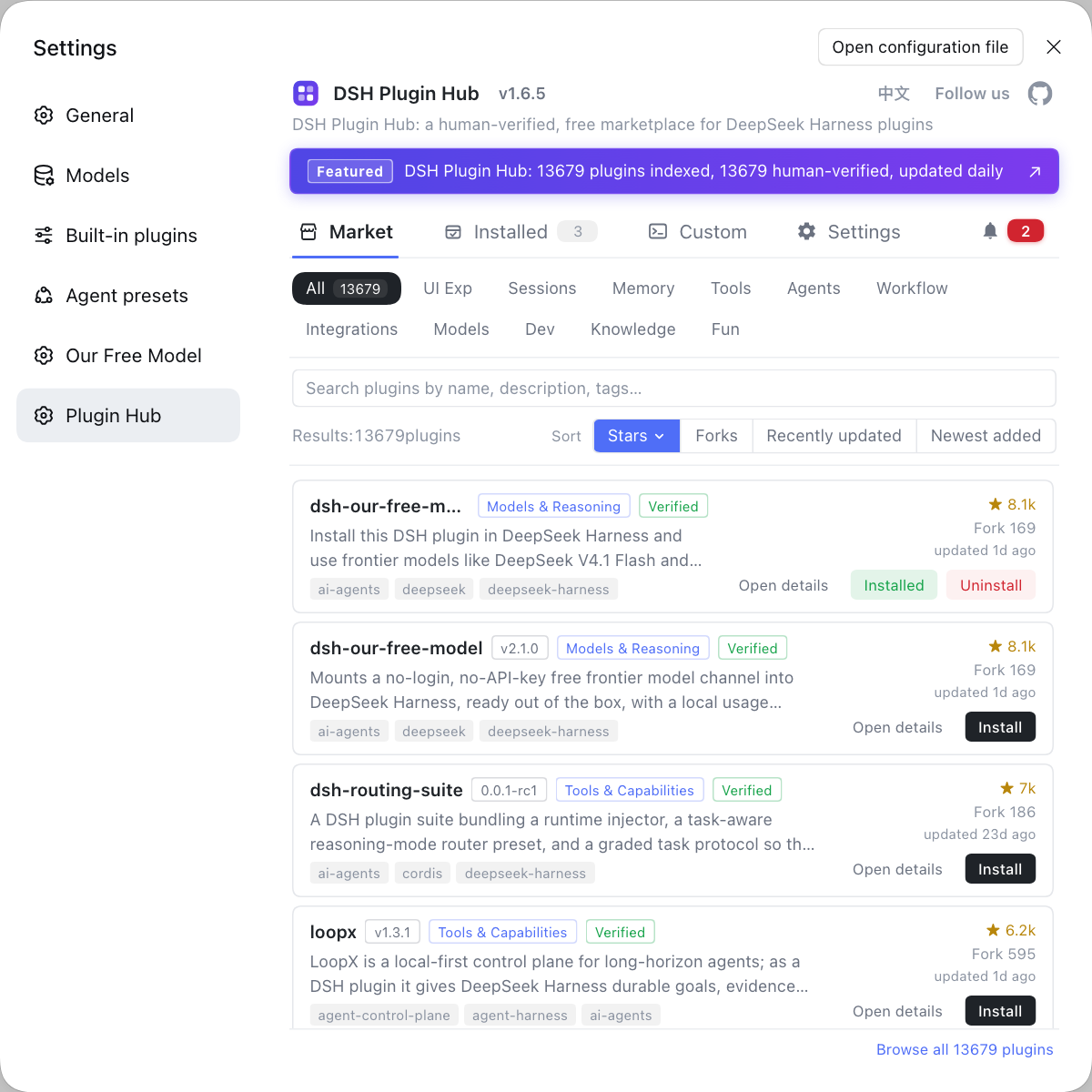
The market does three things: locate plugins by name or feature word, filter and browse by category (All / Installed / Not installed), and install, update or uninstall with a button on the card (source). It turns the command-line dsh plugin add into visual operations: the search box filters live as you type, the category filter keeps only the target plugins, install shows the source repo and the command it will run in a confirmation dialog, Install turns into Update when a newer version is detected, and uninstall happens in the Installed list. For where to click and what each dialog looks like, see how to use the plugin market — that piece covers the step-by-step operations, while this one only covers what it can do.
If this is your first visit, start with the first five minutes in the plugin market, then read five ways to search the market to get systematic about it. What changed in 2.2.5 is covered in what's new in Hub 2.2.5; plugins the catalog does not list can go through custom install, and entry points plus preferences live in the market settings page — all of it part of day-to-day use of the deepseek harness plugin market, so read whichever you need.
dsh plugin market vs dsh plugin store vs DSH Plugin Hub
The dsh plugin market and dsh plugin store point at the same entry, just under different names; DSH Plugin Hub is the official plugin market for that entry. Lined up together they are easy to keep apart:
| Name | What it refers to |
|---|---|
| dsh plugin market | the umbrella term for the plugin-market entry |
| dsh plugin store / marketplace | the casual English name for the same entry |
| DSH Plugin Hub | the official plugin market built into Settings → Plugin Market |
| dshmarket | another community market plugin |
How to choose: official plugin market first, third parties later. DSH Plugin Hub is the community-official plugin market, with search, categories, one-click install and a pre-install confirmation dialog where both source and command can be verified; dshmarket is another market plugin of the same kind with similar features, and one is enough — there is no need to install two of the same type. Understanding these three differences avoids mismatches such as "searched store but installed another market."
Rather than remembering a pile of plugin names, source repos and flags on the command line, just open the DSH Plugin Hub market: search, browse by category, one-click install and update all happen in one interface, with a confirmation dialog before every install.
Notes and limits
Treat the dsh plugin market as an "entry" rather than a "source of capability", and you trip up less. A few boundaries:
- The market must be installed first: the market is itself a plugin, so without connecting it there is no entry — do not assume Settings ships with a market built in.
- Restart after installing: plugins load at startup, so without a restart the entry will not appear.
- Keep the profile consistent: when connecting from the command line, write
--profile webto match the environment the interface uses. - Do not install several markets of the same kind: multiple market plugins overlap, so one is enough, avoiding a duplicated entry and muddled sources.
- Do not be misled by naming: store, market and marketplace are the same entry, so when choosing a plugin, check which concrete market it actually is.
Sources: dsh CLI README, dshplugin/dsh-plugin-hub, dsh-plugin.org
FAQ
The dsh plugin market is the umbrella term for the plugin-market feature entry inside DeepSeek Harness, not the name of one specific plugin. It is provided by a market-type DSH plugin, and once installed into a profile it appears as Settings → Plugin Market. In other words, the market is a capability, several plugins can carry it, and which one you install is up to you.
To open the dsh plugin market you first install a market-type DSH plugin, then enter it from Settings → Plugin Market each time. The command-line approach is dsh plugin --profile web add dsh-plugin, and after restarting dsh web the settings page shows the entry. Once installed, you no longer need the command to reach the market day to day.
In the dsh plugin market you find plugins with the search box and category filters, and install them by clicking Install and confirming in the dialog. Typing a plugin name or feature word filters live, and the category filter can show only Not installed; clicking Install pops a dialog showing the source repo and the command it will run, and a refresh after progress finishes takes effect. When a newer version is detected, Install turns into Update.
dsh plugin store, dsh plugin market and dsh plugin marketplace all point at the same entry, just called differently; DSH Plugin Hub is the official plugin market for that entry. Store leans toward the casual English name and market is more common, with no technical difference between them. DSH Plugin Hub builds the Settings → Plugin Market entry, with search, categories, one-click install and a confirmation dialog.
Multiple market-type DSH plugins overlap, so install just one and start with the official DSH Plugin Hub. Different market plugins differ slightly in catalog and review policy, but browsing, install, uninstall and update cores are the same. Installing several at once duplicates the entry and muddles sources; decide only after one works well.
Related Terms
- dsh plugin market
- The dsh plugin market is the umbrella term for the plugin-market entry in DeepSeek Harness, a visual interface provided by a market-type DSH plugin to search, browse, install, update and uninstall plugins. It is not the name of one specific plugin but the shared name for this class of entry.— dshplugin/dsh-plugin-hub
- dsh plugin store
- dsh plugin store and dsh plugin market point at the same entry, store being the more casual English name with no technical difference. Whichever spelling appears, it refers to the interface inside DeepSeek Harness for browsing and installing plugins.— dshplugin/dsh-plugin-hub
- DSH Plugin Hub
- DSH Plugin Hub is the official plugin market built into DeepSeek Harness under Settings → Plugin Market, supporting search, category browsing, one-click install, update and uninstall, and showing the source and the command it will run in a confirmation dialog before install.— dshplugin/dsh-plugin-hub
- dsh market
- dsh market is community slang for the plugin-market entry, common in search and discussion; the real action behind it is still connecting a market-type DSH plugin (such as dsh plugin --profile web add dsh-plugin) and then entering Settings → Plugin Market.— dsh CLI README
Sources
- dsh CLI README(plugin add 与 --profile 语义)· deepseek-ai
- dshplugin/dsh-plugin-hub GitHub 仓库· dshplugin
- dsh-plugin.org 插件市场· dsh-plugin.org