dsh plugin market search: 5 ways to find a plugin
Two failures explain most "missing plugin" reports in dsh plugin market: the query was written in a form the index does not match, or the category filter never left Installed. A single plugin can have a Chinese name, an English name, a package name, a topic and an author, and only some of those strings are searchable from the toolbar. This article puts all five forms in one table, then walks from broad to narrow and ends with a recovery order for genuine zero-result searches (DSH Plugin Hub 2.2.5 index).
dsh plugin market search: one table for five query styles
A Chinese name suits "I know what it is called", an English name suits "I know roughly what it does", a package name suits "I know where it comes from", a topic suits "I only know the function", and author or category suits "I want to browse by source or field". The five styles are not mutually exclusive; combining them from broad to narrow beats swapping synonyms.
| Query style | Example | Best for | Common failure |
|---|---|---|---|
| Chinese name | the local word for memory, theme, search | You remember the Chinese label | The card displays English; Chinese only appears in the description |
| English name | memory, theme, search | You remember the English function word | The real name carries a prefix or a plural |
| Package name | dsh-memory, @scope/dsh-office | You have the package or repository name | Wrong scope or wrong hyphen |
| Topic | mcp, office, tui | You only know the capability area | The topic is not printed on the card face |
| Author / category | Category "UI", "Memory" | You want to browse a field | Author names are not always searchable |
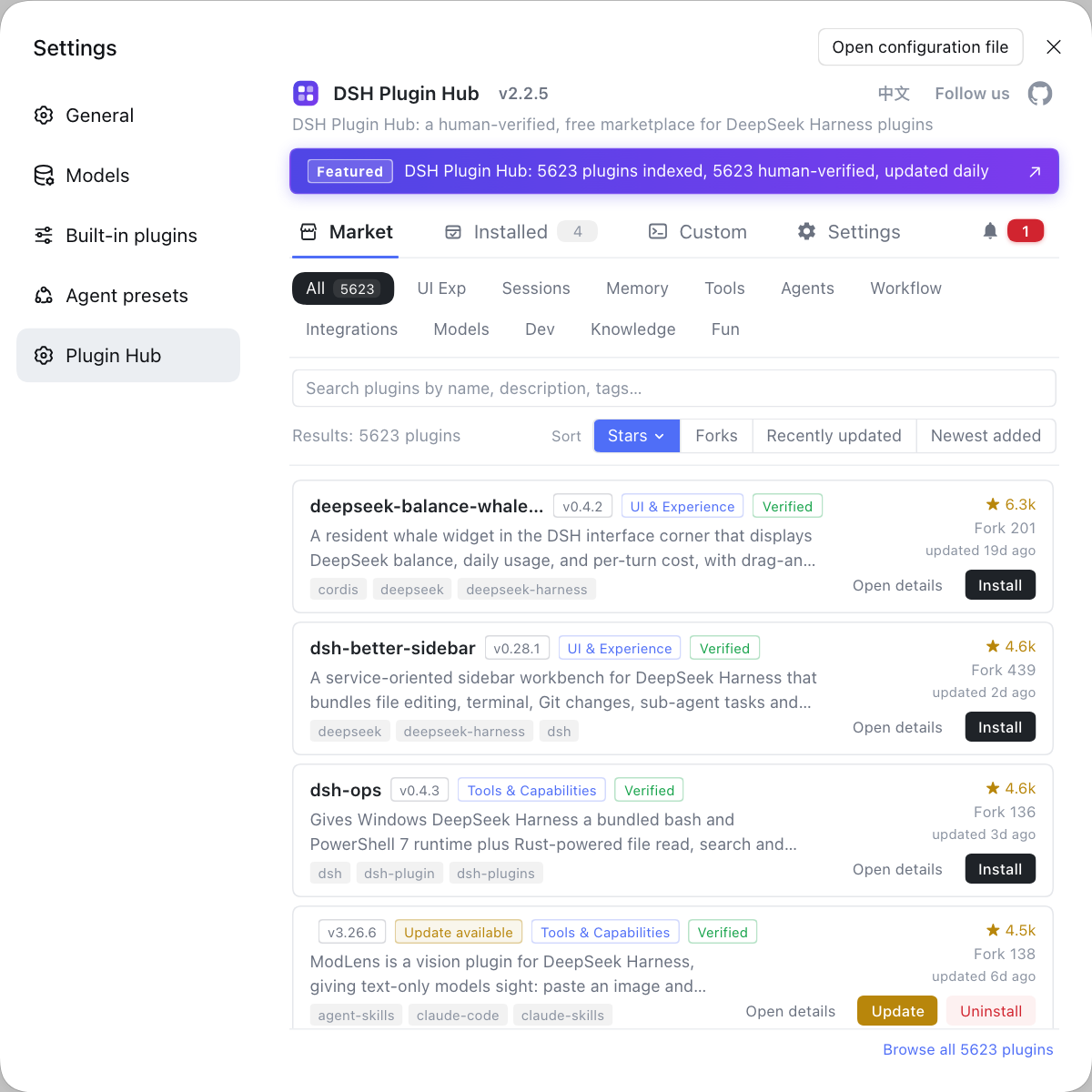
The toolbar that hosts all of this is described in your first five minutes in dsh plugin market, including the four tabs around the search box.
DSH plugin market search way 1: the Chinese name is a probe, not a guarantee
A Chinese name only matches when the card's display name is Chinese; if the display name is English, the Chinese wording may live only in the description and never reach the search index.
- Type the phrase you would naturally use — the Chinese word for memory, theme or search.
- Look at the result count. If it is zero, stop trying Chinese synonyms and switch to English immediately.
- If several unrelated plugins appear, narrow with the category filter to the matching field, such as Memory or UI.
- Open a detail view and confirm that the Chinese term in the description refers to the same plugin you have in mind.
Treat the Chinese query as the first probe. Its value is confirming what the thing is called locally, not guaranteeing a hit.
DeepSeek Harness search way 2: an English function word, never a sentence
The English query works when it is a single noun — memory, search, theme, office — not a sentence such as "a plugin that remembers things".
- Compress the need into one English noun: long-term memory becomes
memory, web lookup becomessearch. - If the result count is too high, add a second word to narrow it, for example
memory sessionorsearch web. - If the count collapses to almost nothing, remove the second word and keep the function word alone.
- When a near-match appears, open its detail view and read the package name; the package name is usually more stable than the display name.
This style fits the stage where you know the job but not the product name. It hits more often than Chinese, but prefixes, plurals and hyphens can still break it.
dsh plugin market search way 3: the package name is exact and unforgiving
A package name is the unique identifier, so it is the most precise query and also the easiest to mistype: one wrong character in dsh-, @scope/ or a hyphen returns zero.
- If you copied a package name from GitHub or a recommendation, paste it verbatim; do not add a
dsh-prefix yourself. - If you only remember the tail, search the tail first —
memoryrather than a guessed full name — then read the complete package name from the results. - For scoped packages, include
@scope/in the query; searching only the part after the slash matches too many unrelated packages. - After a hit, open the detail view and compare the package name with the source repository so you do not install a same-named package from a different author.
Package search is about precision, not volume. Search one package name at a time and keep function words out of the same query.
DeepSeek Harness search way 4: topics when you only know the job
A topic describes what a plugin can do, which makes it closer to your actual need than a display name; searching mcp is more reliable than searching "MCP plugin".
- Translate the need into one topic word: MCP becomes
mcp, memory becomesmemory, office documents becomeoffice, visual themes becometheme. - Enter the topic and read the result count first. A large count means the field is crowded and needs a scenario word.
- Open a detail view and confirm the topic matches the description; some plugins carry several topics, so do not judge by the first one.
- If the topic returns nothing, fall back to the English name and narrow with the category filter.
Topics travel across languages, which is why an English topic still works for a Chinese-speaking user. It is the best entry point when the function is clear but the name is not.
DSH plugin market search way 5: author and category for source-first browsing
Author names are not guaranteed to be searchable card fields but categories always are, so browse by category first and verify the author inside the detail view.
- Pick a large category such as Memory, UI or Tools and scan what exists in that field.
- Sort the results by Recent or Star to move the plausible candidates to the front.
- Open a detail view and read the source repository; if the owner is one you trust, return to the search box and try the author or repository name.
- If the author query still fails, stop fighting it and keep using category plus the repository link from the detail page.
This is the broadest of the five styles. It suits "I want something from this team or this field", not "I know the plugin name". For more on browsing, see what dsh plugin market is and plugin search tips.
Recovery order when dsh plugin market returns nothing
Check the filter first, then spelling, then language, and only last suspect that the plugin was never listed; reversing that order wastes time on keywords.
- Clear the search box and set the category back to All, confirming that Installed was not hiding the result.
- Change the form: Chinese, then English, then package name, then topic — one attempt each.
- Check spelling: the
dsh-prefix, hyphens, plurals and any@scope/segment. - Search GitHub for a repository under the same name and confirm the plugin is published and tagged with the
dsh-plugintopic. - If GitHub has it but the market does not, it is simply not indexed yet; use Custom Install or wait for listing instead of cycling more keywords.
Notes: four query mistakes to avoid
- Do not search with a full sentence. The box is not semantic search, and long phrases usually match nothing.
- Do not search only in Chinese. Many display names are English, with Chinese confined to descriptions.
- Do not ignore the category filter. Under Installed, a new plugin is guaranteed to return zero.
- Do not install the moment you find it. Check package name, source repository, permissions and dependencies before you decide.
The five styles are not a checklist to run every time. Move down the ladder — Chinese name, English name, package name, topic, category — and most plugins appear within the first two steps. When they do not, the recovery order is far more useful than another synonym.
FAQ
DeepSeek Harness often matches the same plugin under a different string, because a card carries a display name, version, category, topics and source information, and the Chinese name is only one of them. When Chinese fails, try English first, then the package name. Prefixes such as dsh- and plugin- can also be dropped so you search only the distinctive half of the name.
DeepSeek Harness treats topics as more stable search terms than display names, so topic queries usually work. Functional plugins commonly carry topics such as mcp, memory, office, theme or tui. If you remember the job but not the name, searching the topic beats pasting a sentence from the description.
DeepSeek Harness filters results before you see them, so check the category filter first. If it is stuck on Installed or Not Installed, a new plugin can be hidden even when the keyword is correct. Clear the box, set the category back to All, and only then change the keyword; that order removes about half of all false zero-result reports.
DeepSeek Harness does not guarantee that author names are indexed as searchable card fields, while category and topic always are. Cards show name, version, category, topics, Star/Fork and last update time; author and repository details live deeper in the detail view. To find work by its source, narrow by category first, then open the detail page and follow the repository link.
DeepSeek Harness responds best to a two-word query that combines a function word with a scenario word, such as memory session or search web, which is narrower than memory alone. Start wide enough to see the category, then tighten with the second word. Once five or fewer remain, re-sort by recent updates and Star/Fork instead of changing the query again.
Related Terms
- dsh plugin market
- dsh plugin market is the plugin marketplace built into DeepSeek Harness; the Chinese phrase for it points to the same entry. It supports retrieval by display name, package name, topic and category.— https://dsh-plugin.org/plugins/dshplugin/dsh-plugin-hub
- package name
- A package name is the unique identifier of a DSH plugin on npm or GitHub, usually starting with `dsh-` or `@scope/dsh-`. It is more stable than a display name and is the right string for exact lookups in the search box.— https://github.com/deepseek-ai/deepseek-harness
- topic
- A topic is a capability label attached to a plugin card, describing the area a plugin belongs to, such as `mcp`, `memory` or `office`. Many plugins share a topic, which makes topics better for function-first discovery than for name-first lookup.— https://api.dsh-plugin.org/images/releases/2-2-5/index.json
- category filter
- The category filter is the All / Installed / Not Installed control in the dsh plugin market toolbar, used to narrow plugins by state before searching. It combines with the search box, and the wrong setting creates the illusion that a plugin does not exist.— https://api.dsh-plugin.org/images/releases/2-2-5/index.json
Sources
- DSH Plugin Hub 2.2.5 UI screenshot index· dsh-plugin.org
- DSH Plugin Hub plugin page· dsh-plugin.org
- deepseek-ai/deepseek-harness (source repository)· GitHub