DSH plugin market cards: version, stars and verified
The plugin with the most stars is usually not the one you should install today. In dsh plugin market, stars are the most visible number on a card and the easiest to over-read; the signals that actually carry risk are version, update time, category, topics and button state (2.2.5 index). This article splits a card into three layers — numbers, labels and buttons — so that by the end you can at least stop being led by the star count. The cards come from the market page of DSH Plugin Hub.
Three numbers in dsh plugin market: version, update time, Star/Fork
The three numbers answer three questions: version says how far it has matured, update time says whether anyone still maintains it, and Star/Fork says how many people noticed or modified it. Each one misleads in isolation; together they become useful.
| Number | Surface meaning | What it can prove | What it cannot prove |
|---|---|---|---|
| Version | Which release this is | Iteration stage and size of change | Compatibility with your Harness |
| Update time | Most recent release | Maintenance activity | Code quality |
| Star / Fork | Order of magnitude of attention and forks | Whether the community used or changed it | Permission or dependency safety |
- Read update time first: a long gap is not automatically bad, but prepare for "nobody will fix this".
- Read version second: a recent update with a 0.x version means rapid change, so keep it out of a stable workflow.
- Read Star/Fork last: high stars earn a place in the candidate pool and high forks mean people really modified it; low on both just means fewer signals.
- When the three conflict, trust update time plus version and treat stars as a tiebreaker.
The relationship between version and update time carries more information than either number. A plugin untouched for two years at 1.x may be finished and stable; one updated last month at 0.3 may change its interface tomorrow. You are judging stability, not popularity.
Three typical combinations
- Recent update, still 0.x: rapid iteration — fine to trial, risky in a stable workflow.
- Old update, version at 1.x or above: stable but low-frequency — confirm compatibility with the current Harness before installing.
- Recent update with a major version jump: possibly breaking changes — read the release notes before deciding.
Three labels in DSH Plugin Hub: verified, category and topic
The labels divide the work: verified covers source, category covers field, and topic covers function. Mixing them up produces mistakes such as "verified so it is safe" or "right category so it fits".
- verified: treat it as "the listing source and basic metadata passed validation", never as proof that permissions, dependencies and build scripts are safe.
- Category: narrow the field to UI, memory, model or tooling and confirm it belongs to the problem you are solving.
- Topic: confirm the specific capability it covers, such as
mcp,memory,officeortui. - Combined judgment: only when category and topic both fit is it worth opening the detail page; a lit verified badge alone is not a reason to install.
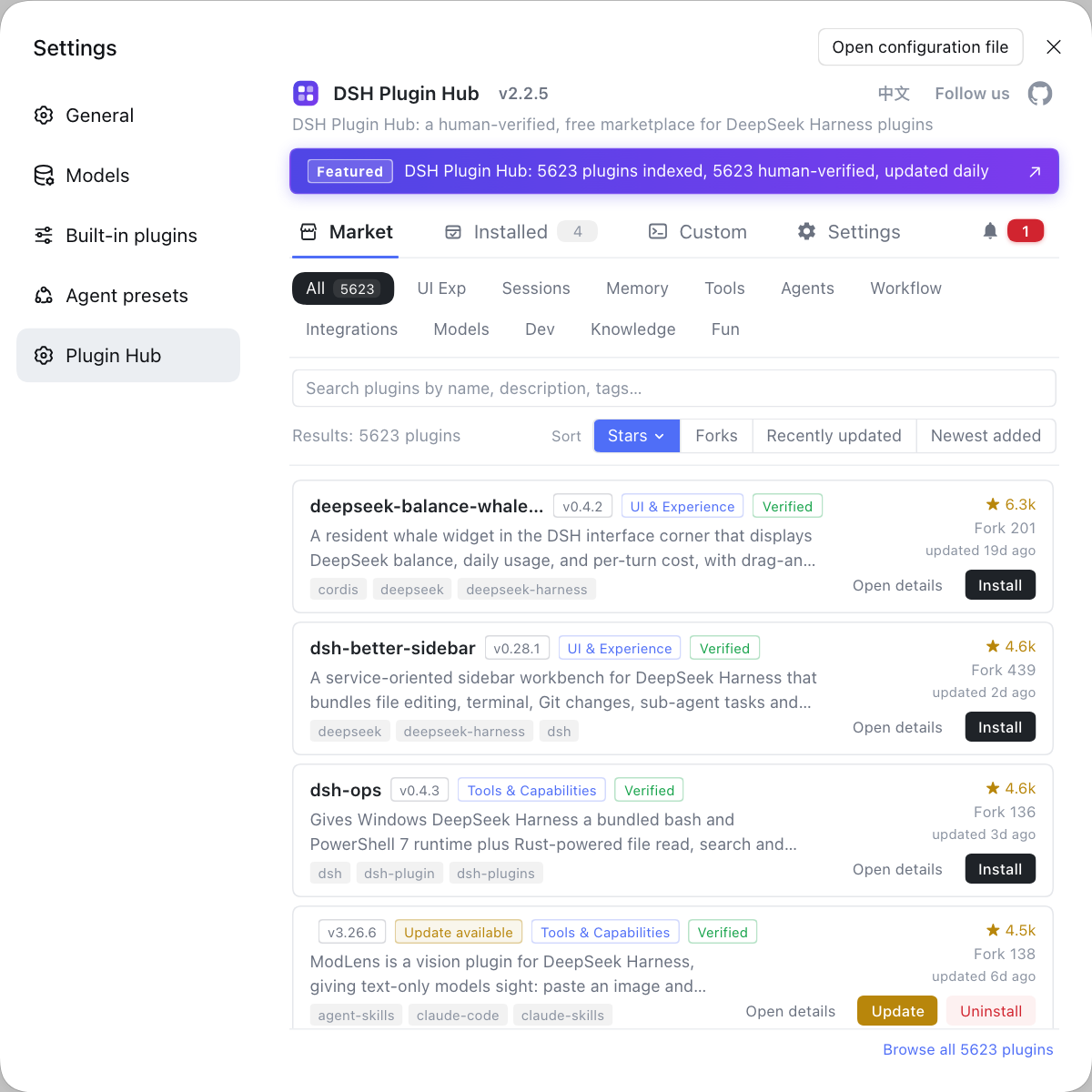
Category is the shelf, topic is the specific problem. A plugin can carry several topics, so do not judge by the first one; a category may also be broader than you expect, which makes the detail description the safer check.
Button states in dsh plugin market: install, installed, uninstall, update
Button state is the most honest layer on a card because it reports what already happened in this environment. Misreading a button wastes more time than misreading a star.
- Install means nothing by that name is present and clicking it opens the confirmation dialog.
- Installed means the package sits in the current profile, not that it is active — check the entry after a restart.
- Update Available means a newer version was detected; open the confirmation dialog to see the changes before deciding.
- Uninstall usually appears on installed entries or installed cards and always asks for confirmation first.
- A disabled button is usually blocked by a category or source filter, so check the filter before reinstalling anything.
Button state also interacts with filters. When category is stuck on Not Installed, an installed plugin disappears from the list; you think it vanished when it was merely filtered out. Confirming the filter before reading a card is a cheap step.
Beyond the card: what a DSH plugin detail page adds
A card is a summary; the detail page is decision material because it adds the full description, version history and dependency clues. Permissions and build scripts are rarely visible on a card, and the detail page offers context much closer to real risk.
- Click Open Details and read the full description to confirm it solves the problem you have.
- Read the version history to see whether recent releases fixed bugs, added features or changed interfaces.
- Check the source repository and dependency clues to confirm author, repository activity and dependency scale.
- Return to the card and decide whether to install, shortlist or drop it.
The detail page is optional for a quick trial and mandatory before a plugin enters your daily workflow. A card filters; details perform due diligence. Merge the two and you buy with insufficient information.
A simple boundary: if you are only testing inside the market, the card is enough; if it will live in your daily environment, open the detail page. The extra thirty seconds usually saves an uninstall and a cleanup later. Fuller field explanations are in how to read market detail fields.
A quick-read table: the order of DeepSeek Harness card signals
The recommended order is state, maintenance, field, source, popularity — popularity last because it is the easiest to inflate emotionally. Following it lets you decide in thirty seconds whether to keep reading or skip.
| Order | What to check | Pass condition | If it fails |
|---|---|---|---|
| 1 | Button state | Not installed or update available | If installed, verify activation first |
| 2 | Update time + version | Recently maintained, acceptable version | Watch it, do not rush |
| 3 | Category + topic | Matches your field and function | Try another keyword |
| 4 | verified | A plus if present, otherwise check source | Open details and verify the repository |
| 5 | Star / Fork | Candidate-pool reference only | Never a reason to reject |
The value of the table is a fixed order, not a fixed conclusion. You can eliminate most cards at row three or discover a quiet but suitable plugin at row five. The only hard rule is that stars must not jump to row one.
- Walk the rows from the top without skipping.
- When a row fails, stop and handle it there instead of reading further.
- When all five pass, open the detail page for due diligence.
One easily missed reading habit: look at the same card twice, a week apart. If stars rose while the version did not move, it was merely recommended into attention; if the version and update time moved, the author is still working. Change over time says more than a single screenshot.
The endpoint of reading a card is not Install but knowing where to click next: open details, shortlist, or skip. For query techniques, compare five ways to search for a plugin; for pre-install checks, continue with the 60-second checklist before installing.
One closing line: every signal on a card answers exactly one question, so never let one number make the whole decision.
FAQ
DeepSeek Harness treats stars as attention only, not as proof of safe permissions, dependencies or build scripts, and certainly not as proof of fit for your workflow. High stars make a useful candidate pool; version, update time, category and pre-install checks decide whether you actually install. Low stars mean fewer community signals, not that a plugin is unusable.
DeepSeek Harness makes most sense of the two together: update time shows whether anyone still maintains it, while the version shows how far it has matured. A recent update with a 0.x version usually means rapid change; an old update with a mature version can mean stable, low-frequency maintenance. Reading one alone often produces the opposite conclusion.
DeepSeek Harness uses verified to mean the listing source and basic metadata passed validation, not that the plugin is secure. It says nothing about permissions requested, dependency count or build scripts. Before installing, review those three risks; verified only tells you the listing is not a random fabrication.
DeepSeek Harness uses category to answer which field a plugin belongs to and topic to answer which problem it solves. Narrow the category to UI, memory, model or tooling, then confirm the functional boundary with topics. Only when both match is it worth opening the detail page for dependencies and permissions.
DeepSeek Harness should send you to Update Available first, where the update confirmation shows the new version and its changes before you commit. Installed only means the plugin exists in the current environment, not that it is current. Record the old version first so you have a rollback reference.
Related Terms
- plugin card
- A plugin card is the single-listing summary in the dsh plugin market list, showing name, version, installed and update badges, category, verified badge, description, topics, Star/Fork, update time and action buttons. It is the first layer of information, not the full detail view.— https://api.dsh-plugin.org/images/releases/2-2-5/index.json
- verified badge
- The verified badge is a source-check marker on a plugin card indicating that the listing source and basic metadata passed inspection. It does not cover permission scope, dependency safety or build-script risk.— https://api.dsh-plugin.org/images/releases/2-2-5/index.json
- topic
- A topic is a capability label on a plugin card describing the area a plugin belongs to, such as `mcp`, `memory` or `office`. It suits function-first discovery rather than name-first lookup.— https://api.dsh-plugin.org/images/releases/2-2-5/index.json
- update-available badge
- The update-available badge is the marker on a dsh plugin market card showing that an installed plugin has a newer version. It only reports that a newer version exists; whether to update still depends on the confirmation dialog and current compatibility.— https://api.dsh-plugin.org/images/releases/2-2-5/index.json
Sources
- DSH Plugin Hub 2.2.5 UI screenshot index· dsh-plugin.org
- DSH Plugin Hub plugin page· dsh-plugin.org
- deepseek-ai/deepseek-harness (source repository)· GitHub