DSH plugin market verified badge: what it proves
Clicking Install the moment you see the verified badge is the most expensive misread in the plugin market: it turns "the source checks out" into "the code is fine". On a dsh plugin market card, verified is only a source-validation marker (2.2.5 index). It rules out the risk that a listing is fabricated, and it touches none of permissions, dependencies or build scripts. This article splits the badge by meaning: what it verifies, what it never verifies, and what you still have to add. The badge appears on market cards and listing pages inside DSH Plugin Hub.
What verified literally checks in dsh plugin market: source and basic data
Verified checks where a listing came from and whether its basic information lines up — not whether the plugin is safe when it runs. Separating those two propositions is the first step in reading the badge.
| What it covers | What it does not cover |
|---|---|
| The listing source can be checked | Which permissions the plugin requests |
| Basic information matches the source | Whether dependencies are safe or swapped |
| The entry is not a random fabrication | Whether installation runs a build script |
| Market-level traceability | Data flows at runtime |
- When you see verified, confirm which listing carries it; do not attribute plugin A's badge to plugin B.
- Open the detail page and verify that the source repository matches the name on the card.
- Treat verified as a ticket to keep reading, not a pass to install.
- If the source repository will not even open, stop regardless of how bright the badge is.
The value of source validation is real: it tells you the listing did not appear from nowhere. Its boundary is equally real — it inspects the listing layer, not the code layer and certainly not the runtime layer.
The three risks it misses: DSH plugin permissions, dependencies, build scripts
Real plugin risk happens at runtime and at install time, and verified inspects neither moment. Three risks deserve item-by-item review:
- Permission scope: which directories the plugin reads or writes, whether it opens a local port, whether it calls tools. A plugin that only needs to read one config but asks for whole-disk access is telling you something.
- Dependency count and origin: more dependencies widen the supply chain, and an unknown package inside the tree remains risky even when the main package carries verified.
- Build scripts: when installing from source, dependencies may execute scripts during installation. A verified listing can still request script execution, and you still decide whether to trust it.
All three share one property: they live in "how the code runs", not in "where the listing came from". A badge can prove the entry is real; it cannot prove the code is restrained.
| Risk | Question to ask | Clue you can see |
|---|---|---|
| Permissions | What must it touch? | Capability notes in details, install prompts |
| Dependencies | Whom does it pull in? | Dependency count, unfamiliar scopes |
| Build scripts | What runs during install? | Script approval prompt at install time |
After verified, three checks a DSH plugin still needs
The order is permissions, then dependencies, then build scripts, starting with the largest blast radius. All three can be assessed without reading the entire source.
- Permissions: find the declared capability scope in the detail page or plugin notes and compare it with the function; flag anything over-provisioned.
- Dependencies: inspect count and origin, and raise suspicion when an unfamiliar scope or an obviously unrelated package appears.
- Build scripts: if installation asks permission to run a script, confirm the repository is trusted; if unsure, refuse and use a prebuilt release instead.
- Source repository: finally check recent commits and issues to confirm it is not an empty shell.
- Record the conclusion: write these judgments into your own notes so the next update can reuse them.
You do not have to finish all three before a quick trial, but you must finish them before a plugin enters daily work. Temporary testing can be looser; long-term use cannot.
A fast order for the three checks
- Check whether permissions are over-scoped, because this has the widest impact.
- Check dependency count and origin, asking "why is this needed?" for every unfamiliar package.
- Check build scripts, and refuse execution when unsure by switching to a prebuilt release.
- Check repository activity last to confirm someone can fix problems.
If all four still leave you unable to explain the plugin, trial it in an isolated environment instead of your daily profile.
Combining with stars and update time: DeepSeek Harness trust signals
Trust signals stack: verified covers source, update time covers maintenance and stars cover attention; three questions, no substitutes. Stacked together they produce a far more reliable picture than a single badge.
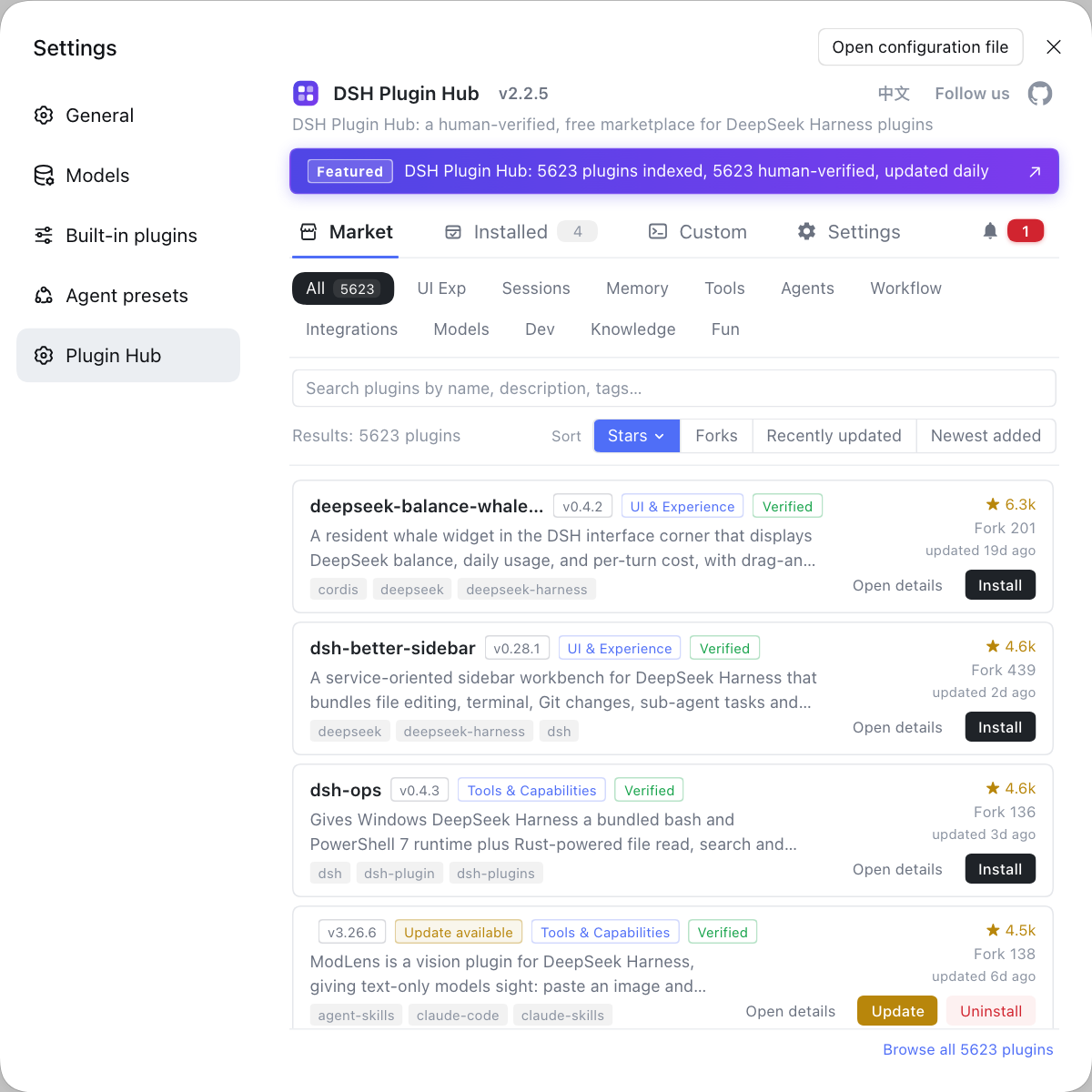
- Check verified first: no badge does not mean unusable, but the source needs an extra verification step.
- Check update time next: recent maintenance means someone responds when things break; long silence means you carry the risk.
- Check Star/Fork only to build a candidate pool, never as a substitute for permission and dependency review.
- When the signals conflict, trust source plus maintenance and put popularity last.
- Record the combined conclusion and compare it on each update instead of re-judging from scratch.
This site breaks the combination down further in how to read DSH plugin trust signals. This article makes one point: verified is one cell in the table, not the table.
When to drop a verified DSH plugin anyway
Any one of over-scoped permissions, suspicious dependencies, opaque scripts or a dead repository is enough to drop it; do not let the badge talk you out of it. Dropping is not conservatism — it puts risk before installation instead of after.
- The function only needs to read config, yet it requests access to the entire home directory or the network.
- The dependency tree contains an unrelated unknown package and the source repository does not explain it.
- Installation requires running a build script that the documentation never mentions.
- The source repository has not updated in a long time, issues go unanswered, yet versions keep rising.
- The plugin description does not match the source repository, or the detail page omits critical information.
The first three are code-layer risks; the last two are maintenance and source risks. If any holds, "it has verified" does not cancel it. For the full pre-install list, see the 60-second checklist before installing; for other card signals, see how to read market cards.
FAQ
DeepSeek Harness uses verified only for the listing-source and basic-metadata layer, meaning the entry is not a random fabrication and its source can be checked. It does not inspect which permissions the plugin requests at runtime, and it does not guarantee that dependencies or build scripts are safe. Read it as a source signal, never as a security certification.
DeepSeek Harness lets a plugin act through the permissions it requests, the dependencies it pulls and the build scripts it runs, and none of those three sits inside verified's scope. A plugin with a real source can still read directories beyond its purpose, pull a compromised dependency or execute a script during installation.
DeepSeek Harness still requires three checks: which permissions it requests, how many dependencies it pulls and where they come from, and whether it runs a build script and whether that script is allowed. Clues appear around installation and in the detail page. If any of the three is unclear, verify it in the detail page or source repository instead of trusting the badge.
DeepSeek Harness works best with the order source first, maintenance second, attention last: verified covers source, update time covers maintenance and stars cover attention. verified is a minimum gate, update time shows someone still cares, and stars only feed a candidate pool. Passing all three is still not proof of safety, so return to permissions, dependencies and build scripts.
DeepSeek Harness gives several drop signals: permissions far beyond the stated function, dependencies with unknown packages, a request to run an undocumented build script, or a source repository that has gone quiet. The badge proves the listing source is checkable; it does not vouch for any of those risks.
Related Terms
- verified badge
- The verified badge is a source-check marker on a dsh plugin market card indicating that the listing source and basic metadata passed inspection. It is not a security certification and does not cover permissions, dependencies or build scripts.— https://api.dsh-plugin.org/images/releases/2-2-5/index.json
- permission scope
- Permission scope is the boundary of resources a DSH plugin can reach at runtime, including the file system, the network and tool calls. It determines what the plugin can touch, which is a different question from whether its listing source passed validation.— https://github.com/deepseek-ai/deepseek-harness
- build script
- A build script is a script executed automatically during plugin installation or build, commonly attached to dependencies installed from source. Because it can run code at install time, the user must decide whether the source is trusted.— https://github.com/dshplugin/dsh-plugin-hub
- trust signal
- A trust signal is an observable clue used to judge whether a plugin deserves installation, including source validation, maintenance recency, community attention, permissions and dependencies. A single signal answers one question and cannot replace the whole judgment.— https://dsh-plugin.org/plugins/dshplugin/dsh-plugin-hub
Sources
- DSH Plugin Hub 2.2.5 UI screenshot index· dsh-plugin.org
- DSH Plugin Hub plugin page· dsh-plugin.org
- deepseek-ai/deepseek-harness (source repository)· GitHub