Is this DSH plugin worth installing? Trust signals
Whether a dsh plugin is worth installing needs no ranking list — four signals are enough: last update time, permission scope, dependency count, and whether anyone files issues on its repository. All four are directly checkable in the plugin market and its GitHub repo, and going through them takes two or three minutes to produce a usable score for a plugin you have never seen. This piece offers no recommendations, only the scorecard.
The four signals for judging a DSH plugin
What the four signals share is that they are self-checkable: repository metadata and code facts, requiring no trust in anyone's recommendation (source). How to check each:
- Last update time: visible right on a plugin card in DSH Plugin Hub. Criterion: UI and session plugins are bound most tightly to the DSH version, and a package untouched for six months often fails to load on a new dsh release.
- Permission scope: look at what its tools touch — read files, write files, make network requests, or require install-time
allowBuilds. Criterion: the smaller the surface the safer, and anything requiring a grant must have readable source. - Dependency count: look at how many packages it pulls in and whether it pins an old core package. Criterion: dependencies-heavy plugins fall behind more easily after a DSH upgrade and more easily fight existing plugins over the same core package.
- Open issues: open the repository's issue list and read the nature, not the number. Criterion: layout breakage or missing icons is low risk; data loss, permission escalation or corrupted sessions is high risk; and zero issues plus zero replies usually just means nobody has used it.
Two more fields sit alongside these in the market: compatibility status (verified / unconfirmed) and the target DSH version (dshTarget). Read together with the last update time, they answer "can it still run today".
Risk tiering for DSH plugin permissions and dependencies
Permission risk tiers by what it can touch and dependency risk tiers by how much it brings in; you need both to judge whether a plugin will change your setup (source). The tiers:
| What the plugin does | What it means | Suggested stance |
|---|---|---|
| Reads workspace files only | Content stays local; the blast radius is the current project | Lowest risk, safe to try |
| Writes workspace / session data | It changes your files and session records; failures may leave residue | Try it in an unrelated project first |
| Makes network requests | Your prompts or file contents may leave the machine | Confirm the provider and data scope first |
Runs build scripts at install time (allowBuilds) | Runs code as you during installation, outside the sandbox | Review the source before allowing |
On the dependency side, watch three things: how many packages, whether an old core package is pinned, and whether it shares a core package with another plugin. The first two decide whether it still loads after a DSH upgrade; the third decides whether plugins collide. The full permission breakdown is in DSH plugin capabilities and permission boundary, and the install-time steps are in installing DSH plugins safely.
Two outcomes: which DSH plugins to hold off on, which to try
The scorecard routes rather than ranks — running the four signals naturally drops a plugin into "hold off" or "safe to try". The outcomes:
Four kinds to hold off on:
- It requires
allowBuildsand you have not read its source; - Its last update is very old while its compatibility status is still unconfirmed;
- It pulls in dozens of packages, or pins the core package to an old version;
- It has unresolved issues involving data loss, permission escalation or corrupted sessions.
Match two or more of the four and switching to a similar plugin beats de-mining this one yourself.
Two kinds to try right away:
- Read-only tool plugins with verified status that are still being updated — the kind that looks things up, views images or reports usage without changing anything of yours;
- Plugins with open issues but an author who keeps replying, where the issues are display-level — proof the project is alive and that someone handles problems.
If you want ready-made lists instead, see top dsh plugins and picking dsh plugins by scenario. Those are someone else's screening; this card is for screening on your own.
DSH plugin evaluation notes
The scorecard gives an order of judgement, not a guarantee; passing all four signals is not the same as zero risk.
- Look at the last update first, everything else second: an unmaintained plugin will break with a DSH upgrade no matter how small its permissions.
- Compatibility status is a community label, not a promise: verified means someone confirmed it works, not that it will work on your version and platform.
allowBuildsreally executes at install time: confirm the package name and source before granting, and never hit enter on a package you do not recognise.- Read the nature of issues, not the count: a repo with zero issues is not necessarily good — it may simply be unused.
- Read dependencies at the profile layer: what
dsh plugin listprints is the layer actually installed into the profile. - When unsure, try it in an unrelated project: a plugin only affects the profile it is installed into, so an isolated profile is the cheapest way to experiment.
- Re-check after installing: the real confirmation is restarting and running
dsh --profile <name> --dump-configto see the config layer attached and the tools present in the tool list.
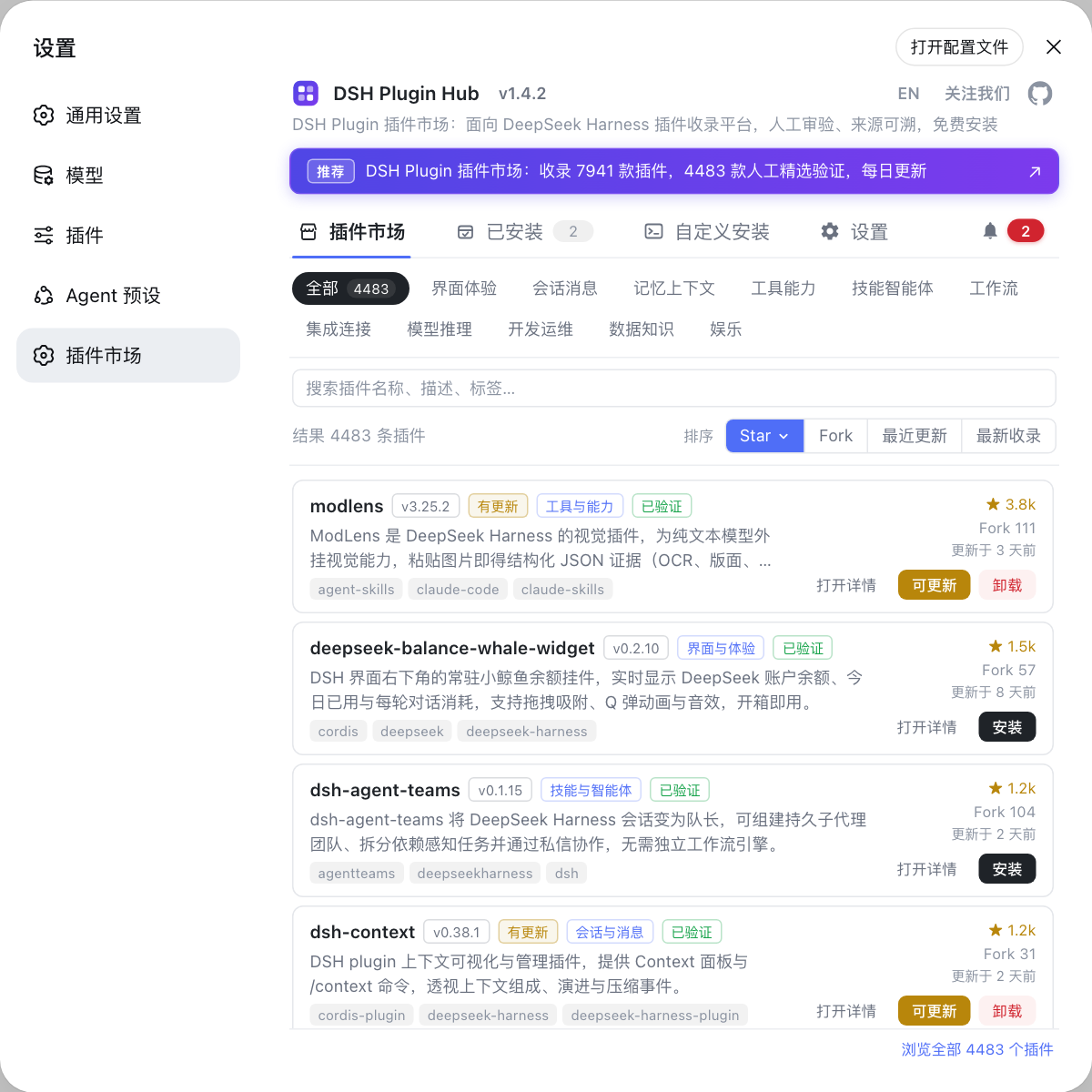
Source: DSH Plugin Hub, DeepSeek Harness CLI README, docs - publishing a plugin, docs - writing tools.
FAQ
When judging whether a DSH plugin is worth installing, start with its last update time. UI and session plugins break easily as DeepSeek Harness evolves, and a package untouched for six months often fails to load on a new dsh release; the market syncs the repository's last update, labels a compatibility status (verified / unconfirmed) and shows the target DSH version. Those three together say more about whether it is alive than stars do.
DSH plugin permission risk tiers by what the plugin can touch: reading files, making network requests, and running build scripts. Read-only workspace tools are lowest risk; a plugin that makes network requests means your content may leave the machine; and a package requiring allowBuilds at install time is the highest risk, because that authorizes its code to run as you outside any sandbox.
Unresolved issues on a DSH plugin are not an automatic veto; open the list and read the nature and the author's replies. Issues about layout breakage or missing icons rarely block use, while those about data loss, permission escalation or corrupted sessions deserve caution. The opposite case is more worrying: a brand-new repo with zero issues and zero replies usually means nobody has used it.
Hold off on four kinds of DSH plugin: one that requires allowBuilds and whose source you have not read; one whose last update is very old while its status is still unconfirmed; one that pulls in dozens of packages or pins an old core package; and one with unresolved issues about data loss or permission escalation. Match two or more and switching to a similar plugin is less work.
Related Terms
- compatibility status
- Compatibility status is the market's availability label for a DSH plugin: verified means the community confirmed it works on the matching DeepSeek Harness version, while unconfirmed means it was discovered automatically but not yet reviewed by a human. Newly listed plugins start as unconfirmed and become verified after review.— https://github.com/dshplugin/dsh-plugin-hub
- dshTarget
- dshTarget is the target DeepSeek Harness version a plugin declares (for example rc.6). UI and session plugins change quickly as DSH evolves, so compare it with the dsh version you actually run — a mismatch is a common reason a plugin installs but never takes effect.— https://github.com/dshplugin/dsh-plugin-hub
- allowBuilds
- allowBuilds is the install-time permission grant: allowing it authorizes a DSH plugin's code to run on your machine during installation, outside any sandbox. It is an install-time boundary, separate from the permission tier carried by run-time tool calls.— https://github.com/deepseek-ai/deepseek-harness/blob/master/docs/user/develop/basic/publish.md
- permission tier
- The permission tier is the sandbox_permissions value carried by a DSH plugin tool call, deciding which tier the operation runs under. It may only move toward wider access, needs a justification to pass validation, and the wider the value the more likely it triggers a human approval.— https://github.com/deepseek-ai/deepseek-harness/blob/master/docs/user/develop/basic/tool.md
Sources
- DSH Plugin Hub (compatibility status, stars and last-update fields)· dshplugin
- DeepSeek Harness CLI README (dsh plugin install and profile dependencies)· deepseek-ai
- DeepSeek Harness docs - publishing a plugin (allowBuilds and install-time execution)· deepseek-ai
- DeepSeek Harness docs - writing tools (capabilities and permission tiers)· deepseek-ai