dsh plugin permissions: what a DSH plugin can and cannot do
A dsh plugin's boundary is decided by three layers: install time only checks allowBuilds authorization, startup time checks which profile it landed in, and run time checks whether tool calls pass the sandbox permission layer and your approval. Plugins run in the same process as dsh, so the capability surface is wide — but the last mile always stays in the permission layer and your hands.
Overview: authorizing one dsh plugin command isn't authorizing everything
To judge what a DSH plugin "can do," split it by time into three layers — conflating them is the most common source of misjudgment. The table lays out what each layer decides (source):
| Stage | Who holds the gate | What it decides |
|---|---|---|
| Install time | allowBuilds allowlist | Whether that package's code may execute on your machine at install time |
| Startup time | profile and composed layers | Which runtime stack the plugin loaded into, and which registrations it owns |
| Run time | sandbox permission layer + approval | Whether the tools it registered actually land this time |
In one sentence: install-time authorization means "the code may run," while run-time authorization means "this operation may land" — neither follows from the other, and they should never be judged together. If you want to know what a plugin is first, read What does dsh plugin mean?.
Capability surface: what a DSH plugin registers through ctx
A plugin is a module exporting an apply function, and ctx is its only interface with the host — the capability surface lives on that interface (source). The main registration entry points are:
| Entry point | Capability registered | Typical plugin shape |
|---|---|---|
ctx.tools | Model-callable tools | Tool plugins |
ctx.command | Terminal / UI commands | Command plugins |
ctx.on | Event listeners | Instrumentation and hook plugins |
ctx.llm | Model provider routes | LLM adapter plugins |
ctx.jobs | Background jobs | Long-running task plugins |
ctx.effect | Disposers for manual resources | Connections, timers, file handles |
This table also explains why plugin permissions equal dsh's permissions: the official tool documentation states that a registered contribution is a same-process typed contribution, not a serialization boundary — the plugin's code simply runs inside the dsh process (source). Its capability floor is therefore high, and the real constraints come from the next two layers.
Install-time boundary: DSH plugin allowBuilds is real execution outside the sandbox
allowBuilds, which a GitHub-source install asks you to approve, is officially defined as "authorizing that package's code to execute on your machine at install time" — outside any sandbox (source). Judge and act in four steps:
- Confirm which distribution form you're installing — an npm prebuilt package ships with its build output ready, so it works immediately. Expect: no build script authorization needed, the smallest risk surface;
- Only git sources require approval — pnpm 10 and later refuse to run build scripts of git dependencies by default, so the first
addfails and prints the package name that needs approval. Expect: you get an exact package name, not a vague range; - Approving means granting execution — add the name to the profile's
pnpm-workspace.yaml:
allowBuilds:
  dsh-hello-plugin: true
Expect: after re-running add the script executes at install time, and its subsequent behavior is neither predictable nor interruptible;
4. When in doubt, don't authorize — switch to the npm prebuilt version or a tarball instead. Expect: it works immediately with no build authorization.
This boundary is most often misread as "a temporary action during install", when it is in fact real execution: review the source before authorizing, or switch to a more trustworthy distribution form.
Run-time boundary: DSH plugin tool calls pass the permission layer and approval
Registering a tool doesn't mean the tool can run freely — every call passes sandbox tier validation and human approval (source). Four steps along the path of one call:
- The plugin declares permission policy extension points — the official guidance is not to bury permission logic in the tool body but to use extension points such as
tools/pre-execute(allow / deny / ask),ctx.tools.guard()(an irrevocable final denial) andtools/execute(wrapping dispatch, where you can add timeouts and retries) (source). Expect: the tool body stays pure and the policy is centralized and auditable; - The call carries a permission tier parameter — to widen access, the request includes
sandbox_permissionsand must state a reason injustificationto pass validation. Expect: the tier may only widen, and a same-level request is treated as an illegal escalation (discussion); - The policy asks you when approval is required — for operations subject to approval, the Web UI asks for consent before executing and only continues once approved (source). Expect: the last human gate before execution;
- An over-reaching request is refused — when the tier is insufficient and escalation conditions aren't met, the call is stopped. Expect: the task visibly "stops and waits for an answer" rather than quietly working around it.
Two corollaries worth remembering: neither a plugin nor a model can bypass approval; and if a dialog appears and you can't tell what the operation does, don't click allow — that is the only veto you get. For repeated sandbox tier rejections, see Sandbox permission escalation rejected.
Three DSH plugin boundaries that get confused
Drawing these lines clearly prevents two opposite mistakes: assuming installing a plugin hands over your computer, or assuming approval blocks everything. The three boundaries separate four objects — plugin, tool, profile and approval (source).
- Plugin permissions ≠ tool call permissions: no matter how much a plugin registers, each call still passes the tier check and approval; conversely, non-tool code a plugin runs inside
applyis in-process code that never goes through the tool approval path. That is exactly why a plugin's origin is itself a judgment call. - One plugin ≠ one independent permission set: the profile decides which runtime stack it loads into, and the same plugin installed into
webandheadlessis two independent instances with separate compositions. Installing into the wrong profile is a common cause of "nothing happened after install." - Approval is a gate, not an audit: approval stops things before execution, not behavior during a run. For controllability and auditability, prefer plugins with approval gating and audit logs, then verify with the method below.
How to inspect a DSH plugin's boundary: a three-step check
Don't rely on the plugin's description — pin it down with three commands and one entry point. Run them in order (source):
- Confirm it's in the current profile —
dsh plugin --profile web list. Expect: the package name and version appear, meaning it belongs to this runtime stack; - Confirm it reached the active composed layers —
dsh --profile web --dump-config | grep -n "^# ==". Expect: the plugin's layer shows up among the active ones, not just sitting in the dependency list; - Confirm what it registered — compare the registrations it prints at load time (tool names, command names) in the terminal, or check the tool list inside a session. Expect: the registrations match the plugin's description; unexpected extra capabilities are a reason for caution;
- Check origin and compatibility — open DSH Plugin Hub under Settings → Plugin Market and look at whether the source is npm or GitHub, the compatible DSH version and the verified status. Expect: traceable origin and matching versions before you decide to keep it long term.
The install step also pops a confirmation dialog that lays out the exact install command and the source in front of you.
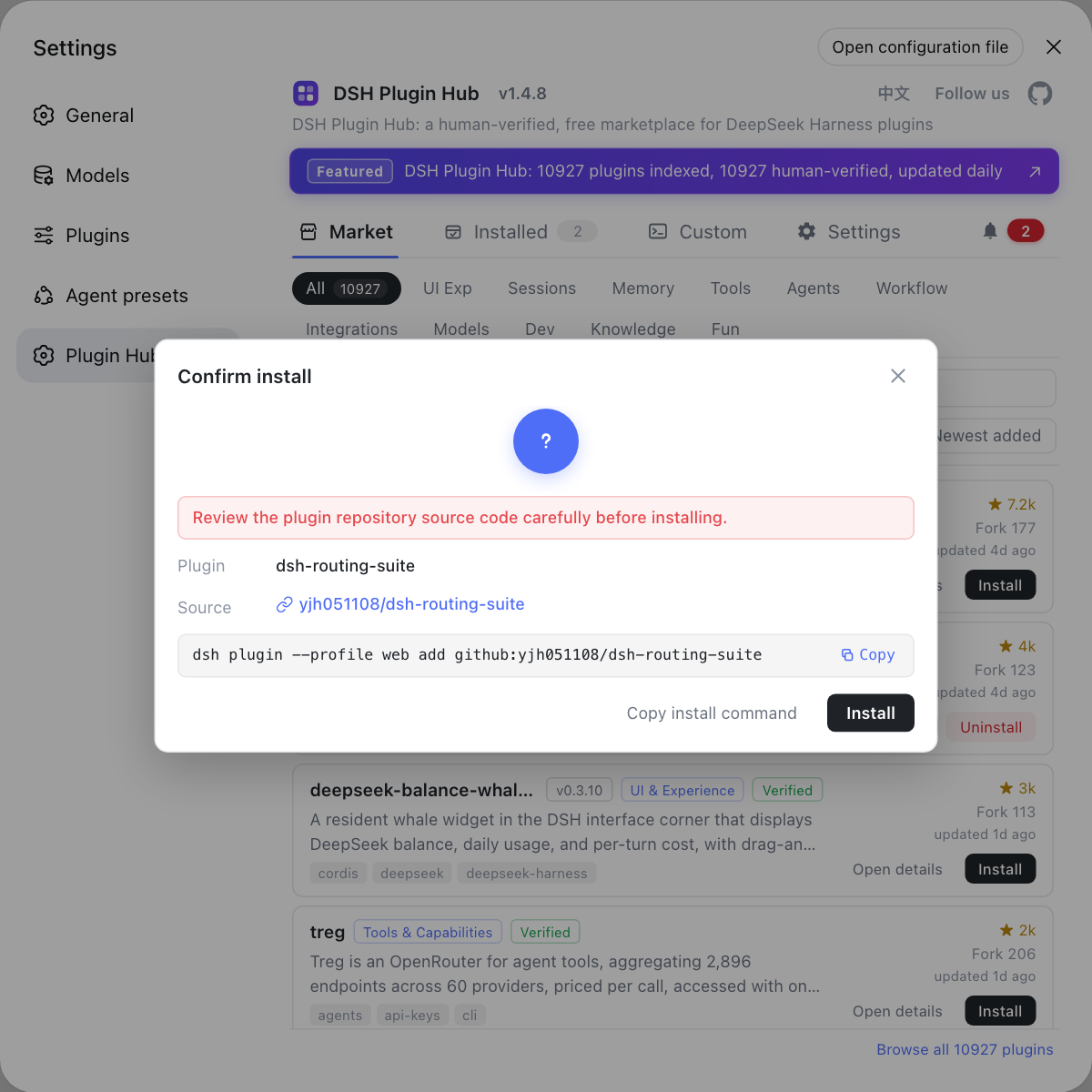
Rather than reverse-engineering what a plugin registered with commands afterwards, check its source, version and command in the Hub at install time — the confirmation dialog lists all of them. Visit https://dsh-plugin.org/ to learn more.
Sources: Building a tool (official docs), Your first plugin (official docs), Packaging and installing plugins (official docs), official Quickstart, Discussion #1149
FAQ
Once installed into a profile, a DSH plugin runs in the same process as dsh: it can register model-callable tools and terminal commands, listen for events, register model provider routes on ctx.llm and start background jobs. What it cannot do is bypass the host — whether a tool actually lands still depends on the sandbox permission tier and your approval, and a plugin cannot change that gate itself.
A DSH plugin is not locked in a sandbox as a whole, but you should be clear about which layer the restriction acts on: the plugin module loads in the same process as dsh, and the sandbox constrains whether the tools it registers can exceed the current permission tier at run time. When the tier is too low the request is stopped and has to be authorized — the plugin isn't locked in a cage.
Approving allowBuilds for a DSH plugin means authorizing that package's code to execute on your machine at install time, outside any sandbox — that is the official definition. It is not the same thing as a run-time permission tier, so only grant it to packages you trust and have reviewed.
Approval can stop a DSH plugin's over-reaching actions: when an operation requires approval under the current permission policy, the Web UI asks for your consent before executing and only continues once you approve, and a plugin can also add its own allow, deny or ask policy through tools/pre-execute and ctx.tools.guard(). Approval is the last human gate before execution.
Inspecting what a DSH plugin registers takes three checks in turn: use dsh --profile web --dump-config to see whether it appears among the active composed layers; use dsh plugin --profile web list to confirm it really is installed in the current profile; and open the plugin's detail page in the market to check its source, compatible version and declared capabilities before deciding.
Related Terms
- ctx
- ctx is the context object the DSH plugin framework passes to apply, and the only entry point a plugin has to framework capabilities: register tools through ctx.tools, events through ctx.on, hand over cleanup functions through ctx.effect, and read other services through ctx.get.— DeepSeek Harness Docs - Your first plugin
- allowBuilds
- allowBuilds is pnpm's build script allowlist. In the DSH context the official definition is "authorizing that package's code to execute on your machine at install time," outside any sandbox — so only grant it to packages of trusted origin whose source you have reviewed.— DeepSeek Harness Docs - Packaging and installing plugins
- sandbox_permissions
- sandbox_permissions is the permission tier parameter a tool call carries, used to request authorization to move between tiers such as workspace-write and full access. It may only widen, and the value must come with a justification to pass validation.— deepseek-harness Discussion #1149
- tool approval
- Tool approval is the human confirmation step before execution: when an operation requires approval under the current permission policy, the Web UI asks first and executes only after the user confirms. It is the final gate that neither plugins nor models can bypass.— DeepSeek Harness Docs - Quickstart
Sources
- DeepSeek Harness Docs - Building a tool· deepseek-ai
- DeepSeek Harness Docs - Your first plugin· deepseek-harness
- DeepSeek Harness Docs - Packaging and installing plugins· deepseek-ai
- DeepSeek Harness Docs - Quickstart· deepseek-harness
- deepseek-harness Discussion #1149: write / bash calls must submit sandbox_permissions and justification· deepseek-ai (GitHub Discussions)