What is a DSH plugin? 5 concepts before you install
dsh plugin means one thing: a code extension package — install it, and DSH gains a capability. Before installing anything, sort out five concepts — plugin, bundle, profile, plugin market and the dsh plugin command — because nearly every later confusion lives on the boundary between them.
DSH plugin concept one: a code package in its own layer from skills, models and MCP
A plugin is a code extension package, a skill is a loadable Markdown instruction set for the model, a model is the reasoning capability itself, and an MCP server is an external tool source — four different layers (source). Pin the division down with a table:
| Layer | What it is | How it is managed | Typical question |
|---|---|---|---|
| Plugin | A code extension package that mounts capability into the runtime | Install / uninstall | What do I install to add this capability? |
| Skill | A loadable Markdown instruction set | Dropped into a root directory and discovered | Why cannot dsh plugin add install a skill? |
| Model | The reasoning capability, configured in settings.yaml | Configure provider and model | Who decides whether images arrive? |
| MCP server | An external tool source, reached by mcp-client over stdio or Streamable HTTP | Declare the server in configuration | Is MCP the same thing as a plugin? |
Work from the table:
- Deciding which road adds a capability — code capability goes through plugins, teaching the model goes through skills, changing reasoning goes through model configuration, and external tools go through an MCP server. Expected: four separate entrances that never substitute for each other.
- Confirming why plugins are the only installable form — only plugins are managed as install and uninstall units; the other three are configuration or files. Expected: every row in an installed list is a plugin.
For what a plugin is on its own, read what a DSH plugin is; for the whole landscape at once, read the plugin ecosystem.
DSH plugin concept two: a bundle is a preset combination of plugins
A bundle is a preset combination of plugins, listed in a profile's dsh.profile.bundles, resolving first from the dsh install directory and then from that profile's node_modules (source). Three things to fix in mind:
- It is how several plugins ship as one unit — the official bundles cover different runtime shapes, such as a base combination and a web app combination. Expected: you never install that baseline plugin by plugin; starting a profile already brings it.
- The resolution order is fixed — the dsh install directory first, the profile's own
node_modulessecond. Expected: this is also why an out-of-tree plugin installed into the profile can be resolved at all. - Bundles are maintained upstream — whatever is listed in
bundlesis the default combination and is not something you installed. Expected: when tracing where a capability came from, check bundles before your own plugins.
DSH plugin concept three: a profile is a stacked runtime
A profile is not a pile of settings but a stacked runtime: bundle patches → that profile's cordis.patch.yml → the home-level patch → the --patch overlay, with later layers further out (source). Three consequences:
- Each profile owns its plugin list and
node_modules— so a plugin installed inwebdoes not appear inheadless. Expected: the two stay independent. - Some profiles initialise themselves —
web,headless,sdk,sdk-minimalandacpinitialise from shipped templates on first use. Expected: any other profile name has to be created throughdsh plugin. - One plugin can behave differently per profile — because the patch layers and lists differ. Expected: when a plugin misbehaves, first confirm which profile you are in.
For a profile's directory contents and config file locations, see where the DSH config files are.
DSH plugin concepts four and five: the market and the dsh plugin command
The plugin market handles discovery and install, while dsh plugin --profile <name> <pnpm args> forwards those arguments to pnpm inside that profile directory — two roads landing in the same node_modules (source). Use them side by side:
- When you want to browse first — go through the market's search and categories. Expected: descriptions, versions and stars are visible, which beats guessing package names at a prompt.
- When you know what to install — run
dsh plugin --profile <name> add <target>. Expected: the command runs inside the named profile, and the installed list shows the same result. - When you need to confirm which profile received it — read the
--profilein the command, or check the installed list of the profile shown in the market UI. Expected: the two agree, so you never hit "installed but missing". - Remember three sentences — a plugin is a code package while a skill is instructions; bundles and patches decide what a profile contains; the market and the command are just two roads. Expected: those three cover most beginner confusion.
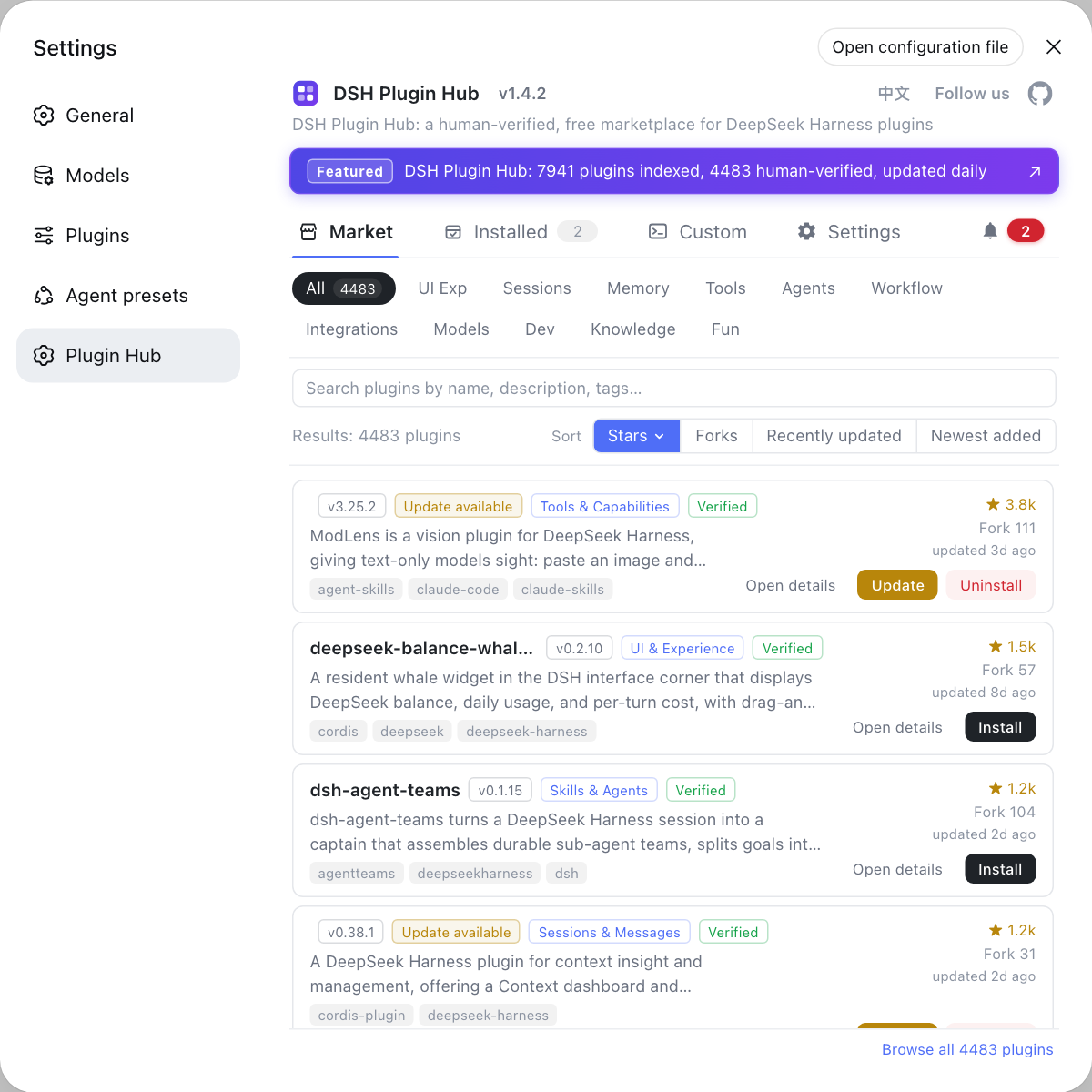
The plugin market is the graphical entry point for discovering and installing plugins, and DSH Plugin Hub folds search, categories, versions and updates into one page; for the command-line side, see the dsh plugin command guide.
DSH plugin caveats before you install
- Never install a skill as a plugin:
dsh plugin addonly installs plugins, while skills are discovered by being dropped into a root directory. - Confirm the profile first: a plugin's install location, list entry and patch layers all belong to one profile, so installing into the wrong one looks like "nothing happened".
- A bundle is not your plugin: bundles are maintained upstream, so keep them apart from what you installed when tracing a capability.
- Watch the names: plugin names, package names and repository names all follow their own conventions, and grabbing the wrong one installs something else — see naming across the ecosystem first.
- The market and the command share one source: both edit the same dependency list, so neither can install something twice.
Once the concepts are clear, the practical side is just two moves: pick plugins in the market and manage them in the installed list. DSH Plugin Hub holds both in a single interface.
Sources: dsh CLI README (official repository), Skills subsystem reference (official docs), dshplugin/dsh-plugin-hub
FAQ
A DeepSeek Harness plugin is a code extension package that mounts itself into the runtime to add capability; a skill is a loadable Markdown instruction set for the model, a model is the reasoning capability itself, and an MCP server is an external tool source. All four sit in different layers, and the plugin is the only one managed as something you install and uninstall.
In DeepSeek Harness a bundle is a preset combination of plugins: the ones listed in a profile's dsh.profile.bundles resolve first from the dsh install directory (such as @deepseek-ai/dsh-base or @deepseek-ai/dsh-web-app) and then from that profile's node_modules. They are the defaults the project ships with, so day-to-day you never maintain them by hand.
A DeepSeek Harness profile is a stacked runtime that starts from each bundle's own patch and then layers the profile's cordis.patch.yml, the home-level patch and any --patch overlay on top. The same plugin behaves differently in another profile because its patch layers and plugin list differ.
In DeepSeek Harness the two roads lead to the same place: the plugin market is the graphical entry for discovery and install, while dsh plugin --profile <name> <pnpm args> forwards those arguments to pnpm inside the profile directory. Both land in that profile's node_modules, so the installed list shows them either way.
Three sentences cover most of DeepSeek Harness plugin installing: a plugin is a code package while a skill is instructions; bundles and patches decide what a given profile contains; and the market and the command are just two roads. Beginners most often get lost trying to install a skill as a plugin, or looking for a freshly installed plugin in the wrong profile.
Related Terms
- plugin
- A plugin is a code extension package in DeepSeek Harness that mounts into the runtime to add capability, and it is the only capability form managed as something to install and uninstall. It sits in a different layer from instruction-set skills, models as reasoning capability, and MCP servers as external tool sources.— dsh CLI README
- bundle
- A bundle is a preset combination of plugins in DeepSeek Harness, listed in a profile's dsh.profile.bundles, and it resolves first from the dsh install directory and then from that profile's node_modules. It defines which capabilities a profile carries by default and needs no manual upkeep.— dsh CLI README
- profile
- A profile is a DeepSeek Harness runtime stack built by layering bundle patches with your own overrides, and it owns its own package.json, cordis.patch.yml and node_modules. Profiles such as web, headless and sdk initialise from shipped templates on first use, while any other profile must be created through dsh plugin.— dsh CLI README
- dsh plugin --profile <name>
- dsh plugin --profile <name> is the plugin management command form in DeepSeek Harness: it forwards the arguments that follow to pnpm inside the named profile's directory. It targets the same artifacts as the plugin market, swapping graphical actions for a command line.— dsh CLI README
Sources
- dsh CLI README· deepseek-ai
- DeepSeek Harness official docs - Skills subsystem reference· deepseek-ai
- dshplugin/dsh-plugin-hub GitHub repository· GitHub