What are dsh plugins? DSH plugin types and three install ways
A dsh plugin (DSH plugin) is an extension component that runs inside DeepSeek Harness, distributed as an npm package and mounted under a profile, adding UI, session, memory or tool capabilities. The whole ecosystem is built from three layers — the DeepSeek Harness host, the DSH Plugin Hub market, and plugin repos on npm and GitHub. This guide covers what plugins are, their types, where to get them, how to install, and a troubleshooting table.
Overview: the three layers of the dsh plugin ecosystem
dsh plugins do not live in isolation; they sit inside a three-layer ecosystem of host, market and repo. Understanding these layers shows where plugins come from and where they land (source):
| Layer | Role | Typical example |
|---|---|---|
| Host | Provides the runtime and the plugin loading mechanism | DeepSeek Harness (dsh) |
| Market | Curates plugins into an in-app Plugin Market | DSH Plugin Hub |
| Repo | Stores the plugin bodies | npm registry, GitHub |
The three layers cooperate: repos hold the source code and packages, the market filters them into a browsable catalog, and the host installs the chosen plugins into a profile and loads them.
What a dsh plugin is: a small component that extends DSH
dsh plugins follow the official plugin spec, ship as npm packages, and are loaded by the host once installed into a profile. The relationship with DeepSeek Harness is host plus plugin: DSH is the base, plugins extend it. A plugin typically includes (source):
- A plugin entry: declares the entry file and dependencies;
- Capability implementations: UI components, tool calls, session logic and more;
- Profile mounting: install writes the plugin into the current profile's dependencies, and the host loads it at startup.
Workflow: write code → package it into an npm package → publish to npm / GitHub → the user installs it into a profile with dsh plugin add → the host loads it at startup → the new capabilities appear in the UI. After installing, restart dsh web and refresh the page to see the new capabilities; uninstalling removes the dependency from the profile.
Types of dsh plugins: four main categories with finer tags
By function, dsh plugins fall into four main categories, with finer topic tags in the market. Common categories (source):
| Type | What it does | Typical use | Example directions |
|---|---|---|---|
| UI & experience | Modifies the DSH interface and interaction | plugin market, status-bar enhancers | sidebar tools, theme enhancers |
| Session & messages | Enhances conversation abilities | chat boosts, message processing | quick commands, message formatting |
| Memory & context | Provides long-term memory | memory plugins, context management | session memory, knowledge injection |
| Tool capabilities | Connects external tools | web search, file handling | search plugins, document processing |
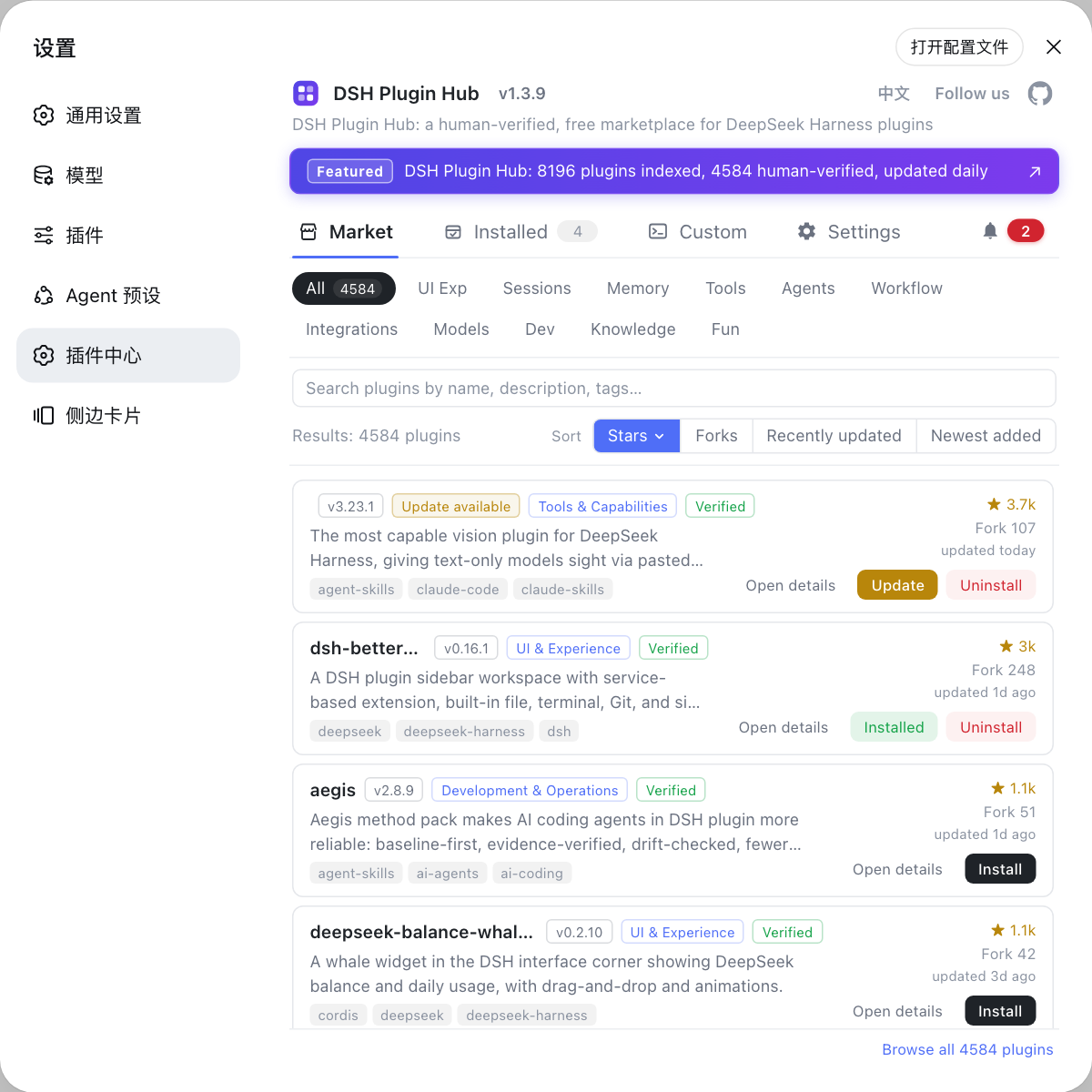
While browsing the market you can filter by category; each card carries topic tags, a verified badge and star/fork counts to help you judge which type fits your needs.
Where to get dsh plugins: three channels
Three ways to obtain plugins: one-click from the market, the npm command, or the GitHub command. Each channel in detail:
Channel 1: one-click from the plugin market (recommended)
Once the market plugin is installed, it is all button clicks — no commands to remember, and the sources are human-curated. Steps:
- Install the DSH Plugin Hub market plugin first (see "Install your first plugin" below);
- Open DeepSeek Harness Web UI → Settings → Plugin Market;
- Search or browse by category to find the target plugin;
- Click Install on the card; verify the plugin name, source repo and the command to run in the confirmation dialog;
- Confirm and wait for the install to finish, then refresh the page.
Channel 2: install via the npm command
If you know the package name you can install it — traceable source and automatic dependency handling. Steps:
# Pull the plugin for a given package name from the npm registry
dsh plugin --profile web add <package>
A typo in the name yields a 404; use npm view <package> to confirm it exists first. A configured npm mirror applies automatically.
Channel 3: install via the GitHub command
For plugins not in the market, or when you want to follow the source, use the repo address. Steps:
# github: prefix + owner/repo
dsh plugin --profile web add github:owner/repo
The prerequisite is access to GitHub from your machine (configure a proxy if the network is restricted). A few repos without build artifacts may install but not load — switch to the npm version or report to the author.
Install your first plugin: three minutes to done
From zero to your first plugin in four steps. Steps:
- Start DSH: run
npx @deepseek-ai/dsh weband let the web profile initialize; - Install the market:
dsh plugin --profile web add dsh-plugin; - Restart dsh web and open Settings → Plugin Market;
- Click Install on a plugin, confirm, wait for completion, and refresh the page.
Once installed, the installed-count badge in the top navigation increments, and your first stop in the ecosystem is live.
Can't install or something wrong? Troubleshooting table
For plugin-related problems, first decide whether it "will not install" or "will not work", then fix accordingly. Common issues:
| Problem | Likely cause | Fix |
|---|---|---|
dsh: command not found | Not globally installed / npx cache issue | Run with the npx @deepseek-ai/dsh prefix, or npm install -g @deepseek-ai/dsh |
| Install returns 404 | Wrong package name / stale mirror | Confirm with npm view <package>, switch the npm mirror and retry |
| Install timeout | Slow network / GitHub restricted | Switch the npm mirror; configure a proxy for GitHub sources |
| Installed but not working | Not restarted / wrong profile | Restart dsh web and refresh; check --profile matches your environment |
| Host crashes after install | Git source missing build artifacts | Install the npm version instead, or install from DSH Plugin Hub |
| Do not know what to install | Too many plugins | Filter by category, check stars/verified badges, start with popular ones |
| Want a plugin back after uninstall | Dependency removed | Install it again through the original channel |
| Version incompatible | Plugin does not match this DSH | Update the plugin, or pin the DSH version |
Quick reference
In one sentence: a dsh plugin is an extension component installed into DeepSeek Harness; the ecosystem is host + market + repo; get plugins through one-click market, npm command, or GitHub command. Four reminders:
- Prefer the market: human-curated plugins are more reliable; verify the confirmation dialog before installing from unknown GitHub repos;
- Installs land in a profile: plugins are isolated per profile;
--profile webtargets the web environment; - Always removable: uninstall from the installed list at any time without touching data under
$DSH_HOME; - Restart to verify: restart dsh web and refresh — plugin capabilities appear only after a reload.
Sources: dshplugin/dsh-plugin-hub, dsh CLI README, dsh-plugin.org Plugin Market
FAQ
A dsh plugin (DSH plugin) is an extension component that adds capabilities to DeepSeek Harness, built to the official plugin spec and distributed as an npm package. It can add UI features, session abilities, memory and context, or tool integrations.
Three parts: the host DeepSeek Harness providing the runtime; the plugin market DSH Plugin Hub with its curated, daily-updated catalog; and the many plugin repos on npm and GitHub installed via the dsh plugin add command.
Mostly four by function: UI & experience, session & messages, memory & context, and tool capabilities. The market adds finer topic tags on top, and you can filter by category while browsing.
Three channels: one-click install from the plugin market is easiest; if you know the package name run dsh plugin --profile web add <package> to install from npm; or use github:owner/repo to install from GitHub source. The market channel is human-curated and safer.
Run DeepSeek Harness once with npx @deepseek-ai/dsh web, then install the market: dsh plugin --profile web add dsh-plugin. Restart dsh web, open Settings → Plugin Market and click Install on any curated plugin.
Sources
- dshplugin/dsh-plugin-hub GitHub repository· GitHub
- dsh CLI README· deepseek-ai
- dsh-plugin.org Plugin Market· dsh-plugin.org