How to install dsh-plugin npm packages
Many DSH plugins on npm are named with the dsh-plugin prefix (for example dsh-plugin-hub), and they install with the single command dsh plugin --profile web add <package>. This guide explains what the prefix means, how package and repo names relate, three ways to install, how to verify the install, and what to do when problems come up.
Overview: the dsh-plugin prefix is a plugin identity marker
dsh-plugin is the npm prefix used by many DSH plugins — a one-glance signal that the package extends DeepSeek Harness. The clearest example is the plugin market DSH Plugin Hub, whose npm package is literally dsh-plugin-hub (source). Three core takeaways:
- The prefix identifies: a package starting with dsh-plugin belongs to the DSH ecosystem;
- The package name is the command target:
dsh plugin addconsumes it directly; - The name matches the function: dsh-plugin-hub is the plugin market; naming usually follows purpose.
Installing a dsh-plugin package: three ways
There are three routes to install a package with the dsh-plugin prefix — pick the one that fits.
Way 1: direct command-line install (most common)
If you know the package name you can install it; npm handles the fetch and profile write. Steps:
- Confirm the name: search npm or dsh-plugin.org for the exact package name;
- Run the install command:
# Taking the plugin market as an example
dsh plugin --profile web add dsh-plugin-hub
- Wait for the npm download to finish and a success message;
- Restart dsh web and refresh the page to confirm.
Failure tip: a typo in the name yields a 404; run npm view <package> to confirm it exists first, and switch to an npm mirror if downloads are slow.
Way 2: graphical install from the Plugin Market
With DSH Plugin Hub installed, you can also do it all with button clicks. Steps:
- Open DeepSeek Harness Web UI → Settings → Plugin Market;
- Search for the plugin name and find the target;
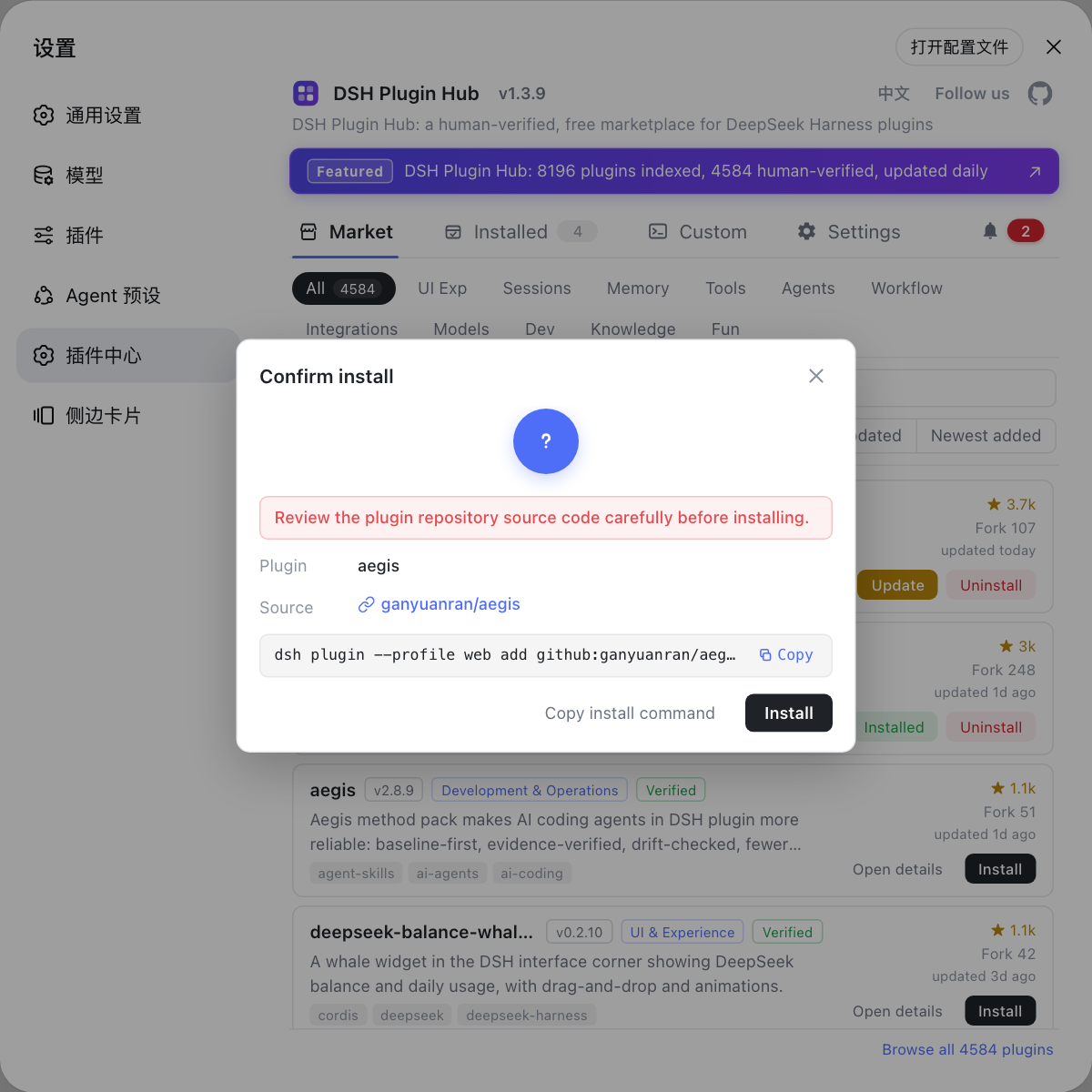
- Click Install on the card and verify the plugin name and source in the confirmation dialog;
- Confirm; wait for the install to finish, then refresh the page.
The graphical route runs the same underlying command as Way 1 — the system just executes it for you.
Way 3: install from GitHub source
When the package is not on npm, or you want the source version, use the repo address. Steps:
# Format: github: prefix + owner/repo
dsh plugin --profile web add github:dshplugin/dsh-plugin-hub
The prerequisite is access to GitHub from your machine; a few repos without build artifacts may install but not load — switch to the npm version.
Package names vs repo names: trust npm first
Prefer the npm package name; the GitHub repo is the fallback channel. Common mapping:
| npm package | GitHub repo | Note |
|---|---|---|
dsh-plugin-hub | dshplugin/dsh-plugin-hub | package and repo match |
other dsh-plugin-* | various authors' repos | may or may not match |
Search npm for the package first; if it is absent, install from the repo source with github:owner/repo; afterwards confirm with dsh plugin --profile web list (source).
How to verify the install took effect
Do not jump to conclusions after installing — verify in two steps. Steps:
- UI check: restart dsh web → refresh the page → check whether the entry appears in Settings → Plugin Market;
- Command-line check: run
dsh plugin --profile web listand see whether the package is listed; - When the feature works normally, the install succeeded; to uninstall, run
dsh plugin --profile web remove dsh-plugin-hub.
Install failed? Troubleshooting table
For install problems, first decide whether it "cannot find the package" or "cannot install", then fix accordingly. Common issues:
| Problem | Likely cause | Fix |
|---|---|---|
| Install returns 404 | Wrong package name / stale mirror | Confirm with npm view <package>, switch the npm mirror and retry |
| Package not found on npm | Plugin distributed as GitHub source only | Install with github:owner/repo, or search the Plugin Market |
| Download very slow | Slow default npm registry | npm config set registry to a mirror |
| Entry does not appear after install | Not restarted / wrong profile | Restart dsh web and refresh; check --profile |
| Host crashes after install | Git source missing build artifacts | Install the npm version, or install from the Plugin Market |
| Installed the wrong plugin | Similar name, picked the wrong package | Check the package name and source repo in the confirmation dialog |
| Unsure whether the install worked | Never did the double check | dsh plugin --profile web list + Plugin Market entry |
| Want to uninstall | No longer needed | dsh plugin --profile web remove <package>, or uninstall from the Plugin Market |
Quick reference
In one sentence: the dsh-plugin prefix marks a DSH ecosystem package; install it with dsh plugin --profile web add <package>, then verify with a restart plus list. Four reminders:
- Do not guess the name: verify the exact spelling on npm or the official site first — a wrong guess ends in a 404 or the wrong package;
- npm first, GitHub second: npm packages have traceable sources and automatic dependencies; repo source is the fallback;
- Restart before verifying: restart dsh web and refresh; if the entry is missing, restart before deep troubleshooting;
- Check the source: review the package name and source repo in the install confirmation dialog; be cautious with unknown sources.
Sources: dsh CLI README, dshplugin/dsh-plugin-hub, DeepSeek Harness docs - Packaging and installing plugins
FAQ
dsh-plugin is the npm package prefix used by many DSH plugins, marking the package as an extension for DeepSeek Harness. For example, dsh-plugin-hub is the package name of the DSH Plugin Hub market; names usually match the plugin's purpose.
Run dsh plugin --profile web add <package> directly; for the plugin market that is dsh plugin --profile web add dsh-plugin-hub. npm fetches the package from the registry and writes it into the current profile.
Usually the package name matches the repo: dshplugin/dsh-plugin-hub publishes as the dsh-plugin-hub package. Sometimes they differ; trust the npm package name, and use github:owner/repo for the GitHub channel.
Restart dsh web and refresh the page, then check that the entry appears in Settings → Plugin Market; or run dsh plugin --profile web list to confirm the package is listed. The feature working normally means the install succeeded.
The plugin may only be distributed as GitHub source — install with dsh plugin --profile web add github:owner/repo. Or the package name may be spelled differently; search the plugin market or dsh-plugin.org first for the exact name.
Sources
- dsh CLI README· deepseek-ai
- dshplugin/dsh-plugin-hub GitHub repository· GitHub
- DeepSeek Harness docs - Packaging and installing plugins· deepseek-harness