dsh-plugin 开头的插件怎么装?DSH 插件 npm 包安装教程:包名含义、三种安装方式与验证
npm 上大量 DSH 插件以 dsh-plugin 开头命名(比如 dsh-plugin-hub),这类包用 dsh plugin --profile web add <包名> 一行命令即可安装。本文讲清 dsh-plugin 前缀代表什么、包名与仓库名的关系、三种安装方式,以及装完如何验证生效、遇到问题怎么处理。
概览:dsh-plugin 前缀 = 插件的身份标识
dsh-plugin 是很多 DSH 插件的 npm 包名前缀,一眼可识别「这是给 DeepSeek Harness 用的插件」。 最典型的例子是插件市场 DSH Plugin Hub,它的 npm 包名就叫 dsh-plugin-hub(来源)。核心认知三条:
- 前缀即标识:包名以 dsh-plugin 开头,说明是 DSH 生态插件;
- 包名即命令目标:
dsh plugin add直接吃这个包名; - 包名对应功能:dsh-plugin-hub = 插件市场,命名一般与功能一致。
dsh-plugin 包怎么安装:三种方式
装一个 dsh-plugin 开头的包有三条路,按场景选最顺手的。
方式一:命令行直接安装(最常用)
知道包名就能装,npm 负责拉取与写入 profile。 操作步骤:
- 确认包名:到 npm 或 dsh-plugin.org 官网搜索确认准确包名;
- 执行安装命令:
# 以插件市场为例
dsh plugin --profile web add dsh-plugin-hub
- 等待 npm 下载完成,出现成功提示;
- 重启 dsh web,刷新页面确认生效。
失败提示:包名拼错会提示 404,用 npm view <包名> 可提前确认包存在;下载慢可先配置 npm 镜像。
方式二:插件市场图形化安装
装了 DSH Plugin Hub 后,也可以全程点按钮。 操作步骤:
- 打开 DeepSeek Harness Web UI → 设置 → 插件市场;
- 搜索插件名,找到目标插件;
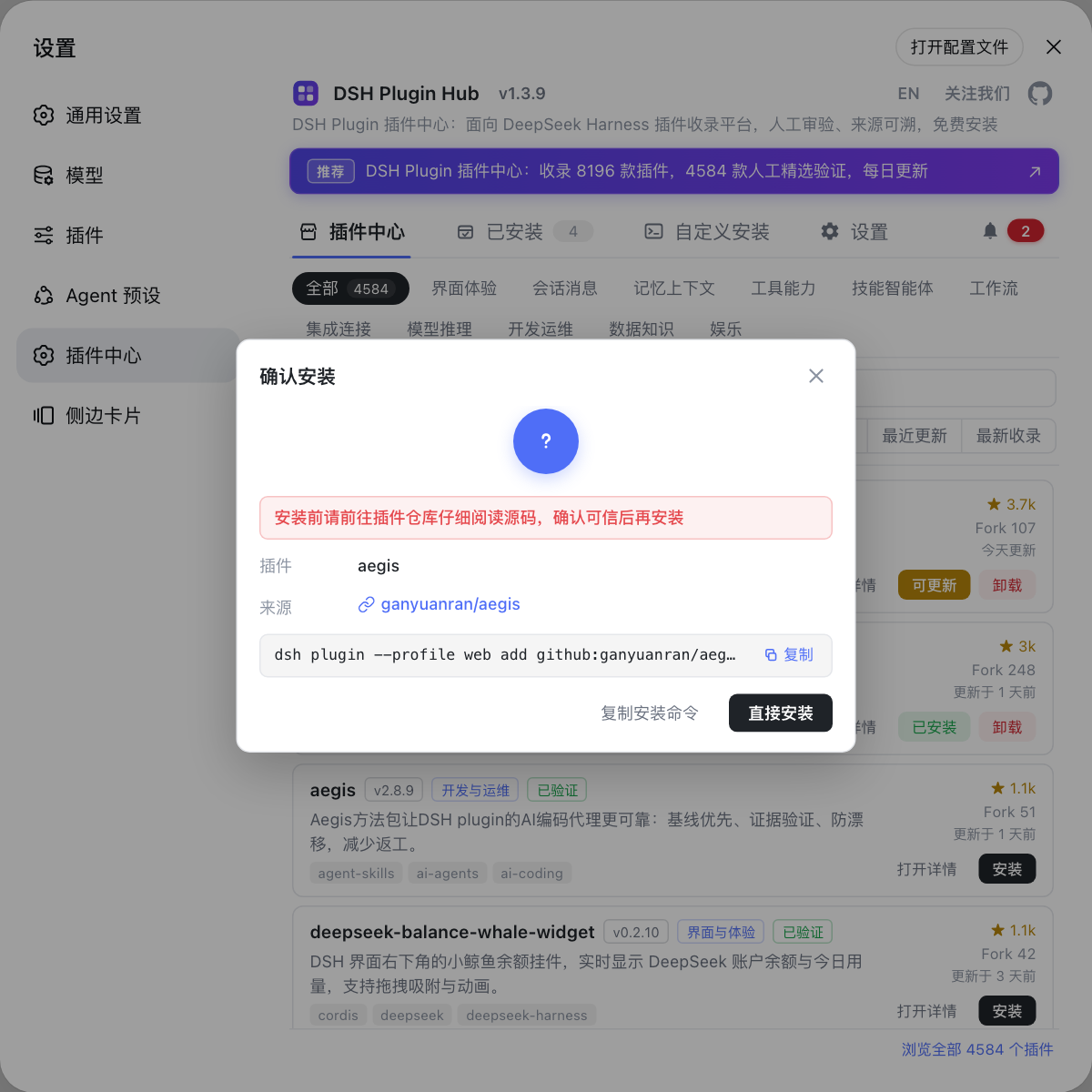
- 点卡片上的安装,在确认弹窗核对插件名与来源;
- 确认后自动安装,进度完成后刷新页面生效。
图形化方式底层命令与方式一相同,只是由系统代为执行。
方式三:GitHub 源码安装
npm 上没找到包、或想装源码版时用仓库地址。 操作步骤:
# 格式:github: 前缀 + owner/repo
dsh plugin --profile web add github:dshplugin/dsh-plugin-hub
前置条件是本机能访问 GitHub;个别仓库缺构建产物时可能装完不生效,改装 npm 版。
包名与仓库名:先包名后仓库
安装优先用 npm 包名,GitHub 仓库是备选渠道。 常见对应关系:
| npm 包名 | GitHub 仓库 | 说明 |
|---|---|---|
dsh-plugin-hub | dshplugin/dsh-plugin-hub | 包名与仓库名一致 |
其他 dsh-plugin-* | 各作者仓库 | 可能一致也可能不同 |
先到 npm 搜包名;找不到包,再用 github:owner/repo 从仓库源码安装;装完用 dsh plugin --profile web list 确认在列表里(来源)。
装完怎么验证生效
装完别急着下结论,两步验证确认「真生效」。 操作步骤:
- 界面确认:重启 dsh web → 刷新页面 → 到设置 → 插件市场看入口是否出现;
- 命令行确认:执行
dsh plugin --profile web list,看列表里有没有该包; - 对应功能正常使用,即安装成功;卸载用
dsh plugin --profile web remove dsh-plugin-hub。
安装失败?常见问题与解决
安装相关的问题,先看是「找不到包」还是「装不上」,再对症处理。 常见问题清单:
| 问题 | 可能原因 | 解决办法 |
|---|---|---|
| 安装报 404 | 包名拼错、镜像源滞后 | npm view <包名> 确认存在,切换 npm 镜像重试 |
| npm 上搜不到该包 | 插件只以 GitHub 源码分发 | 用 github:owner/repo 安装,或到插件市场搜 |
| 下载很慢 | 默认 npm 源慢 | npm config set registry 换镜像 |
| 装完入口没出现 | 没重启 / 装错 profile | 重启 dsh web 并刷新;核对 --profile |
| 装完宿主报错 | git 源缺构建产物 | 改装 npm 版,或在插件市场安装 |
| 装了不是想要的那个 | 包名相似、认错包 | 核对确认弹窗里的包名与来源仓库后再装 |
| 不确定装没装成功 | 没做双重验证 | dsh plugin --profile web list + 插件市场入口 |
| 想卸载 | 不需要了 | dsh plugin --profile web remove <包名>,或插件市场点卸载 |
总结速查
一句话:dsh-plugin 前缀 = DSH 生态插件标识,装它就用 dsh plugin --profile web add <包名>,装完重启 + list 双重验证。 四个提醒:
- 包名别猜:先到 npm 或官网确认准确拼写,猜错了会 404 或装错包;
- 先 npm 后 GitHub:npm 包来源可溯、依赖自动处理,仓库源码是备选;
- 重启再验证:装完重启 dsh web 并刷新,入口没出现先重启排查;
- 来源核对:安装确认弹窗里核对包名与来源仓库,来源不明的包谨慎安装。
来源:dsh CLI README、dshplugin/dsh-plugin-hub、DeepSeek Harness 官方文档 - 打包与安装插件
常见问题
dsh-plugin 是许多 DSH 插件的 npm 包名前缀,标识该包是给 DeepSeek Harness 用的插件,例如 dsh-plugin-hub 就是插件市场 DSH Plugin Hub 的包名;包名一般与插件功能对应。
直接用 dsh plugin --profile web add <包名>,例如安装插件市场:dsh plugin --profile web add dsh-plugin-hub;npm 会自动从 registry 拉取并写入当前 profile。
通常包名对应仓库名:dshplugin/dsh-plugin-hub 仓库发布为 dsh-plugin-hub 包。也有仓库名与包名不一致的情况,以 npm 上的包名为准,GitHub 渠道用 github:owner/repo 安装。
重启 dsh web 并刷新页面,到设置 → 插件市场确认入口出现;或执行 dsh plugin --profile web list 看列表里有没有该包;对应功能正常显示即安装成功。
可能该插件只以 GitHub 源码分发,用 dsh plugin --profile web add github:owner/repo 安装;也可能包名拼写不同,先到插件市场或 dsh-plugin.org 官网搜索确认准确包名。
来源
- dsh CLI README· deepseek-ai
- dshplugin/dsh-plugin-hub GitHub 仓库· GitHub
- DeepSeek Harness 官方文档 - 打包与安装插件· deepseek-harness