DeepSeek Harness official links: docs, repo, releases
There is no dsh commercial website — DeepSeek Harness has no standalone domain, and the official docs at deepseek-harness.github.io are the authoritative entry. This lays out every official channel: what each link is, when to use which, where versions and plugins live, and how Chinese-language material currently stands.
DeepSeek Harness official channels: repo, docs site, releases and feedback
There are six official channels — the GitHub repository, the docs site, the Releases page, Discussions, the safety notes and the license — and each does one job (source). Match them up:
| Channel | Address | Purpose | When to use it |
|---|---|---|---|
| GitHub repository | github.com/deepseek-ai/deepseek-harness | Source, README, issues and every documentation source file | Verifying implementation detail or reading the official text |
| Official docs site | deepseek-harness.github.io/deepseek-harness/ | User guide, development guide, architecture documents | Learning usage and checking configuration or behaviour |
| Releases page | the repository's releases path | Change entries listed per version | Finding out what a new version changed |
| Discussions | the repository's discussions path | Feedback and bug reports | When the problem is not plugin-specific |
| Safety notes | the SAFETY document in the repository | Safety briefing before running | First deployment and multi-user environments |
| License | the LICENSE file in the repository | Terms of use (MIT) | Before redistributing or using commercially |
DeepSeek Harness is developed by DeepSeek AI as an open-source agent harness built on an "everything is a plugin" architecture and driven by Cordis — all of that positioning comes from the README. Pick a channel by purpose:
- Learning how to use it — start with the user guide on the docs site, then use this site's tutorials for platform and scenario detail. Expected: concepts and boundaries follow the official docs and are not skewed by second-hand retellings.
- Confirming a specific behaviour — dig into the matching document or source in the GitHub repository. Expected: every page on the docs site has a source file in the repository, so the two corroborate each other.
- Preparing a deployment — read the safety notes first. Expected: the README explicitly asks you to read them before running, so do not skip this.
Where to check the DeepSeek Harness version and changelog
Version information lives in two places: the Releases page lists the changes per version, and the npm package page shows the currently published version and publish time (source). Establish a baseline in three steps:
- Check your machine first — run
dsh --version. Expected: you hold the real local version number, which is what any comparison needs. - Then check the latest — open the Releases page and the npm package page side by side. Expected: when both agree, that is your answer; when they differ, trust the later publish time.
- Then decide whether to move — the project is in developer preview and the maintainers state that breaking changes lie ahead. Expected: read the change entries before upgrading and pin the version when needed.
The full method for checking versions and reading release notes is in checking your DSH version and reading the changelog; the upgrade commands themselves are in the dsh update command cheat sheet.
Finding DeepSeek Harness plugins: the dsh-plugin topic and the market
The convention the project gives plugin authors is to label their repository with the dsh-plugin topic so it can be found, which makes the topic page the official discovery entry; to browse, install and update directly, use the plugin market (source). Each road has its own job:
- Browsing by topic — open the
dsh-plugintopic page on GitHub and sort repositories by popularity and update time. Expected: you reach the author's original repository and README, which suits evaluating a plugin before reading code. - Browsing by category and stars — use the market's category filters and sort buttons for stars, forks and update time. Expected: descriptions, versions and installed or updatable badges are right there, which beats paging through topics.
- Installing straight away — click install in the market and watch progress and result in the UI. Expected: no need to go back to the command line to assemble a package name.
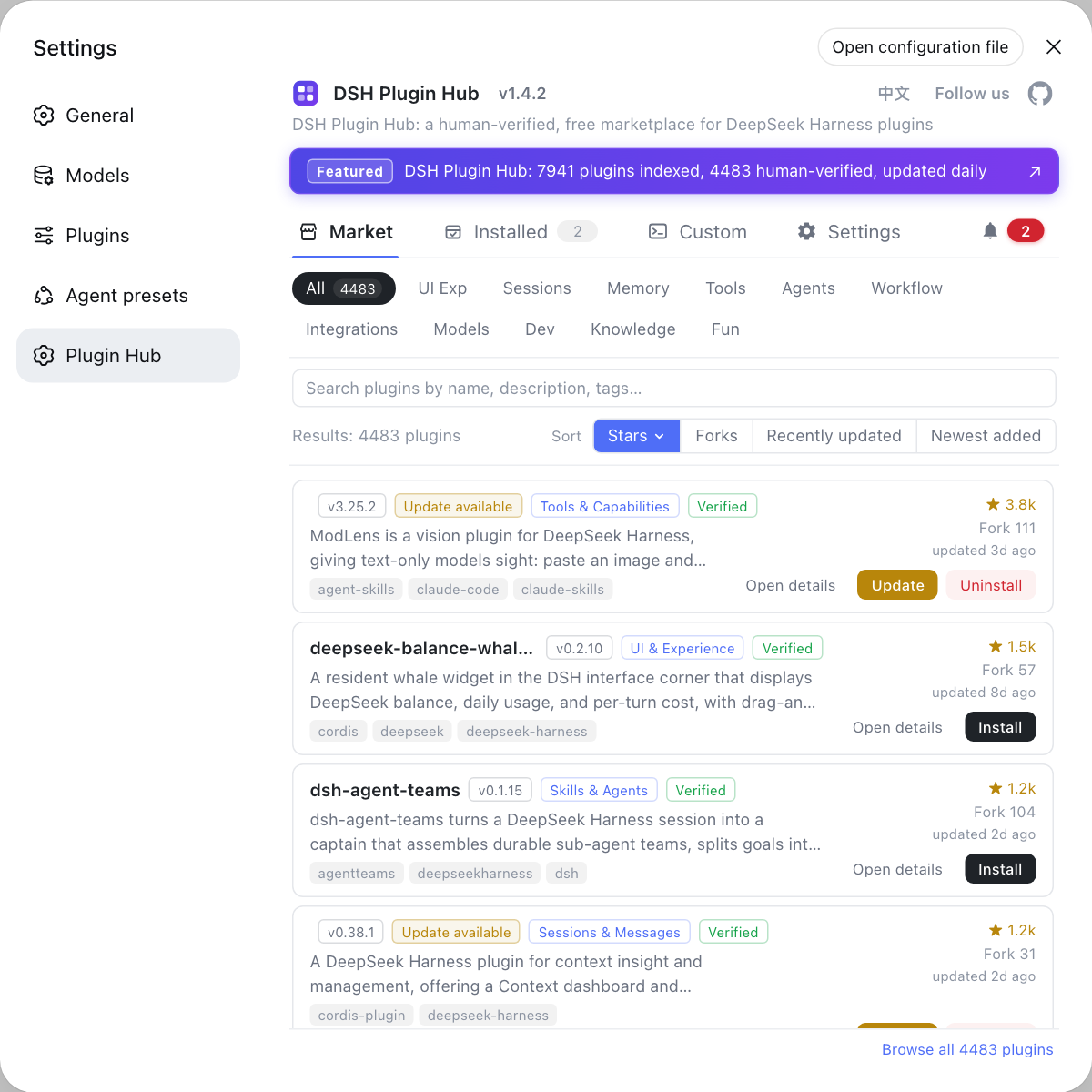
The plugin market is the graphical entry point for discovering and installing plugins, and DSH Plugin Hub folds search, categories, versions and updates into one page, filtered by category, stars and update time. To sort out how plugin, package and repository names differ, read naming across the ecosystem; for the whole landscape at once, read the plugin ecosystem.
Finding DeepSeek Harness material in Chinese: what exists today
Chinese content comes from both official and community sources, and they do not carry equal authority: the official docs and README both ship Chinese versions, and files ending in .zh.md in the repository are Chinese source text (source). Three tiers of trust:
- Tier one: official Chinese documentation —
README.zh.mdand its sibling.zh.mddocuments, sharing one source and one version with the English side. Expected: configuration fields and behavioural descriptions follow it. - Tier two: official Chinese community — the README offers an enterprise WeChat group and the team's official WeChat account. Expected: announcements and answers arrive in the official voice.
- Tier three: third-party tutorials — plentiful but uneven in freshness, especially error-related content that ages quickly. Expected: fine for orientation, but verify configuration and commands against the official Chinese docs.
DeepSeek Harness official resource caveats
- No standalone site means watch for impostors: the docs live on GitHub Pages under
deepseek-harness.github.io, so any other domain claiming to be the official site needs verification. - Developer preview means things will change: breaking changes are stated to be coming, so read the release entries before upgrading and pin versions when necessary.
- Route feedback to the right entry: app-level problems go to Discussions, plugin problems go to that plugin's repository issues, and tutorial comment sections are not an official channel.
- Never quote a version number from memory: Releases and the npm page move constantly, so check both live whenever you cite one.
- The topic page and the market complement each other: topics suit evaluation and source reading, the market suits filtering and installing — do not rely on only one.
Once plugins are installed, day-to-day management — the installed list, update checks, logs and diagnostics — converges in DSH Plugin Hub; to see which plugins the maintainers ship themselves, read the official plugin list.
Sources: DeepSeek Harness README (official repository), DeepSeek Harness official docs site, dshplugin/dsh-plugin-hub
FAQ
DeepSeek Harness has no separate commercial site: the documentation address given in its README, deepseek-harness.github.io, is the authoritative entry. The DeepSeek AI corporate site only describes the company itself and does not carry DSH documentation or version information, so treat the official docs site and the GitHub repository as the sources of truth.
DeepSeek Harness version information lives in two places: the repository's Releases page lists the changes per version, and the npm package page shows the currently published version and its publish time. To learn what your machine runs, start with dsh --version and compare against those two rather than trusting memory.
The convention DeepSeek Harness gives plugin authors is to label the repository with the dsh-plugin topic so it can be discovered on GitHub, which makes that topic page the official discovery entry. To browse, install and update directly, use the plugin market in DSH Plugin Hub, filtered by category, stars and update time.
DeepSeek Harness ships Chinese versions of both the official documentation and the repository README, so any file ending in .zh.md is Chinese source content. On the community side the README offers an enterprise WeChat group and the team's official WeChat account; third-party Chinese tutorials vary in freshness, so verify against the official Chinese docs.
The official feedback entry for DeepSeek Harness is GitHub Discussions, which the README points to for feedback and bug reports. Problems with a specific plugin belong in that plugin's own repository issues; this site's bug report flow also links straight to the right repository so you need not hunt for the address.
Related Terms
- official docs site
- The official docs site is the authoritative documentation entry of DeepSeek Harness at deepseek-harness.github.io, maintained from the official repository and updated with each release. It carries the user guide, development guide and architecture documents, making it the first source for verifying configuration and behaviour.— DeepSeek Harness README (official repository)
- GitHub Releases
- GitHub Releases is the page where DeepSeek Harness publishes change entries per version, under the releases path of the official repository. It is the official basis for confirming the latest version number and reading what changed, used alongside the npm package page.— DeepSeek Harness README (official repository)
- dsh-plugin topic
- The dsh-plugin topic is the GitHub topic DeepSeek Harness asks plugin authors to apply to their repositories so plugins can be discovered by the community. Applying it is equivalent to entering the officially recognised discovery surface for plugin authors.— DeepSeek Harness README (official repository)
- developer preview
- Developer preview is the stage DeepSeek Harness currently occupies, meaning the project iterates quickly and the maintainers state plainly that breaking changes will arrive. It is why you read the release notes before upgrading and pin versions when necessary.— DeepSeek Harness README (official repository)
Sources
- DeepSeek Harness README (official repository)· deepseek-ai
- DeepSeek Harness official docs site· deepseek-harness
- dshplugin/dsh-plugin-hub GitHub repository· GitHub