DeepSeek Harness image understanding: vision models, ModLens
Image understanding in DeepSeek Harness comes from the model, not a plugin: only a model that declares image input receives images, and hand-entered custom models are treated as text-only. This covers where the capability comes from, how the three fields work, what vision plugins add, and how to split the two image errors apart.
DeepSeek Harness image support comes from the model, not a plugin
What decides whether images arrive is the model's own modality declaration: only a model declaring image input receives them, and that declaration is a claim about the endpoint rather than a check (source). Three boundaries to internalize:
- The model decides — an image only travels if the model declares image input; a hand-entered custom model with no declaration is always treated as text-only. Expected: attaching an image to a text-only model is rejected before sending, and the model is named in the error.
- A declaration is a claim, not a check — writing
imagedoes not mean the endpoint truly supports it. Expected: DeepSeek Harness does not block an unsupported model here; the provider rejects the request instead. - DeepSeek's own chat-completions route is text-only — and configuration cannot change that. Expected: to make a DeepSeek model read images, either go through a vision plugin or move to a model that declares image support.
Enabling images in DeepSeek Harness: input, defaultInput and modelOverrides
input sits on a single model, defaultInput is a route-level fallback defaulting to [text], and catalog models are narrowed through modelOverrides — different places with different meanings (source). Pick by scenario:
-
Open images for one model only — write
[text, image]under that model'sinput:yamlmodels: - id: legacy-chat - id: vision-preview input: [text, image]Expected: one route serves both kinds of model, and
inputapplies only to the model that carries it. -
Open images for every hand-entered model on a route — set
defaultInputonce on the route:yamlvision-gateway: defaultInput: [text, image] models: - id: first-model - id: second-modelExpected: models the catalog does not describe answer to it, while catalog models that already declare image support stay untouched.
-
Narrow a catalog model that already reads images — use
modelOverrideskeyed by model id with its owninput:yamlanthropic: modelOverrides: claude-sonnet-4-5: input: [text]Expected: that model is treated as text-only while the rest of the catalog is unaffected.
-
Respect the two syntax rules — apart from a model's own list, every modality list must carry at least one entry, and an unknown modality is rejected wherever it is written. Expected: a malformed field fails at the configuration layer instead of surfacing at request time.
Omitting input and writing it as an empty list are equivalent: the modality recorded for that model by the installed catalog is kept. To work the full flow backwards from an error, see fixing models without image support.
What vision plugins add in DeepSeek Harness: ModLens as an example
Vision plugins cover the other half of the problem: when the model itself cannot take an image, convert the image into evidence it can read. In this ecosystem modlens returns structured JSON evidence — OCR, layout, semantics — after you paste an image, so the model quotes specifics instead of imagining (source). The typical division of labour:
- Auto-discover and wrap eligible text-only routes — text-oriented DeepSeek or GLM models gain selectable vision entries, while native vision models are excluded. Expected: no hand-editing per model.
- Start with zero config — it reuses the model configuration you already have. Expected: vision-labelled entries appear in the model selector right after install.
- Paste and read — paste an image and the plugin turns it into structured evidence before handing it to the model. Expected: the model receives text evidence, so a text-only model can work with image content.
- Read plugin and model capability together — the plugin supplies the conversion path, while the model's declaration decides whether images arrive directly. Expected: the two must line up; expecting a plugin to make a non-image model accept images is a mismatch.
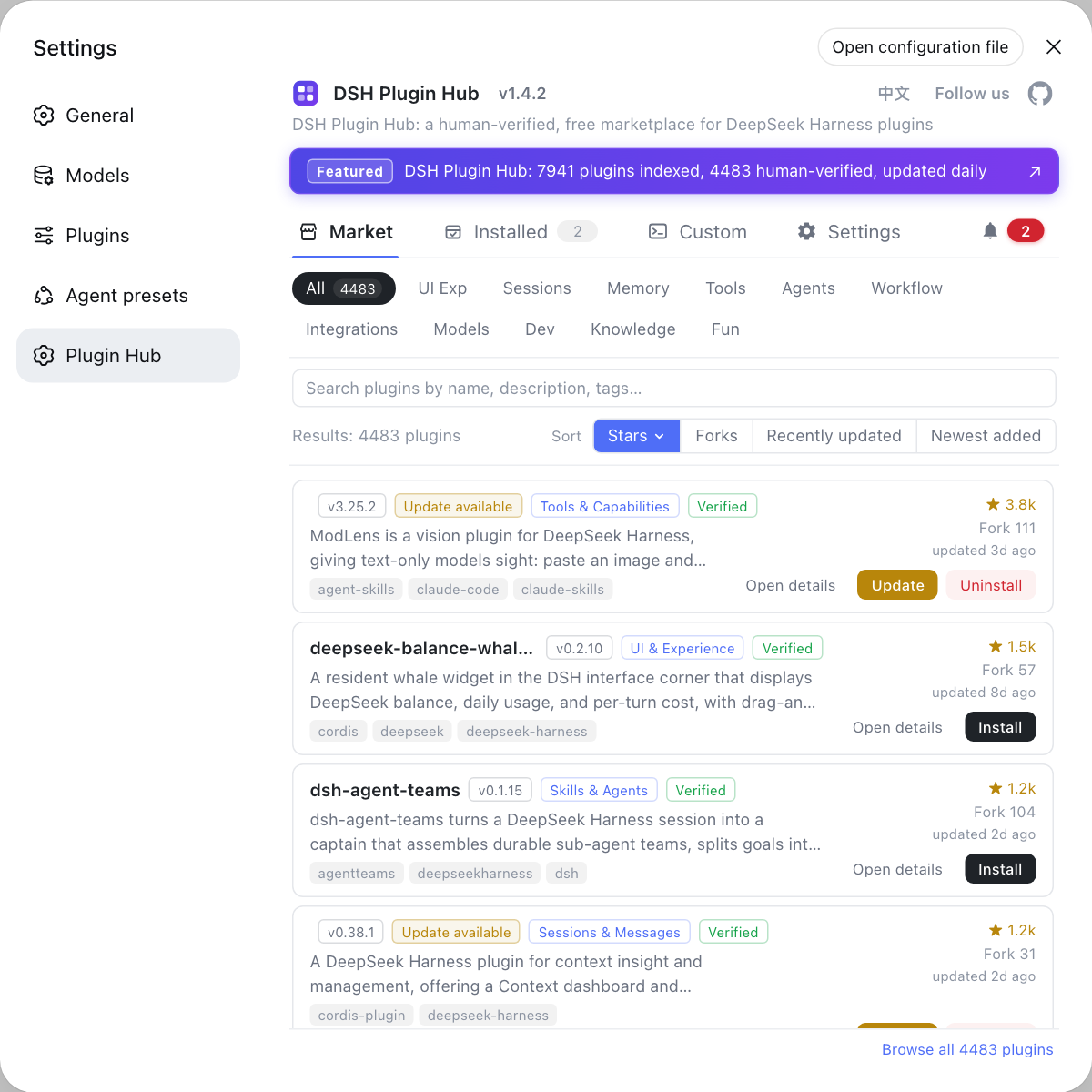
The plugin market is the graphical entry point for discovering and installing plugins, and DSH Plugin Hub folds search, categories, versions and updates into one page, so vision plugins and their detail pages are one search away.
DeepSeek Harness image errors: rejected before sending vs rejected by the provider
The two errors point at entirely different causes: rejection before sending means the model never declared image modality, while a provider rejection means it claimed something the endpoint does not offer (source). Split them by symptom:
- Rejected before the image leaves — the model has no image modality declared. Expected: add
input: [text, image]to the custom provider's model; if the model is DeepSeek's own chat-completions route, configuration cannot change it, so switch models or go through a vision plugin. - Rejected by the provider after sending — the model claimed image support its endpoint does not provide. Expected: remove
imagefrom whichever list granted it, be that the model'sinputor the route'sdefaultInput. - Still failing after the config change — start a new session and retry. Expected: the attachment stays in the session log, so the same request replays as long as you remain in that session.
- The error is about encoding or Base64 rather than modality — that is the image encoding pipeline, not the modality declaration. Expected: follow fixing image Base64 400 errors instead of editing
input.
DeepSeek Harness image understanding caveats
- A modality declaration is not real capability: both
inputanddefaultInputare claims about the endpoint, so a wrong claim is never blocked locally and only fails when the provider rejects the request. - The DeepSeek chat-completions route cannot be changed: it is text-only by design, so the fix is another model or a vision plugin rather than a config flag.
defaultInputnever strips a catalog model: it is a fallback, so narrowing requires the model's owninputormodelOverrides.- Start a new session after changing modality: images in the history keep replaying the old request, so the fix stays invisible until you leave that session.
- Plugin capability cannot replace model capability: a vision plugin converts images into evidence for the model and cannot alter whether the model declares image input.
To tune the image-related model configuration as a whole, go back to how to configure DeepSeek Harness; to see the wider plugin ecosystem, browse the market in DSH Plugin Hub.
Sources: Configuring models (official docs), liustack/modlens, dshplugin/dsh-plugin-hub
FAQ
Image support in DeepSeek Harness comes from the model, not a plugin: only a model that declares image input receives an image, while a plugin adds peripheral capability such as turning an image into something the model can read. Installing a vision plugin therefore never changes a model's modality declaration — model capability and plugin capability have to line up before you can actually read images.
A hand-entered model in DeepSeek Harness is treated as text-only by default, so attaching an image is rejected before sending and the model is named in the error. Add input: [text, image] to that model in $DSH_HOME/settings.yaml; if every hand-entered model on that route accepts images, set defaultInput: [text, image] once on the route instead.
In DeepSeek Harness defaultInput is a route-level fallback, defaulting to [text], that answers only for models the catalog does not describe and never strips image support from a catalog model; to narrow a catalog model that already accepts images, use its own input. A catalog provider has no models list, so that override goes under modelOverrides keyed by model id.
DeepSeek Harness gives you two distinct cases: rejection before sending means the model never declared image modality, which is a config problem; a request rejected by the provider means the model claimed image support its endpoint does not offer, which is an over-claim. For the latter, remove image from whichever list granted it and then start a new session — the attachment stays in the session log, so the same failing request replays until you leave that session.
modlens is a vision plugin in the DeepSeek Harness ecosystem that lends sight to text-only models: paste an image and it returns structured JSON evidence — OCR, layout, semantics — so the model quotes specifics instead of imagining. It auto-discovers and wraps eligible text-only routes and excludes native vision models, so it never replaces a model's own vision capability and only covers what text-only models lack.
Related Terms
- input (model modality declaration)
- input is the modality declaration written on a single model in DeepSeek Harness, accepting text and image, and it applies only to that model. Omitting it or writing an empty list is equivalent: the modality recorded for that model by the installed catalog is kept, and models the catalog does not describe fall back to the route's defaultInput.— DeepSeek Harness official docs - Configuring models
- defaultInput (route-level modality fallback)
- defaultInput is the route-level modality fallback in DeepSeek Harness, defaulting to [text]. It is a fallback rather than an override: on a catalog provider it answers only for models the catalog does not describe, so it never removes image support from a catalog model that already has it.— DeepSeek Harness official docs - Configuring models
- modelOverrides (per-model catalog override)
- modelOverrides is the per-model override entry for catalog providers in DeepSeek Harness, keyed by model id. Because a catalog provider has no models list to fill in, narrowing the modality of one catalog model has to be written here.— DeepSeek Harness official docs - Configuring models
- vision plugin
- A vision plugin is a class of DeepSeek Harness plugin that converts images into evidence a text-only model can read, typically structured JSON with OCR, layout and semantics. It works on the model's surrounding pipeline and never changes the model's own modality declaration.— liustack/modlens GitHub repository