dsh-plugin vs dsh-plugin-hub: DSH naming & official channels
DeepSeek Harness (DSH) is the host, dsh is its command line, a DSH plugin runs inside it, DSH Plugin Hub is the community marketplace, and dsh-plugin.org is the website hub — each name points to a different role. This guide unpacks all five, lists the plugin channels, and gives a checklist for telling official from community.
Overview: one family of names, five roles
dsh, DSH plugin, dsh-plugin-hub and dsh-plugin.org are different layers: the host, the CLI, the plugin, the marketplace, and the website. Newcomers searching "dsh hub" or "dsh plugin" often blur them together, but the split is clear. Start with the table:
| Name | Role | Where it lives |
|---|---|---|
| DeepSeek Harness (DSH) | host project | website deepseek.com/harness |
| dsh | command-line tool | npx @deepseek-ai/dsh web |
| DSH plugin (dsh-plugin) | extension | installed inside the host |
| DSH Plugin Hub (dsh-plugin-hub) | community marketplace | in-app "Settings → Plugin Market" |
| dsh-plugin.org | website plugin market | browse by category in a browser |
DeepSeek Harness is DeepSeek AI's open-source project (source); each role is unpacked below.
DeepSeek Harness and dsh: the host and its CLI
DeepSeek Harness is the host project and dsh is its CLI entry point — two names for the same product. Concretely:
- DeepSeek Harness (DSH): an open-source project by DeepSeek AI, with the official website at deepseek.com/harness and docs at deepseek-harness.github.io.
- dsh: its command-line tool — daily use runs through the CLI (source):
npx @deepseek-ai/dsh weblaunches the Web UI in one shot;dsh pluginmanages extensions;dsh --versionchecks the version.
Note that dsh is the lowercase CLI name — the command entry of DeepSeek Harness, not a plugin.
DSH plugin and the dsh-plugin topic: extension and listing mark
A DSH plugin is an extension that runs inside DeepSeek Harness, and dsh-plugin doubles as the listing topic on GitHub. Two layers:
- The extension itself: a DSH plugin is a TypeScript module exporting an apply function; the framework calls apply with a ctx on load, and the plugin registers models, tools, interfaces and skills through it (source).
- The listing topic: on GitHub, tagging a repository with the
dsh-plugintopic lets the dsh-plugin.org directory discover and list it automatically — so "dsh-plugin" is both a plugin category and a recognition mark for plugin repositories.
To build your own plugin, start with Developing DSH plugins.
dsh-plugin-hub and DSH Plugin Hub: the community marketplace
dsh-plugin-hub is DSH Plugin Hub, the community marketplace plugin built by the dsh-plugin.org team, with the npm package name dsh-plugin. Built to the official plugin spec, it embeds into Settings → Plugin Market after install, letting you browse, search and one-click install 10000+ community plugins — 10000+ of them human-curated and verified — without leaving the app (source). The marketplace home looks like this:
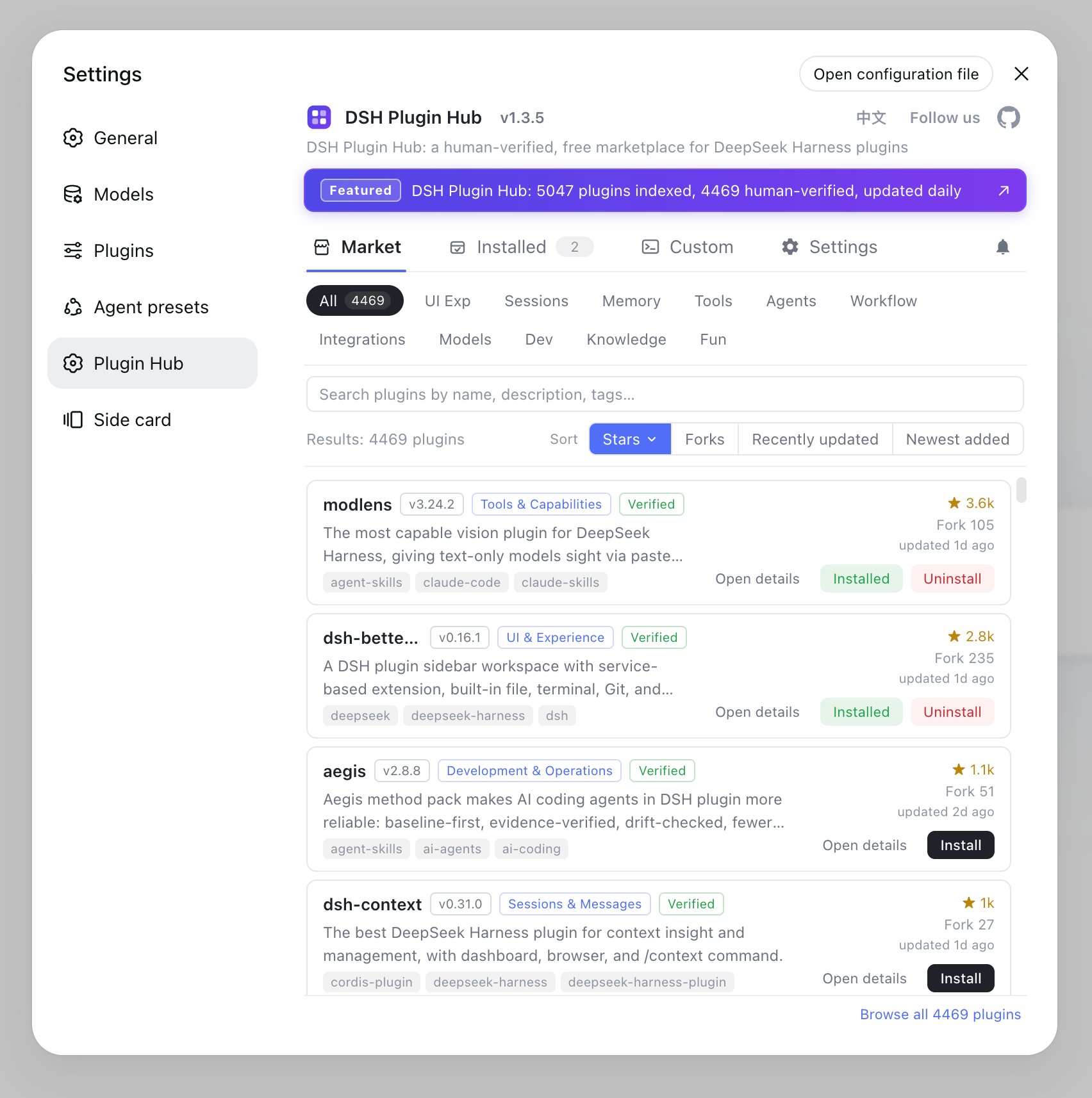
It is maintained by the dsh-plugin.org team as an independent community project with no affiliation to DeepSeek Harness — yet because it follows the official spec and lives inside the official host, many users assume it is official.
Plugin marketplaces and channels available
There are four channels to find DSH plugins: the in-app plugin market, the website plugin market, GitHub, and npm. They are:
- DSH Plugin Hub: embeds Settings → Plugin Market — browse by category, search and one-click install with the least effort, best for most users; see How to use DSH Plugin Hub.
- The dsh-plugin.org website plugin market: browse by category in a browser, read details and copy install commands — nothing to install.
- GitHub: repositories tagged
dsh-plugin— great for reading source and following development. - npm: the packages themselves — install directly with
dsh plugin --profile web add <package>.
All four channels expose the same DSH plugin ecosystem with shared data.
How to tell official from community
DeepSeek Harness officially ships only the host itself; almost every plugin is community-built, and the official domains make the split easy. The checklist:
- There are exactly three official sources: the website deepseek.com/harness, the docs deepseek-harness.github.io, and the code github.com/deepseek-ai/deepseek-harness.
- Everything else is community-contributed: all plugins and marketplaces, including DSH Plugin Hub, are community projects — which does not make them unusable: the Hub marks each plugin with verified / unconfirmed status, confirming compatibility by hand.
- Mind the source when installing: prefer plugins with verified status; if a GitHub-sourced plugin does not load because build output is missing, switch to its npm version.
Apply this method to any plugin or marketplace — check the domain and repository ownership first, and you can tell whether it is official.
Sources: DeepSeek Harness official website, Official Quickstart, dshplugin/dsh-plugin-hub
FAQ
dsh is the command-line tool of DeepSeek Harness; dsh-plugin (DSH plugin) is an extension that runs inside DeepSeek Harness and doubles as the GitHub listing topic; dsh-plugin-hub is DSH Plugin Hub, the community marketplace plugin whose npm package is dsh-plugin.
DeepSeek Harness is DeepSeek AI's open-source host project and dsh is its CLI entry point (e.g. npx @deepseek-ai/dsh web). DSH is the abbreviation of DeepSeek Harness — they refer to the same project.
No. DSH Plugin Hub (dsh-plugin-hub) is an independent community marketplace built by the dsh-plugin.org team, not an official DeepSeek product. Official channels are the website, the docs, and the deepseek-ai/deepseek-harness repository.
Three main ones: the in-app DSH Plugin Hub under Settings → Plugin Market (10000+ plugins, one-click install), the dsh-plugin.org website plugin market (browse by category in a browser), and GitHub and npm repositories themselves.
DeepSeek Harness officially ships only the host itself; almost every DSH plugin is community-built. Check the repository ownership and doc links: official docs live at deepseek-harness.github.io and official code under deepseek-ai; everything else is community.
Sources
- DeepSeek Harness official website· DeepSeek
- DeepSeek Harness Documentation - Quickstart· deepseek-harness
- dshplugin/dsh-plugin-hub GitHub repository· GitHub