Best DSH plugins to install: top DeepSeek Harness picks
DSH plugins fall into UI, sessions, memory, models, tools and agents — with popular picks like sidebar workspaces, terminal interfaces, context visualization, persistent memory, vision add-ons and multi-agent teams. This guide reviews the picks by category, gives a four-step selection method, and ends with one-click installation through DSH Plugin Hub.
Overview: a four-step method for picking a DSH plugin
Pick a DSH plugin in four steps — category, verification status, activity, then install — rather than judging by the name alone. DeepSeek Harness ships only base capabilities; models, tools, interfaces and skills all come in as DSH plugins (source). dsh-plugin.org and DSH Plugin Hub list 10000+ community plugins, 10000+ of them human-curated and verified, so browsing by category gets you to the right plugin fast (source). The method:
- Pick a category first: want a better UI, look at the UI category; want more models, the model category; want vision for the model, the tooling category — know your need before you browse.
- Check verification status:
verifiedmeans compatibility was manually confirmed — prefer these; treatunconfirmedplugins with more caution. - Check activity: stars and the last-update time show whether a plugin is maintained; plugins untouched for a long time deserve extra care.
- Install last: one click in DSH Plugin Hub, or copy the install command from dsh-plugin.org.
Below are representative, popular picks per category.
UI & experience DSH plugins: sidebar and terminal
UI plugins are the most direct way to make DeepSeek Harness easier to use: sidebar workspaces, TUI terminals and balance widgets each have their role. Representative picks:
- dsh-better-sidebar: a sidebar workspace with file, terminal, Git and side-chat pages, extensible through services — around 2,679 stars. Best for users who want the Web UI to feel like an all-in-one workbench.
- deepseek-balance-whale-widget: a corner whale widget showing live DeepSeek balance and today's usage — around 599 stars. Best for heavy users who need to watch their quota.
Sessions, memory & context DSH plugins: smarter conversations
Session and memory plugins make context visible and information persistent — the key to better dialogue quality. Representative picks:
- dsh-context: context visualization and management with a Context panel, browser and /context command — around 917 stars. Best for users who want to know exactly what the model sees.
- mnemon: LLM-supervised persistent cross-session memory with intent-aware recall and dedup on a knowledge graph — around 507 stars. Best for users who want DSH to remember project context across sessions.
- engramory: a portable memory protocol using Markdown files as long-term memory, zero infrastructure — around 169 stars. Best for users who want memory-as-files and full control over the data.
Model & cost DSH plugins: more providers, controlled spend
Model plugins let you use subscription accounts or track token costs — everyday gear for heavy users. Representative picks:
- dsh-plugin-subscriptions: use ChatGPT, Claude and Grok subscriptions as LLM providers without API keys, with OAuth login — around 245 stars. Best for users with existing subscriptions who want to cut API costs.
- dsh-cost-meter: session cost tracking with live cost, budget, balance, peak/off-peak pricing and usage heatmaps — around 162 stars. Best for cost-sensitive teams that need budget control.
- tokenledger: token usage attribution to relay endpoints, zero-config and credential-free — around 135 stars. Best for users on relay channels who need usage accounting.
Tooling DSH plugins: eyes for text-only models
DeepSeek Harness is text-first by default, so vision plugins are one of the hottest community directions. Representative picks:
- modlens: paste an image and get structured JSON evidence (OCR, layout, semantics) — around 3,534 stars, one of the most popular DSH plugins. Best for users who regularly read screenshots and image documents.
- dsh-vision-router: free built-in vision chains and pixel-level tools, one-command install with no Python — around 935 stars. Best for users who want vision fast without a Python setup.
- dsh-vision-toolkit: a vision toolbox for image Q&A, long-screenshot OCR and UI reconstruction — around 810 stars. Best for UI testing and long-screenshot OCR workflows.
Agents & automation DSH plugins: teams and safe auto-approval
Agent plugins turn a single session into a multi-agent team for complex task orchestration. Representative picks:
- dsh-agent-teams: turns sessions into multi-agent teams with sub-agent orchestration and task coordination — around 853 stars. Best for complex projects with parallel subtasks.
- dsh-auto-mode: a safe automatic approval mode balancing development speed and risk — around 121 stars. Best for trusted, repetitive tasks that should not need manual approval each time.
- sandbase-harness: a local-first sandbox for sessions, MCP tools, memory, credentials and audit replay — around 629 stars. Best for security- and audit-conscious workflows.
How to install DSH plugins: one click via DSH Plugin Hub (recommended)
The easiest route is to install DSH Plugin Hub first: it embeds Settings → Plugin Market so browsing by category, searching and one-click install all happen in-app. The full steps:
- Install the Hub itself (after running
npx @deepseek-ai/dsh webonce):
dsh plugin --profile web add dsh-plugin
- Restart
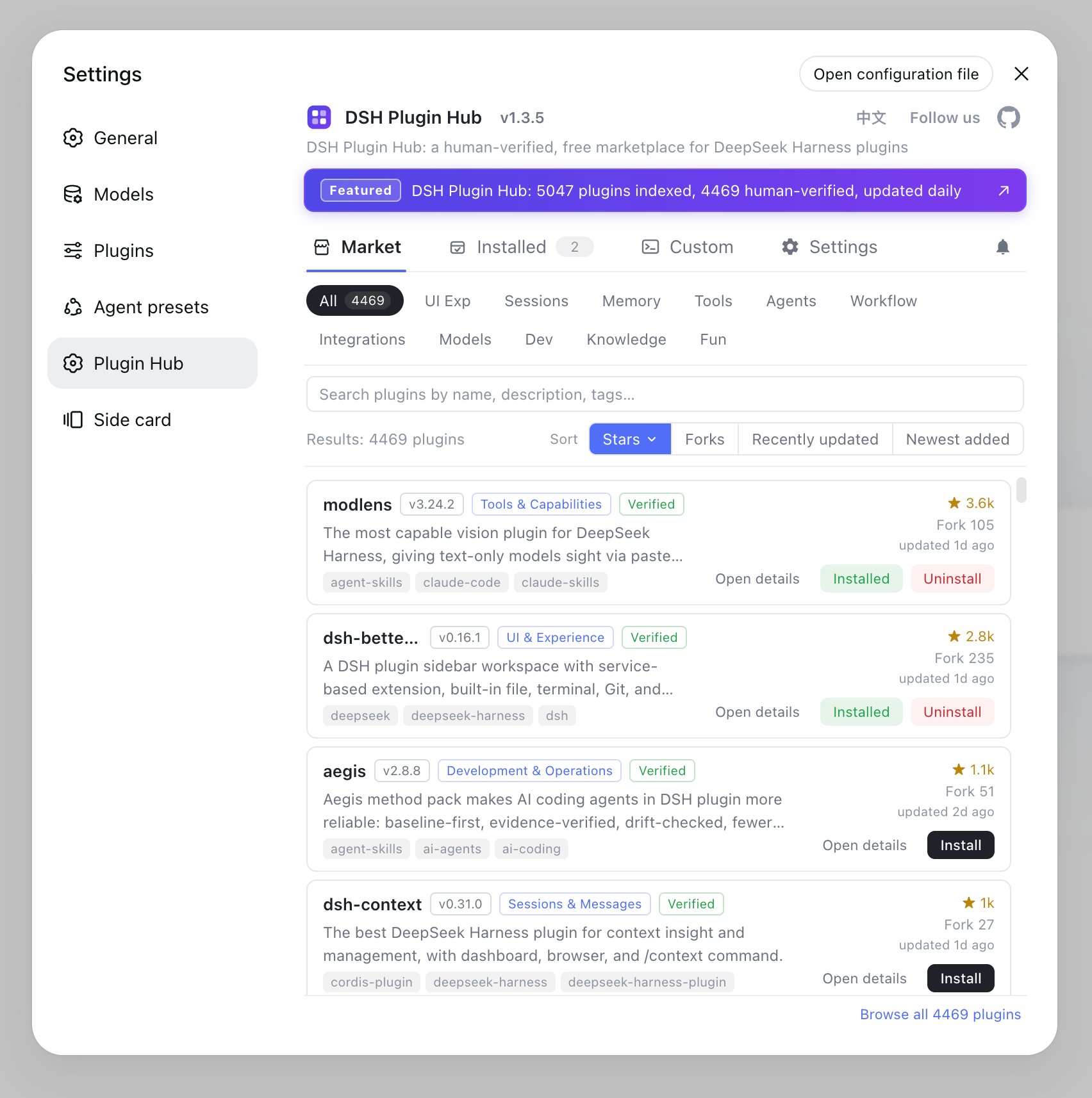
dsh weband open Settings → Plugin Market — the Hub's marketplace home, where you browse 10000+ community plugins by category, with name, description, stars and last-update time on each card:
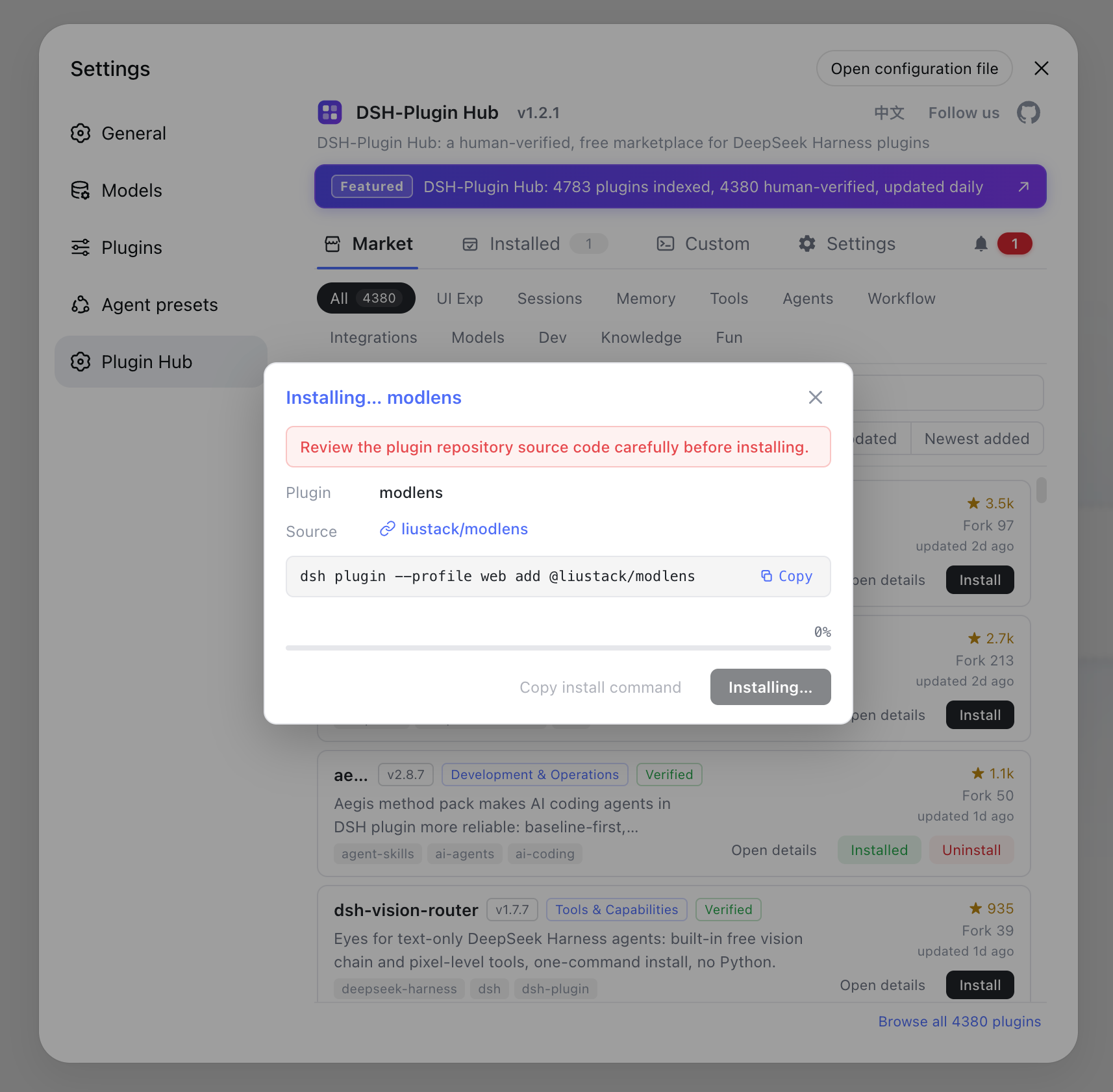
- Search the plugin name and click "Install" to finish in one click:
- Without the Hub, you can also copy the install command
dsh plugin --profile web add <package-or-github-ref>from a plugin detail page and run it in the terminal (source).
Notes on picking and installing
Pick plugins by verification status, stars and update time, and by whether the capability matches — and mind the source when installing. A few reminders:
- Check verification status: prefer
verifiedplugins (compatibility manually confirmed); double-checkunconfirmedones before installing. - GitHub sources can lack build output: if a git-distributed plugin does not load after install, it is usually an incomplete package — switch to its npm version or report it to the author.
- Plugins hold local runtime permissions: confirm the source is trustworthy and avoid unknown plugins.
- Remove what you no longer need: uninstall from the Hub's plugin market to keep the environment clean.
See How to use DSH Plugin Hub for the full browsing, install, uninstall and update workflow.
Sources: dsh-plugin.org, dshplugin/dsh-plugin-hub, DeepSeek Harness Quickstart
FAQ
By category: dsh-better-sidebar sidebar workspace for interface; dsh-context for context visualization; mnemon and engramory for persistent memory; dsh-plugin-subscriptions and dsh-cost-meter for models and costs; modlens for vision; dsh-agent-teams for multi-agent workflows. Pick by your own needs.
DSH plugins are grouped by capability into UI & experience, sessions & messages, memory & context, models & costs, tooling, and agents & automation. Both the website market and DSH Plugin Hub organize plugins this way for easy browsing.
Install DSH Plugin Hub first: it embeds Settings → Plugin Market with 10000+ community plugins for browsing, search and one-click install. You can also copy install commands from dsh-plugin.org, or run dsh plugin --profile web add <package> directly.
Check three things: the verification status (verified means compatibility was manually confirmed), stars and last-update time, and whether the description matches your need. DSH Plugin Hub detail pages show all three before you install.
DSH plugins hold local runtime permissions, so verify the source first. Prefer verified plugins with solid stars; GitHub-distributed plugins may lack build output — if one does not load after install, switch to its npm version.
Sources
- dsh-plugin.org plugin hub· dsh-plugin.org
- dshplugin/dsh-plugin-hub GitHub repository· GitHub
- DeepSeek Harness Documentation - Quickstart· deepseek-harness