DeepSeek Harness session DSH plugin: browse, pick, pair
A DeepSeek Harness session manager DSH plugin fills in the missing half of the native session panel: browsing all and archived sessions, one-click restore, bulk delete and content preview (source). In the native UI, archiving merely hides a session from the list, and the current version has no entry point to un-archive it; these plugins put the archived set back on screen so that archiving is reversible and deleting asks for confirmation. This guide covers three things: what these plugins solve, which real implementations exist, and how they work alongside config and plugin manager plugins.
What a session manager DSH plugin solves: list, archive, delete, search
In one line: the native session panel can do very little, and a session manager DSH plugin completes three jobs — see, recover and clean up (source). It adds four concrete pieces:
- Browse all sessions — the native sidebar groups by workspace and gets hard to search once there are many sessions; a plugin offers a unified list with search. Expected: typing a keyword locates a past session.
- Restore archived sessions — native archiving is one-way: a session vanishes from the workspace groups, Ungrouped, content search and the flat list, while the archived set lives at the registry level with no UI entry point. A plugin lists archived sessions and restores them in one click. Expected: archived no longer means gone.
- Bulk and safe delete — the native UI has no delete button, only rename, fork and archive. A plugin adds delete with confirmation (usually two steps), and some support clearing the archive in one click. Expected: deleting a session takes a second confirmation rather than a slip of the finger.
- Content preview and search — some plugins preview session content inline, so you can recall "what did this chat cover" without opening the whole session. Expected: locating a session takes less effort.
Be clear about what it manages: it acts on the view and reachability of sessions, and does not change the write semantics of the session log. To understand the essential difference between archiving and deleting, see archived sessions vs deleted sessions.
One more common misconception to clear up: it is not a full-text search tool. A session manager plugin usually locates by title, time and preview snippet, which is not the same as a full-text index over every session's content; to find a session by "some sentence I chatted about", you rely on a plugin's own preview or external retrieval, so do not treat "the list is searchable" as "all content is searchable". Also, a plugin changes which sessions are visible, not where a session is stored or how long it is kept — archiving does not compress the disk and deleting does not necessarily free space immediately, both of which still have to be handled at the session directory level to count.
Which DeepSeek Harness session manager DSH plugins exist
What these plugins share is filling a native gap, and they differ in whether they lean toward restore, navigation or a management panel; the unified place to find them is DSH Plugin Hub. Several real entries:
- dsh-session-manager — browses all and archived sessions in a Settings panel, with one-click restore, two-step confirmed delete, delete-all, a full session overview and inline content preview; every action runs through official services and modifies no official package. Expected: archiving is reversible and sessions are not lost.
- dsh-archived-sessions — views, restores or permanently deletes archived sessions directly on the Settings, archived sessions page, with a fast-loading list, restore-in-place and cross-platform permanent deletion (including sub-session interception). Expected: you manage the archive without parsing logs or digging through the filesystem by hand.
- dsh-session-nav — it does not switch sessions; it puts a semi-transparent floating button on the right of the current session page that pops up a list of every past question in that session on hover and jumps smoothly on click, which makes finding old questions in a long conversation easier, including questions collapsed by compaction. Expected: any past question in the current session is one click away, no manual scrolling.
How to choose: when the core need is "recover an archived session", take the first two; when it is "jump back to a past question inside the current long session", take the navigation kind. Some plugins ship no npm package and need a github: direct install, so follow the command on the Hub entry. After installing, restart dsh web and the matching panel should appear under Settings.
Laid out together, the three implementations differ like this:
| Implementation | Main entry | What it focuses on | Modifies official package? | Install |
|---|---|---|---|---|
| dsh-session-manager | Settings panel | Browse / restore / two-step delete / inline preview | No, uses official services | Per Hub entry |
| dsh-archived-sessions | Settings, archived sessions page | Fast-loading list / restore-in-place / permanent delete | No | Per Hub entry |
| dsh-session-nav | Floating button on the session page | Jumping among past questions in the current session | No, pure front end | github: direct install |
One easy mix-up: the first two solve "the archived set is invisible and untouchable", while the last solves "you cannot find an old question inside one long session". One manages cross-session reachability and the other in-session location, so never expect a navigation plugin to recover an archived session.
How DSH plugin session tools pair with config and plugin managers
Hand the three jobs — session, config and plugin — to their own plugins and clear boundaries mean they will not interfere (source). The division:
| Question you care about | Which DSH plugin kind | Typical implementations |
|---|---|---|
| What did I chat about, how do I recover a session | Session management | dsh-session-manager, dsh-archived-sessions |
| What is installed/configured, how do I migrate | Config management | dsh-config-manager |
| How do I install, remove and update plugins | Plugin management | dsh-plugin-manager |
- Session management — only the session view: list, archive, delete, preview. Expected: a clean session list and reversible archiving.
- Config management — dsh-config-manager packs the whole environment (model config, plugins, MCP, skills, workspaces) into a ZIP, with scheduled and encrypted backups plus Git/WebDAV sync. Expected: one-click environment restore when you change machines or reinstall.
- Plugin management — dsh-plugin-manager handles installing, removing, updating and inspecting plugins. Expected: the plugin lifecycle is visual, no hand-editing profiles.
A pairing scenario: on a new computer, move the whole environment over with a config manager first, then tidy history with a session manager. Cleaning up sessions does not affect plugins — sessions belong to the host, plugins belong to the profile, and the two tracks do not pull on each other.
Notes and limits for using DSH plugin session management
Remember three things — a plugin changes the view, the log is on disk, deleting needs confirmation — and it stays stable in use.
- It is not the same as rewriting the log: a session manager plugin makes archiving reversible and deleting confirmed, but the session log still sits under
$DSH_HOME/sessions; to reclaim disk for real, see how to delete a session. - Archive and delete are two different things: archiving is a non-destructive view hide, deleting is an irreversible removal; do not mix them up, and see archive vs delete for the distinction.
- Prefer official services: choose entries that explicitly state they modify no official package and run through official services, so they break less often after a DeepSeek Harness upgrade.
- Delete should take two steps: implementations with a second confirmation are worth using, to avoid wiping history with one wrong click.
- Install into the right profile: it hooks the Web UI and installs with
--profile web; a wrong profile means no panel under Settings. - Many sessions slow things down: a log that only grows slows session search and startup, so periodic tidying helps, but do not expect a plugin to shrink your disk for you.
- Do not use the navigation kind as an archive tool: dsh-session-nav solves jumping among past questions inside the current session and cannot list archived sessions; recovering an archive still needs the session manager panel, and the two kinds do not replace each other.
- Regression-test after an upgrade: an entry running through official services may briefly break after a DeepSeek Harness upgrade, so open the Settings panel after upgrading and confirm the list still loads.
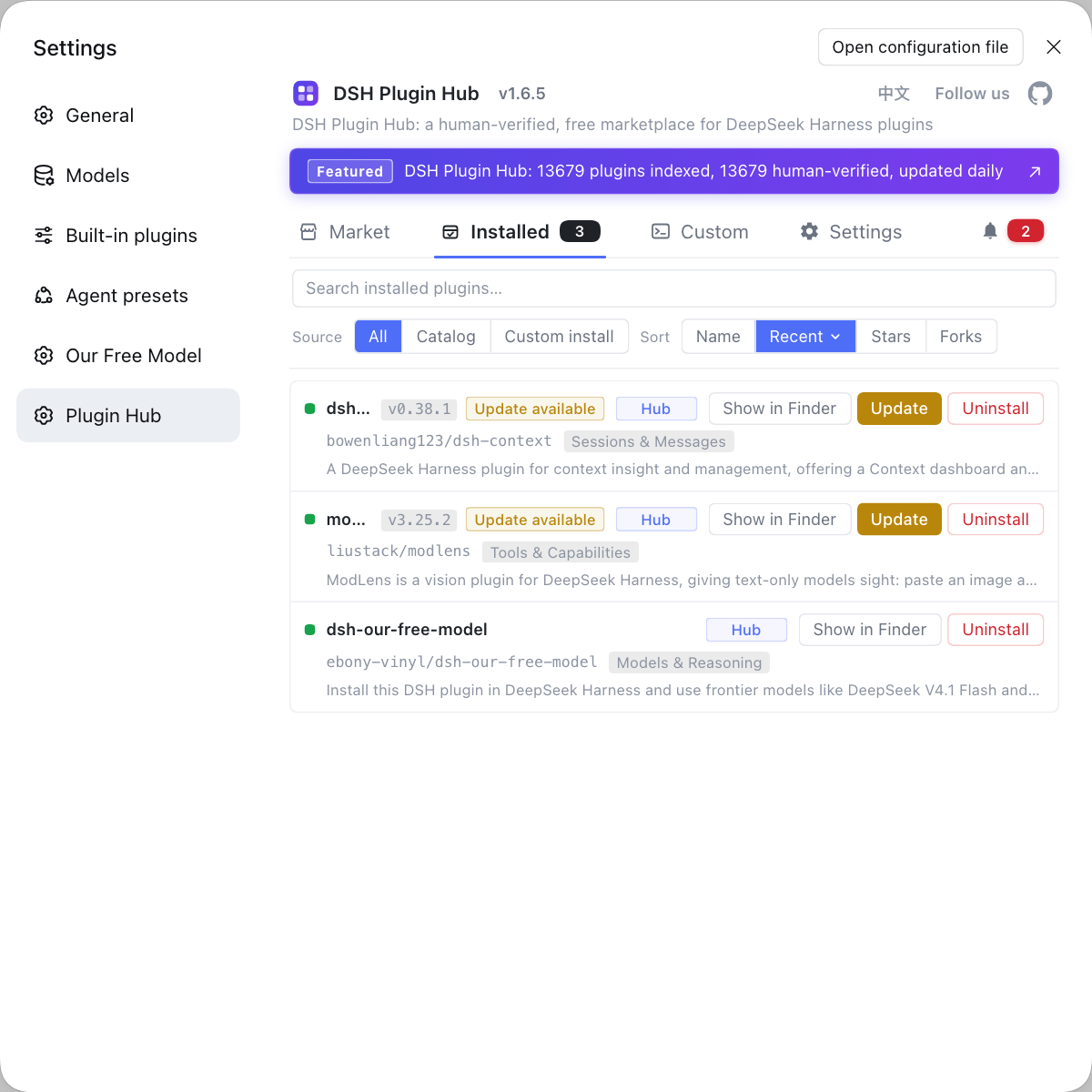
Rather than poking through the session directory and matching each folder by hand to see which one can be restored, install your session DSH plugins together through DSH Plugin Hub and cross-check source and version in the Installed list, where restore, delete and preview all finish on one panel. Its home page is https://dsh-plugin.org/.
Sources: DeepSeek Harness docs - session subsystem, dsh-session-manager (DSH Plugin Hub), dsh-archived-sessions (DSH Plugin Hub).
FAQ
A session manager DSH plugin fills in what the native DeepSeek Harness session panel lacks: browsing all sessions and archived sessions, one-click restore, bulk delete and content preview. In the native UI an archived session disappears from the sidebar, and the current version has no entry point to view or un-archive it; these plugins put the archived set back on screen so archiving becomes reversible and deleting asks for confirmation. They manage the session view, not the session log itself.
Common session manager DSH plugins include dsh-session-manager, dsh-archived-sessions and dsh-session-nav, each with a different focus. dsh-session-manager browses all and archived sessions in a Settings panel, with one-click restore, two-step confirmed delete and inline preview; dsh-archived-sessions highlights a fast-loading list on the Settings, archived sessions page with restore-in-place and cross-platform permanent deletion; dsh-session-nav instead puts a floating button on the current session page that lists all of that session's past questions on hover and jumps on click, which is in-session location rather than switching between sessions. Pick by whether you want to restore an archived session or jump among past questions inside one session.
These plugins generally operate through official services and do not modify any official package, which makes them relatively safe. In dsh-session-manager, for example, restore, delete and clear all run through official capabilities, and an archived session's log still sits in the session directory; the plugin re-exposes the unreachable archived set and lets you change it back. Delete-style actions usually carry a two-step confirmation to avoid accidents.
The split is clear: a session manager plugin manages what you chatted about, while config and plugin manager plugins manage what is installed and configured. In DeepSeek Harness, dsh-config-manager packages model config, plugins, MCP, skills and workspaces for backup and migration, and dsh-plugin-manager handles installing, removing and updating plugins, while a session manager plugin focuses on the session list and archive. On a new machine, back up the environment with a config manager first, then tidy history with a session manager; the two tracks do not collide.
Not entirely: a plugin can delete a session record, but freeing disk space for real still depends on whether it touches the session log files. Session logs live under $DSH_HOME/sessions, split into per-project directories, and the native backend itself offers no ability to delete session files. Clearing sessions in the UI with a plugin is convenient, but to actually reclaim disk you should follow the delete-session guide and work in the session directory.
Related Terms
- session manager plugin
- A session manager plugin is a DSH plugin that gives DeepSeek Harness session browsing, archive restore and delete capabilities, acting on the session view rather than the session log itself. Representative implementations are dsh-session-manager and dsh-archived-sessions.— DSH Plugin Hub - dsh-session-manager
- Archive
- Archive is the operation in DeepSeek Harness that writes a session id into a registry-level global archived set, making the session disappear from grouped views and search without touching the session log file. The native UI has no un-archive entry point, so restoring depends on a plugin or a disk operation.— DeepSeek Harness docs - session subsystem
- dsh-config-manager
- dsh-config-manager is a DeepSeek Harness config backup and migration DSH plugin that packs model config, plugins, MCP, skills and workspaces into one ZIP, with scheduled and encrypted backups plus Git/WebDAV sync. It manages the environment, not the session list.— DSH Plugin Hub - dsh-config-manager
- $DSH_HOME/sessions
- $DSH_HOME/sessions is the root directory where DeepSeek Harness stores session logs, split per workspace with one directory per session. Session manager plugins change visibility; to really delete files you work here.— DeepSeek Harness docs - session subsystem
Sources
- DeepSeek Harness docs - session subsystem· deepseek-harness
- dsh-session-manager (DSH Plugin Hub entry)· dsh-plugin.org
- dsh-archived-sessions (DSH Plugin Hub entry)· dsh-plugin.org