DSH Plugin Hub: DeepSeek Harness Market Entry & Alternatives
DSH Plugin Hub is the community plugin market built into DeepSeek Harness, opened from Settings → Plugin Market — it is not the host itself but a DSH plugin installed into DeepSeek Harness that gathers "where to find plugins, how to install them, and how to manage them after install" into a single interface. This article covers concepts only: what it is, what it provides, and how to choose it over other markets; the step-by-step browsing and install flow lives in how to use the DSH plugin market and the full install walkthrough in how to install DSH Plugin Hub, so neither is repeated here.
Overview
This article answers three things: what the DSH Plugin Hub plugin market is, what it provides, and how to choose it over third-party markets such as dsh plugin store or dsh market. DeepSeek Harness is currently in developer preview: the official team builds only the core and hands the plugin ecosystem to the community, and DSH Plugin Hub fills exactly the "registration and distribution" layer (source). If you have not got the host running yet, start with install DeepSeek Harness.
Why it is needed: DeepSeek Harness's core idea is "everything is a plugin" — model access, tools, UI, skills, MCP services, sub-agents and more are all abstracted into plugins, leaving the core responsible only for scheduling and running them (source). That creates two consequences — adding capability needs no core change, so the plugin count grows fast, yet plugins come from different authors and sit scattered across npm and GitHub, leaving users no way to know what exists, what is still maintained, and which one is safe to install. The official team leaves ecosystem growth to the community and does not build its own app store, so the community's dsh-plugin.org fills that layer with centralized listing, categories and compatibility labeling.
What is DSH Plugin Hub? The DeepSeek Harness plugin market entry
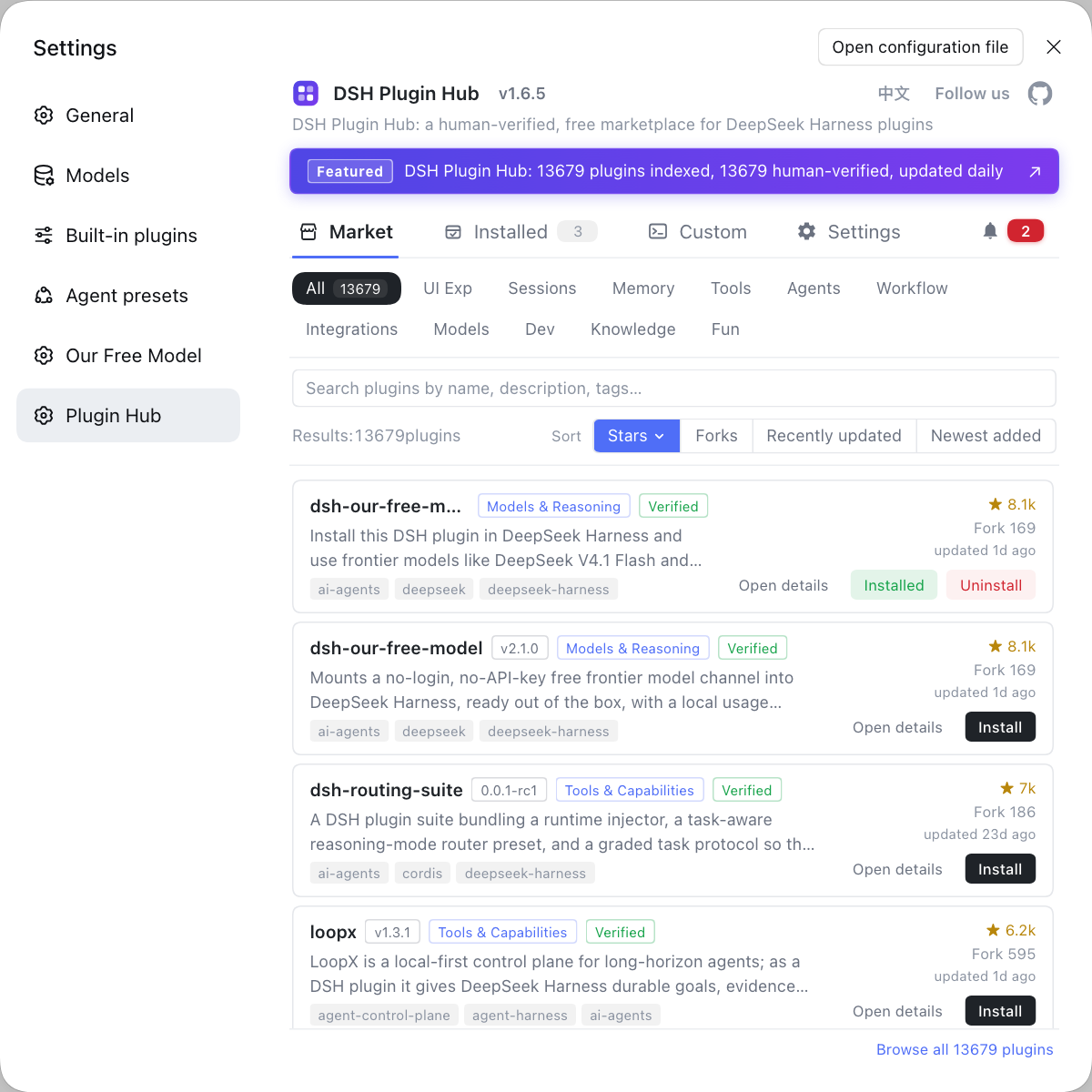
DSH Plugin Hub is a DSH plugin for DeepSeek Harness, not the DeepSeek Harness host; it aggregates official and community plugins and provides a searchable, one-click-install graphical entry at Settings → Plugin Market (source). Four points to grasp:
- It is a plugin inside the host — install it first, and only then does the "Plugin Market" item appear in the UI; so "I installed DeepSeek Harness but there is no plugin market" is normal, and the missing piece is this step.
- It is an independent, community-maintained project — built by the dsh-plugin.org team following the official plugin spec, with data sourced from dsh-plugin.org and updated daily, and no affiliation with the DeepSeek Harness team.
- It solves discovery and management — the DeepSeek Harness core only runs plugins; it does not tell you which plugins exist, which work, or how to upgrade them.
- It is a pure browser-side plugin — it injects only a market page into the UI, with no host service dependency and no telemetry, leaving no resident process after uninstall.
The entry sits at Settings → Plugin Market, but how to open it, browse by category, and one-click install is operational detail this article does not cover — the full steps are in how to use the DSH plugin market.
What does DSH Plugin Hub provide? Discovery, distribution and compatibility labeling
Hub provides three capabilities rather than an operating procedure: discovery (gathering scattered plugins into one searchable catalog), distribution (a single entry to install, update and uninstall), and compatibility labeling (marking each plugin's category, stars, update time and verified status). Each capability solves one problem:
- Discovery — the platform registers official and community plugins in one place and organizes them by category, keyword, stars and last update time, so finding a class of plugin means checking one entry instead of digging through the whole web.
- Distribution — the Settings → Plugin Market entry handles install, update and uninstall, operating on the same artifacts as the command-line
dsh plugin add, just folding the commands into the UI (source). - Compatibility labeling — every card marks its category, stars, last update time, verified status and whether an update is available, so you can compare peer implementations before choosing.
Together these three answer "where to find, how to get, and which one is trustworthy"; the actual clicking and installing lives in how to use the DSH plugin market.
Since 2.2.5, Hub is more than a market: a notifications center collects install and update results, custom install adds plugins by package name or repository URL, and a settings page gathers entry points, sources and preferences. When an install or update fails, read the reason in Hub notifications first, then cross-check the system logs for environment changes; see what's new in Hub 2.2.5 for the rest of that release, custom install for installing by address, and Hub settings for entry points and preferences.
How is DSH Plugin Hub different from third-party markets like dsh plugin store and dsh market?
The core difference is "source" and "whether it is built in": DSH Plugin Hub is the official community market built into DeepSeek Harness, with data sourced from dsh-plugin.org and updated daily; dsh plugin store and dsh market are mostly different names users give to "the plugin market entry", or non-built-in external sources. With many names pointing in scattered directions, this table sorts it out:
| Name | What it actually points to | Source | How to use it |
|---|---|---|---|
| DSH Plugin Hub / plugin market / plugin hub | The community market built into DeepSeek Harness | dsh-plugin.org, same source as the website | Settings → Plugin Market |
| dsh plugin store / dsh market / dshmarket | Mostly another name for "the plugin market entry"; may also point to an external, non-built-in source | Depends on the specific source | Confirm first whether it is the built-in Hub |
Command line dsh plugin add | Skips the UI and installs the package into the profile | npm / GitHub | dsh plugin --profile web add <package> |
When choosing, judge in this order:
- Go official Hub first — search the same plugin name in Settings → Plugin Market and prefer the listed, verified version. Expected: source and compatibility information is checkable, and the risk of installing the wrong thing is lowest.
- Then consider direct sources — only when the official market does not list it, install with
dsh plugin --profile web add <package>or a GitHub source; before installing, check the repo's last update time and permission scope. Expected: you clearly know you are installing a plugin the market has not listed. - Do not get dizzy from names —
dsh plugin store,dsh market, "plugin hub", and "plugin community" usually point to the same "plugin market" entry; the test is whether it is the official market built into DeepSeek Harness. Expected: by recognizing the built-in Hub, you will not install duplicate versions from different sources.
DSH Plugin Hub notes and limitations
DSH Plugin Hub is convenient, but first separate what it is not from the practical notes: it is not the host itself and not an official app store, and it cannot decide plugin safety for you; meanwhile DeepSeek Harness is still in preview, Hub is an independent community project, plugins are isolated per profile, and plugin permissions still need your own review. One by one:
- Not the host itself — Hub is a DSH plugin installed into DeepSeek Harness; uninstalling it only removes the "Plugin Market" entry and does not affect the host or other installed plugins.
- Not an official app store — it is maintained by a community team with no affiliation to the DeepSeek Harness team and is released under the MIT license; being listed does not mean an official endorsement (source).
- Cannot decide safety for you — the market helps you discover and distribute plugins, but whether a plugin can read files, reach the network, or run build scripts is still up to you to check via its permissions and source.
- Developer preview stage — DeepSeek Harness iterates quickly and the plugin interface may change, so when problems appear, treat the official docs as authoritative.
- Isolated per profile — plugins are installed into a specific profile, so a plugin installed in web does not appear in another profile; when judging whether something is installed, align profiles first.
Next step: if you have not browsed the official plugin market yet, open dsh-plugin.org and flip through the categories, then follow how to use the DSH plugin market to install whatever catches your eye.
Source: dshplugin/dsh-plugin-hub, dsh-plugin.org, dsh CLI README, DSH Plugin Hub plugin entry
FAQ
DSH Plugin Hub is the community plugin market built into DeepSeek Harness; it is itself a DSH plugin installed into DeepSeek Harness, not the host. The host runs plugins, while Hub adds a Settings → Plugin Market interface for browsing, searching, installing, and managing plugins.
The plugin market entry is fixed at Settings → Plugin Market in DeepSeek Harness, and it appears after you install the Hub plugin and reload the interface. If there is no Plugin Market in the settings page, the plugin itself is probably not installed or the interface has not refreshed; run dsh plugin --profile web add dsh-plugin and restart dsh web.
In the plugin market, filter by category or keyword, open a plugin card to read its description and install command, then click Install to install it in one click. Installation shows a confirmation dialog with the command to be run, and it takes effect once you refresh the page; the installed list also offers one-click update and uninstall.
Yes — every card in the plugin market marks its category, stars, last update time, and whether an update is available, which helps you compare peer DSH plugins first. Use the sort buttons to sort by stars or last update time to quickly surface the still-active plugins with the same function.
The difference lies in source and whether it is built in: Hub is the official community market built into DeepSeek Harness, sourced from dsh-plugin.org with daily updates, whereas dsh plugin store and dsh market are mostly different names for the plugin market entry, or non-built-in external sources. When choosing, go through the official Hub first, and only consider a direct command-line install for plugins the market does not list.
Related Terms
- DSH Plugin Hub
- DSH Plugin Hub is the community plugin market built into DeepSeek Harness, opened from Settings → Plugin Market for browsing, searching, installing, updating, and uninstalling community plugins. It is maintained by the dsh-plugin.org team, sources its data from dsh-plugin.org, and is an independent community project with no affiliation to the DeepSeek Harness team.— dshplugin/dsh-plugin-hub
- plugin market (plugin market / plugin store)
- The plugin market is the graphical entry in DeepSeek Harness for browsing and installing plugins, located at Settings → Plugin Market and often called a plugin store. It points to the same artifacts as the command-line `dsh plugin add`, just replacing command-line actions with graphical ones.— dsh CLI README
- dsh plugin add
- `dsh plugin add` is the plugin install command of DeepSeek Harness, with the form `dsh plugin --profile <name> add <package-or-repo-url>`. It forwards arguments to that profile's package manager, and installed plugins land in that profile's node_modules.— dsh CLI README
- verified (compatibility status)
- verified is a label the plugin market uses for the usability of a DSH plugin, meaning the plugin has been community-confirmed to run on the corresponding DeepSeek Harness version. Plugins not manually reviewed are labeled unconfirmed, so prefer verified versions when choosing.— DSH Plugin Hub plugin entry
Sources
- dshplugin/dsh-plugin-hub· dshplugin
- dsh-plugin.org· dsh-plugin.org
- dsh CLI README· deepseek-ai
- DSH Plugin Hub plugin entry· dsh-plugin.org