DSH plugin ecosystem: layers, extension points, community
The DeepSeek Harness plugin ecosystem reads as a three-layer map: on top of the kernel sit the official built-in bundles, and above them the largest layer of community DSH plugin. The kernel ships only the plugin runtime and the most basic seams; the official side uses bundles to lay down the "web" and "headless" skeletons; and almost every other capability extension is handed to the community. This piece does not dissect plugins one by one or repeat the basics — it answers exactly three questions: what the ecosystem is made of, where extension points land, and what domains community plugins cover and who makes them. (source)
What the DeepSeek Harness plugin ecosystem is made of: kernel, official plugins and community plugins
The DeepSeek Harness plugin ecosystem has three layers, bottom to top — the kernel and plugin runtime, the official built-in bundles, and the official and community DSH plugin (source). The makeup and role of each is set out just below; for the official bundle list and what each profile template does, see DeepSeek Harness profiles and bundles. After establishing the three layers, this piece focuses on two further things: exactly where extension points land in the runtime, and what domains community plugins cover and how they are distributed.
Start at the bottom. The kernel and plugin runtime are the root of the whole tree; they provide no business capability themselves, only a set of "seams" for plugins to plug into — tools, commands, hooks, UI cards, and services and providers, five kinds in all. Seam registration runs through Cordis's effect scope: whatever a plugin registers while loading is revoked together the moment it is unloaded, so "install or uninstall" is not adding a line to a config file but genuinely hanging on and taking off a whole subtree. That also explains why the same kernel filled with different plugins feels like a different piece of software: what changes is the batch of implementations hung on those seams.
Now the middle layer. The official built-in bundles package and ship the "web" and "headless" skeletons; they are not ordinary plugins but bundles — a distribution format of "Cordis config fragment + mount code", declaring their identity through the dsh.bundle field in package.json and joining startup as one whole layer once installed into a profile. The profile templates that commonly ship with the release are web, headless, sdk and sdk-minimal, plus acp: web carries a graphical interface, headless drops the interface and suits scripting, sdk and sdk-minimal are for embedding into programs, and acp faces protocol access. They decide "what shape the tree grows into", but not "how much fruit hangs on it".
The top layer is the community one. The vast majority of feature extensions are community work, hosted on npm and GitHub and uniformly marked with the dsh-plugin topic. A community plugin may be a small package registering just a single tool, or a whole enhancement registering tools, commands, UI cards and service providers at once; its count, coverage and iteration speed all far outrun the few layers the official side ships with. Put the three layers into one table and the boundaries are clear at a glance:
| Layer | Role | Maintained by | Carrier | How it takes effect |
|---|---|---|---|---|
| kernel and plugin runtime | provides the seams and the plugin loading mechanism | official | ships with the release | always present; plugins hang on top |
| official built-in bundles | lay down the web / headless skeletons | official | profile template + bundle | joins startup as one whole layer |
| community plugin layer | fills in the vast majority of feature extensions | individuals and organisations | npm package / GitHub repo | loaded after being installed into a profile |
One boundary to flag: the three layers are a division of roles, not three unrelated rosters. The same plugin may be community work by "who maintains it", a bundle by "in what format it distributes", and land on some profile's seam by "where it hangs". So to place a plugin in the ecosystem you have to ask all three questions separately, rather than forcing one label onto everything.
The DSH plugin extension point index: where tools, commands, hooks and UI cards land
A DSH plugin has five main extension points — tools, commands, hooks, UI cards, and service and provider seams — and each one maps to a fixed registration site (source). Lay them out as a landing index:
| Extension point | Registration site | Where it shows after install |
|---|---|---|
| tool | ctx.tools.register(defineTool(...)) | the tool list the model can call in a conversation |
| command | the plugin's command registration interface | /command in the terminal or chat |
| hook | event and guard seams | intercept, approve or rewrite behaviour before execution |
| UI card (settings card) | Settings slots and namespaces | forms and cards in the Settings page "Plugins" area |
| service and provider | the registry and ctx.get | subsystems such as model routing, subagents and skills |
A plugin rarely occupies just one kind: most register several extension points at once, and a wider capability surface means more sites registered. A context-visualisation plugin, for example, may register a tool (to pull context), a UI card (a Settings toggle) and a service provider (to replace the context source) all at once, each doing one part.
Taken apart, the five kinds differ in both effect and cost:
- tool: registered through
ctx.tools.register(defineTool(...))and appearing in the conversation's callable tool list, it is the highest-impact of the five — it directly decides what the model can read and write. The wider the tools, the stronger the capability and the larger the error surface. - command: registered as a
/commandin the terminal or chat, it is the shortcut entry for a person to use. A command is "triggered by a human", a tool is "triggered by the model"; the two face different initiators. - hook: attached to event and guard seams, it decides at what moment a plugin may step in — intercepting before execution, appending one approval, or rewriting behaviour all count as hooks.
- UI card (settings card): landing in the Settings page "Plugins" slots and namespaces, it decides whether the plugin has a toggle, form or panel in the interface, making its capability visible and configurable.
- service and provider: going through the name registry and
ctx.get, it replaces subsystems such as model routing, subagents and skills — the "deepest" of the five, changing an internal part of the whole tree.
One rule to remember: extension points are not hung at random — every site requires the plugin to declare its dependency in inject first, so the runtime only guarantees the matching service is ready. A plugin's capability surface therefore equals what it registers across these five kinds. Read them in this order to gauge the weight of a DSH plugin fastest:
- Tools first: tools decide what the model can do and which resources it reads and writes — the highest-impact of the five.
- Then commands and hooks: commands are the quick entries for users; hooks decide when the plugin may step in, whether it can intercept an action or append an approval.
- Finally UI cards and services: UI cards decide whether it has a toggle in Settings; service providers decide whether it can replace subsystems such as models and subagents.
To check on your own machine exactly which sites a plugin hangs on, run these steps; each has a definite expected result:
- See whether it is a layer: run
grep -A3 '"dsh"' "$DSH_HOME/profiles/web/package.json". Expected: a package declaringdsh.bundlemounts itself as a whole layer, otherwise it is just an ordinary dependency. - See whether it is in the load list: run
dsh plugin --profile web list | grep -n "<package-name>". Expected: output means the package is installed into that profile; no output means it was never installed here. - See whether it has that layer in the tree: run
dsh --profile web --dump-config | grep -n "# ==". Expected: only the line# == <package-name>appearing means it will really be loaded in this profile; if it shows up inlistbut there is no such layer indump-config, it is an ordinary dependency that declared nodsh.bundle. - See the UI site: open the Settings page "Plugins" area. Expected: a plugin that registered a UI card shows a toggle or panel here; a plugin registering only tools/commands has no card here.
In one line: reading extension points is reading "through which ports it plugs into the runtime" — the deeper the ports, the more carefully you should check the source before installing. To weigh a plugin by generic signals, see the signals for whether a dsh plugin is worth installing.
How community plugins are distributed at scale: which domains they cover and who makes them
The community layer is the largest and fastest-moving of the tree, and its "distribution" reads on two axes: which functional domains it covers, and who its sources are (source). This section covers only coverage and source makeup on the ecosystem map, not the listing workflow itself.
Take coverage first. Community plugins cover almost every kind of seam the kernel exposes:
- Interface and interaction: register UI cards and settings panels, changing what the Settings page looks like and which switches it offers.
- Session and context: register tools and hooks, stepping into what the model sees and may call, such as context visualisation, compaction and retrieval.
- Memory and knowledge: register services and providers, replacing or supplementing subsystems such as memory and retrieval.
- Tools and integration: register tools, wiring external commands, APIs and MCP servers into the conversation.
- Agents and orchestration: register service providers and hooks, replacing subagents and splitting up team collaboration.
Now the composition of sources. By "who maintains it", community plugins are published by individuals and organisations; by "in what format", some are ordinary npm packages and some declare dsh.bundle to mount as one whole layer; by "where it is published", the two main routes are npm and GitHub. The same plugin may differ across these three axes, which is exactly what "the three layers are a division of roles, not three rosters" means. Coverage and sources in one table:
| Axis | What to look at | Typical shape |
|---|---|---|
| Functional coverage | which seams it registers | interface ones register UI cards, tool ones register a tool, orchestration ones register a service provider |
| Maintainer mix | who publishes and maintains | mostly individuals and organisations, with very different cadences |
| Distribution format | whether it mounts as a layer | an ordinary dependency, or a whole layer declaring dsh.bundle |
| Publishing channel | where to get it before install | an npm package or a GitHub repo, often both at once |
To see how busy a given domain is and how many ready implementations exist, count entries by category in DSH Plugin Hub; as for "how to take part and how to get a plugin submitted", that belongs to the topic of community plugins themselves, handled here in one inline link: see how to find DeepSeek Harness community plugins.
In one line: reading the "distribution" on the ecosystem map means reading "which domains are covered and who maintains them", not a particular listing workflow.
Common misconceptions about the DSH plugin ecosystem
Read this map as a manual and you will step into the following pits. Corrected one by one:
- "Installing a plugin = installing it on the whole machine" — not on the whole machine but on a profile:
$DSH_HOME/profiles/<name>/each has its ownpackage.jsonandnode_modules, so installing intowebdoes not make it appear indesktop; you install once per profile. - "Installed means it works automatically" — it is not automatic: after installing you must restart that profile's process and refresh the page. If it shows up in
listbut has no such layer indump-config, it is still an ordinary dependency, not loaded as a layer. - "More extension points = more powerful and safer" — not more powerful and safer: every extra tool or hook registered is one more path the model may take wrong and the plugin may step into, widening capability and risk together.
- "Being in the market = official endorsement" — not an endorsement: the vast majority of plugins are community-maintained, and the market only categorises and checks compatibility.
- "The
dsh-plugintopic is just a casual label" — not a casual label but the basis on which the market fetches: pinning that topic confirms a repo published to the DSH plugin spec and auto-indexed by the market. - "A bundle and a plugin are the same thing" — not the same but different layers: a bundle is a distribution format (
dsh.bundle), a plugin is a capability implementation, and one bundle can organise several plugins.
Notes and limits
The ecosystem map is a coordinate system, not a promise — keep these boundaries in mind so you never read a map as a manual. Point by point:
- DeepSeek Harness is still in developer preview: breaking changes are fairly frequent, and this index is a snapshot of the current version — both the categories and the extension points on the map may shift between versions, so trust the compatibility version marked on each plugin page before installing.
- Source and permissions must be checked separately: plugins run in the same process as the host and hold local permissions, so a clear extension-point landing does not mean a trustworthy source — still vet source and permissions before installing.
- Checking landing points requires reading the local profile: the steps in this piece depend on reading
$DSH_HOME/profiles/...and runningdsh --dump-config; on another machine or profile name, re-run the check. - Market indexing lags: the market is a sorting layer, and a freshly published repo may not be indexed immediately; when it is missing, install straight from its GitHub or npm address.
- A map cannot replace a dissection: this piece gives a positional index — to judge what a plugin really touches you still go back to its capability, settings, permissions and dependencies.
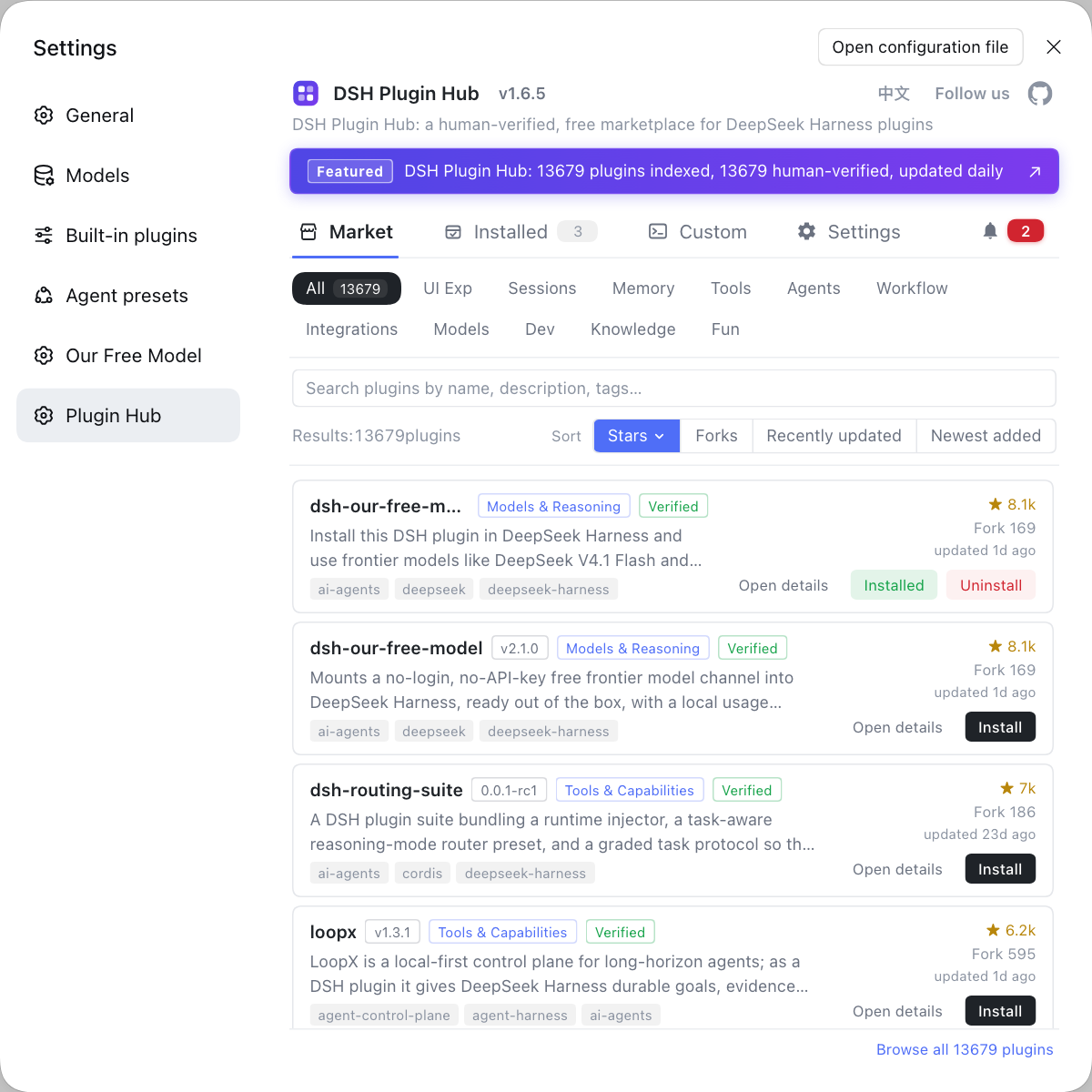
Rather than digging through GitHub topic lists and a string of repos, open the community-official DSH Plugin Hub (dsh-plugin.org) to see the whole ecosystem in one place inside the app, then install what you want by category.
Sources: DeepSeek Harness 官方文档 - 架构总览, dsh CLI README, dshplugin/dsh-plugin-hub.
FAQ
The DeepSeek Harness plugin ecosystem has three layers from the bottom up: the kernel and plugin runtime, the official built-in bundles, and the official and community DSH plugin published on top. The kernel exposes only five kinds of seam — tools, commands, hooks, UI cards, and services and providers — and when a plugin is unloaded the seams it registered are revoked with it, so installing or uninstalling is the only way capability is managed per plugin. The official bundles lay down the web and headless skeletons, while community plugins fill in the vast majority of feature extensions, making the community layer the largest and fastest-moving of the three.
A DSH plugin has five main extension points: tools, commands, hooks, UI cards, and service and provider seams. Tools registered through ctx.tools.register show up in the conversation's tool list, commands become slash commands in the terminal or chat, hooks attach to event and guard seams, UI cards land in the Settings page Plugins slots, and services and providers plug in through the name registry and ctx.get to replace subsystems such as model routing, subagents and skills. Each site requires the plugin to declare its dependency in inject first, so the runtime only guarantees the matching service is ready.
DeepSeek Harness community plugins cover almost every kind of seam the kernel exposes, falling broadly into five functional domains: interface and interaction plugins register UI cards and settings panels, session and context plugins register tools and hooks, memory and knowledge plugins register services and providers, tools and integration plugins register tools that wire external commands, APIs and MCP servers into the conversation, and agents and orchestration plugins register service providers and hooks to replace subagents and split up collaboration. By source, community plugins are mainly published by individuals and organisations; by distribution format, some are ordinary npm packages and some declare dsh.bundle to mount as one whole layer; by channel, the two main routes are npm and GitHub.
DSH plugin and official plugins are two kinds of nodes on different layers of the same ecosystem tree: official plugins ship with the release or come from the official repo, while community plugins are published by individuals and organisations. The install path is identical — dsh plugin --profile web add, or one-click install from the plugin market. The only difference is source and maintainer; the install command and the landing point are the same, both entering the current profile's dependency manifest and node_modules.
Related Terms
- DSH plugin
- A DSH plugin is an extension for DeepSeek Harness and the only unit by which the framework installs and uninstalls capability; models, tools, interfaces and skills all plug into the kernel as plugins.— DeepSeek Harness 官方文档 - 架构总览(reference)
- extension point
- An extension point is a fixed registration site where a DSH plugin plugs into the runtime, split into five kinds: tools, commands, hooks, UI cards and service providers; each requires the plugin to declare its dependency in inject before the runtime guarantees the service is ready.— DeepSeek Harness 官方文档 - 架构总览(reference)
- bundle
- A bundle is DeepSeek Harness's distribution format of a Cordis config fragment plus mount code, declared in package.json under dsh.bundle and mounted into a profile as one whole layer at startup.— dsh CLI README(apps/ 目录与 profile)
- DSH Plugin Hub
- DSH Plugin Hub is the community plugin market built into DeepSeek Harness, letting you browse by category, search and one-click install, update or uninstall plugins, with every entry showing version, verification status and compatibility.— dshplugin/dsh-plugin-hub GitHub 仓库
Sources
- DeepSeek Harness 官方文档 - 架构总览(reference)· deepseek-harness
- dsh CLI README(apps/ 目录与 profile)· deepseek-ai
- dshplugin/dsh-plugin-hub GitHub 仓库· GitHub