DeepSeek Harness community plugins: market, trust & picks
DeepSeek Harness community plugins are, at bottom, third-party DSH plugin published by community developers and sorted and verified by the market. They are not official work, yet in count, coverage and iteration speed they far outrun the few layers the official side ships with. This piece works through three questions: where community plugins come from, which trust signals are unique to community plugins, and how to get picks and find them in the market by category and search. By the end you will have your own selection process rather than a copied list. (source)
Where DeepSeek Harness community plugins come from: GitHub topic and market indexing
Community plugins originate on GitHub: developers tag their plugin repos with the dsh-plugin topic, and the market then fetches, categorises and verifies them by that mark (source). In other words, the same plugin is visible both as a repo on GitHub and as an entry in the market — just presented differently:
- The GitHub side: search the
dsh-plugintopic and you see raw repos — README, commit history, Issues and licence all in one place, good for reading source or checking maintenance status. - The market side: browse by category in DSH Plugin Hub and you see sorted cards — version, verification status, Stars/Forks, update time and an install button all present, good for fast selection.
For this chain to hold, three things each play their part. The first is the mark: an author tags the repo with the dsh-plugin topic, which is the only door through which the market discovers it — a repo without the topic will not be auto-collected into the catalogue. The second is the fetch: the market periodically fetches repos by that topic, reads package.json and the description, and files them under a category. The third is distribution: market listing does not change distribution — users still install the same npm package or GitHub repo, and the market merely places it where it can be browsed.
Both sides show the same set of plugins, one closer to raw material and one closer to a finished display. Set the two side by side and it is clearer:
| Dimension | GitHub side (topic search) | Market side (plugin market) |
|---|---|---|
| What you see | raw repo: source, commits, Issues, licence | sorted cards: version, verification, Stars, install button |
| Who it suits | people who read code and check maintenance | people who pick and install fast |
| Entry | GitHub's dsh-plugin topic | the plugin market on the Settings page |
| Freshness | synced with the repo, fastest | indexing lags, a bit slower |
| Direct install | yes, via github:owner/repo | yes, click the card to install |
Finding a community plugin from zero usually runs along this path, each step checkable:
- Decide which category the need falls into first: work out whether the problem you want to solve is about interface, session, memory, tools or agents. Expected: you can name a concrete scenario, not "just browsing".
- Browse by category in the market: open DSH Plugin Hub and click through the matching category, reading cards one by one. Expected: you can sift out a few candidate cards carrying version and verification status.
- Cross-check the repo on GitHub: take the card's repo address to GitHub and look at commit history and Issues. Expected: the repo is hit by the
dsh-plugintopic and has recent commits with answered Issues. - Confirm source and compatibility back in the market: check the owner, version and compatibility state on the entry page. Expected: the source repo the card points to matches the one you saw on GitHub, with no mix-up.
To judge whether a plugin is worth installing, look at both sides: the market for its positioning and compatibility, GitHub for its code and activity. If what you want to map out is "which market entries exist and where to download plugins", that is a channel-level question — see where to download and install DeepSeek plugins; this piece stays on community-plugin sourcing and discovery.
Trust signals unique to community plugins: GitHub topic, market verified and telling same-named repos apart
To judge whether a community plugin is worth installing, the generic "source, activity, permissions" scorecard lives in whether a DSH plugin is worth installing; this piece covers only the three source signals unique to community plugins: GitHub topic ownership, the market verified badge, and how to tell same-named repos apart (source). Point by point:
- GitHub topic ownership: community plugin repos are uniformly tagged with the
dsh-plugintopic, so pinning that topic confirms it is a plugin repo published to the DSH plugin spec and auto-indexed by the market, not an arbitrarily named repo that happens to share a name. - The market verified badge: in DSH Plugin Hub, entries that pass manual checking carry
verified, meaning compatibility has been manually confirmed — the handiest source endorsement among community plugins, though it is not a security audit, so still read the permissions yourself. - Telling same-named repos apart: community plugins of the same name often come from several accounts' versions, so before installing go back to the entry page and check the owner and repo address, trusting the one source the market entry points to rather than the name alone.
What each signal can and cannot tell you is worth setting out:
| Signal | How to read it | What it can say | What it cannot say |
|---|---|---|---|
dsh-plugin topic | the topic tag at the top of the repo page | it is published to spec and will be indexed by the market | code quality, whether it is safe |
verified badge | the verification mark on the market entry | compatibility has been manually checked | security audit, official status |
| owner and repo address | the owner/repo the entry points to | which real source this entry corresponds to | whether that source is worth trusting |
Beyond these three community-specific signals, two more can be folded into the checklist. One is npm ownership: many plugins have both a GitHub repo and a same-named npm package, and if the publishers match, the source is comparatively single and clear; if they do not, keep an extra eye out. The other is activity: look at how long ago the last commit was, whether Issues get answered, and whether Stars and Forks have volume. A plugin untouched for half a year with ignored Issues is probably not a long-term dependency even if it wears verified.
Read the signals together and the order can be fixed at three steps: first check whether it is a plugin published to spec (does it carry the dsh-plugin topic), then whether it has had one round of manual checking (verified), and finally go back to the owner and npm ownership to confirm "this entry really comes from that source". Only when all three pass does it come down to whether it matches your scenario; if any one of the three is unclear, switch to another plugin of the same kind — the community usually has more than one implementation, and there is no need to gamble on a package of unclear origin.
In one line: judging a community plugin has a dedicated entry point — recognise "topic + verified + owner" first, and hand the generic capability-and-permission scorecard to the article above.
Where to get picks, and how to find community plugins in DSH Plugin Hub
The easiest way to find community plugins is to browse by category or search by name right inside DSH Plugin Hub, along a fixed set of steps; for which one to actually pick, see the three ready-made lists below (source). Walk through this order, and every step has a checkable landing point:
- Open a category: in the plugin market under Settings, click down through categories such as interface, session, memory, tools and agents. Expected: you pin down a category matching your need and see a set of cards under it.
- Use search: if you already know the plugin or package name, type it or the
dsh-pluginkeyword into the top search box. Expected: it jumps straight to the entry, skipping the categories. - Read the entry before deciding: the entry page lays out version, compatibility status, Stars, update time and an install button together. Expected: you can confirm the
verifiedstate and the owner source before deciding whether to install. - One-click install: once confirmed, click install. Expected: after installing, the plugin's count increments and its entry appears in the interface.
- Restart and verify after installing: as prompted, restart that profile's gateway process and refresh the browser. Expected: after refreshing you can really use the plugin's capability, not merely see it in the list.
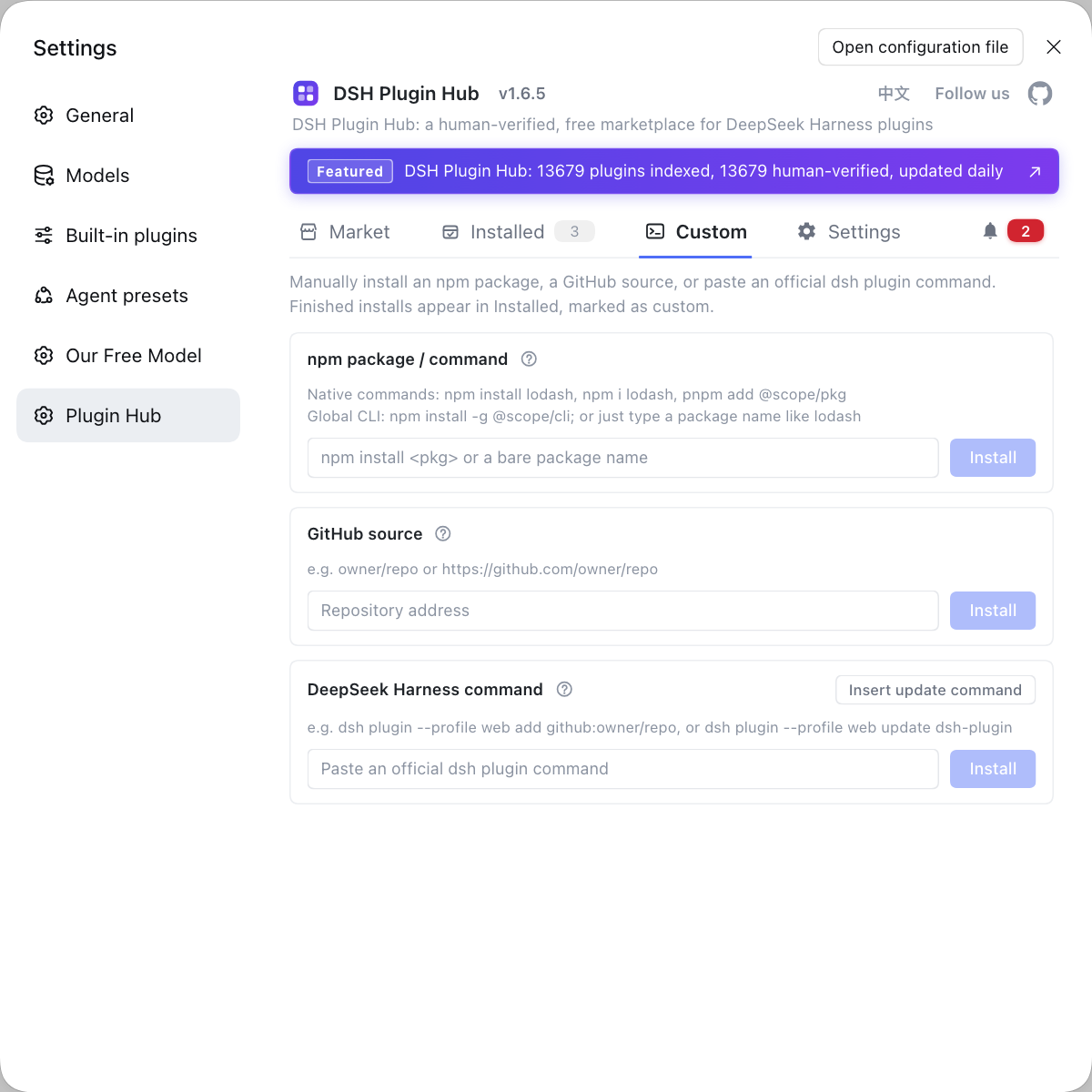
- Custom-install when the market has not indexed it: when the entry cannot be found, use the "custom install" on the entry page to paste a GitHub repo address or npm package name and install by hand. Expected: the same thing gets installed, and it too appears in the installed list.
Rather than picking one by one, just copy a ready-made conclusion: pick by scenario in choosing dsh plugins by scenario, see what is popular in which dsh plugins are worth installing, and get the must-have list in DSH plugin must-have picks. The three lists answer different questions: picking by scenario answers "which one fits my need", the popular one answers "what is everyone installing", and the must-have list answers "what is the minimum to install" — match whichever fits your question at hand. One search tip too: prefer a unique keyword such as the plugin or package name over broad words like "memory" or "search", which hit a huge set and leave you too many candidates to choose from.
Common misconceptions about DeepSeek Harness community plugins
When hunting for community plugins, the pit you fall into most easily is mistaking "visible" for "reliable". Corrected one by one:
- "Not searchable in the market = it does not exist" — not non-existent, just not indexed yet; indexing lags, so you can install it directly with a GitHub or npm address.
- "Same-named plugins are all the same" — not the same but each with its own source: the community often has several accounts publishing a same-named plugin, and you install whichever owner the market entry points to; mistaking the source is installing the wrong thing.
- "High Stars means it fits me" — not so. Popularity reflects how widespread a plugin is, not whether it matches your scenario and version; compatibility still has to be read off the entry page.
- "
verified= safe" — no. It checks compatibility only and does not mean a security audit was done; permissions and source still need your own look. - "Whether to tag the topic does not matter" — it does matter, because the topic is the basis on which the market fetches; a repo without it will not be auto-collected, and is hard to find by anyone searching the topic.
Notes and limits
Beyond telling the misconceptions apart, a few boundaries and prerequisites must be set first. Numbered:
- A plugin installed from GitHub source may lack build output: when it installs but fails to load, switching to the npm version of the same plugin usually fixes it.
- Community plugins run in the same process as DeepSeek Harness and hold local permissions, so never install one of unclear origin.
- Align versions before installing: community plugins iterate fast, so confirm the entry's compatibility state covers your current DeepSeek Harness version.
- Uninstalling may not clean up fully: a plugin can write global config outside the profile, so if behaviour is odd after uninstall, go back and check for leftovers.
- Decide what you need it for first: the community has several implementations of the same kind, so compare against a clear need rather than ordering by popularity or name.
Rather than filtering the GitHub topic over and over and opening each repo to read its README, install the community-official DSH Plugin Hub (dsh-plugin.org) and find, inspect and one-click install plugins by category and scenario right inside the market.
Sources: GitHub topic: dsh-plugin, dshplugin/dsh-plugin-hub, DeepSeek Harness 官方文档 - Quickstart.
FAQ
DeepSeek Harness community plugins are third-party DSH plugin published by community developers and sorted and verified by the plugin market, with their source mostly on GitHub and tagged with the dsh-plugin topic. They differ from official plugins in source and maintainer: official plugins ship with the release or come from the official repo, while community plugins are run by individuals and organisations. Both install the same way, via dsh plugin --profile web add or one-click market install, so the only difference is who maintains and who endorses.
To judge whether a community DSH plugin is trustworthy, check three things: source ownership, maintenance activity and permission declarations. For source, look at whose account the repo sits under and whether there is a linked npm package and a dsh-plugin topic; for activity, look at the latest commit, whether Issues get answers, and the Star and Fork counts; for permissions, look at whether installing requires allowing allowBuilds and whether it frequently asks for wider sandbox_permissions at runtime. If any one of the three is unclear, hold off.
The easiest way to find DSH plugin recommendations is to browse by category first and then match by scenario. Categories split into interface, session, memory, tools, agents and the rest — decide which one your need falls into; for scenarios, match your problem, so if you want to see what context the model read, look for a context-visualisation plugin. Cross-check the market's category list with the GitHub dsh-plugin topic and try first the ones that appear in both and are marked verified.
The two serve different scenarios, so the best move is to combine them. The GitHub dsh-plugin topic shows the raw repo, good for reading source, commit history and Issues; the plugin market shows sorted cards that put version, verification status, Stars and an install button together, good for fast selection. Use the market when you want speed, and go back to the GitHub repo when you want to read code or confirm maintenance status — both sides show the same set of plugins.
Related Terms
- community plugin
- A community plugin is a third-party DSH plugin in DeepSeek Harness published by an individual or organisation and indexed and verified by the plugin market, distinct from the official plugins that ship with the release.— dshplugin/dsh-plugin-hub GitHub 仓库
- dsh-plugin topic
- The dsh-plugin topic is the unified GitHub label that marks DeepSeek Harness plugin repos, and the plugin market uses that label to fetch and index community plugins.— GitHub topic: dsh-plugin
- verified
- verified is the badge the plugin market puts on a plugin to show that its compatibility and similar details have been manually checked, a priority signal when choosing community plugins that is not a security audit.— dshplugin/dsh-plugin-hub GitHub 仓库
- DSH Plugin Hub
- DSH Plugin Hub is the community plugin market built into DeepSeek Harness, letting you browse by category, search and one-click install, update or uninstall plugins, with entries synced to the website daily.— dshplugin/dsh-plugin-hub GitHub 仓库
Sources
- GitHub topic: dsh-plugin· GitHub
- dshplugin/dsh-plugin-hub GitHub 仓库· GitHub
- DeepSeek Harness 官方文档 - Quickstart· deepseek-harness