Best DSH plugins to install for DeepSeek Harness
Which DSH plugins should you install right after DeepSeek Harness? The starter-pack logic is simple: install DSH Plugin Hub first as your visual market entry, then add three high-coverage plugins by scenario — dsh-context to see the context, dsh-meow-memory to remember across sessions, and dsh-agent-teams to orchestrate multi-agent teams. Below are the must-have list, a scenario quick-pick, and the safe one-click install steps.
Overview
DeepSeek Harness ships with core capabilities only — models, tools, UI and memory all arrive as DSH plugins, so “what to install after the core” is the first question for every newcomer. For the mechanics of DSH plugins see our DSH plugin primer. This article is not an exhaustive roundup (see top DSH plugins for that); it gives you a minimal path that works right away: one market entry plus three high-frequency plugins, all human-curated, verified catalog entries that install with one command or one click. If you have not installed the core yet, follow Install DeepSeek Harness for the first time first.
The DSH plugin starter pack: four plugins to install first
The pick-first logic for DSH newcomers: get the “market” first, then add three high-frequency categories — context insight, long-term memory and multi-agent teams. Each of these installs in one click from the plugin market:
- DSH Plugin Hub — the market entry (npm package
dsh-plugin) — the community plugin market for DeepSeek Harness, built by the dsh-plugin.org team and embedded in Settings → Plugin market. It gives you one visual window to browse categories, search and one-click install human-curated community plugins, with data synced daily from the official site. It is both the install entry for the other three plugins below and the unified place to update or remove them later (source). - dsh-context — context insight — install it if you want to know exactly what the model saw on every turn. It visualizes the composition, evolution and compression of the context: stats, trends, events, file activity and the agent network, plus a
/contextcommand to open the panel right from the chat. It works as soon as it is enabled, with no build or restart, ideal for users who want deep visibility into DSH sessions (details). - dsh-meow-memory — cross-session long-term memory — makes the AI remember you across windows and sessions. It consolidates each workspace's memory into a seven-layer SQLite store (soul, user, project, fact, lesson, topic, rules), injects long-term memory on the first turn of a new session, retrieves by keywords afterwards, and tidies up when idle. No more re-explaining your project background in every new session (details).
- dsh-agent-teams — multi-agent collaboration — hands one complex goal to a team. It turns the current session into a captain that assembles durable sub-agents, splits the goal into dependency-aware tasks and schedules them automatically, with a live panel to watch progress. Ideal for goals that need several sub-tasks in parallel (details).
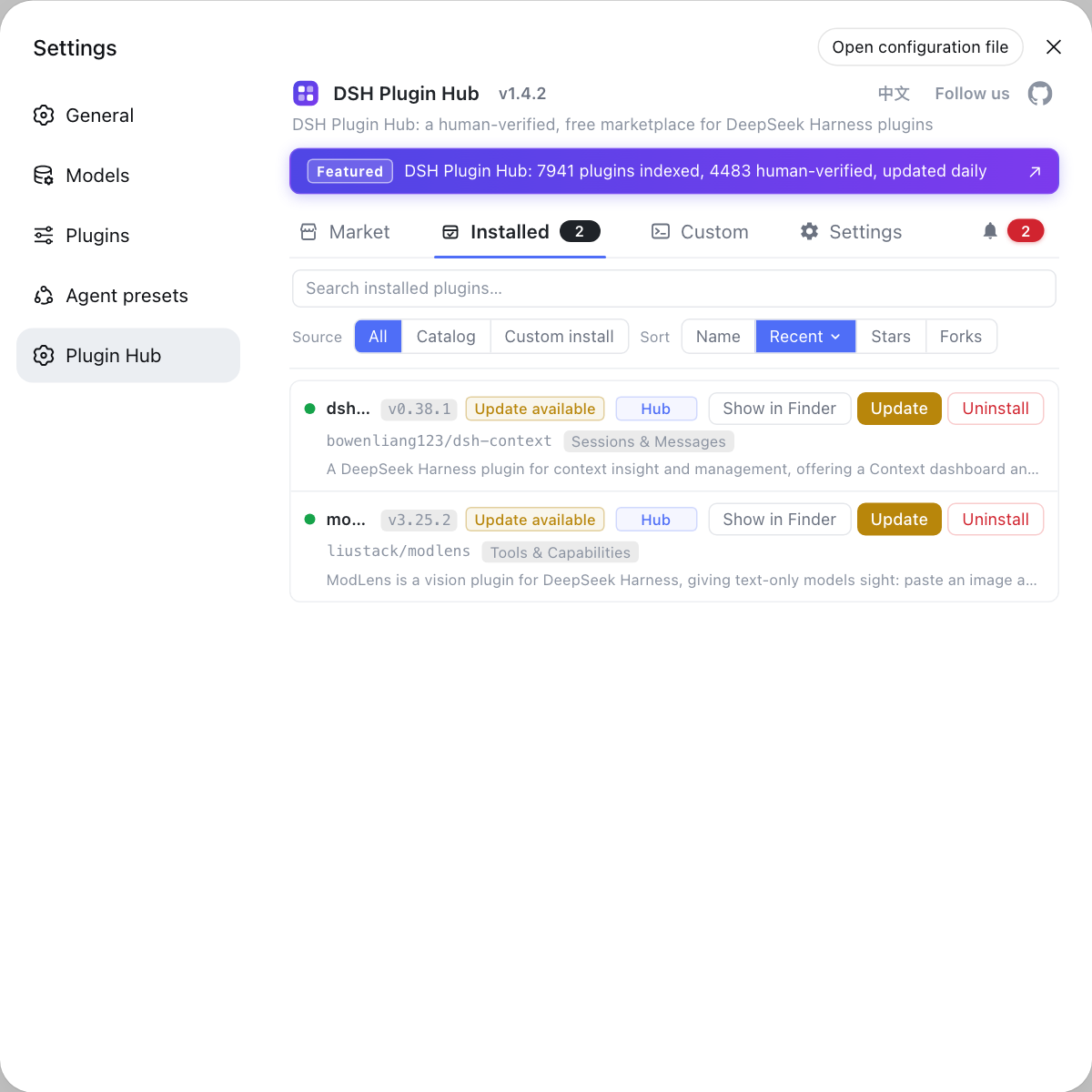
Once you install the four from the list above, they all appear in DSH Plugin Hub's Installed list — each row shows the source tag, version and update time, with update, remove and reveal-in-Finder actions at the end, so everything is managed in one place and stays current:
Pick a DSH plugin by scenario: what you need vs what fits
Scenario decides the plugin: say clearly what you want first, then match it — that avoids installing a pile of plugins you never use. Three high-frequency scenarios:
- See inside the conversation — how much context the model reads, which files it touched, how the context gets compressed: install dsh-context;
- Make the AI remember you — a new session that already knows your project background and preferences, without repeating them: install dsh-meow-memory (for more memory plugins, compare DSH memory plugins);
- Hand a big goal to a team — split sub-tasks, run them in parallel and watch progress: install dsh-agent-teams.
Anything else — UI polish, extra models, cost tracking, vision — is out of scope here: find the category you need in how DSH plugins are categorized, see representative plugins per category in top DSH plugins, then search and install them back in DSH Plugin Hub.
Install DSH plugins safely: one-click from DSH Plugin Hub
Installing inside DSH Plugin Hub is a visual flow — search, confirm the source, install — with confirmations and live progress all the way, no commands to memorize. It assumes the Hub is already installed (see the first article for how). Full steps:
- Start
dsh weband open Settings → Plugin market to reach the Hub's Market screen; - Type the plugin name in the search box (for example
dsh-context) and click Install on the result card; - A confirmation dialog shows the plugin name, source repo and the install command that will run — a safety gate; click confirm only when the source is trustworthy;
- Watch the live progress until it finishes, then switch to the Installed screen to confirm the plugin is listed;
- Restart
dsh web(most plugins load after a restart, and the UI will tell you); from then on, updates show an update entry in the Installed list and removal comes with its own confirmation.
Installation pitfalls to remember:
- Check the source and the verified badge first — prefer entries marked verified with traceable sources; do not install unknown plugins, because a DSH plugin gets local run privileges;
- A GitHub-source plugin that will not load: switch to the npm version — git distribution pulls source, not build artifacts; if the repo ships no artifacts the installed package has no entry file, and the prebuilt npm version fixes it;
- A blocked build script means allowBuilds authorization — allow only packages you have reviewed and trust; the full safe-install procedure is in how to install DSH plugins safely;
- Do not stack too many overlapping plugins — memory plugins especially will inject duplicates; run one main pick first.
In short: after installing DeepSeek Harness, get DSH Plugin Hub first so you have the market in hand, then pick plugins for your actual scenarios — plugins are what take DSH from “it runs” to “it works for you.”
Sources: dsh-plugin.org plugin market, deepseek-ai/deepseek-harness, dshplugin/dsh-plugin-hub
FAQ
DSH plugins follow a starter-pack logic: install DSH Plugin Hub first as the market entry, then add dsh-context for context insight, dsh-meow-memory for cross-session memory, and dsh-agent-teams for multi-agent teams. All four are human-curated, verified entries that install in one click.
DSH plugins are easiest to choose by scenario: install dsh-context to see what the model actually reads, dsh-meow-memory to make new sessions remember your project, and dsh-agent-teams to split one goal into parallel sub-tasks; for anything else, browse the categories in DSH Plugin Hub.
DSH Plugin Hub is the community-official plugin market for DeepSeek Harness, built by the dsh-plugin.org team. It is not a required dependency, but it is the easiest path for beginners: after installing it, browsing, searching, one-click install and later updates or removals all happen inside the app, no dsh plugin flags to memorize.
DSH plugins usually need a dsh web restart to activate. If pnpm says a prepare build script was blocked, it is asking you to allow it in the allowBuilds whitelist — that grants the package the right to run code during install, so only allow packages you trust. If a GitHub-source plugin does not load, it is usually missing build artifacts; switch to its npm version.
Related Terms
- DSH plugin
- A DSH plugin is an extension for DeepSeek Harness (DSH). Models, tools, UI, memory and multi-agent capabilities are all added as plugins, making it the unit of extension in the all-plugins architecture.— deepseek-ai/deepseek-harness
- DSH Plugin Hub
- DSH Plugin Hub is the community plugin market for DeepSeek Harness built by the dsh-plugin.org team, embedded in Settings → Plugin market, with browsing and one-click install, update and removal of plugins, synced daily with the official site.— dshplugin/dsh-plugin-hub GitHub repository
- verified
- Verified is a badge a plugin gets in the market when its entry has been human-checked, for example for compatibility; it is a useful first filter for beginners.— dsh-plugin.org plugin market
- allowBuilds
- allowBuilds is pnpm's build-script whitelist: prepare scripts of git-installed packages do not run unless you allow them, and allowing one grants that package the right to run code on your machine during install — only allow packages you trust.— pnpm official docs
Sources
- dsh-plugin.org plugin market· dsh-plugin.org
- deepseek-ai/deepseek-harness· GitHub
- dshplugin/dsh-plugin-hub GitHub repository· GitHub