DSH memory plugins: long-term memory for DeepSeek Harness
DSH memory plugins solve DeepSeek Harness's cross-session amnesia: DSH session state in memory-mode scopes lives only in the process and is lost on restart (confirmed in the official source), so without a memory plugin a new session knows nothing about the old one. Memory plugins persist important facts to local SQLite or files and inject them when a new session starts - the common mechanisms are auto-extraction, auto-injection and context compression. This guide reviews five representative memory plugins from the registry, compares them, and gives selection criteria plus install steps.
Overview
In one sentence: if you want "the AI to remember what you said last time", install a memory plugin. It is not about conversation quality but about persistence - which facts to keep, how to store them, and how to retrieve them in a new session. Below: what the problem is, five representative plugins, then selection criteria and install steps.
What memory plugins solve (cross-session long-term memory)
Cross-session long-term memory is the core value of a memory plugin - without one, a new session knows nothing about the old one. DSH sessions and settings live in different scopes, and in the official source a memory-mode scope only keeps its writes in the process without persisting them (source). In other words, "remembering you" is not reliable by default - a plugin has to write it to disk. Memory plugins share four mechanisms:
- Auto-extraction: during a conversation, distill key facts, decisions and preferences.
- Auto-injection: at the start of a new session, put relevant past memory into context so the AI "remembers" from the first turn.
- Context compression: compress long histories into key points or knowledge structures to save tokens without losing the essentials.
- Local persistence: memory is stored in local SQLite or files, no external service, survives restarts.
Memory data lives locally by default - which is why memory plugins commonly advertise "local-first" and "SQLite storage".
Five real memory plugins: picks and comparison
The DSH plugin registry has many memory plugins with different trade-offs - the five below are representatives of different approaches. Data comes from real registry entries (dsh-memento, graph-memory, dsh-meow-memory, dsh-auto-memory, dsh-memory):
| Plugin | Core mechanism | Install method | Status |
|---|---|---|---|
| dsh-memory | Project+global stores, auto extract/inject, small-model consolidation, Obsidian-style link graph | GitHub source | Basic, early addition |
| graph-memory | Knowledge graph, cross-session recall, 75% context compression, semantic vector retrieval, local-first | GitHub source (beta, not on npm) | v2.0.0, high stars, active |
| dsh-memento | Bounded & layered, unbypassable approval gate, SQLite storage, snapshot injection, rebuildable audit trail | npm one-click | v0.4.5, verified |
| dsh-auto-memory | Three-layer memory injection, calendar reminders, AI greetings, daily journal | npm one-click | verified |
| dsh-meow-memory | Seven-layer SQLite store, BM25 retrieval, first-turn injection, nightly dream consolidation | npm one-click (package meow-memory) | v0.17.0, verified |
The approaches are easy to tell apart: graph-memory goes "knowledge graph + vector retrieval" and excels at context compression; dsh-memento goes "approval + audit" so every memory write needs approval and leaves an audit trail - great when you care about control; dsh-meow-memory goes "structured layers + keyword retrieval" and archives memory with nightly "dream consolidation"; dsh-auto-memory goes "fully automatic + humanized", auto-recording and auto-reminding; qwert702's dsh-memory is a general-purpose "dual store + link graph" pick. To browse more, open the memory category in DSH Plugin Hub and sort by stars and compatibility.
How to choose and install
Pick a memory plugin by install method first, then by feature focus - npm one-click suits beginners, GitHub source builds are harder. Four selection criteria:
- Check the install method: npm-published plugins (dsh-memento, dsh-meow-memory, dsh-auto-memory) install with one
dsh plugin --profile web add <package>command; GitHub-source plugins (graph-memory, qwert702's dsh-memory) usegithub:owner/repoand can hit missing build artifacts or allowBuilds prompts, which is a higher bar. - Check the feature focus: for control and audit pick dsh-memento (approval gate); for fully automatic pick dsh-auto-memory; for knowledge graph plus compression pick graph-memory; for structured layers plus keyword retrieval pick dsh-meow-memory; for a link-graph organizer pick dsh-memory.
- Check compatibility: prefer verified entries in the registry; try unconfirmed ones on a small scale first.
- Install one at a time: memory plugins overlap, and running several can double-inject context - get one primary memory plugin working first.
Installing dsh-memento, step by step:
- Start the Web UI: run
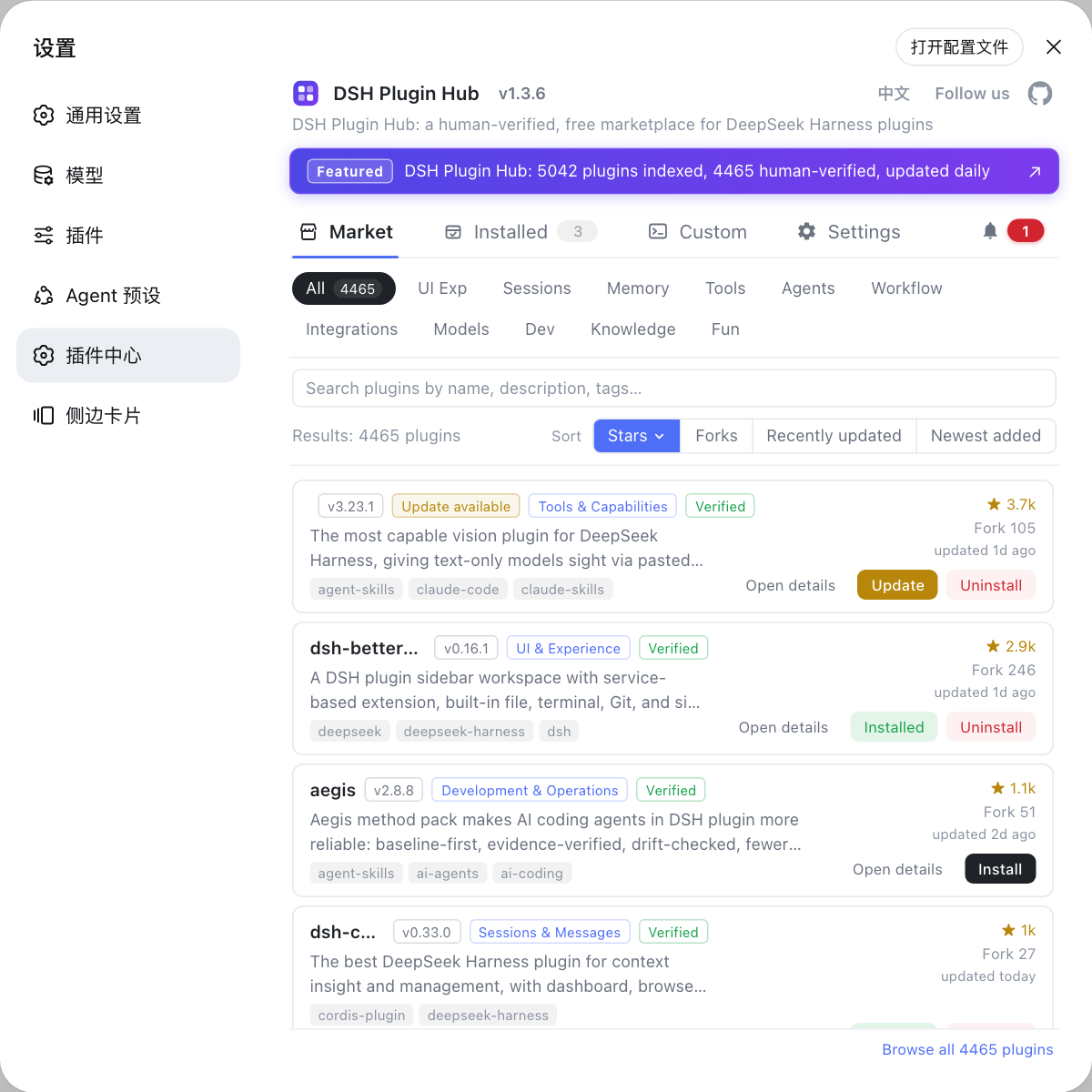
dsh web(same asdsh --profile web) and openhttp://127.0.0.1:3080in the browser. - Go to Settings -> Plugin Market (that is DSH Plugin Hub) and search for
dsh-memento. - Click Install; or install from the command line:
bash
dsh plugin --profile web add dsh-memento - Restart DSH (or follow the restart prompt) so the plugin bundle takes effect.
- Back in Settings, confirm the memory plugin is enabled and note that memory data starts being written to local storage.
Notes
- Without a memory plugin, DSH cross-session memory is not reliable: memory-mode scope state lives only in the process and is lost on restart (source).
- GitHub-source memory plugins may lack build artifacts; if installation fails, switch to the npm version or wait for the beta release.
- Memory data lives locally (SQLite/files); uninstalling the plugin does not necessarily delete already-written memory files - clean those up separately.
- Memory persists conversation facts, so be mindful of where sensitive content is stored and what approval mechanism is in place.
- Running several memory plugins at once can overlap and double-inject context; start with one primary.
- If you cannot decide, sort the memory category in DSH Plugin Hub by stars and pick a verified one.
Sources: DeepSeek Harness source - welcome-store.ts, dsh-memento, graph-memory, dsh-meow-memory, dsh-auto-memory, dsh-memory
FAQ
They let DeepSeek Harness remember information across sessions. DSH session state in memory-mode scopes lives only in the process and is lost on restart (confirmed in the official source), so without a memory plugin a new session knows nothing about the old one. Memory plugins persist important facts to local SQLite or files and auto-inject them into new sessions.
The registry has many memory plugins. Representative picks: dsh-memory (project+global stores, Obsidian-style link graph), graph-memory (knowledge graph, 75% context compression), dsh-memento (approval-gated, auditable), dsh-auto-memory (three-layer auto memory, calendar reminders), and dsh-meow-memory (seven-layer SQLite, BM25 retrieval).
dsh-memory auto-extracts conversation facts into project and global stores organized as a link graph; graph-memory turns conversations into typed nodes and edges forming a knowledge graph, emphasizing semantic vector retrieval and context compression to recall relevant history instead of replaying full conversations.
Check the install method first: npm-published plugins like dsh-memento, dsh-meow-memory and dsh-auto-memory install with one dsh plugin add <package> command; graph-memory is still beta and not on npm, so it needs a source build. For control and audit pick dsh-memento; for fully automatic pick dsh-auto-memory.
Open Settings -> Plugin Market in the Web UI (DSH Plugin Hub), search the plugin name and click Install; or run dsh plugin --profile web add <package> (npm) or dsh plugin --profile web add github:owner/repo (GitHub source). Restart for the bundle to load, then confirm the memory plugin is enabled and data is written locally.