Find & Install DSH plugins: DeepSeek Plugin Marketplaces
DeepSeek plugins are free to find and install on the dsh-plugin.org plugin hub, the in-app DSH Plugin Hub, GitHub, and npm — with the website hub curating 10000+ human-verified plugins updated daily, it's the easiest place to start.
Overview
This guide covers three things: which DeepSeek plugin marketplaces and app marketplaces exist, how to download and install a DSH plugin, and what dsh-plugin.org does. DeepSeek Harness (DSH) is built on an everything-is-a-plugin architecture, so "where do I find plugins and how do I install them" is every new user's first lesson. If DSH isn't running yet, see How to install DeepSeek Harness first.
DeepSeek plugin marketplaces: where to find DSH plugins
There are four places to find DeepSeek plugins: the website plugin hub, the in-app marketplace, GitHub, and npm. Ranked by convenience:
- dsh-plugin.org plugin hub: browse by category and search in your browser; detail pages show descriptions, compatibility status, and a copy-ready install command. It's the most complete community catalog (source);
- DSH Plugin Hub (in-app marketplace): a community marketplace DSH plugin that lives in Settings → Plugin Market, synced daily with the website, letting you install, upgrade, and uninstall with one click without leaving the app (source);
- GitHub: DeepSeek publishes DSH itself at deepseek-ai/deepseek-harness; community plugin repos tagged with the
dsh-plugintopic are auto-discovered and listed on the website; - npm: both DSH and its plugins ship as npm packages — if you know the package name, reference it directly with
dsh plugin, which also helps scripted and CI installs.
The "app marketplace" of the DeepSeek ecosystem is exactly these two community marketplaces — the website plugin hub (web) and DSH Plugin Hub (in-app) — sharing the same source and complementing each other.
DSH Plugin Hub: the in-app plugin marketplace
DSH Plugin Hub is the in-app marketplace DSH plugin built by the dsh-plugin.org team. Installed in Settings → Plugin Market, it lets you install, upgrade, and uninstall community plugins with one click without leaving the app. It's our own plugin hub, sharing the same data source as the website:
- One-click install / upgrade / uninstall: background tasks run serially with live progress and can be cancelled anytime; the catalog flags new versions and the button becomes Update; uninstall is fully visual;
- Notification center: every success and failure is logged, failures can be filed as a GitHub Issue with one click, and pending-restart items support "Later / Restart now";
- Human-curated: 10000+ human-curated community plugins, browsable by category or search, each marked with a verified compatibility status, stars, and last update;
- Bilingual: the UI follows the system language with a manual switch in the top-right corner; both interface text and plugin data switch together.
Open Settings → Plugin Market and you're at the DSH Plugin Hub marketplace home — browse by category, with cards showing name, description, stars, and last update:
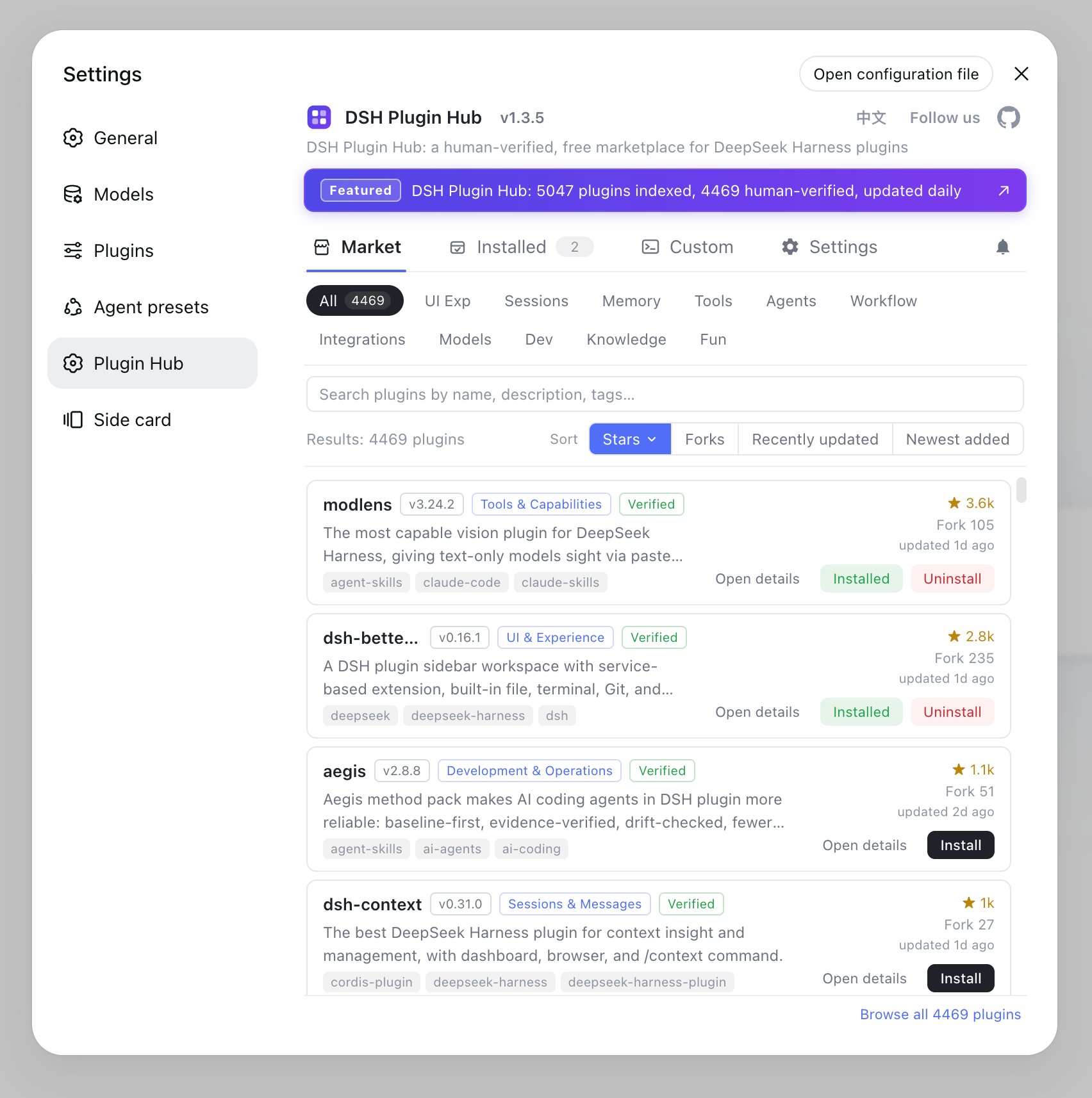
Install DSH Plugin Hub with a single command (npm recommended): dsh plugin --profile web add dsh-plugin, then restart dsh web. For the full install and usage guide, read Install & Use DSH Plugin Hub.
How to download & install a DSH plugin: three ways
The universal install command is dsh plugin --profile web add <package or Git URL>, then restart dsh web for it to take effect (source). Three common paths:
- Copy the command from the website: open a plugin detail page on dsh-plugin.org and run the copied install command in your terminal;
- One-click install in DSH Plugin Hub: install DSH Plugin Hub first (
dsh plugin --profile web add dsh-plugin), then just click install inside Settings → Plugin Market with live progress; - Install directly from the command line: if you know the package or repo address, run it manually:
# install from an npm package
dsh plugin --profile web add <npm-package>
# install from a GitHub repository
dsh plugin --profile web add github:<owner>/<repo>
Before your first use, boot once with npx @deepseek-ai/dsh web to initialize the web profile; after installing, most plugins take effect on page refresh, and a few need a dsh web restart.
What is dsh-plugin.org? The DeepSeek Harness plugin hub
dsh-plugin.org is a community-maintained DeepSeek Harness plugin hub that collects, categorizes, human-verifies, and updates plugins daily, offering free browsing, search, download, and installation. What it does:
- Categories & search: browse by category — UI & experience, tools & capabilities, models & memory, dev & ops, and more — with full-text search;
- Human verification: every plugin shows a compatibility status —
verifiedmeans community-checked,unconfirmedmeans not yet checked — plus its source (npm or GitHub), stars, and last update, so you can judge before installing; - Listing mechanics: public GitHub repos with the
dsh-plugintopic are auto-discovered, or submit manually via the submit a plugin page; - Bilingual: plugin descriptions, tutorials, and FAQs are published in Chinese and English.
It is an independent community project with no affiliation to DeepSeek AI. To dig into the in-app marketplace, read Install & Use DSH Plugin Hub; for the generic install command, see How to install DSH plugins.
Notes & limitations
Before hunting for and installing plugins, keep these three points in mind: independent project, compatibility status, and install source.
- Independent project: the website hub and DSH Plugin Hub are community projects with no affiliation to DeepSeek AI, and they are not official recommendations (source);
- Check compatibility status:
unconfirmedplugins are not yet human-verified — review the repo's stars, last update, and README before installing; - Install source differences:
github:-sourced plugins may be distributed without build artifacts and fail to load — switch to the npm version; if a plugin update fails, you can also reinstall from the website detail page or the Hub.
Sources: dsh-plugin.org, dshplugin/dsh-plugin-hub, dsh CLI README
FAQ
Four places: the dsh-plugin.org plugin hub (browse by category, search, copy install commands), the in-app DSH Plugin Hub (Settings → Plugin Market, one-click install), GitHub (repos with the dsh-plugin topic), and npm (DSH plugin packages). The website hub has the largest, most thoroughly verified catalog — start there.
Open the plugin detail page and copy the install command, run dsh plugin --profile web add <package> in your terminal, then restart dsh web. Or install DSH Plugin Hub and click to install in-app. The universal format is dsh plugin --profile web add <package or Git URL>.
dsh-plugin.org is a community-maintained DeepSeek Harness plugin hub with no affiliation to DeepSeek AI. It collects, categorizes, and human-verifies plugins, updated daily; every plugin shows a verified / unconfirmed compatibility status and its source, so check status, stars, and last update before installing.
They share the same data source. The website collects, human-reviews, and publishes community plugins daily; DSH Plugin Hub is a community marketplace DSH plugin running inside DeepSeek Harness (Settings → Plugin Market) that pulls the latest catalog from that same source after install, with no manual upgrade needed.
Boot once with npx @deepseek-ai/dsh web to initialize the web profile, then find a plugin on dsh-plugin.org and copy the install command, or install DSH Plugin Hub and click install. Run dsh plugin --profile web add <package>, restart dsh web, and the plugin's capabilities appear in the Web UI.
Sources
- dsh-plugin.org plugin hub· dsh-plugin.org
- dshplugin/dsh-plugin-hub· dshplugin
- dsh CLI README· deepseek-ai