DeepSeek Harness compaction: DSH plugin triggers, loss/setup
Context compaction is one optional seam in the DeepSeek Harness context pipeline, not the pipeline itself: it takes a selected slice of surface history and folds it into a single summary node (source). A DeepSeek Harness session is an append-only event log from which the message history is derived and never stored separately, so "saving space" cannot mean deleting events. That one constraint explains almost everything about how compaction behaves. This guide answers three questions in order: what compaction is, when it fires and exactly what it costs you, and which DSH plugin context tools and settings sit around it.
What DeepSeek Harness context compaction is: folding history into one summary
Compaction does one thing: it takes a selected stretch of surface history and replaces it with a single summary node (source). Because the session log is append-only, compaction does not delete events; it performs one replacement on the derived message surface. Three points carry the whole idea:
- It is a capability seam, not the backbone — like bash, it splits into a Service Definition (
dsh-compaction, exposingctx.compaction), a Service Provider (a backend such asdsh-compaction-basic) and a user-facing Consumer (dsh-command-compact). Expected: swapping the backend does not change how the callers above it work. - Compaction writes three log-only events —
compaction/start,compaction/summaryandcompaction/end, recording the lock, the summary, the selected range and the shadowed seqs, and never entering the message surface directly. Expected: the compaction process itself stays invisible to the model. - The only surface change is that one summary — the summary rides on one
user/messagecarryingsurfaceOp: { op: 'replace', startSeq, endSeq }. Expected: next turn the model reads the summary instead of the whole hidden stretch.
Why build it as a replace rather than a delete? Because the session log is the single source of truth and replay re-derives everything from the same event set. Deleting events would make replay disagree with itself, while one replace shrinks what the model sees and keeps the log intact. That is the mechanism behind "compacted but traceable".
Beware that "dsh-compaction" names two different things. The first is the official capability seam package dsh-compaction, which only exposes the ctx.compaction interface and belongs to the DeepSeek Harness compaction subsystem. The second is the community plugin ljsysfurryace/dsh-compaction that happens to share the name, replacing default LLM summarization with semantic plus physical dual-track KV compression (about 28.4x, with no extra LLM calls). One is an official interface definition and the other a third-party implementation, so when you see dsh-compaction, check first whether the context is official documentation or a plugin entry.
When context compaction triggers and what it loses
Automatic compaction has two trigger reasons, pressure (the limit drawing near) and context-overflow (a provider-confirmed overflow), and compaction is always lossy, so the folded-away detail is not kept in the summary (source). Unpacked:
pressure— the automatic policy runs inside theagent/pre-stepwaterfall event, before the request is derived; when conditions are met it first calls the optional tool-result pruner (ctx.toolResultPruner), re-measures throughctx.tokenMeter, and can even advance the surface without generating a summary. Expected: oversized tool results get trimmed before any summarisation is considered.context-overflow— once the provider has confirmed an overflow, the policy may shrink more aggressively in a single pass as a recovery move. Expected: a session that has errored out can be rescued by compaction instead of forcing a brand-new session.- What you lose — one successful compaction records
shadowedRange(the replaced surface boundary pair),shadowedSeqs(the shadowed node seqs, in surface order) andshadowedTokenCount(an estimated token count). Expected: you can see how much was folded away, but the summary keeps only the gist and drops the detail lossily. - No safe range, no action — when no safely compactable range can be selected (say, one oversized retained unit),
compactIfNeededreturnsnulland writes no log. Expected: it will not compact for the sake of compacting and corrupt the session.
Lined up side by side, the three trigger paths differ in force and boundary:
| Trigger path | Who starts it | When it enters | Force and boundary |
|---|---|---|---|
pressure | Automatic policy | agent/pre-step, before the request is derived | Conservative; may trim tool results, or even advance the surface without a summary |
context-overflow | After the provider confirms an overflow | Recovery stage | More aggressive; one valid shrink to rescue the session |
compactNow manual | User command | Idle session | Ignores the threshold; writes a null-turn marker pair before summarising |
One hard boundary is worth noting: none of these trigger paths automatically protects the hard constraints you place in a hard-to-compact position, such as interface signatures, acceptance criteria or secret names. They only pick by surface range and the selection logic does not understand business meaning, so deciding what must be kept is on you.
One easily missed point: the boundary keeps tool calls paired with their results. A region boundary guarantees that an assistant tool call stays paired with its tool/result, but it need not preserve a whole turn, so earlier-closed steps inside one oversized turn can still be compacted. When a compaction genuinely goes wrong, recovery only returns a retry after the surface replacement generation advances; this is not something a casual retry sneaks past.
DSH plugin options for context compaction and settings
Around compaction the community offers two kinds of DSH plugin: one that "sees the context" (visualization) and one that "actually shrinks it" (a compaction engine or auto-compactor), and the single entry point for finding and installing them is DSH Plugin Hub. Split by kind:
- Diagnostic visualization — the representative is dsh-context: it provides a Context panel and a
/contextcommand that draw the context composition, its evolution and compaction events, and it is read-only. Expected: you first see which block is growing and which stretch was compacted before deciding what to compact. - Compaction execution — for example dsh-compaction-instant (near-lossless compaction without an LLM, with
recall/searchlook-back) and dsh-context-compactor (auto-summarising at 80% usage and validating that the token count dropped). The first leans on millisecond speed with zero model calls; the second on threshold-triggered auto-compaction and overflow recovery. Expected: a long session's occupancy curve gets pushed down after install. - How to install — visualization plugins are usually standard npm packages, one command:
Expected: the terminal echoes that it joined thebash
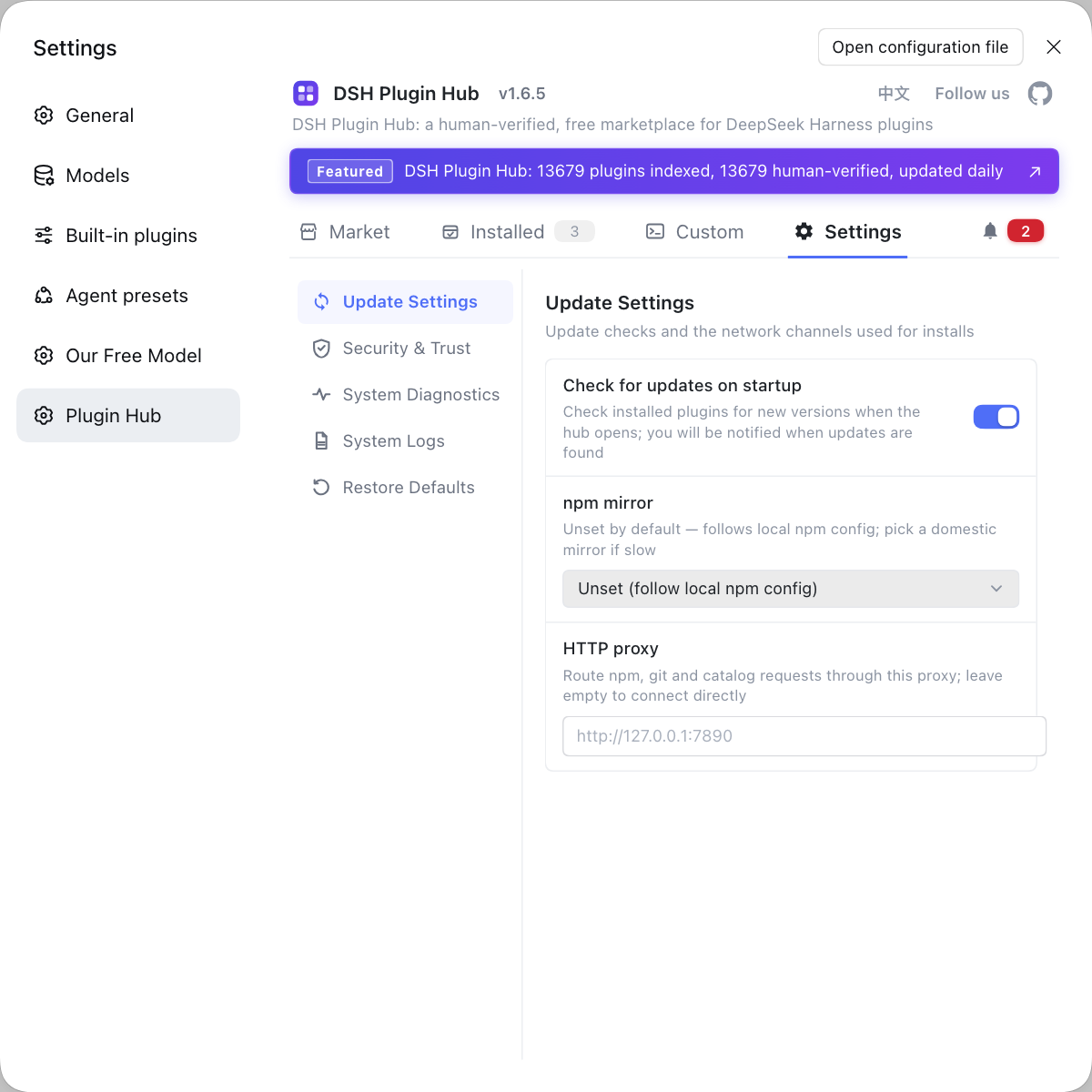
dsh plugin --profile web add dsh-contextwebprofile, and a Context tab appears on the left after you startdsh web. - Where the settings live — update sources, the npm mirror, a proxy and install trust are configured together on the Hub's "Settings" page; once a compactor is installed, its own settings card governs the threshold (for example the 80% trigger line). Expected: trigger thresholds, caching and safety confirmations for compaction plugins are managed in one place.
One-line division of labour: visualization answers "what is installed right now", compaction answers "how do I fit more in" — do not use a diagnostic tool as a slimming tool.
Two typical scenarios map straight onto this choice. Scenario one, "it is only growing, nothing has errored": install dsh-context first to see which turns pushed the context up, and if it is just a pile of tool results, let the tool-result pruning inside automatic pressure triggering hold the line rather than swapping the compaction backend. Scenario two, "it already throws maximum context length": recovery is the priority, so pick a compactor with overflow auto-recovery or near-lossless look-back, rescue the session, then think about long-term settings. The two scenarios point in completely different directions — one is "do not compact blindly", the other is "save the session first".
Notes and limits for using DSH plugin compaction
Hold on to three facts — you compact the view, you lose the detail, the raw log stays — and compaction stops misreading.
- Compaction is lossy: the summary keeps only the gist, so interface signatures and acceptance criteria belong somewhere that is not easily compacted, or in a cross-session memory DSH plugin.
- Do not expect the summary to hold the full text: to reproduce the original exactly, read the underlying log by
seqwhere no replace landed, rather than searching inside the summary. - Manual compaction depends on the command being present: the user entry point for
compactNowcomes fromdsh-command-compact, and whether the command shows up depends on which consumer plugin your profile installed. - Do not brute-force an overflow: if you actually hit
maximum context length, handle it the way the context window overflow guide describes; compaction is one recovery move, not a universal fix. - Look before you compact: compare composition before and after with the dsh-context context visualization guide so the effect is verifiable rather than a feeling.
- Do not stack lookalikes: several compaction DSH plugins installed at once can fight each other; get one working first, then add another.
Rather than hand-deleting messages in a long session and guessing which stretch to compact, let DSH Plugin Hub keep your context and compaction DSH plugins in one place, with update sources, mirrors and install trust configured on one screen and both what is installed and what got compacted visible. Its home page is https://dsh-plugin.org/.
Sources: DeepSeek Harness docs - compaction subsystem, DeepSeek Harness docs - session subsystem, dsh-context (DSH Plugin Hub).
FAQ
Context compaction is an optional DeepSeek Harness capability that replaces a stretch of history with one summary node, and it is not part of the agent loop backbone. The official docs classify it as a capability seam: dsh-compaction exposes the ctx.compaction interface, a backend such as dsh-compaction-basic implements it, and dsh-command-compact is the user-facing consumer. A successful compaction swaps the selected surface range for one summary node, which is the only place it touches model-visible content.
Automatic compaction has two trigger reasons: pressure and context-overflow. Pressure is the policy considering compaction at the agent/pre-step stage when context occupancy nears the limit; context-overflow is the fallback once the provider has confirmed an overflow, and it may shrink more aggressively in one pass. Both enter through compactIfNeeded, and when no safe range can be found the call returns null and writes no log.
Compaction folds a whole surface range into one summary, so detail is lost lossily, but the raw events stay in the session log. It records the shadowed surface boundaries and seq list (shadowedRange, shadowedSeqs) plus an estimated token count, and the summary itself rides on a user/message carrying a replace op. To recover the original text, read the underlying log by seq rather than expecting the summary to hold every detail.
Manual compaction goes through compactNow, whose user entry point is the compaction command provided by dsh-command-compact. compactNow targets an idle session and can shrink effectively even below the pressure threshold; it first writes a standalone marker pair with a null turn, then generates the summary. Whether the command appears in the input box depends on whether your active profile has installed the matching consumer plugin.
Install visualization first, talk compaction later: visualization shows what context is made of, while compaction actually shrinks it, which is observation versus action. A read-only tool such as dsh-context draws the per-turn context sections, the compacted ranges and file activity, so you confirm the bottleneck before deciding what to compact. That ordering beats switching compaction on blindly.
Related Terms
- compaction
- compaction is an optional DeepSeek Harness capability that replaces a stretch of surface history with one summary node, exposed through ctx.compaction and implemented by backends such as dsh-compaction-basic. It is not part of the agent loop backbone.— DeepSeek Harness docs - compaction subsystem
- CompactionTrigger
- CompactionTrigger is the DeepSeek Harness type that expresses why automatic compaction fired, taking one of two values: pressure or context-overflow. The first is the limit drawing near; the second is a provider-confirmed overflow.— DeepSeek Harness docs - compaction subsystem
- surfaceOp
- surfaceOp is the surface metadata on a DeepSeek Harness session event, declaring how that event joins the derived message surface. The only surface change compaction performs is one user/message with a replace op covering the shadowed range.— DeepSeek Harness docs - session subsystem
- compaction/start
- compaction/start is the log-only DeepSeek Harness event written when compaction begins, taking a log-recorded lock. Together with the paired compaction/end it brackets the whole operation, and a mid-way crash shows up as a detectable leftover lock.— DeepSeek Harness docs - compaction subsystem
Sources
- DeepSeek Harness docs - compaction subsystem· deepseek-harness
- DeepSeek Harness docs - session subsystem· deepseek-harness
- dsh-context (DSH Plugin Hub entry)· dsh-plugin.org