Install a DSH plugin in DeepSeek Harness: 3 entry points
Installing a DSH plugin comes down to three entry points: click-to-install in the DSH Plugin Hub market, install from the command line with dsh plugin --profile web add, or install from a local directory or offline package — choose according to whether you have a UI and whether you have a network.
DSH plugin install overview
This guide answers how to install a DSH plugin with a single three-entry cheat sheet: use the market to save effort, the command line for flexibility, and a local or offline package when the network is restricted. DeepSeek Harness is built on an "everything is a plugin" architecture, so "installing a plugin" really means adding it as a dependency into the current profile directory (default ~/.dsh/profiles/web), which the plugin tree then loads on the next start (source). If you haven't got the host running yet, start with How to install DeepSeek Harness. Compare the three entries first:
| Entry | Best for | Requires | How it takes effect |
|---|---|---|---|
| Market install (DSH Plugin Hub) | Fewer commands, visual management | Hub installed, network access | Restart dsh web |
Command-line install (dsh plugin add) | A known package or Git ref, scripting | Terminal + pnpm | Restart dsh web |
| Local / offline install | Intranet, no internet, self-edited source | A local directory or offline package | Restart dsh web |
In one line: if you have internet and dislike fuss, use the market; if you have internet and want precise control, use the CLI; if you have no internet, use local or offline. All three end at the same action — write the dependency into a profile directory, then restart so it mounts.
Entry one: install from the DSH Plugin Hub market
Installing a DSH plugin from the market means no commands at all: open the market, search or filter by category, click "Install", then confirm "Install now" in the dialog. Its catalog is fed from the same source as dsh-plugin.org, which currently indexes 10,000+ community plugins (source). Go in order:
- Open "Plugin market" — enter DSH Plugin Hub from the sidebar; it lands on the market by default. Expected: the plugin card list finishes loading, with a search box and a catalog count at the top.
- Search or narrow by category — search covers plugin name, description and tags; typing the plugin or repo name is most precise. Expected: the list narrows live, with the result count shown above it.
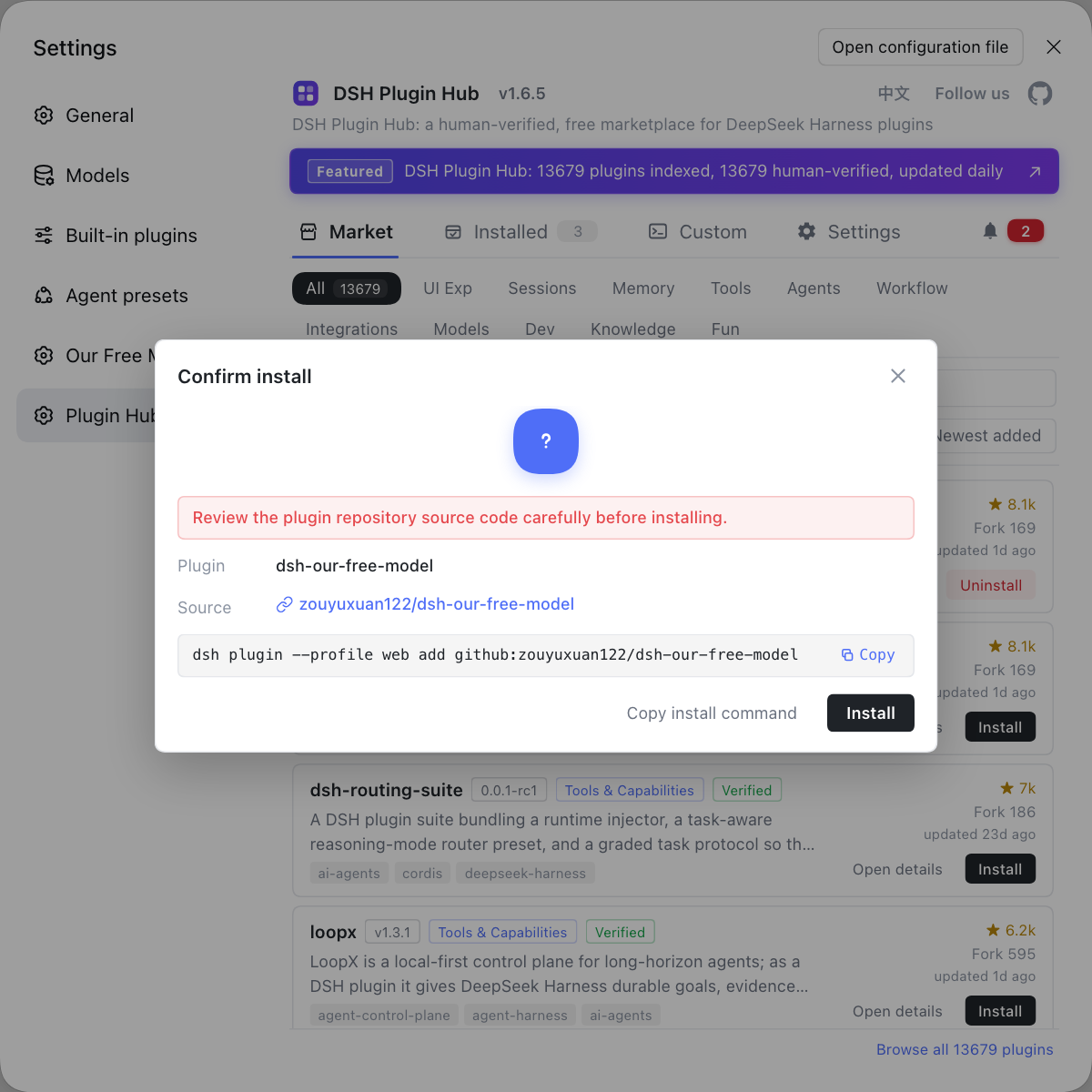
- Click "Install" on the target card — nothing installs yet; this only opens a confirmation. Expected: a "Confirm install" dialog appears; anything already installed shows "Installed" and follows update semantics.
- Check the three items, then click "Install now" — verify the plugin name, the source repo and the install command that will run, then confirm. Expected: the dialog switches to live progress and prints output line by line; clicking "Cancel" sends no install request at all.
- Restart the host as prompted — the result dialog offers "Restart now / Restart later". Expected: after the restart the plugin's capabilities appear and its status dot turns running.
When picking a DeepSeek plugin, check the compatibility badge (verified / unconfirmed) and the last update time on the card before deciding. Hub also takes over "what happens after" an install: the notification center records every install and update success or failure, and a failed one can be filed as an issue in one click; the installed list manages every plugin in the current profile with search, source filtering, update and uninstall. For a click-by-click walkthrough of this path and the confirmation dialog, see DeepSeek Harness plugin install: the shortest path.
Entry two: command line with dsh plugin add (profile ownership)
The unified command-line form is dsh plugin --profile <name> add <package-or-git-ref>, which forwards everything after --profile to pnpm inside that profile's directory (source). The crux is profile ownership: web is the profile the Web UI uses, headless is the no-UI mode, and installing into one only affects that one, leaving the other untouched. Go in order:
- Start once so the profile initializes — run
npx @deepseek-ai/dsh web. Expected: first launch generates thewebprofile from the bundled template (directory~/.dsh/profiles/web). - Install an npm package — run
dsh plugin --profile web add dsh-plugin. Expected: pnpm prints anaddedline and the dependency is written to the profile'spackage.json. - Install a GitHub repo — run
dsh plugin --profile web add github:<owner>/<repo>. Expected: it pulls and installs from the git source, with output like the previous step. - Verify the dependency really landed — run
dsh plugin --profile web why <package>. Expected: it prints the dependency chain, confirming the package wasn't pulled in indirectly by something else. - Restart
dsh web— a DSH plugin installed from the CLI also needs a host restart to mount. Expected: the tools or UI entries the plugin provides show up.
# install an npm package
dsh plugin --profile web add dsh-plugin
# install a GitHub repo
dsh plugin --profile web add github:<owner>/<repo>
# confirm why a dependency is installed
dsh plugin --profile web why dsh-plugin
Why have --profile at all? Because DeepSeek Harness isolates "config + plugins" per profile: one profile equals one set of bundle patch layers plus its own node_modules, and the directory you launch dsh from becomes its default workspace root. So a plugin you want in both Web and headless mode must be installed into each. For the command's syntax details, where the action word goes and real plugin examples, see How to install a DSH plugin: the dsh plugin add command.
Entry three: local directory and offline install (works without internet)
When the plugin is source you checked out yourself, or the machine cannot reach npm or GitHub, go local: relative paths (., ../plugin and file:/link: forms) anchor to the directory you run the command from, so add . installs the copy in your hand rather than a same-named package from the internet (source). Go in order:
- Enter the plugin source directory — run
cd ~/code/my-plugin. Expected:pwdpoints at that directory. - Install this directory's copy — run
dsh plugin --profile web add .. Expected: pnpm installs from the local path, installing the source you are editing rather than an online package of the same name. - Reference a sibling with
file:/link:— rundsh plugin --profile web add file:../my-plugin. Expected: it references by file or symlink, so local edits reflect straight into the profile. - Switch to an offline method — with no internet, use an offline package or an internal npm mirror to avoid any public request. Expected: the install succeeds without touching the public network.
Why keep this path separate? Because intranet development, editing a plugin yourself and reproducing CI all need to bypass the public network: a local directory lets you edit and try as you go, and an offline package lets a closed network install plugins in bulk. For the details, see Install from a local directory and Offline install.
Notes and limits for using DSH plugins
- A plugin belongs only to the profile it was installed into — one installed in
webdoes not carry over toheadless; switching profiles means installing again. - A restart is usually needed — the files are already in the profile, but the plugin tree loads them on the next start; restarting doesn't lose files, it just mounts them.
- A first add of a git-source plugin can fail — pnpm 10 and later blocks build scripts for git dependencies by default; copy the
allowBuildskey it prints into the profile'spnpm-workspace.yamland rerun. - Installing means running third-party code — a plugin executes on your machine once installed, so read the source repo first and skip anything with unknown origins.
- Don't mix the three entries — don't install the same plugin from both the market and the CLI; it causes version drift, so treat the version in the installed list as the truth.
- Versions change — DeepSeek Harness is in developer preview and the vendor states breaking changes are coming (source), so treat the UI copy and commands as version-specific.
Rather than digging through docs and hand-typing dsh plugin add for every package name while checking the source yourself, put search, one-click install, the confirmation dialog and installed-plugin management on one screen with the market in DSH Plugin Hub.
Source: dsh CLI README, dsh CLI behavior reference, dshplugin/dsh-plugin-hub
FAQ
Installing a DSH plugin in DeepSeek Harness takes one of two paths: the graphical DSH Plugin Hub market, where you click Install and confirm a popup, or the command line, where you run dsh plugin --profile web add <package>. The two are functionally equivalent; the market saves you from memorizing commands and manages installed plugins visually, while the CLI suits cases where you already know the package name or want to script the install.
dsh plugin --profile web add takes a plugin package name or a GitHub reference, and the command forwards its arguments to pnpm inside the profile directory, installing into ~/.dsh/profiles/web. Whichever profile you install into is the only environment affected; web and headless stay independent, and profile ownership is decided entirely by --profile.
With no internet, install a DSH plugin from a local directory or an offline package: place the plugin source on the machine and run dsh plugin --profile web add . inside that source directory, where the relative path anchors to the current folder. Offline packages work the same way through a file: reference or an internal npm mirror, without any public network access.
A DSH plugin almost always needs a host restart to be mounted, because the plugin tree loads it on the next start. After installing, restart dsh web: interface plugins change the UI and tool plugins appear in the tool list. If nothing changes, check the plugin's declared compatibility version, then run dsh plugin --profile web why <package> to confirm the dependency really reached the profile.
That DSH plugin error comes from pnpm 10 and later not allowing git dependency build scripts by default: a git-sourced plugin needs to run prepare during install, so pnpm asks you to copy an allowBuilds key into the profile's pnpm-workspace.yaml. Copy it, then rerun dsh plugin --profile web add, or install the plugin's npm package version instead.
Related Terms
- DSH plugin
- A DSH plugin is the smallest unit installed into a DeepSeek Harness profile to extend its capabilities, distributed as an npm package or a GitHub repository and installed into the profile directory through dsh plugin add.— dsh CLI README
- profile
- A profile is an ordered stack of plugin-bundle patch layers for DeepSeek Harness, stored under $DSH_HOME/profiles/<name>; the --profile flag decides which profile a plugin installs into, and web and headless stay independent.— dsh CLI README
- dsh plugin add
- dsh plugin add is the DeepSeek Harness subcommand for installing plugins, written as dsh plugin --profile <name> add <package-or-git-ref>; it forwards its arguments to pnpm inside the profile directory to complete the install.— dsh CLI behavior reference
- $DSH_HOME
- $DSH_HOME is the user data root of DeepSeek Harness, defaulting to ~/.dsh; profiles and their installed plugins live under $DSH_HOME/profiles/<name>.— dsh CLI README
Sources
- dsh CLI README· deepseek-ai
- dsh CLI behavior reference· deepseek-ai
- dshplugin/dsh-plugin-hub· dshplugin