dsh-find-plugin: finding DSH plugins inside DeepSeek Harness
dsh-find-plugin is a DSH plugin you install into a profile: it lets the DeepSeek Harness agent search the GitHub plugin ecosystem right inside a session, returning repos and install commands ranked by stars — it is not a dsh terminal subcommand, you use it in conversation.
DSH plugin overview
This guide answers three things: what dsh-find-plugin is, how to install and use it, and what to do when a search comes up empty. In one line, it solves "I don't know which plugins exist or how to find them", moving a task that used to happen in a browser into the session (source). For newcomers, working out which DSH plugins are worth installing often matters more than memorizing commands. It is not the same as an overview of "how to find plugins" — that one covers strategy, this one covers the plugin itself. To get the entry points straight first, see Where to download and install DeepSeek plugins.
What dsh-find-plugin is: an in-session DSH plugin discovery tool
dsh-find-plugin is a plugin-discovery DSH plugin distributed as an npm package that lets the agent search GitHub dsh-plugin topic repos in real time, returning the repo name, a one-line description and a runnable install command ranked by stars (source). A few points:
- It is not a
dshcommand — there is nodsh find-pluginsubcommand in the terminal, so don't expect to type one to search; what searches is the agent in the session, calling the tool this plugin provides. - Two data sources — it queries GitHub repos tagged in real time and merges a ready-made list, then ranks by stars and de-duplicates before returning results.
- Results are runnable — every result carries an install command, and the agent can run the install for you, saving the copy-paste step.
- Natural language works — you can say "find me a plugin that does memory" without knowing an exact package name.
- Same-name implementations are not unique — the community may have several implementations whose slug is dsh-find-plugin, published by different owners, close in function but different in detail, so judge by compatibility status and maintenance activity.
It complements the market: the market installs and manages, this one finds. You'll notice both share one data foundation — public GitHub repos carrying the dsh-plugin topic, so a plugin visible in one surface is usually visible in the other and you can start from whichever you're already in.
How a plugin repo gets discovered: the dsh-plugin topic
The official README tells plugin authors to add the dsh-plugin topic to their repository for discoverability (source). That topic is exactly the data foundation dsh-find-plugin queries: once a public repo carries it, the catalog picks it up and in-session search can find it, with no manual submission from the author. A repo without the topic, by contrast, is invisible to anything that searches by topic — which is precisely why the fallback section below has you search GitHub for topic:dsh-plugin directly. Nothing else is required from the author, which keeps the whole discovery path low-friction.
How to install and use dsh-find-plugin: setup, triggers and queries
Usage has two halves: install it into a profile from the command line, then trigger a search in a session in natural language (source). Install and trigger in order:
- Start the profile once — run
npx @deepseek-ai/dsh web. Expected: first launch generates thewebprofile and~/.dsh/profiles/webappears. - Install as an npm package — run
dsh plugin --profile web add dsh-find-plugin. Expected: pnpm printsaddedand the dependency is written to the profile'spackage.json. - Or install from the GitHub repo — run
dsh plugin --profile web add github:awesome-dsh-plugin/dsh-find-plugin. Expected: it installs from the git source with the same effect as the previous step. - Restart
dsh web— so the plugin tree reloads. Expected: the search tool the plugin provides is registered in the session. - Trigger it in the session — just say "find me a plugin that does memory" or "is there one that supports image input". Expected: the agent returns matching repos, star counts and runnable install commands.
- Let the agent install it (optional) — once you trust the result, you can have the agent run the install command directly. Expected: the plugin lands in the current profile and is usable after a restart.
On "parameters": this is not driven by subcommand flags — what you tune is the query itself, where a plugin or repo name is most precise and a function word is only a fallback. This matches the search box in the plugin market, where search covers plugin name, description and tags (source). In other words, dsh-find-plugin searches inside the session and the market searches in the UI, hitting the same data. For how to phrase a search term more precisely, see How to search DSH plugins.
What the returned install command looks like
Every result comes with an install command in the same form the CLI uses: dsh plugin --profile <name> add <package-or-git-ref>, the very subcommand you would run by hand (source). An npm package is given by name, and a GitHub repo as github:<owner>/<repo>. So you can let the agent run it, or copy the command out, verify the source yourself and run it — what the result hands you is exactly what you'd type in the terminal.
What to do when a search returns nothing: rephrasing, categories and GitHub topics
An empty result does not mean the plugin doesn't exist; usually the keyword is off or the plugin isn't indexed. Fall back through four steps — rephrase, browse categories, check the GitHub topic, then a custom install (source). Work through them in order:
- Rephrase more precisely — swap a function word such as "memory" for a concrete plugin or repo name, or an English synonym, and retry. Expected: results go from empty to present, or from a pile of irrelevant hits to the target.
- Use category filtering instead of keywords alone — browse the catalog by category in the DSH Plugin Hub market. Expected: you see plugins the keyword missed, under the matching category.
- Query the GitHub topic directly — search GitHub for
topic:dsh-pluginto find repos the catalog hasn't indexed. Expected: you find plugins that are not in the catalog yet but do exist. - Custom-install what's outside the catalog — if a plugin really isn't listed, use the market's "Custom install" channel (npm package, GitHub source or a DSH command). Expected: even with no search hit, it can still be installed into the current profile.
- Pick the actively maintained one among same names — when several implementations share a slug, compare stars and last update time. Expected: you choose the one still maintained, avoiding a stale version.
In one line: in-session search is the fast path, categories and topics are the fallback, and custom install is the final exit for "install it even though it can't be found".
Notes and limits for using DSH plugins
- It's a plugin, not a command — don't treat dsh-find-plugin as a built-in
dshsubcommand; installing and uninstalling still belong todsh plugin add/removeor the plugin market. - A hit isn't automatically compatible — star ranking reflects popularity only; a found DeepSeek plugin still needs its compatibility status and last update time checked before you decide.
- It depends on index coverage — plugins that don't carry the
dsh-plugintopic and aren't in the catalog are likely unfindable in-session and must be found by category or topic by hand. - In-session triggering depends on the tool being enabled — restart after installing, and confirm the tool is enabled under the current profile and preset, or the agent can't reach it.
- Installing means running third-party code — before letting the agent auto-install, confirm the source repo is trustworthy; don't treat "install it anyway" as skipping review.
- Same names need separating — the same name isn't necessarily the same author; open the source repo first to confirm the owner and README.
Rather than having the agent search one plugin at a time while you verify its source and install method yourself, browse candidates by category first in the market of DSH Plugin Hub, where search, compatibility status, stars and update time all sit on the card.
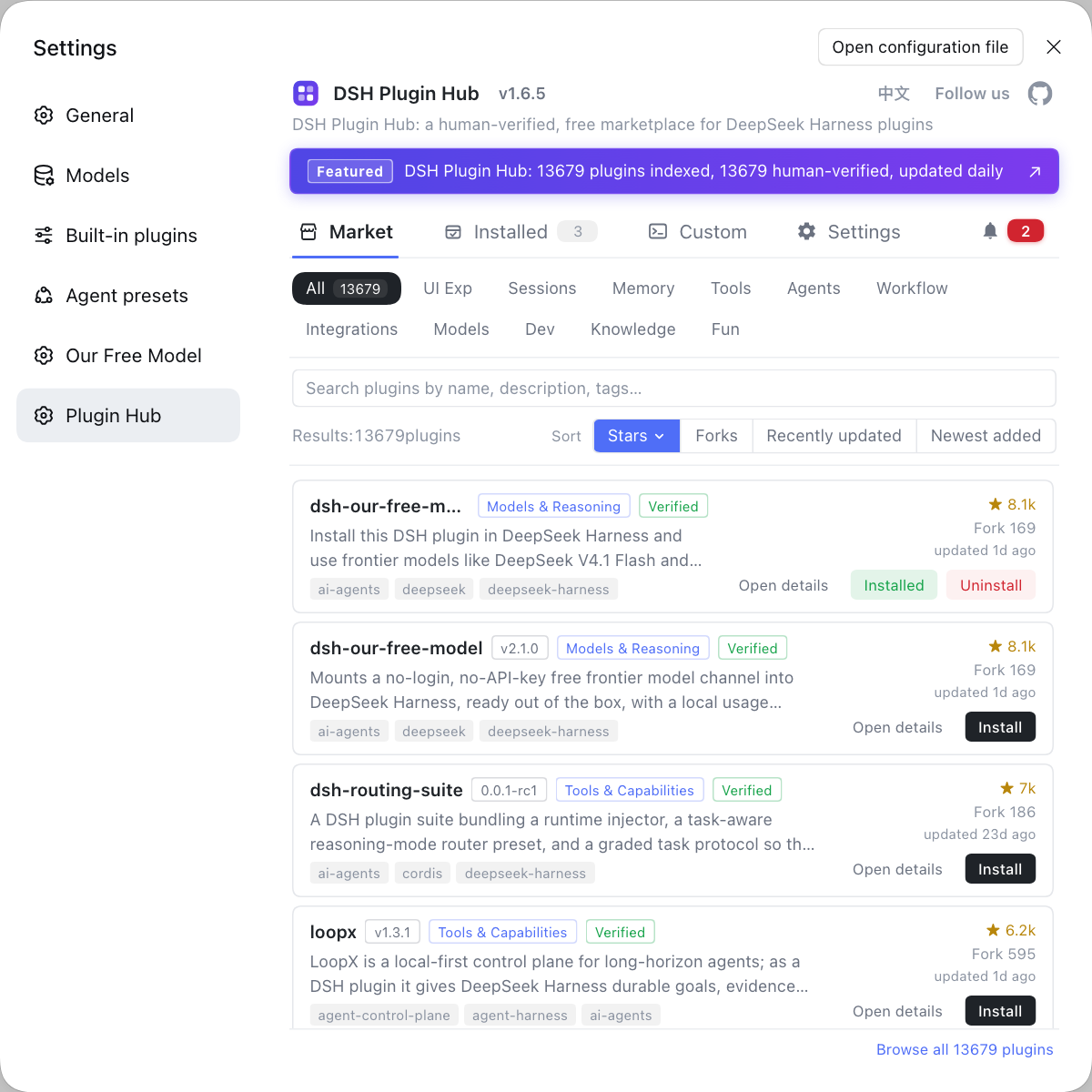
Source: awesome-dsh-plugin/dsh-find-plugin, dsh-plugin.org plugin market, dsh CLI README
FAQ
dsh-find-plugin is a DSH plugin installed into a profile and used in-session, not a plugin-management command that dsh ships with. It lets the DeepSeek Harness agent search the GitHub plugin ecosystem in a conversation, rank results by stars and return repos plus install commands, while installing and uninstalling still belong to dsh plugin add / remove or the plugin market — one finds, the other installs.
dsh-find-plugin installs by starting the profile first and then running dsh plugin --profile web add dsh-find-plugin; after a restart of dsh web it is ready to use. You don't trigger it with a command but by asking in natural language inside a session, for example "find me a plugin for memory", and the agent returns matching repos, star counts and runnable install commands that you can have it execute directly.
When a search finds nothing, change the keyword first: a function word like "memory" or "translate" is usually less precise than a plugin or repo name, and an English synonym is worth a second try. You can also filter by category in the market, or search GitHub directly for topic:dsh-plugin to find repos the catalog hasn't indexed, and plugins outside the catalog install through the market's custom-install channel.
Because a dsh-find-plugin is a community implementation rather than a single official one, the same slug can be published by different owners with close features but different code. Compare the compatibility badge, stars and last update time on the card, prefer the one that is actively maintained and from a trusted source, and open its source repo to read the README before installing.
dsh-find-plugin ranks mainly by GitHub stars, so popular plugins surface first, but stars only reflect popularity and not whether a plugin fits your DSH version. Before installing, still check the compatibility status and last update time, ask the agent for the repo URL, and read the source and README yourself before deciding.
Related Terms
- dsh-find-plugin
- dsh-find-plugin is a plugin-discovery DSH plugin that lets the DeepSeek Harness agent search the GitHub plugin ecosystem in-session, rank results by stars and return repos plus install commands.— awesome-dsh-plugin/dsh-find-plugin
- dsh-plugin topic
- The dsh-plugin topic is a GitHub repository topic tag; public repos carrying it are auto-discovered and listed by the plugin catalog, and it is also the main data source dsh-find-plugin queries.— dsh-plugin.org plugin market
- plugin discovery
- Plugin discovery is the process of finding which plugins exist before installing any; dsh-find-plugin moves it into the session, replacing browsing across several sites with a natural-language query.— awesome-dsh-plugin/dsh-find-plugin
- DSH Plugin Hub
- DSH Plugin Hub is the community plugin market client for DeepSeek Harness, offering browsing, search, one-click install and installed-plugin management, with catalog data synced from dsh-plugin.org.— dsh-plugin.org plugin market
Sources
- awesome-dsh-plugin/dsh-find-plugin· GitHub
- dsh-plugin.org plugin market· dsh-plugin.org
- dsh CLI README· deepseek-ai