dsh web authentication required: DeepSeek Harness, port 3080
Every DeepSeek Harness Web UI start generates a random startup token and prints a ?token= URL once, and only that URL turns the token into a browser cookie; requests without a valid cookie all receive the same minimal 401, which the browser renders as authentication required. This article walks the mechanism, three recovery moves, the port and bind rules, and how to tell the two kinds of 401 apart.
DeepSeek Harness web authentication: where authentication required comes from
A DeepSeek Harness Host process generates a random startup token on every start, and only GET /?token=... exchanges the process token for a cookie and redirects to a clean /; API paths and the Authorization header never accept that token (source). A full exchange looks like this:
- Start dsh web — the terminal prints and opens a token URL once. Expected: an address like
http://127.0.0.1:3080/?token=..., printed only once, because the token is never persisted and changes on the next start. - Open that URL once —
GET /?token=...swaps the process token for a cookie and redirects to a clean/. Expected: the address bar returns tohttp://127.0.0.1:3080/and later visits need no token. - Request without credentials — missing and invalid credentials get the same minimal 401. Expected: the browser shows a minimal authentication required response instead of the normal page.
- Request that fails the origin check — Host / Origin validation runs first and returns 403. Expected: 403 and 401 mean different things — 403 is an untrusted origin (DNS rebinding and cross-site defence), 401 is a trusted origin without a valid browser session.
Two details cause false conclusions: non-index static assets stay public, so "the images load" does not prove authentication; and the token URL is a process credential, so treat it as sensitive output and never paste it into a chat or an issue.
Three recovery moves when DeepSeek Harness dsh web will not open
Recover from cheapest to heaviest: reuse the token URL printed after a restart, then delete the credential record and restart to revoke every session, and only then switch browser or port (source). In four steps:
- Restart and open the new token URL once — stop and rerun
npx @deepseek-ai/dsh web. Expected: the browser receives a fresh cookie and the page works again; an old token URL still carrying a valid cookie also redirects to a clean/. - To revoke every browser session, delete the credential record and restart — remove the
client-connection/browser-sessionrecord from$DSH_HOME/.credentials.yaml, then restart the process. Expected: all existing cookies stop working and a fresh token URL is required; note the running process keeps the key it already loaded, so the deletion takes effect on the next activation. - Re-authenticate after switching browser or port — a cookie is bound to a hostname and port. Expected: the new address needs one fresh exchange with the newly printed token URL, and the old cookie will not follow.
- There is no logout to click — the product ships no logout operation. Expected: global revocation is "delete the credential record and restart", while a single session is dropped through your browser's site data controls.
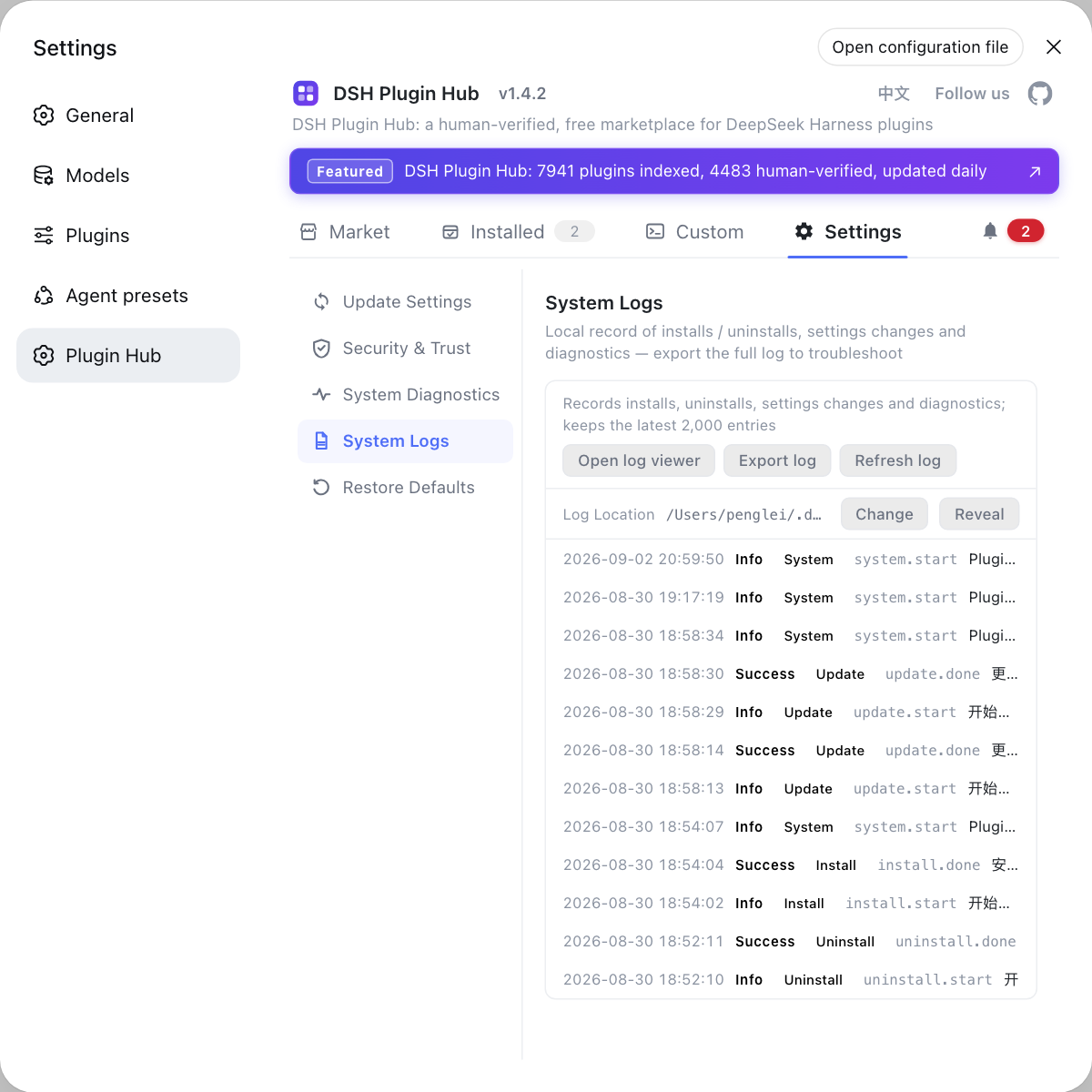
Web access problems also show up in the System Logs page of DSH Plugin Hub: read the level and category of each line to tell a startup-stage problem from a request-stage one.
DeepSeek Harness port and binding: 127.0.0.1:3080 by default, no --host 0.0.0.0
dsh web binds 127.0.0.1:3080 by default, and the CLI offers only the loopback choice while rejecting --host 0.0.0.0 — the token and cookie authentication does not widen that deployment contract (source). Handle ports in three steps:
- Confirm the address — the default is
http://127.0.0.1:3080, and a local start also opens your default browser; a start over SSH only prints the host URL, because the local forwarding address belongs to the SSH client or editor. Expected: a URL line in the terminal; no browser window does not mean the server failed. - Change the port —
--portbelongs to the web app, so it goes after the command:dsh --profile web --port 8080(equivalentlydsh web --port 8080). Expected: the service listens on the new port andhttp://127.0.0.1:8080opens; re-authenticate once as in step 3 of the previous section. - Do not try to bind 0.0.0.0 —
dsh webrejects--host 0.0.0.0, because binding a non-loopback address exposes a tool-capable Host directly. Expected: the flag exits with a usage error; for remote use, forward the port over SSH and follow 127.0.0.1:3080 unreachable, while UI-side problems are covered in the Web UI blank page guide.
Telling two DeepSeek Harness 401s apart: web session vs model key
DeepSeek Harness produces 401s from two places: a web-layer 401 means the browser session is invalid, while a model-layer 401 means the model API key or endpoint was rejected — they are fixed in completely different places (source). Triage in four steps:
- See where the 401 appears — a 401 the moment you open the page is web layer; a 401 only when a conversation calls a model is model layer. Expected: you know immediately whether model settings are even relevant.
- Web layer: exchange a fresh cookie — follow steps 1 and 2 of the previous section. Expected: the page recovers, and editing model keys would have changed nothing.
- Model layer: check key and endpoint — verify the key, base URL and model name under Settings → Models. Expected: model calls resume; the full walkthrough is in model configuration 401.
- 403 is neither — a failed Host / Origin check means the origin is untrusted. Expected: go back to the local address; no key edit and no cookie reset is needed.
For the UI itself start from configuring the DeepSeek Harness Web UI; and if you are not running the web profile there is no page to open at all — compare the modes in the dsh run modes guide.
DeepSeek Harness web auth and port caveats
- The token URL is a process credential: it is the only way to exchange a cookie, runtime diagnostics never reprint it, and losing it means restarting the process for a new one.
- Cookies survive restarts but stay bound to an authority: an unexpired cookie on the same hostname and port keeps working; a different port or hostname always needs re-authentication.
- Revocation is global only: there is no logout; deleting the
client-connection/browser-sessionrecord and restarting revokes every session, while single sessions are dropped through browser site data. - Authentication is not a deployment story: the project states it does not imply network deployment, TLS, forwarded-header interpretation or proxy configuration — use an SSH tunnel for remote access.
- Versions move: DeepSeek Harness is in developer preview and the official repository states that breaking changes will come (source), so treat the wording here as the current state.
Sources: Agent Note: browser startup token authentication, Agent Note: explicit web bind address, DeepSeek Harness README, dshplugin/dsh-plugin-hub
FAQ
The DeepSeek Harness Web UI authenticates with a startup token: every Host process start generates a random token and prints a ?token= root URL once, and only that URL exchanges the process token for a browser cookie. When the cookie is missing or invalid the request gets the same minimal 401, which the browser shows as authentication required — the server is running, the request just has no usable browser session.
Restoring DeepSeek Harness web access has three routes: restart the process and use the newly printed token URL, delete the credential record and restart to revoke every session before authenticating again, or switch browser or port and authenticate with the fresh token URL. Go cheapest first — reuse a new token URL before revoking all sessions.
Yes, because a DeepSeek Harness browser cookie is bound to an authority: the signed payload carries the normalized hostname and port, so changing the port stops the old cookie from matching. An unexpired cookie on the same hostname and port survives a process restart, but a different port needs one fresh exchange with the printed token URL.
No. DeepSeek Harness ships dsh web on 127.0.0.1 and rejects --host 0.0.0.0, and the project states that authentication does not imply support for network deployment, TLS, forwarded-header interpretation or proxy configuration. For remote use, forward the port over SSH, or run headless / SDK modes instead of widening the bind address.
They are different. A 401 in the DeepSeek Harness web layer means the browser session is invalid (missing and invalid credentials return the same minimal response), while a 401 from the model layer means the API key or endpoint was rejected. Exchange a fresh cookie for the first and check the model settings for the second; a 403 is a third case, a failed Host / Origin check.
Related Terms
- startup token
- A startup token is the random token a DeepSeek Harness Host process generates on every start; it is printed once through the application root URL so a browser can trade it for a persistent session cookie, and it is never persisted or reused across starts.— Agent Note: browser startup token authentication
- browser session cookie
- A browser session cookie is the signed credential DeepSeek Harness issues after authentication; it is bound to a hostname and port, is host-only with Path=/, HttpOnly and SameSite=Strict, and its absolute lifetime is governed by cookieMaxAgeDays (30 days by default).— Agent Note: browser startup token authentication
- $DSH_HOME/.credentials.yaml
- $DSH_HOME/.credentials.yaml is the local file where DeepSeek Harness keeps credentials; the browser session signing key lives in its client-connection/browser-session record, so deleting that record and restarting the process revokes every existing cookie.— Agent Note: browser startup token authentication
- 127.0.0.1:3080
- 127.0.0.1:3080 is the default address of dsh web: 127.0.0.1 keeps it reachable only from the local machine and 3080 is the default port, changeable with dsh --profile web --port 8080.— DeepSeek Harness README
Sources
- Agent Note: browser startup token authentication· deepseek-ai
- Agent Note: explicit web bind address· deepseek-ai
- DeepSeek Harness README (run and SSH notes)· deepseek-ai
- dshplugin/dsh-plugin-hub GitHub repository· GitHub