Uninstall DSH plugins in the right order (Harness deps)
Uninstalling a dsh plugin is all about order, because a profile keeps two manifests — dependencies records the package and dsh.profile.bundles records the load layer — and the moment one is cleared first, the profile goes looking for a package that no longer exists and reports plugin tree failed to load at startup. The correct sequence is fixed: stop the process → remove upper-layer plugins → touch shared dependencies and core packages → clean profile directories and caches last. Get the order right and every step is clean; get it wrong and you have to go back and de-mine.
Why order matters: remove the dsh plugin before the core packages and deps
This sequence is not fussiness — it follows from "two manifests plus one protection" (source). Three reasons:
- The two manifests must move in lockstep:
dsh plugin removeclears both the pnpm dependency and the matching load layer indsh.profile.bundles, whereas deleting thenode_modulesdirectory by hand only touches files and leaves both manifests intact, so the profile still resolves a package that is gone. Deleting files first and patching manifests later is the classic wrong order. - Shared dependencies cannot be removed while another plugin references them: pnpm will not remove a package other dependencies still need. Touch the base package first and it is either refused or leaves a plugin referencing a missing package — both cases mean cleaning up afterwards.
- Editing files while a process is loading plugins leaves a half-finished state: deleting a plugin's files while it is loaded tends to leave a partially resolved scene. The first step is always quitting the running
dsh webor desktop app.
In one sentence: the goal of ordering is to keep every profile manifest, at every step, pointing at packages that really exist.
The right DSH plugin removal order in three cases: single, batch, official
All three cases share the skeleton "stop the process → record the scene → remove top-down → verify", and differ only in how much the middle step clears. Case by case:
Case 1: removing a single plugin
# 1. Quit the running dsh web / desktop app (Ctrl+C)
# 2. Copy the exact package name, never from memory
dsh plugin --profile web list
# 3. Remove it (rm / uninstall / un are equivalent)
dsh plugin --profile web remove <package>
# 4. Verify both places (next section)
Case 2: removing a batch of plugins
The rule is remove the ones that depend on others first, and the ones others depend on last: clearing the top layer unwinds pnpm's view of the graph level by level until the base package is no longer referenced and can be removed cleanly. You can also pass several names at once (dsh plugin --profile web remove <A> <B>), but that does not change the top-down principle — the least error-prone approach is one at a time with a verification after each.
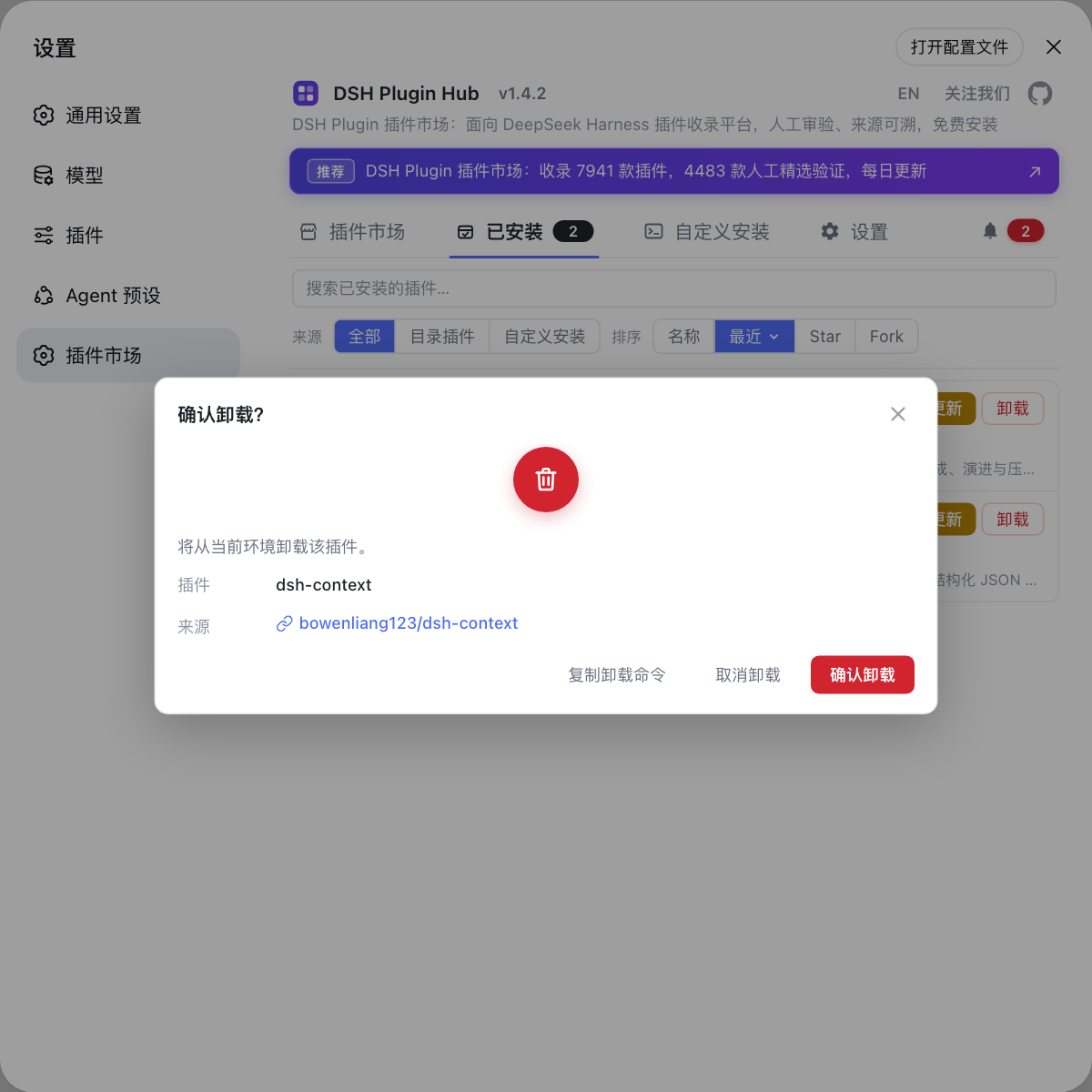
The plugin market gives this a visual path: open Settings → Plugin Market, which is DSH Plugin Hub, switch to the installed plugins list, find the target and click Uninstall at the end of its row; the confirmation dialog lists the plugin and its source repo. Removing item by item is inherently top-down and makes it hard to miss a manifest entry. The full visual steps are in uninstalling plugins with DSH Plugin Hub.
Case 3: removing down to official bundles only
Remove only out-of-tree plugins and leave every in-box bundle untouched — @deepseek-ai/dsh-base, @deepseek-ai/dsh-web-app and @deepseek-ai/dsh-headless resolve from the dsh installation rather than the profile's node_modules, so remove never applies to them (source). Expected: dsh plugin --profile web list shows only in-box packages and --dump-config shows only the official layers. To wipe and reset in one go, see removing all dsh plugins at once.
Caches and residue come last: clean the pnpm store and leftover profile config only after the plugins are gone and you are sure the old versions are not needed. Doing this too early means downloading everything again if you roll back. The scope of that cleanup is in cleaning up after uninstalling plugins.
What to run after each step to confirm the DSH plugin order held
There is exactly one acceptance criterion: the package name must vanish from both manifests. After each removal, check these four places in order:
- Check the pnpm side:
dsh plugin --profile web list | grep -n "<package>"
No output means the package left the dependencies; output still there means the step did not take effect.
- Check the load layer:
dsh --profile web --dump-config | grep -n "# =="
The # == <package> layer should no longer appear. This is the criterion for "no longer loaded" — list only says whether the package files exist.
- Check the manifests themselves:
cat ~/.dsh/profiles/web/package.json
The package name should be absent from both dependencies and dsh.profile.bundles.
- Check your own override layer: if the profile's
cordis.patch.ymlhas a hand-written line referencing that plugin, clear it too — that override is not managed by pnpm or the bundle manifest, andremovewill not touch it for you.
Once all four are clean, move to the next step. During batch removal run through them after every single removal so any problem maps to a specific step.
DSH plugin removal order notes
Remember the spine: stop the process, remove the top layer first, touch the base last, clean caches at the very end.
- Step one is always quitting the running instance: deleting files while plugins are loading is the easiest way to leave a half-finished state.
- Never "delete the directory, then patch the manifest": the right approach is letting
dsh plugin removeclear both at once, with hand-deletion reserved as a last resort for residue. - In batch removals clear the top layer first: leave base packages that others depend on for last, or pnpm refuses the removal or leaves a dangling reference — see when uninstalling fails.
- In-box bundles are out of scope: they ship with the dsh installation, and they can neither be removed nor should they be.
- Back up
package.jsonbefore removing: if something goes wrong, restoring the manifest from that copy beats reinstalling everything one by one. - Caches and residue go last: do not rush into
pnpm store prunewhile a reinstall is still possible. - To switch something off temporarily, disable it instead of removing it: it is faster, and the difference is explained in disabling plugins vs uninstalling them.
Source: DeepSeek Harness CLI README, pnpm remove docs.
FAQ
Getting the DSH plugin removal order wrong most often ends in a plugin tree that fails to load, because a profile keeps two separate manifests: dependencies records the package and dsh.profile.bundles records the load layer. Delete the package while the manifest stays and the profile resolves a package that no longer exists, which surfaces as plugin tree failed to load at startup.
When removing a batch of DSH plugins, remove the upper-layer plugins that depend on others first, and the base packages others depend on last. Do it the other way and pnpm may refuse the removal because another plugin still needs it, or it leaves behind a plugin referencing a missing package; clearing the top layer first lets the dependency graph unwind one level at a time.
When uninstalling DSH plugins, in-box bundles should be left alone and cannot be removed anyway: packages such as @deepseek-ai/dsh-base, @deepseek-ai/dsh-web-app and @deepseek-ai/dsh-headless always resolve from the dsh installation itself, never through the profile's node_modules. To strip a profile down to official bundles only, remove every out-of-tree plugin and leave the in-box ones untouched.
After each DSH plugin removal, check two places: the package name should disappear from dependencies and from dsh.profile.bundles at the same time. Run dsh plugin --profile <name> list to see whether the package is gone, then dsh --profile <name> --dump-config | grep "# ==" to see whether the layer is gone; only when both are clean is that step done.
Related Terms
- removal order
- Removal order is the sequence of actions when uninstalling plugins in DSH: stop the process loading plugins, remove upper-layer plugins before the base packages they depend on, and only then clean profile directories and caches. Its point is keeping both profile manifests pointing at packages that actually exist.— https://github.com/deepseek-ai/deepseek-harness/blob/master/apps/cli/README.md
- dsh.profile.bundles
- dsh.profile.bundles is the ordered bundle array inside a profile package.json's dsh.profile manifest, deciding which plugin layers stack in which order when the profile starts. It must move in lockstep with dependencies, or the manifest points at a package that is gone.— https://github.com/deepseek-ai/deepseek-harness/blob/master/apps/cli/README.md
- out-of-tree plugin
- An out-of-tree plugin is one installed into a profile's node_modules and managed by pnpm, as opposed to the in-box bundles shipped with the dsh installation. Only out-of-tree plugins can be removed with dsh plugin remove, and they are the whole subject of removal ordering.— https://github.com/deepseek-ai/deepseek-harness/blob/master/apps/cli/README.md
- dependency refusal
- Dependency refusal is pnpm's protective behaviour: when a package is still referenced by other dependencies in the project, removing it would remove a resolution path others need, so pnpm refuses or leaves a dangling reference. Clearing the upper layer first in batch removals is exactly how you avoid this.— https://pnpm.io/cli/remove