DSH plugin market: install via npm, GitHub, or dsh command
A plugin missing from the DSH plugin market is not necessarily uninstallable — the market only indexes public GitHub repositories tagged with dsh-plugin, so everything else goes through custom install. DSH Plugin Hub turns custom install into three input cards: npm package, GitHub source and dsh command. Below is when each card applies, which formats it accepts, and which input is blocked before it ever runs.
DSH plugin custom install overview
Market listing is the result of proactive scanning plus human review, not a full inventory of every plugin, so "I cannot find it" is normal rather than a fault — custom install is the door left open for plugins outside the catalogue. How to open and browse the market, filter by category and search is covered in browsing the DSH plugin market, and the three sources compared from the command line in where to install DSH plugins from. This article answers one question only: when the plugin you want is not in the market, how do you get it into the current profile safely?
Why the DSH plugin market cannot find your plugin
Because listing has hard boundaries: the repository must be a public GitHub repository and must carry the dsh-plugin topic before the site can scan it and add it after review. The market currently indexes 10000+ community plugins, sourced from user submissions and proactive scanning — if any step is missing, the plugin stays invisible. Before installing, check three things:
- Open the repository URL and confirm it is a publicly accessible GitHub repository (a private repository is invisible to everyone and cannot be installed);
- Check the About section for the
dsh-plugintopic — that is the official discovery channel, and a repository without it will not be scanned; - Search again with a different term: market search covers plugin names, descriptions and tags, so searching the repository or owner name beats searching a generic feature word.
If all three are fine and it is still missing, the repository is either too new to have been scanned or is not an installable plugin package (a demo, or a notes repository). In that case install it through custom install first — custom install only cares whether the package can go into your profile, not whether the market lists it. Once indexed, it appears in the market as a catalog plugin.
Choosing among the three DSH plugin custom install channels
The choice is not about plugin type but about what you already hold: an npm package name goes to the npm card, a GitHub URL to the source card, and an official command or an update of an installed target to the dsh command card. The entry point is the Custom Install page of DSH Plugin Hub. Each card accepts exactly one format, so a mismatch is reported in place instead of making you guess how the address should be installed.
Channel 1: npm package
Use this when the plugin is published to npm and you want the prebuilt package with no local build. The card accepts three forms:
- A bare package name, such as
@scope/pkg, one per submission; - A regular install command —
npm install <pkg>,npm i <pkg>,pnpm add <pkg>orpnpm install <pkg>— installed into the current profile, one at a time; - The official global form
npm install -g <pkg>, which installs a system-level CLI and does not appear in the installed plugin list.
It does not accept a GitHub URL (that belongs to channel two) or a token starting with -, which npm would read as a flag rather than a package name.
Channel 2: GitHub source
Use this when the plugin only ships source and has no npm release yet; the trade-off is that dependencies are installed and the package is built. The card accepts github:owner/repo, https://github.com/owner/repo, git+https://github.com/owner/repo, git@github.com:owner/repo, and a bare owner/repo.
Set one expectation first: a git distribution only contains what the repository committed. If the author committed source but not the build output, the install completes yet the plugin has no entry file and will not load. What to do about that is covered in the last section.
Channel 3: dsh command
Use this when you copied an official command from the plugin documentation, or when you want to update an installed target to the latest version. This card accepts the one official form:
dsh plugin --profile <name> add <target>
--profile is a required long option with no -p shorthand — omitting it is an error — and the --profile=<name> form works too. Only the verbs add and update are allowed (update overwrites an installed target with the latest version). Uninstall is not on this card; it is done from the Installed list.
In the official CLI this command means "forward the arguments to pnpm inside the profile directory selected by --profile <name>". In other words it is equivalent to running pnpm add <target> in that profile directory, except the CLI aligns the path and profile for you.
The standard flow for one custom install
- Pick the card on the Custom Install page that matches the format you hold. Expected: the matching channel passes the format check, while a mismatch is stopped outright;
- Paste the target (package name, repository URL or full command) and wait for the format check — if it fails you get the recommended format and no request is sent. Expected: only after the check passes does Hub resolve the install method;
- In the confirmation dialog, verify the plugin name and the method about to run, then confirm. Expected: nothing is written to the profile before you confirm;
- Watch the live progress in the dialog, then find the plugin in the Installed list filtered by the manual-install source. Expected: a plugin mounts only after the host restarts, so restart when the dialog offers it.
DSH Plugin Hub's Custom Install turns the three channels into three input cards, each with its own example syntax line and format hints — unrecognised input is stopped outright, with no request sent:
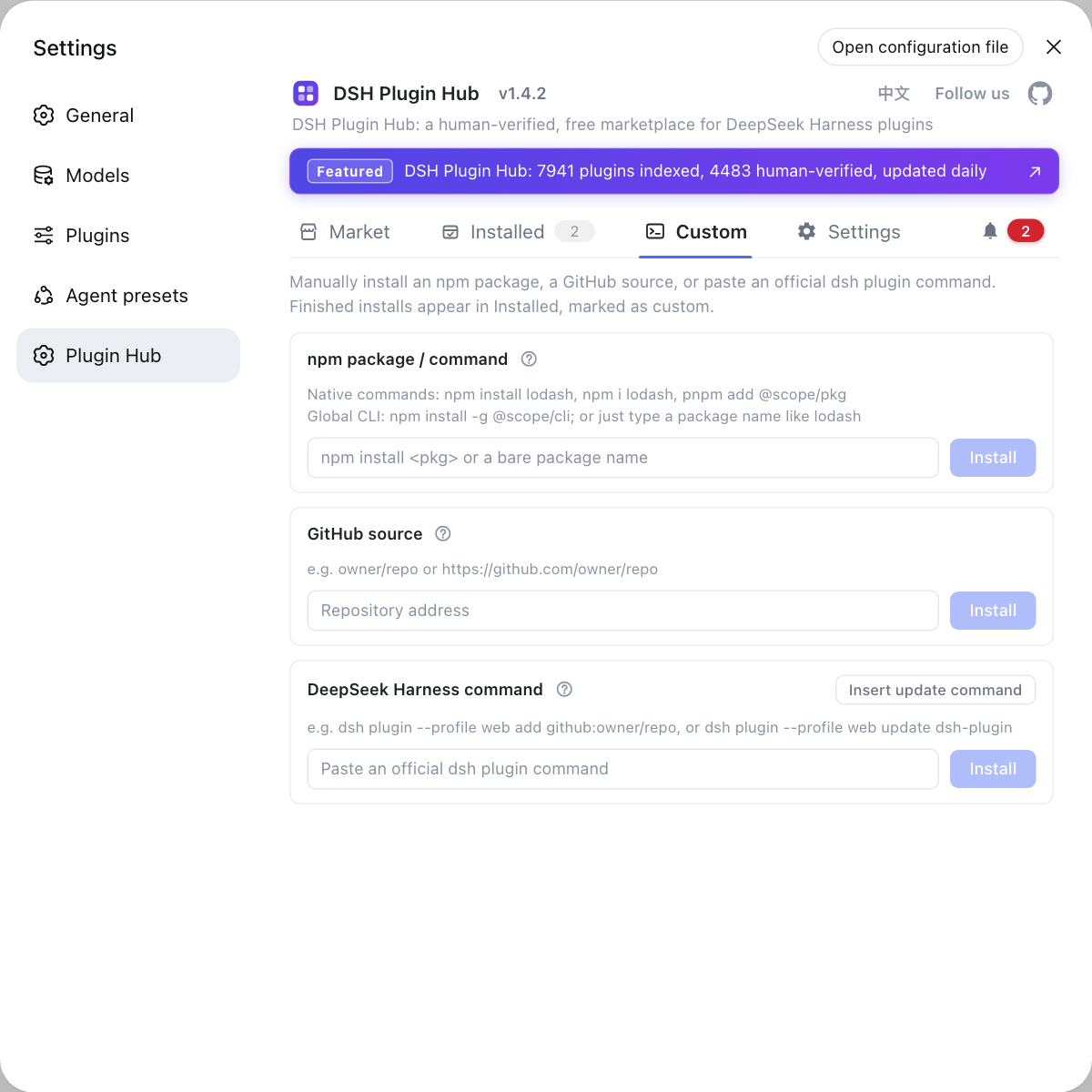
When a plugin is not in the catalogue, or you just want to try one temporarily, the Custom Install page of DSH Plugin Hub beats typing commands by hand: each channel shows its own format hints, and everything installed there lands in the Installed list tagged as a manual install.
DSH plugin pre-install checks: which input is blocked and why
A custom install runs third-party code, so three gates are in place: the client format check rejects invalid input, the server entry-file check rejects repositories missing their build output, and a post-install check catches what slipped through. In detail:
- Format check (client) — each card has its own format rule; input that does not belong to that channel is flagged in place with a red field, and no request is sent, so a typo never triggers a real dependency install;
- Entry-file check (server, GitHub source channel only) — the default-branch commit is resolved, the source archive for that commit is downloaded, and the entry declared in
package.jsonis confirmed to exist inside the archive; if it is missing, the install request is rejected instead of producing a plugin that installs but cannot load. npm packages are trusted from the registry and pass straight through, with the post-install check as a backstop; - Post-install entry check — even when the install command exits 0, the
main/exportstarget inside the plugin'snode_modulespackage is verified to exist; if it does not, the task fails and the pending restart is revoked, so the host is not left unable to start; - Channel switches (Settings → Security) — the npm, GitHub and dsh channels can each be turned off, which disables the matching card and points you to Settings; turning off a channel you never use reduces the sources of executable code at the root;
- Build-script confirmation — installing from GitHub source requires you to confirm whether a dependency's build script may run; allow it only for repositories you trust, as explained in how to install DSH plugins safely.
DSH plugin caveats and limits
- Manual installs are managed differently from catalog plugins: plugins installed by custom install carry a manual-install source tag and can be filtered as their own group in the Installed list;
- Private repositories do not work through the GitHub source channel: it only handles publicly cloneable repositories, and Hub does not carry credentials on your behalf;
npm install -gstays out of the installed list: it installs a system-level CLI that does not travel with a profile, and npm itself handles removal;- Prefer the prebuilt npm package: the GitHub source channel depends on committed build output, and a missing artifact means a missing entry file — when an npm release exists, use channel one;
- Versions move: DeepSeek Harness is in developer preview and the official repository states that breaking changes will come (source), so treat the command forms and wording here as the current state of the official CLI and Hub.
Sources: deepseek-ai/deepseek-harness, dsh-plugin.org plugin market, dshplugin/dsh-plugin-hub
FAQ
Because the DSH plugin market only indexes public GitHub repositories that carry the dsh-plugin topic. A plugin missing from the market is not unusable: the common causes are a private repository, a missing dsh-plugin topic in the repository's About section, a repository too new to have been scanned, or a repository that is not an installable plugin package. Search again by repository or owner name, and if it still does not appear, install it through the custom install channels and wait for it to be indexed.
Pick the DSH plugin custom install channel by what you already hold rather than by plugin type: use the npm package channel when the plugin is published to npm and you want the prebuilt package, the GitHub source channel when all you have is a repository URL, and the dsh command channel when you copied the official command from the plugin docs or want to update an installed target to the latest. Each card accepts one format only, so pasting into the wrong card is stopped by the format check before any request is sent.
Yes, a DeepSeek Harness custom install runs third-party code, which is why it has two pre-install gates and one post-install check. The client validates the format per channel and sends no request for unrecognised input; for GitHub sources the server reads the entry declared in package.json and confirms the file is actually present in the source archive; after install the entry file under node_modules is verified again and a missing file fails the task. Settings → Security also lets you disable the npm, GitHub and dsh channels separately.
If a plugin was installed through custom install it lands in the Installed list of DSH Plugin Hub tagged as a manual install, which separates it from catalog plugins. You can filter the list by source to see manual installs only, and each row offers update, uninstall and reveal-in-Finder, with a confirmation before anything is removed.
A DSH plugin installed from GitHub source is missing its entry file when the repository never committed its build output, so the git distribution contains source only. Switch to the plugin's prebuilt npm version first; if only source exists, clone the repository, install dependencies and build it yourself, then install the output into the current profile, or ask the author to commit the build output and reinstall.
Related Terms
- DSH plugin market
- The DSH plugin market is the community catalogue that indexes and distributes DeepSeek Harness plugins; it only lists public GitHub repositories that carry the dsh-plugin topic, discovered by regular scanning and reviewed before listing.— dsh-plugin.org plugin market
- custom install
- A custom install is an installation route that bypasses the market catalogue and installs a plugin into the current profile by hand; DSH Plugin Hub splits it into three separate cards: npm package, GitHub source and dsh command.— dshplugin/dsh-plugin-hub GitHub repository
- dsh-plugin topic
- The dsh-plugin topic is the GitHub repository tag a plugin author adds so discovery channels can find the repository; it is one of the prerequisites for being indexed by the plugin market.— deepseek-ai/deepseek-harness
- entry file
- An entry file is the file a plugin's package.json main or exports field points to, where the host starts executing the plugin; a missing entry file makes the plugin fail to load and can even break host startup.— deepseek-ai/deepseek-harness
Sources
- deepseek-ai/deepseek-harness· GitHub
- dsh-plugin.org plugin market· dsh-plugin.org
- dshplugin/dsh-plugin-hub GitHub repository· GitHub