How to verify a dsh update: order, snapshot and regression
A dsh update comes down to two things done right: order (app first, plugins second, one class at a time) and verification (snapshot before, the same minimal regression path after). Skip either and a successful upgrade becomes indistinguishable from one that introduced a failure — especially for crashes like version drift that only appear after upgrading and that "it starts" will never catch.
Overview: a dsh update is "snapshot → upgrade → regression"
Treat a dsh update as an operation with a before-and-after comparison, not as typing a command and watching it finish. None of the three steps is optional (source):
| Stage | What you do | What happens without it |
|---|---|---|
| Before | Record a version snapshot + back up the data directory | No baseline when the regression fails, and no way to say which layer changed |
| During | App first, plugins second, one class at a time | Problems can't be attributed, leading to repeated reinstalls |
| After | Run the fixed four-step regression | "It starts" passes for "the upgrade worked," and the defect surfaces later under real work |
The steps most often skipped are the first and the third. The command details (npx automatic, npm update -g, git pull) are covered separately in How to update dsh; this article is only about order and verification.
Step 1: take a dsh version snapshot before upgrading
The snapshot is valuable because it lets you compare item by item after the upgrade, so record three layers of versions — not just the app version.
- Record the app version:
dsh --version          # global install
npx @deepseek-ai/dsh --version   # npx
Expect: a definite version number, which becomes your rollback target; 2. Record the version list inside the profile:
dsh plugin --profile web list
Expect: the plugin package names and versions in the current profile — the plugin-side rollback targets (source); 3. Back up the data directory (config, sessions and plugin manifests):
cp -r ~/.dsh ~/.dsh.backup-$(date +%Y%m%d)
Expect: a backup directory exists, so there's a way back if something breaks; 4. Save the snapshot as one text file — paste the output of the previous two commands into a file. Expect: you won't have to compare from memory after upgrading.
Step 2: dsh upgrade order — app first, plugins second
There is exactly one ordering rule: change only one class at a time. Three steps:
- Upgrade the app first, using however you installed it (with npx every run is the latest, a global install uses
npm update -g @deepseek-ai/dsh, a source checkout runsgit pulland rebuilds); - Restart and confirm the process actually changed: updating changes packages on disk, while a running process still holds the old code. Expect:
dsh --versionshows the new version after restarting. If it still shows the old one, work through PATH and caches per dsh updated but the version didn't change — and don't stack a plugin update on top at this point; - Once the app regression passes, upgrade plugins:
dsh plugin --profile web update(add a package name to update just one). Expect: the plugin upgrade is the only change this round, so any problem points straight at the plugin side.
Why not upgrade both together: problems introduced by an app upgrade and by a plugin upgrade look highly similar (features gone, load errors, tool anomalies). Change both classes at once and the only way left is bisecting via repeated rollbacks — far more expensive than doing it in two passes. The batch commands and caveats are in How to batch update DSH plugins.
Step 3: run the four-step dsh regression after upgrading
The regression path must be fixed, and every step needs one verifiable expectation — all four passing is what completes an upgrade.
- The service starts — open
http://127.0.0.1:3080after starting, or probe it directly:
curl -s -o /dev/null -w "HTTP %{http_code}\n" http://127.0.0.1:3080/
Expect: the page opens and returns HTTP 200. If it won't start, check port conflicts and startup failures;
2. The model replies — send a short message with no tools involved. Expect: a normal reply, meaning the model and provider path is healthy (this step is the baseline for judging "is this a tool-layer problem" later);
3. Tools run — have it read a workspace file or execute a simple command. Expect: a tool/call paired with a tool/result and no error. This is the critical step in an upgrade regression: failures in the tool dispatch layer often surface only when a tool is called, while text-only turns look perfectly fine (discussion);
4. Plugins are in place — open Settings → Plugin Market → Installed and confirm the plugin is still there with a version matching the snapshot; then confirm it reached the active layers:
dsh --profile web --dump-config | grep -n "^# =="
Expect: the plugin still appears among the active layers with the same layer count as before the upgrade. If the plugin vanished or the count changed, the upgrade touched the composition config.
The dsh secondary failure that only appears after upgrading: version drift
One class of crash appears only after an upgrade, and its symptom looks nothing like "the update didn't take effect": text works fine, but any tool call crashes (source). The typical picture and how to judge it:
- Symptoms: the error is consistently
Cannot read properties of undefined (reading 'prepare'), occurring after a tool call; the session log never writes atool/resultafter thetool/call, and it reproduces across several consecutive turns; - Root cause: a third-party plugin declares the core package
@deepseek-ai/dsh-toolsas a direct dependency, so the profile resolves an older copy of the core package; and because the scheduler key is a plainSymbol()rather thanSymbol.for(), keys from the two copies are never equal, so a cross-copy read yieldsundefined(root cause confirmed); - How to confirm: compare the app version with the core package inside the profile — a mismatch means drift:
dsh --version
ls ~/.dsh/profiles/<name>/node_modules/@deepseek-ai/
- Recovery order: disable the suspect third-party plugin → move the drifted core package copy out of the profile → restart and verify tool calls in a new session. The crash turn leaves
tool_callswithout results, and the old session may be rejected by the provider with a 400INVALID_REQUEST— don't retry in the same session.
The full bisect-by-disabling and per-package comparison flow is in Core package version drift, and the static duplicate-copy case is in Duplicate core package in a plugin. This failure is exactly why "make it run a tool once" cannot be dropped from the third step — drop it and you'll believe the upgrade went fine.
When a dsh regression fails: single-variable rollback
The rollback principle matches the upgrade — change only one layer at a time and keep the amount of change minimal (source).
- Use the snapshot to locate the changed layer: if only the app version changed, pin the app back to its old version (
npx @deepseek-ai/dsh@<old version> web, orgit checkout <old commit>and rebuild for a source install); - If only one plugin changed, pin that one back:
dsh plugin --profile web add <package>@<old version>and leave the others alone; - Never roll back the app and plugins together: that merely covers the problem up, and it returns on the next upgrade;
- Preserve the scene before acting: keep a copy of the session logs and the
--dump-configoutput, so after rolling back you can still say which layer was at fault.
The complete rollback and downgrade procedure is in Incompatibility after updating and version rollback.
Rather than comparing snapshots by hand: check versions in the DSH Plugin Hub UI
Let the UI handle "check versions before, check status after" — less work than diffing command output by hand (source). After installing DSH Plugin Hub, Settings → Plugin Market → Installed lists each plugin's current version and an "update available" badge, so a glance before upgrading is a ready-made snapshot; clicking update pops a confirmation dialog first, restating the operation for you to confirm.
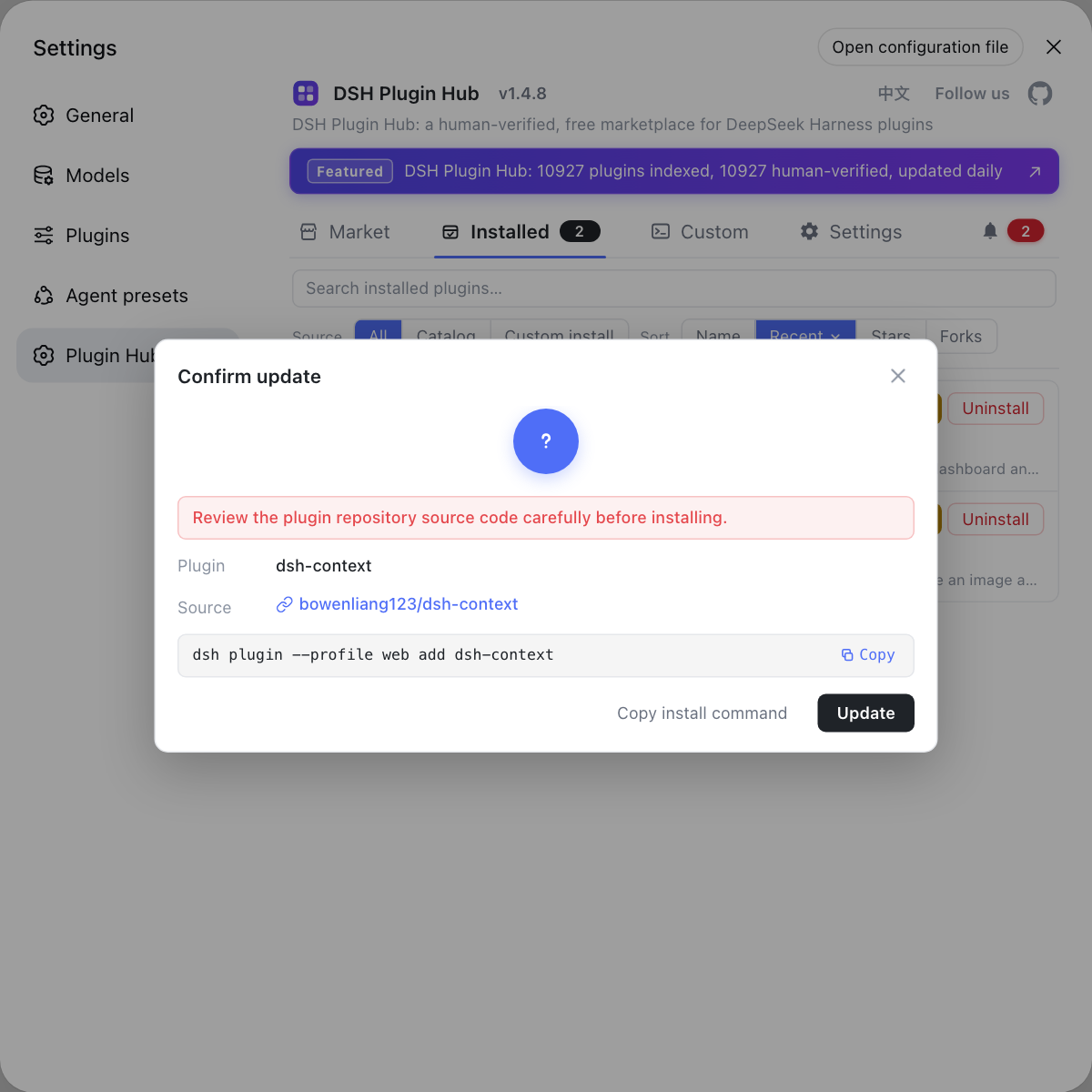
The update confirmation dialog puts "which plugin, from which version to which version" into a single confirmation — far easier to compare against your snapshot than scrolling back through terminal output. Visit https://dsh-plugin.org/ to learn more.
Notes: five hard rules for a dsh update
These five rules are what make a dsh update attributable and reversible — drop one and the next failure can't be explained (source).
- Don't skip the order: app first, plugins second, one class at a time — the only precondition for a rollback that can be attributed.
- Don't skip the snapshot: app version, profile plugin list and a data directory backup; all three are needed as a baseline.
- The regression must run a tool once: confirming only "it starts" misses the entire tool dispatch layer.
- Suspect version drift for post-upgrade crashes: text fine, tool call crashes, error mentions
prepare— go straight to drift troubleshooting. - Keep rollbacks single-variable: rolling back the app and plugins together throws away all the information this investigation produced.
Sources: dsh CLI README, official Quickstart, Discussion #4601, Discussion #4529
FAQ
A dsh update goes app first, plugins second — and only one class at a time. The DSH app and DSH plugins use two completely different command sets, and when something breaks you must be able to attribute it to "only one class changed." Squeezing a batch plugin update between the two makes a failed regression impossible to attribute.
Run a four-step regression after updating dsh: the service starts (the page opens at 127.0.0.1:3080), the model replies (send a short message and get an answer), tools run (read a file or execute a command), and plugins are in place (the installed list and the active layers still line up). Only when all four pass is the update complete.
A dsh version snapshot records three things: the app version (dsh --version or npx @deepseek-ai/dsh --version), the core package and plugin versions in the profile (dsh plugin --profile <name> list, or pnpm list inside the profile directory), and a backup of the data directory. With those three you can tell which layer changed when a regression fails.
A crash with reading 'prepare' after a dsh update points to version drift when it didn't happen before the upgrade and every tool call crashes after it. The root cause is a third-party plugin declaring the core package as a direct dependency, so the profile resolves an older copy of the core package — and because the scheduler key is a plain Symbol(), keys from two copies are never equal, so the read returns undefined. Disable the suspect plugin and remove the duplicate copy to recover.
When a dsh regression fails, apply the single-variable principle: roll back one class at a time. Check which layer changed in your snapshot — if only the app changed, pin the app back to its old version; if only one plugin changed, pin that plugin back on its own. Never roll back the app and plugins together, which merely covers the problem up and lets it return on the next upgrade.
Related Terms
- version snapshot
- A version snapshot is the record taken before an upgrade of the app version plus the core package and plugin versions inside a profile. It is the baseline for comparison when a post-upgrade regression fails, tells you which layer changed, and supplies the target versions for a rollback.— dsh CLI README
- regression check
- A regression check reruns the key capabilities along a fixed minimal path after an upgrade — start the service, send a message, run a tool, check plugins — to confirm the upgrade didn't break existing behavior. The path must stay fixed so it can be compared item by item with the pre-upgrade state.— DeepSeek Harness Docs - Quickstart
- version drift
- Version drift is what happens when a plugin declares the core package as a direct dependency and the profile resolves an older copy of that core package alongside the one bundled with the app. Because the scheduler key is a plain Symbol(), the two copies' keys are not equal, so a tool call reads undefined and crashes.— deepseek-harness Discussion #4601
- single-variable rollback
- A single-variable rollback changes only one layer at a time — revert just the app, or just one plugin — keeping the amount of change minimal so the next regression result points clearly at a cause instead of being muddied by new variables.— dsh CLI README
Sources
- dsh CLI README· deepseek-ai
- DeepSeek Harness Docs - Quickstart· deepseek-harness
- deepseek-harness Discussion #4601: crash with reading 'prepare' after tool calls, recovered by disabling a third-party plugin· deepseek-ai (GitHub Discussions)
- deepseek-harness Discussion #4529: root cause confirmed, TOOL_RUNTIME_SCHEDULER is a plain Symbol()· deepseek-ai (GitHub Discussions)
- dshplugin/dsh-plugin-hub GitHub repository· GitHub