dsh plugin market not loading? Proxy, registry and 403 fixes
Don't reinstall DSH when the dsh plugin market won't open — there are three completely different failures, and using the wrong fix wastes your time. The test is simple: is the entry missing, is the list blank, or is there an error? This article gives the diagnosis and steps for each.
Overview: first identify which kind of DSH Plugin Hub "won't open" you have
"Won't open" splits into three layers in DSH Plugin Hub: the entry layer (does Settings show a plugin market at all), the data layer (did the list load), and the link layer (does the error point to network, registry or credentials). The official troubleshooting docs group download problems into timeout/disconnect, 404, and 401/403 — and the same split applies here (source).
The symptom decides the direction — match your case before touching anything. Find your row in the table:
| Symptom | Most likely cause | Immediate action |
|---|---|---|
| No "Plugin Market" entry in Settings | Hub not installed or not active | Reinstall the Hub, restart dsh web and refresh |
| Market opens but the list is blank | Restricted network, catalog never fetched | Check network and proxy, restart and re-fetch the catalog |
| An error appears after clicking install | Splits into timeout / 404 / 401/403 | Work through the error classes below |
Missing entry: DSH Plugin Hub isn't installed or isn't active
If Settings has no plugin market entry, it is almost always DSH Plugin Hub not installed or not active (source).
- Reinstall the Hub:
dsh plugin --profile web add dsh-plugin
Expect: installation succeeds with no terminal error. If it errors, determine whether it's the network or the registry first (see the 404 section below);
2. Restart dsh web. Expect: the service reloads its plugins;
3. Refresh the page and open Settings → Plugin Market. Expect: a list of plugin cards, which means the entry is live.
dsh plugin market empty list: the catalog never loaded
A dsh plugin market that opens but shows zero plugins means the UI is there and the data isn't — the problem is the network path, not the plugin itself (source).
- Confirm the machine has outbound access. Expect: the browser can open sites you normally visit. Corporate or campus networks that require a proxy usually expose the problem at this step;
- Configure a terminal-level proxy. Expect: on macOS / Linux set
http_proxyandhttps_proxyin the shell; on Windows PowerShell use$env:HTTP_PROXY; this applies to npx, git and pnpm alike; - Restart
dsh webso it re-fetches the catalog. Expect: plugin cards appear in the list.
dsh error classes: timeout, 404 and 401/403
The dsh error text itself points the direction: timeout/disconnect means network, 404 means registry and package name, 401/403 means credentials and origin validation (source).
ETIMEDOUT,ECONNRESET,ECONNREFUSEDand friends. Expect: a network or registry issue — handle it with the proxy and mirror steps above;E404,404 Not Found. Expect: usually a wrong package name or version. If installing a plugin reportsERR_PNPM_FETCH_404, that is a lagging registry mirror — verify against the official registry:
dsh plugin --profile web add <package> --registry=https://registry.npmjs.org
The environment-variable form works too: npm_config_registry=https://registry.npmjs.org dsh plugin add <package>;
3. 401. Expect: credential-related; check provider keys or the relevant authorization settings;
4. 403. Expect: a Host / Origin validation failure — the origin isn't trusted (DNS rebinding and cross-site request defenses). Not an account restriction, and not a plugin-market-specific error.
On networks where timeouts are common, switching mirrors helps:
npm config set registry https://registry.npmmirror.com
Expect: packages now fetch through the mirror with more stable speed. Remember that mirrors lag: when a 404 shows up, verify against the official registry as in step 2 (source).
Windows special case: the dsh sandbox breaks Schannel
If HTTPS requests fail wholesale on Windows and the log reports SEC_E_NO_CREDENTIALS, the thing to investigate is the sandbox and the system TLS stack, not the network (source). That error means the Windows sandbox or an isolated environment can't obtain TLS credentials and has broken Schannel (the system HTTPS stack), so no HTTPS connection can be established.
- Switch the run preset back to the full-access preset first. Expect: HTTPS requests return to normal after restarting dsh;
- Or switch to a node / python runtime. Expect: the sandbox credential restriction is bypassed;
- If the system reports a missing certificate, install / import the matching TLS credential as prompted. Expect: HTTPS succeeds once the credential is in place;
- Re-check: reopen the plugin market. Expect: the list loads and installs work normally.
Configure registry and proxy in DSH Plugin Hub settings, and export the logs
Rather than tweaking environment variables in terminals, configure the mirror and proxy once on the DSH Plugin Hub settings page; when you still can't pin it down, export the log trail it records itself (source). The left side groups update settings, security trust, system diagnostics, system logs and restore defaults:
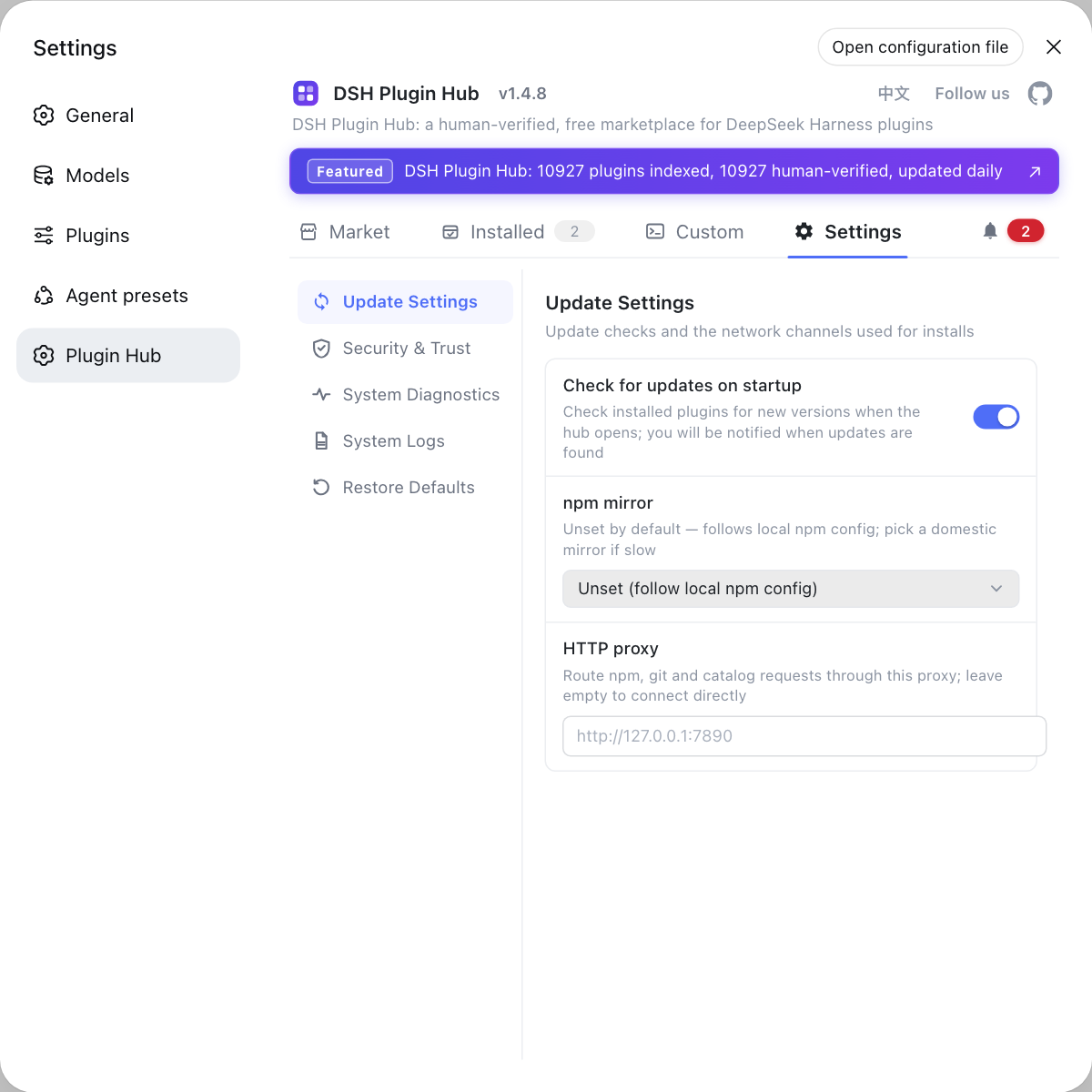
Configure registry and proxy
"Update settings" holds the check-on-startup toggle, the npm registry dropdown and the proxy address field; after configuring the proxy and mirror, restart dsh web and reopen the market — far less work than editing environment variables across several terminal windows:
- Open Settings → Plugin Market → Settings. Expect: the three options in the "Update settings" group;
- Pick a working npm registry, fill in the proxy address and save. Expect: the configuration is written and takes effect immediately;
- Restart
dsh weband refresh the market page. Expect: the list loads normally and installs no longer time out.
Still stuck: export the system logs
When you still can't pin it down, the Hub's own log trail is the fastest answer. The system logs page records installs, uninstalls, settings changes and diagnostics, viewable by category and level, and exportable:
- Go to Settings → Plugin Market → System Logs. Expect: log entries arranged by time, level and category;
- Reproduce the failure once. Expect: a matching failure record appears at that timestamp;
- Use "Export logs" or "Copy all". Expect: you get the complete error context, ready to compare or to ask about.
Sources: dshplugin/dsh-plugin-hub, DeepSeek Harness Docs - Quickstart, dsh CLI README, npm config docs
FAQ
A missing entry isn't a broken marketplace — DSH Plugin Hub is either not installed or not active: reinstall it in the terminal with dsh plugin --profile web add dsh-plugin, then restart dsh web and refresh the page, and the Plugin Market entry appears in Settings. If the install fails, read the terminal error first — it is usually a network or registry problem.
A blank dsh plugin market list means the catalog data never arrived, usually because the network is restricted. First check whether the machine can reach the internet and the market API; on networks that need a proxy, set terminal-level http_proxy / https_proxy and restart dsh web so it re-fetches the catalog. You can also enter the proxy address and npm registry directly in DSH Plugin Hub's Settings and retry.
A 403 is not an account restriction but a Host / Origin validation failure: the origin isn't trusted (DNS rebinding and cross-site request defenses), it is not specific to the plugin market, and it has nothing to do with your account. Keep it separate from 401: 401 is about credentials, while 403 means origin validation failed.
dsh reporting SEC_E_NO_CREDENTIALS means the Windows sandbox environment has broken Schannel (the system HTTPS stack), so no HTTPS connection can be established. The fix is to switch the run preset back to the full-access preset, or use a node / python runtime to bypass the sandbox credential restriction, then restart dsh and retry. If the system reports a missing certificate, import the matching TLS credential as prompted.
ERR_PNPM_FETCH_404 is most likely a lagging registry mirror: the 404 is on the mirror's repository, not your network, and not a misspelled package name. Verify against the official registry temporarily with dsh plugin --profile web add <package> --registry=https://registry.npmjs.org, or npm_config_registry=https://registry.npmjs.org dsh plugin add <package>. If that installs, the mirror was the problem — switch back to the official registry or choose another mirror.
Related Terms
- DSH Plugin Hub
- DSH Plugin Hub is the official plugin market built into DeepSeek Harness, reached from Settings → Plugin Market. It offers browsing, one-click install, uninstall and updates, and shows a confirmation dialog with the source and the exact command before installing.— dshplugin/dsh-plugin-hub GitHub repository
- Host / Origin validation
- Host / Origin validation is the DeepSeek Harness server-side origin check that defends against DNS rebinding and cross-site requests. When it fails, the API returns 403 — unrelated to credentials.— DeepSeek Harness repository architecture notes
- ERR_PNPM_FETCH_404
- ERR_PNPM_FETCH_404 is the 404 pnpm returns when fetching a package from a registry. The usual cause is that the configured npm mirror lags behind and hasn't synced that version yet, not a misspelled package name.— pnpm official docs
- SEC_E_NO_CREDENTIALS
- SEC_E_NO_CREDENTIALS is a Windows HTTPS failure indicating that a sandboxed or isolated environment cannot obtain TLS credentials and Schannel (the system HTTPS stack) is broken, so every HTTPS request fails to connect.— DeepSeek Harness official troubleshooting docs
Sources
- dshplugin/dsh-plugin-hub GitHub repository· GitHub
- DeepSeek Harness Docs - Quickstart· deepseek-harness
- dsh CLI README· deepseek-ai
- npm CLI docs - npm config· npm