What's inside a DSH plugin: tools, settings, permissions
There are exactly four things inside a dsh plugin: capabilities, settings, permissions and dependencies. Capabilities are the tools and commands it adds to the conversation, settings are the options it exposes on the settings page, permissions are the two boundaries at install time and run time, and dependencies are the packages it brings along and the services it asks for. Read all four before installing and you will know whether it touches your files — this piece does anatomy, not ecosystem.
The four parts of a DSH plugin: capabilities, settings, permissions, dependencies
Each part has a defined place in the plugin's code: capabilities register inside apply, settings are declared with a Config schema, permissions split into install-time and run-time, and dependencies live in package.json and are requested through inject. Taking them one by one:
- Capabilities (tools and commands): the entry point is
apply(ctx), and every capability registers throughctxthere — model-callable tools go throughctx.tools.register(defineTool({...})), withparametersandoutputschemas constraining input and output (source). Before registering tools you must declareexport const inject = ['tools'], otherwise the framework does not guaranteectx.toolsis ready. - Settings namespace: the plugin declares options and defaults with a
Configtype plus a matching Schemastery schema. To surface them in the UI, the host half callsctx.settings.installSection()to register the namespace and the browser half binds a card into thesettings.plugin.itemslot — the two halves pair up by the same namespace (source). - Permission declarations: two layers — install time depends on
allowBuilds, which authorizes that package's code to run on your machine outside the sandbox during installation; run time depends on thesandbox_permissionstier carried by a tool call, and a wider request goes through approval (source). - Dependencies: one layer is the package's own
dependencies, the other is the record it leaves in the profile. A package declaringdsh.bundleis appended bydsh plugin addto the profile'sdsh.profile.bundles, which decides the layer it joins at startup (source).
In one sentence: capabilities answer "what can it do", settings answer "what can you change", permissions answer "what is it allowed to do", and dependencies answer "what does it bring in".
Where each part shows up: DSH plugin card, settings page, tool list
These four are not paper terms: every one of them has a place in the UI or on disk, and recognising those places is the same as seeing through the plugin. The mapping:
- Capabilities → the tool list in a conversation. After a restart, model-callable tools appear in the tool list; the features listed on a market card describe exactly this part.
- Settings namespace → the form in the Plugins section. The card is rendered from the schema, and values you change there write the same layer as a
config:block you type intocordis.patch.yml. Plugins that never register a namespace get no card in that section — keys such asui-themeandpermissionfall into that non-rendered case (source). - Permission declarations → install prompts and approval dialogs. Install time maps to the terminal prompt asking you to allow
allowBuilds; run time maps to the confirmation dialog when a tool call exceeds its tier. - Dependencies → the profile directory. The dependency record lives in
$DSH_HOME/profiles/<name>/package.jsonandnode_modules, and that is the scopedsh plugin listreports.
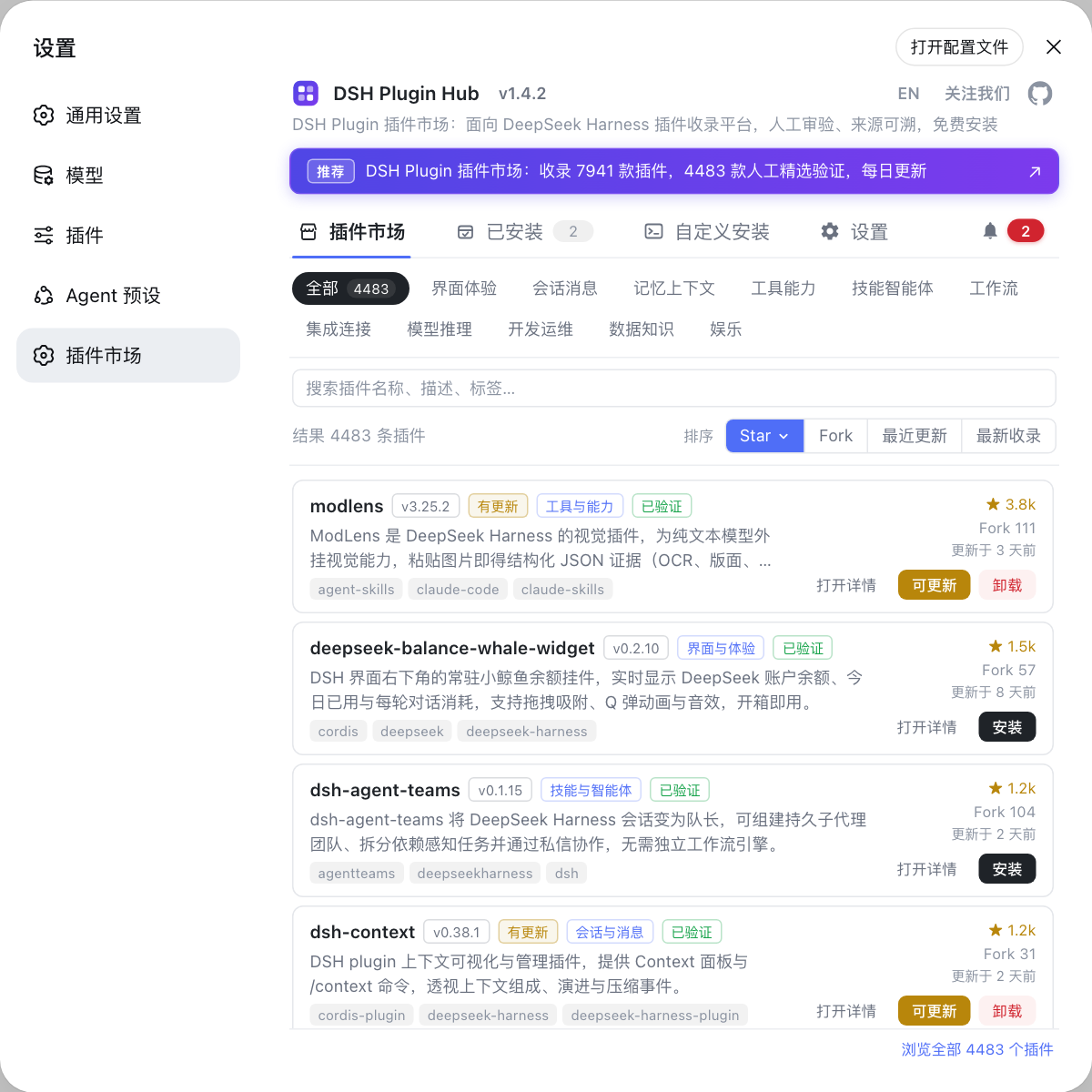
To see all four at once, the plugin market is the fastest entry: open a card under Settings → Plugin Market, which is DSH Plugin Hub, where capabilities, source, version and install command sit together. The default location of the plugin directory is covered in where the DSH config file lives.
Reading an unfamiliar DSH plugin with these four parts
The real value of the four parts is preview: facing an unknown plugin, ask one question per part, and anything you cannot answer is a reason not to install. The four questions:
- Capabilities — "how many tools does it add?" More tools mean more the model can do and more ways to go wrong; a plugin adding one or two read-only tools is clearly steadier than one adding a pile of file-writing tools.
- Settings — "is there a switch?" A settings namespace means you can turn part of its behaviour off from the settings page; a plugin with no settings at all can only be turned off by uninstalling it.
- Permissions — "does it need approval, will it ask for more?" A package requiring
allowBuildsmust have its source reviewed before you allow it; tools that repeatedly request a widersandbox_permissionstier deserve extra attention. - Dependencies — "how many packages does it drag in?" The more dependencies and the tighter the pins, the more likely it falls behind after a DSH upgrade, and the more likely it fights an existing plugin over the same core package.
If you cannot answer even one of the four, do not install yet — the full version of this judgement is in DSH plugin capabilities and permission boundary, and how the concepts relate is in five concepts to know before installing plugins.
DSH plugin anatomy notes
The four parts are a checklist, not a scorecard: look at all four, then decide whether to install.
- The four parts are four places you can inspect, not four adjectives: tools for capabilities, the settings page for settings, install prompts and approvals for permissions, the profile directory for dependencies.
- No settings ≠ unusable: it only lacks tunable switches, so focus the judgement on capabilities and permissions.
- More tools is not stronger: every tool is another path the model can take wrongly, so install by need.
allowBuildsis only the install-time boundary: allowing it means the package runs code as you during installation, which is a different matter from the run-time permission tier.- Read dependencies at the profile layer:
devDependenciesin the repository are irrelevant to you, and whatdsh plugin listprints is the layer that actually takes effect. - Confirm attachment with
--dump-config: only whendsh --profile web --dump-configshows the# == <package>layer is the config layer active. - To read the code yourself: the
applyregistrations, theConfigschema, theinjectdeclaration and thedsh.bundlemarker are where the four parts live in source — see how to write a dsh plugin.
Source: DeepSeek Harness docs - your first plugin, docs - tools, docs - plugin config, cookbook - adding a settings card.
FAQ
A DSH plugin is made of four parts: capabilities, a settings namespace, permission declarations and dependencies. Capabilities are the tools and commands it registers, settings are the options it exposes on the settings page, permissions are the two boundaries at install time and run time, and dependencies are the packages it pulls in.
DSH plugin settings are declared by the plugin itself and rendered on the Plugins section of the Web UI settings page. The plugin declares options and defaults with a Config schema and registers a namespace via installSection, while the browser half binds a card to the same namespace; editing cordis.patch.yml under a config: block writes the same layer, so UI and file do not conflict.
To judge whether a DSH plugin will touch your resources, read its tools and its permission declarations. Tools decide which resources it can read and write, while permission declarations decide whether it needs extra authorization: tool calls requesting a wider tier trigger approval, and a package asking for allowBuilds runs code as you at install time — never approve it without reviewing the source.
No — DSH plugin dependencies exist on two layers: the package's own dependencies and the dependency record it leaves in the profile. The first ships with the plugin package, the second lives in the profile's package.json and node_modules and is what dsh plugin list reports; packages declaring dsh.bundle are also appended to dsh.profile.bundles, which fixes the layer they load as.
Related Terms
- ctx
- ctx is the context object the DSH plugin framework passes to apply, and the only entry point for framework capabilities: register tools via ctx.tools, subscribe with ctx.on, hand back cleanup functions with ctx.effect, read other services with ctx.get. Plugins never import framework internals.— https://github.com/deepseek-ai/deepseek-harness/blob/master/docs/user/develop/basic/index.md
- settings namespace
- A settings namespace is the identifier a DSH plugin exposes its options under. The host half calls ctx.settings.installSection() to register the namespace and Config schema, the browser half binds a card into the settings.plugin.item slot, and the two halves pair up by the same key so the Plugins section renders the form.— https://github.com/deepseek-ai/deepseek-harness/blob/master/docs/cookbook/adding-a-settings-card.md
- dsh.bundle
- dsh.bundle is the bundle marker a DSH plugin declares in package.json. When a package declaring it is installed through dsh plugin add, dsh appends it to the profile's dsh.profile.bundles list, which decides the layer it joins at startup; a package without dsh.bundle is just a dependency and activates no config layer.— https://github.com/deepseek-ai/deepseek-harness/blob/master/apps/cli/README.md
- sandbox_permissions
- sandbox_permissions is the permission tier carried by a DSH plugin tool call, used to request authorization between workspace-write and full-access tiers. It may only move toward wider access, must be paired with a justification to pass validation, and the wider the request the more likely a human approval is required.— https://github.com/deepseek-ai/deepseek-harness/blob/master/docs/cookbook/adding-a-settings-card.md
Sources
- DeepSeek Harness docs - your first plugin· deepseek-ai
- DeepSeek Harness docs - tools (defineTool)· deepseek-ai
- DeepSeek Harness docs - plugin config schema· deepseek-ai
- DeepSeek Harness cookbook - adding a settings card· deepseek-ai
- DeepSeek Harness CLI README (dsh plugin and profile dependencies)· deepseek-ai