dsh memory plugin: install & recall in DeepSeek Harness
A dsh memory plugin is the DSH plugin that gives DeepSeek Harness cross-session memory: it solves a concrete problem — open a new session and the model no longer remembers the project background, naming habits and output preferences you set in the last one (source). This guide covers three things: what it solves and how it differs from built-in session memory; how to find, install and enable one in the DSH Plugin Hub; and how memory is written, recalled and kept private. To compare several memory plugins side by side, see choosing a DeepSeek Harness memory plugin.
Overview
In one line: a dsh memory plugin moves the things worth remembering from in-process state onto disk, so a new session opens with the previous session's context. It does not raise the quality of a single turn; it changes persistence and recall — which information deserves to stay, where it lives, and how the next session pulls it back. What follows first covers the problem it solves, then the install and enable steps in the Hub, then the read/write and privacy boundary.
What a dsh memory plugin is: cross-session memory vs built-in session history
The core value of a dsh memory plugin is cross-session long-term memory: without it, DeepSeek Harness session state lives only in the process in some modes, so a restart or a new session loses it (source). Built-in session history records "what we talked about this time"; a memory plugin records "what should be remembered from now on." The difference looks like this:
| Dimension | Built-in session memory | dsh memory plugin |
|---|---|---|
| What it stores | the full messages of the current session | extracted facts, preferences, conclusions |
| How long | within the session, may not survive a restart | persisted to disk, usable across sessions |
| Carried into a new session | no | yes, relevant memory injected on demand |
| Organisation | linear message history | key points / graph / layered, depending on implementation |
Such plugins generally do four jobs: automatic extraction (pull durable facts from a conversation), automatic injection (put relevant memory into a new session's context), periodic consolidation (dedupe, merge, compress) and local persistence (write to a local SQLite database or files). A memory plugin is therefore a reusable long-term thread for the model, not a replay of the whole chat.
How to install and enable a dsh memory plugin in the DSH Plugin Hub
Installing a dsh memory plugin always goes through the DSH Plugin Hub: search the market for the plugin, click install and confirm, then restart so the plugin loads. DSH Plugin Hub is the official market built into Settings → Plugin Market, where search, install, update and uninstall all happen. Using a real memory plugin, dsh-memory, the steps are:
- Check prerequisites: DeepSeek Harness is running and the plugin market is installed; if not, install it first with how to install a DSH plugin. Expected: a "Plugin Market" entry appears on the settings page.
- Open the market and search: open the Web UI → Settings → Plugin Market, and type
memoryor the plugin name into the search box. Expected: the list filters down to memory plugins. - Click install: on the target plugin card, click Install. Expected: a confirmation dialog opens.
- Verify the dialog: the dialog shows the plugin name, source repository and the
dsh plugin --profile web add <package>command it will run; confirm once it checks out. Expected: the download and install begin in the background with live progress. - Restart and enable: stop and start
dsh webso the plugin reloads. Expected: the card turns to "Installed" and the plugin's capability takes effect. - Verify persistence: open a new session and restate a preference from the previous one. Expected: the model answers with that old context; if not, return to the market and confirm the plugin is enabled and memory has started writing locally.
The command line is the equivalent second path: dsh plugin --profile web add <package> (source). Both paths end the same way; the only difference is a button versus a command.
How a dsh memory plugin stores and recalls memory — and the privacy limits
A memory plugin's data lands locally by default (SQLite or files), and writing and recall follow two mechanisms: distill during the conversation, persist to disk, inject by relevance in a new session. Break it into three points:
- Where it writes — most implementations store memory in local files or a SQLite database, usually under the plugin's own data directory; that means backup, migration and cleanup all have to be handled separately, and uninstalling the plugin does not erase memory already written.
- How it is recalled — when a new session starts, the plugin retrieves historical key points against the current question and injects the most relevant fragments into context; some use keyword retrieval (such as BM25), some semantic vectors, some a knowledge graph, and the retrieval method decides which memories surface.
- What to watch for privacy — memory persists what was said, which means conversation content stays on disk long term; with keys, customer data or private preferences, first confirm the storage location, whether there is approval gating, and whether a single memory can be deleted by hand.
One line to remember: the cost of "remembering" is "writing it down," and what is written down should be handled as sensitive data.
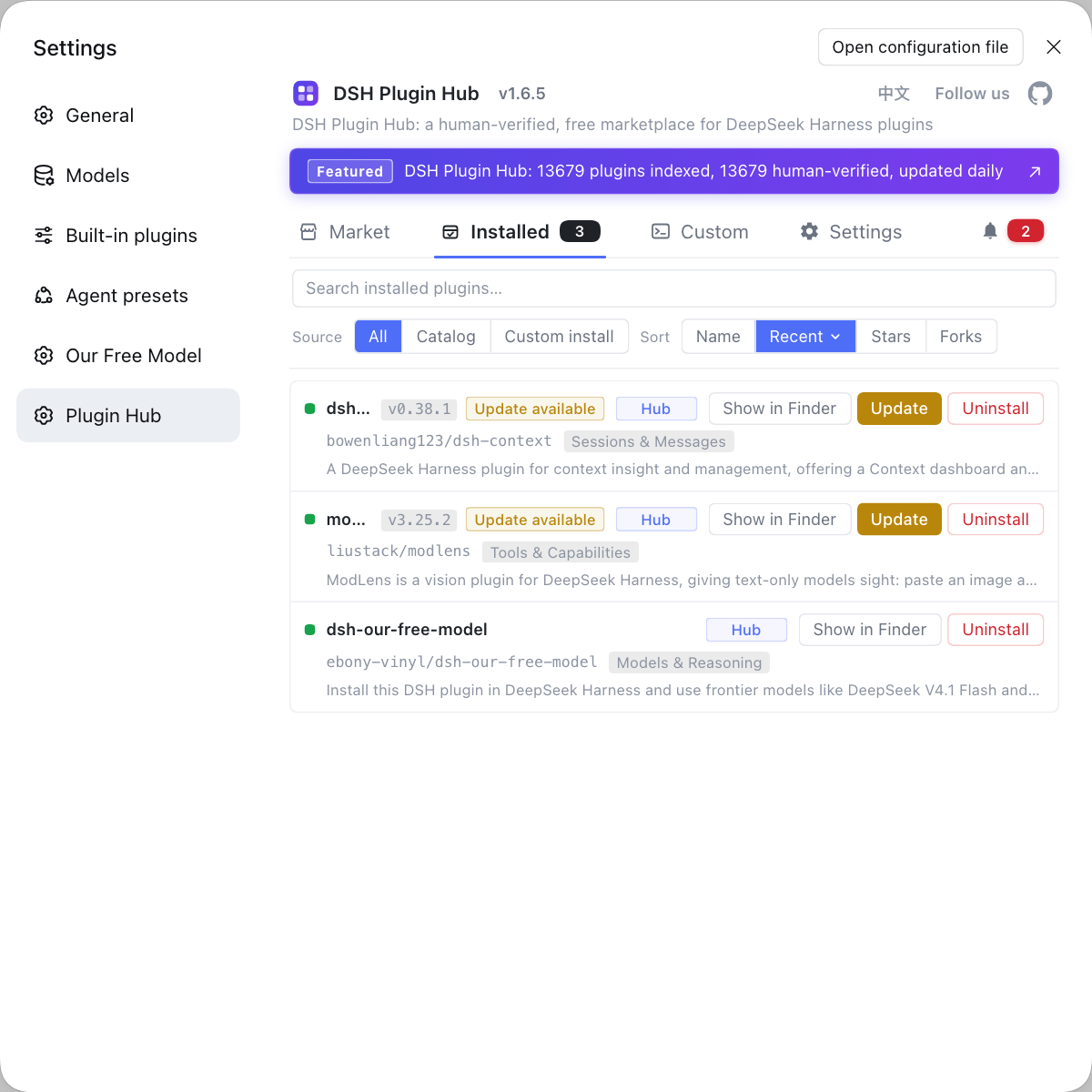
Rather than tracking a memory plugin's install, update and uninstall through scattered commands, use the DSH Plugin Hub Installed list to manage them in one place: what is installed, whether a newer version exists, and whether to remove it, all on one screen.
Notes and limits
Treat a dsh memory plugin as a long-term notebook rather than an all-purpose memory, and it is easier to live with. A few boundaries:
- Installing is not the finish line: recall depends on retrieval quality, so a vague question may pull back nothing — the more specific the wording, the better it lands.
- Do not run several of the same kind: memory plugins overlap heavily, and installing more than one causes duplicate injection and interference; keep a single primary memory plugin.
- Uninstalling does not delete data: removing the plugin only clears its dependency; memory files already written need separate cleanup.
- Be careful with sensitive content: with private data or credentials, check the storage location and the deletion path before letting the plugin record.
- Check compatibility: prefer entries marked as verified in the market, and trial anything unconfirmed on a small scale first.
Sources: DeepSeek Harness 官方文档 - 会话子系统, dshplugin/dsh-plugin-hub
FAQ
A dsh memory plugin is the DSH plugin that gives DeepSeek Harness cross-session long-term memory, and its job differs from built-in session memory. Built-in session memory keeps the messages of the current chat, which may scatter on a restart or a new session; a memory plugin extracts key points, preferences and conclusions, writes them to disk and injects them on demand in a new session. In short, one is a chat log, the other a long-term notebook.
Installing a dsh memory plugin goes through the DSH Plugin Hub: search memory in Settings → Plugin Market, click install, verify the source in the confirmation dialog and confirm, then restart dsh web. The command-line equivalent is dsh plugin --profile web add <package>. After installing, open a fresh session to check whether memory actually persists and takes effect.
A dsh memory plugin stores data locally by default, usually a SQLite database or files under the plugin's own data directory. When a new session starts, the plugin retrieves historical key points against the current question and injects the most relevant fragments into context; retrieval may be keyword, semantic vector or knowledge graph, so the hits differ. Uninstalling the plugin does not automatically delete those memory files, which need separate cleanup.
The key privacy point of a dsh memory plugin is that it persists conversation content to disk, keeping what was said long term. With keys, customer data or private preferences, first confirm the storage location, whether there is approval gating and whether a single memory can be deleted by hand. Treat memory as sensitive data and never hand it credentials to record.
A dsh memory plugin that fails to recall old content usually means memory was not persisted, the plugin did not take effect, or retrieval missed. First confirm the plugin is in the installed list and that dsh web was restarted, then check whether memory data has started writing locally; if all is normal, ask a more specific question, because vague prompts rarely retrieve the right memory. Installing several similar plugins at once can also interfere.
Related Terms
- dsh memory plugin
- A dsh memory plugin is a class of DSH plugin that gives DeepSeek Harness cross-session long-term memory: it extracts key points, preferences and conclusions from a conversation, persists them, and injects them on demand in a new session. It solves the forgetting that follows a session restart or a new session.— DeepSeek Harness 官方文档 - 会话子系统
- cross-session memory
- Cross-session memory is information kept after a session ends and recallable in later new sessions, the core goal of a memory plugin. Unlike message history that exists only in the current session, it needs persistent storage plus on-demand retrieval.— DeepSeek Harness 官方文档 - 会话子系统
- memory scope
- Memory scope is the range a memory applies to, such as one project only or all sessions globally. Implementations offer different scope levels, and knowing the scope before writing avoids dragging project-private data into the global set.— DeepSeek Harness 官方文档 - 会话子系统
- DSH Plugin Hub
- DSH Plugin Hub is the official plugin market built into DeepSeek Harness under Settings → Plugin Market, used to browse, install, update and uninstall plugins. When installing a memory plugin, it is the single search-and-install entry.— dshplugin/dsh-plugin-hub
Sources
- DeepSeek Harness 官方文档 - 会话子系统· deepseek-harness
- dshplugin/dsh-plugin-hub GitHub 仓库· dshplugin