mnemon-memory-agent: DeepSeek Harness memory agent & setup
mnemon-memory-agent is a memory-agent DSH plugin running in DeepSeek Harness: it keeps a conversation as raw dated records, retrieves and judges only when a question arrives, and uses System 1 for quick decisions and System 2 to answer (source). This guide works through three directions: its positioning — why it is called a "memory agent" rather than an ordinary memory plugin; how to install and use it, and what the entry and dependencies are; and how it compares with similar memory plugins. To survey memory plugins as a whole first, see choosing a DeepSeek Harness memory plugin.
Overview
In one line: mnemon-memory-agent moves the judgement of memory from "write time" to "read time", using a dual-process split to answer cross-session questions within roughly a 4k token budget. It is not a small plugin that stuffs memory into the main flow, but a memory agent running in parallel beside the main agent. Below it unfolds across three layers: positioning, install, and trade-offs. This piece discusses grivn's mnemon-memory-agent; dsh-mnemon and mnemon are two other similarly named but different plugins.
The positioning of mnemon-memory-agent: why it is a "memory agent", not an ordinary memory plugin
mnemon-memory-agent's positioning is "memory agent": it runs as a second instance beside the main agent, does not modify it, publishes one view per turn, and only returns to the raw records to gather evidence when needed (source). Its difference from an ordinary memory plugin centres on one thing: when it judges.
| Dimension | Ordinary memory plugin (write-time extraction) | mnemon-memory-agent (read-time judgment) |
|---|---|---|
| When it processes | extracts facts and entities at write time | retrieves and judges only when a question arrives |
| Needs predefined schemas | yes, a new rule per new kind of data | no, keeps raw records |
| Runtime form | often mounted straight into the main flow | a second instance beside the main agent |
| Output | extracted key points / graph | one view per turn |
Two mechanisms are worth remembering on their own:
- Dual-process split — System 1 uses a fast decision model for small-grained yes/no judgement (is this record relevant), and System 2 uses an LLM to write retrieval terms and organise answers.
- Background consolidated index — it gathers records into an overlay that points back at the records themselves, so retrieval checks the index first and then returns to the raw records for the original text.
The upside is shedding the burden of "predefining a fact schema"; the cost is that retrieval and judgement happen at question time, making it more sensitive to retrieval quality — a vague question hits fewer records.
How to install and use mnemon-memory-agent: Hub entry, dependencies and runtime
mnemon-memory-agent installs through the DSH Plugin Hub and is a GitHub-direct install type, with the equivalent command dsh plugin --profile web add github:grivn/mnemon-memory-agent (source). The steps:
- Check prerequisites: DeepSeek Harness runs and the plugin market is installed. Expected: a "Plugin Market" entry appears on the settings page.
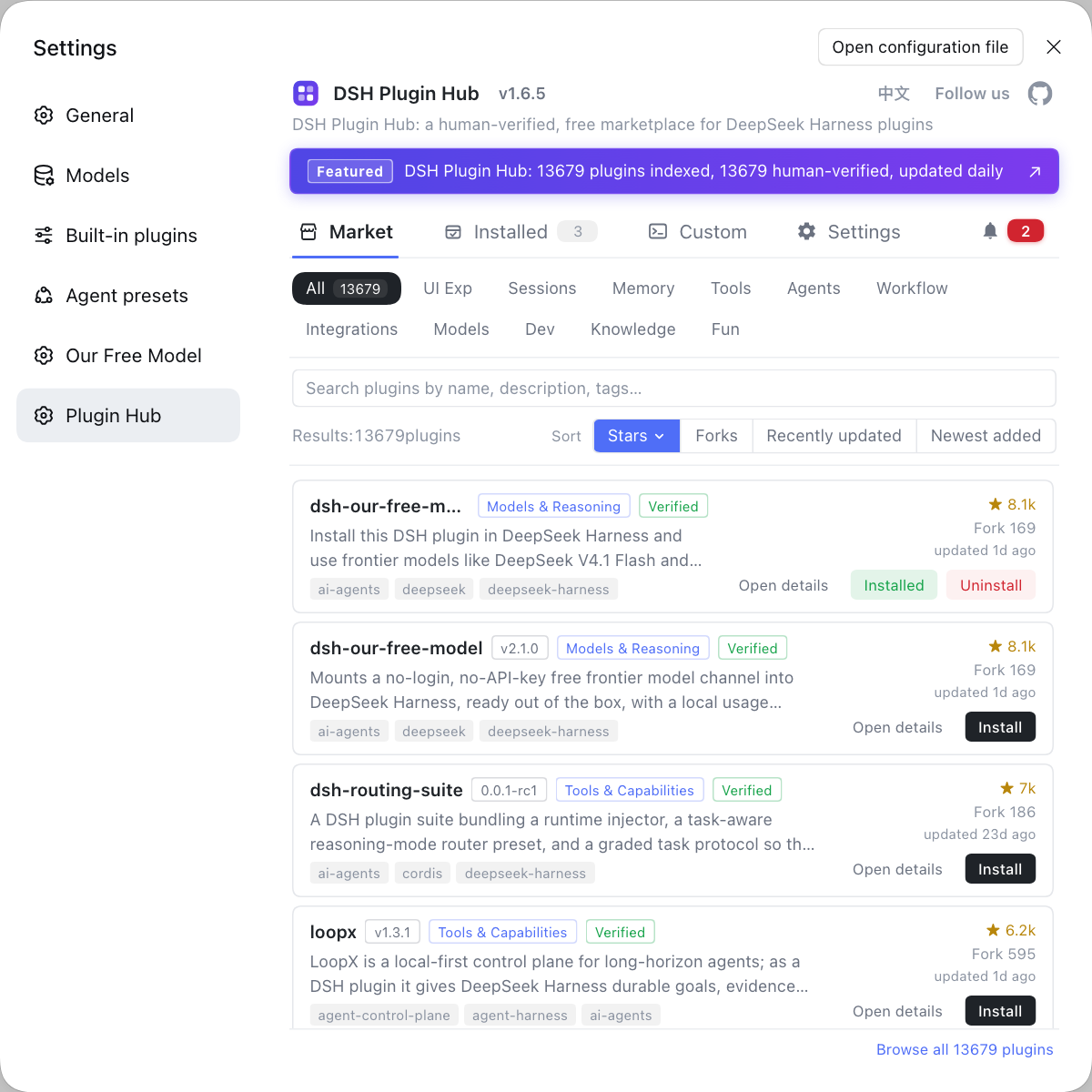
- Open the market and search: open the Web UI → Settings → Plugin Market and search
mnemon-memory-agent. Expected: the list locates the plugin and the card shows its source repo and status. - Check dependencies and source: confirm it is a GitHub-direct install type with the repo grivn/mnemon-memory-agent. Expected: the source and ownership check out (many plugins share the name, so do not install the wrong one).
- Click install and verify: click Install and verify the plugin name, source repo and the
dsh plugin --profile web add github:grivn/mnemon-memory-agentcommand in the confirmation dialog. Expected: the download and install begin after confirming. - Restart to take effect: restart
dsh webso the plugin loads. Expected: the plugin appears in the installed list and the memory agent starts publishing a view per turn. - Verify usage: open a new session and ask a question that depends on the previous session's context. Expected: the model answers with the earlier information; if not, check whether memory has been persisted and whether the question is specific enough.
The command line is the equivalent second path: dsh plugin --profile web add github:grivn/mnemon-memory-agent. A GitHub-direct install may be blocked the first time by the package manager's build-script permission, so follow the error prompt to allow it and retry.
How mnemon-memory-agent compares with other memory plugins
Choosing starts with three things: judgment timing (write-time or read-time), whether you can see memory reads and writes in a UI, and the install channel. A few peers side by side:
| Plugin | Route | Install channel | Fits whom |
|---|---|---|---|
| mnemon-memory-agent | read-time judgment, dual-process | GitHub-direct | those who do not want to predefine a fact schema |
| dsh-mnemon | layered memory, viewable and editable in a UI | one-click npm | those who want to manage memory in a UI |
| mnemon | LLM-supervised, graph structure | GitHub-direct | those who want graph-structured recall |
Three practical suggestions:
- Keep only one primary memory plugin — memory-type features overlap heavily, and installing several causes duplicate injection and interference.
- Choose by process preference — if you accept the uncertainty of "judging at question time", pick mnemon-memory-agent; if you would rather view and edit entries one by one in a UI, pick something like dsh-mnemon.
- Look at the install threshold — GitHub-direct installs may hit build authorisation; for one-click simplicity, prefer entries with an npm channel and a verified market badge.
Rather than installing several similar memory plugins that fight each other, browse the DSH Plugin Hub market and pick one by Stars and compatibility status: source, maintenance and the install command are all verifiable in the interface.
Notes and limits
mnemon-memory-agent takes the "read-time judgment" route, and using it comes with a few fixed boundaries. Line by line:
- Get the name right:
mnemon-memory-agent,dsh-mnemonandmnemonare three different plugins, so confirm the owning repository before installing. - Write the direct-install command in full: a GitHub-direct install must write
github:grivn/mnemon-memory-agent, or it fails to resolve. - Restart after installing: plugins load at startup, so without a restart you will not see the effect.
- Retrieval depends on question quality: read-time judgment is more sensitive to wording, and a vague question hits fewer records.
- Uninstalling does not delete data: removing the plugin only clears its dependency; memory files already written need separate cleanup, and with sensitive content confirm the storage location and deletion path first.
Sources: grivn/mnemon-memory-agent, DeepSeek Harness 官方文档 - 会话子系统, dshplugin/dsh-plugin-hub
FAQ
mnemon-memory-agent is a memory-agent DSH plugin running in DeepSeek Harness, and its special trait is moving judgement to read time. Instead of the write-time extraction that defines facts and entities before storing them, it keeps the conversation as raw dated records and only retrieves and judges when a question arrives. It runs as a second instance beside the main agent, does not modify it, and publishes one view per turn.
mnemon-memory-agent installs through the DSH Plugin Hub: search mnemon-memory-agent in Settings → Plugin Market, click install and verify the source in the confirmation dialog before confirming. It is a GitHub-direct install type, with the equivalent command dsh plugin --profile web add github:grivn/mnemon-memory-agent, and no npm package yet. Restart dsh web after installing to take effect.
They are not the same: mnemon-memory-agent (grivn), dsh-mnemon (omdsh-dev) and mnemon (mnemon-dev) are three different memory-type DSH plugins. All three offer cross-session long-term memory, but their implementation routes and install channels differ. Do not be misled by the name when searching; confirm the owning repository before installing.
Choosing comes down to three things: write-time or read-time, whether you can see memory reads and writes, and the install channel. mnemon-memory-agent takes read-time judgement, using System 1 for quick decisions and System 2 to answer, fitting cases where you do not want to predefine fact schemas; pick dsh-mnemon to view and edit memory in a UI, or another for approval and audit. Beginners should prefer entries with a one-click npm channel and a verified market badge.
When cross-session memory stops working, first check whether the plugin is in the installed list and whether dsh web was restarted, then check whether memory data has been persisted. mnemon-memory-agent is a GitHub-direct install type, so you must write the full github:grivn/mnemon-memory-agent or it fails to resolve. If all of that is normal, ask a more specific question so read-time retrieval is likelier to hit the relevant records.
Related Terms
- memory agent
- A memory agent is one form of memory-type DSH plugin: it runs as a second instance beside the main agent, does not modify the main agent, and is responsible for retrieving history and publishing a view per turn when a question arrives. It differs in duty from an ordinary memory plugin that writes memory straight into the main flow.— grivn/mnemon-memory-agent
- dual-process
- Dual-process means the memory agent splits work across two kinds of model: System 1 uses a fast decision model for small-grained yes/no judgement, and System 2 uses an LLM to write retrieval terms and organise answers. It borrows the split between fast and slow thinking.— grivn/mnemon-memory-agent
- read-time judgment
- Read-time judgment means not extracting facts and entities at write time but keeping the conversation as is and waiting until a question arrives to retrieve and judge. It targets the problem that write-time extraction needs predefined schemas and a new rule for every new kind of data.— grivn/mnemon-memory-agent
- View
- A View is a result the memory agent publishes each turn, summarising the information it read from history, judged and organised that round. The main agent consumes this view instead of directly touching all the raw records.— grivn/mnemon-memory-agent
Sources
- grivn/mnemon-memory-agent· grivn
- DeepSeek Harness 官方文档 - 会话子系统· deepseek-harness
- dshplugin/dsh-plugin-hub GitHub 仓库· dshplugin