Is DeepSeek Harness official? What the DSH framework does
Is DeepSeek Harness the official, open-source agent harness built by DeepSeek AI? Yes — it is developed by DeepSeek AI and open-sourced under the MIT license in the official repository. But it is not the DeepSeek App and not a model API: it is an agent framework that runs on your machine and extends through plugins, currently in developer preview.
Overview
“What is deepseek harness and is it official” is the most frequent identity question in search, and the one-sentence answer is: it is the open-source agent framework released by DeepSeek AI, with source code public in the official GitHub repository and the mainline published as an npm package — anyone can download, read and build on it. Below we first confirm the official identity, then separate it from the easily confused DeepSeek App and API, and finally explain what it can do and who it is for. For a deeper dive into the all-plugins architecture, see What is DeepSeek Harness.
Is DeepSeek Harness official? Identity and origin
The answer: yes, official and open source. Three verifiable facts:
- Developer: DeepSeek Harness is built by DeepSeek AI and positioned as an open-source agent harness, not a third-party project (source);
- Open repository: the source is public on GitHub at deepseek-ai/deepseek-harness — you can clone it, read the code and file issues;
- License and distribution: the repository is open-sourced under MIT (see the LICENSE file for the exact terms), and the official npm package @deepseek-ai/dsh lets you run it with a single
npxcommand.
In short, “DSH” refers to DeepSeek Harness, an official open-source project from DeepSeek AI — with no affiliation to community-run plugin sites such as dsh-plugin.org.
The difference between DeepSeek Harness, the App and the API
All three names carry “DeepSeek,” but one is a chat product, one is a model interface, and one is a framework that runs on your machine — they are not the same layer. Compare:
- DeepSeek App: a chat product for end users (web/mobile), ready out of the box; requests are served on DeepSeek's servers, and you install nothing as a developer;
- DeepSeek API: the interface service DeepSeek offers to developers — call its models with an API key, pay per usage, and treat it as the provider of “model capability”;
- DeepSeek Harness: open-source software that runs on your own machine or server. It is not a model; it composes models, tools and skills into an agent system that executes tasks, and you can configure DeepSeek API (or other compatible sources) as the model provider.
The key distinction: the App and API run on DeepSeek's servers, while the Harness runs in your own environment; the App and API deliver “chat/models,” while the Harness delivers the framework that orchestrates chat and tools into agents.
What the DSH framework does: CLI, Web UI and the plugin ecosystem
In short, DeepSeek Harness gives you a programmable, extensible agent runtime on your own machine: start with one command, operate from a browser UI, and add capabilities by installing plugins. Main capabilities:
- The dsh CLI: the official quickstart,
npx @deepseek-ai/dsh web, downloads and runs without a prior global install (source); - Web UI: after startup it serves an interface at
http://127.0.0.1:3080by default — conversations, session and plugin management all happen in the browser; - Everything is a plugin: model access, tools, UI, memory, skills — nearly every extension point is abstracted into a plugin, so adding capability does not mean changing the core (mechanics in our DSH plugin primer);
- Model composition: through plugins and configuration you mix models and combined capabilities into an agent system fit for your task.
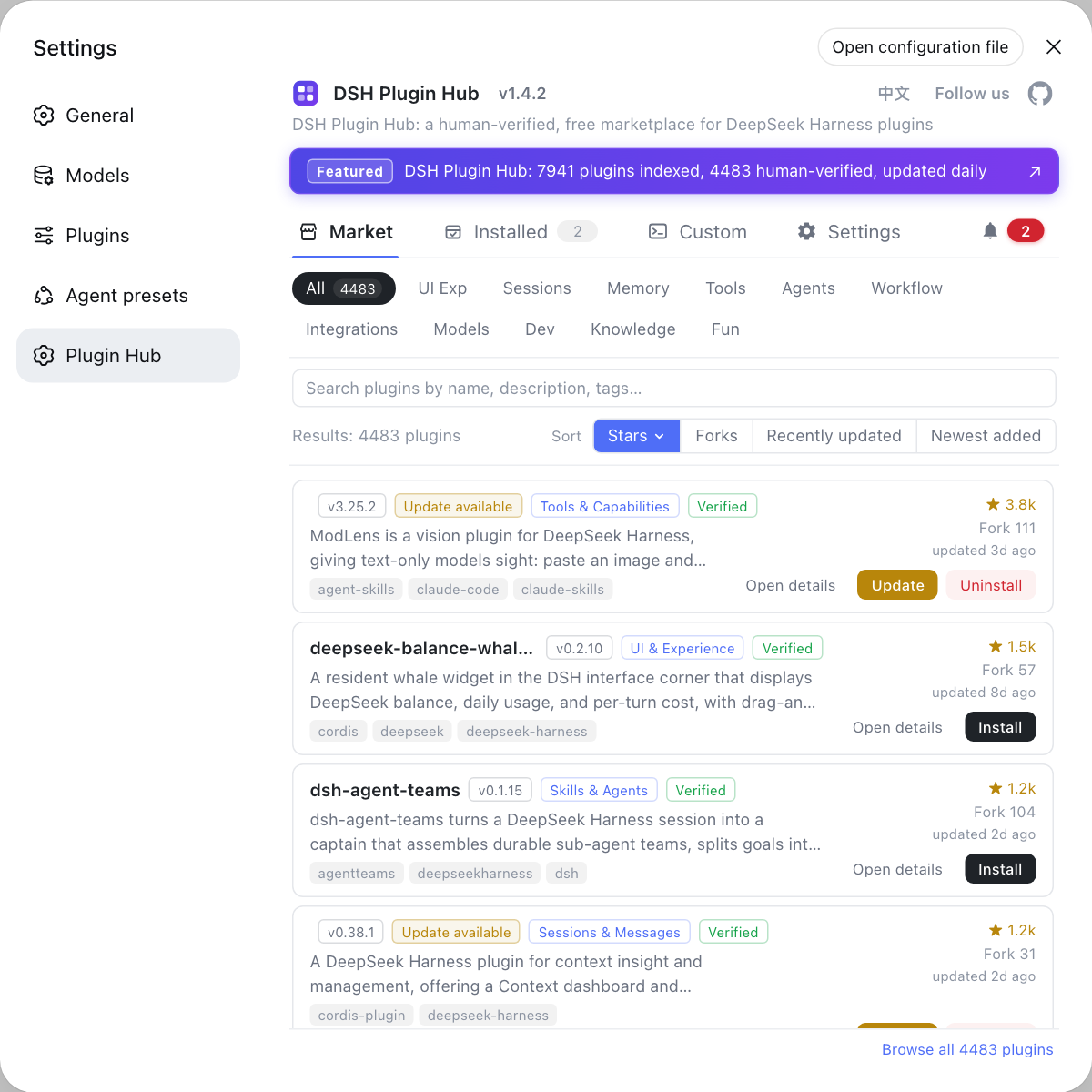
These plugin-provided capabilities are collected in DSH Plugin Hub, the community-official plugin market built into DeepSeek Harness — after installing DSH, open Settings → Plugin market to browse by category, stars or search, and install what you need in one click:
Who DeepSeek Harness is for (and not): keep developer preview in mind
Bottom line: DeepSeek Harness currently best suits developers who want to build their own agents and early adopters; if you need a stable out-of-the-box product, wait. Reasons and advice:
- Officially a developer preview: the project iterates fast and will introduce breaking changes, so plugins and configuration may shift between versions (source);
- Good fit: developers who can follow versions, read docs and source, and want deeply customized agents; enthusiasts who enjoy experimenting and can tolerate rough edges;
- Poor fit: casual users who need “download once, stable forever,” and production scenarios that depend on a fast-moving preview;
- How a casual user can try it: go through the official Web UI plus the community plugin market first; judge the value before committing to self-hosting or long-term adoption.
Getting started with DeepSeek Harness: pick either path
Two ways to start: install Node.js and run one npx command, or clone the official repository and build from source. Steps:
- Quick start: after installing Node.js run
npx @deepseek-ai/dsh web, then openhttp://127.0.0.1:3080— the full beginner walkthrough is in Install DeepSeek Harness for the first time; - Source exploration:
git clone https://github.com/deepseek-ai/deepseek-harness.gitand follow the official README to build — for reading source, hacking the core or tracking the development line.
Once installed, see must-have DSH plugins for what to install first.
Sources: deepseek-ai/deepseek-harness, @deepseek-ai/dsh on npm, DeepSeek Harness official docs - Quickstart
FAQ
DeepSeek Harness is the official open-source project built by DeepSeek AI: the source is public on github.com/deepseek-ai/deepseek-harness under the MIT license, and the official npm package @deepseek-ai/dsh provides one-command running. It is official, but it is neither the DeepSeek App nor the DeepSeek API service.
DeepSeek Harness, the DeepSeek App and the DeepSeek API are different layers: the App is a chat product for end users; the API is an interface service that lets developers call DeepSeek models; DeepSeek Harness is an open-source agent framework that runs on your own machine — it is not a model itself but composes models, tools and skills into an agent system, and you can configure DeepSeek API (or other providers) as the model source.
DeepSeek Harness is in developer preview: it iterates quickly and will ship breaking changes, so it suits developers and early adopters who want to build and tune their own agents. Users who want a stable out-of-the-box product should wait, or first try the official Web UI and plugin market to judge whether it fits.
DeepSeek Harness's source code lives in the GitHub repository deepseek-ai/deepseek-harness — you can clone it, read it and file issues. The license is MIT, which permits free use and modification; check the LICENSE file in the repo for the exact terms. To run it without cloning, install Node.js and run npx @deepseek-ai/dsh web.
Related Terms
- DeepSeek Harness
- DeepSeek Harness (DSH) is the open-source agent harness built by DeepSeek AI, with a command-line tool named dsh, based on an all-plugins architecture driven by Cordis; it is currently in developer preview.— deepseek-ai/deepseek-harness
- agent harness
- An agent harness is a software framework that organizes models, tools and skills into a runnable agent system; DeepSeek Harness is the official implementation from DeepSeek AI.— deepseek-ai/deepseek-harness
- dsh
- dsh is the command-line tool of DeepSeek Harness; the official quickstart runs npx @deepseek-ai/dsh web, which serves a Web UI at http://127.0.0.1:3080 by default.— deepseek-ai/deepseek-harness
- MIT License
- MIT is a permissive open-source license; DeepSeek Harness is released under it, allowing free use, modification and redistribution, subject to the exact terms of the LICENSE file.— deepseek-ai/deepseek-harness LICENSE
Sources
- deepseek-ai/deepseek-harness· GitHub
- @deepseek-ai/dsh on npm· npm
- DeepSeek Harness official docs - Quickstart· deepseek-harness