What npx @deepseek-ai/dsh web does: cache and install
npx @deepseek-ai/dsh web is the official way to get DeepSeek Harness's Web UI running in one line: npx fetches the newest package and runs dsh, web is an alias for dsh web (dsh --profile web), which boots the web app. Behind that command are three layers — an npm package, a profile-composition mechanism and a user data directory. This post explains each one: what it downloads, where data lives, why a global install is unnecessary, and whether it is really the same thing as npm global install or a source build.
In one sentence: npx folds download and start into one step
The core value of npx @deepseek-ai/dsh web is merging "download the package" and "start the app" into a single command. A traditional flow installs first, then starts; npx fetches the latest version each run and executes it immediately, so you always run the newest release without installing first.
That command breaks into three parts:
npx— the runner that ships with npm; it fetches and runs a package without a global install and without polluting your global environment (source).@deepseek-ai/dsh— DeepSeek's official npm package; it is the Node application launcher for DeepSeek Harness, and thedshcommand is the only supported Node launcher (source).web— an alias fordsh web, equal todsh --profile web, which boots the web app (the Web UI) (source).
The official Quickstart uses it the same way: start the Web UI per the root README, and the command prints its address (source).
Layer one: what the @deepseek-ai/dsh npm package is
@deepseek-ai/dsh is the launcher package for DeepSeek Harness; the dsh command you run comes from it. From npm metadata (source):
| Field | Value | Meaning |
|---|---|---|
| Name | @deepseek-ai/dsh | DeepSeek official scoped package |
| License | MIT | open source, free to use |
| Dependencies | 62 | the launcher and runtime dependency set |
| Dependents | 39 | an ecosystem builds on it |
| Weekly downloads | 443,043 | widely used |
The dsh command does one thing: load the selected profile (an ordered stack of plugin-bundle patch layers) and hand the remaining arguments to the booted profile to parse. Command grammar lives in src/args.ts; src/bin.ts loads only the selected runner (source).
That "load only the selected runner" design is why npx @deepseek-ai/dsh web does not have to boot web, headless and sdk all at once — it starts only the one you name. Invalid commands, options from another mode, configuration errors and boot failures all exit nonzero, so you can branch on exit code in scripts.
Layer two: web is an alias for --profile web, a composition mechanism
web is not a separate app — it is an alias for --profile web; a profile composes several plugin bundles by layering patches in order. This is the key to understanding the command. Each profile directory that dsh boots holds a package.json (out-of-tree plugin dependencies plus the profile manifest dsh.profile, whose fields are an ordered bundles list and a patchReload lifecycle) and a cordis.patch.yml (your own patch layer) (source).
The Web UI is assembled from multiple bundles. The tree composes over an empty root, in order:
- apply each bundle's patch in
dsh.profile.bundlesorder; - then the profile's
cordis.patch.yml; - then the home-level
$DSH_HOME/cordis.patch.yml; - finally
--patchoverlays.
Bundles named in dsh.profile.bundles resolve from the dsh installation first (@deepseek-ai/dsh-base, @deepseek-ai/dsh-web-app, @deepseek-ai/dsh-headless, @deepseek-ai/dsh-sdk-app, @deepseek-ai/dsh-sdk-minimal, @deepseek-ai/dsh-acp-app), then from the profile's own node_modules, where pnpm installs out-of-tree plugins (source). The web, headless, sdk, sdk-minimal and acp profiles auto-initialize from shipped templates on first use; any other profile must be created via dsh plugin.
To see the composed config without booting, use --dump-default-config and --dump-config.
Layer three: where the data lives ($DSH_HOME and the cwd)
npx does not scatter user data globally; it concentrates it in $DSH_HOME (default ~/.dsh) and treats the directory where you launch dsh as the default workspace. This decides where your config, plugins and files are:
- cwd = default workspace root — whichever directory you run
npx @deepseek-ai/dsh webin becomes the default filesystem location (source). The Web UI does not select any workspace until you add one (source). - $DSH_HOME = user data directory — default
~/.dsh; profile dirs live at$DSH_HOME/profiles/<name>, and the home-level patch$DSH_HOME/cordis.patch.ymlis also read (source). - npm cache directory — the fetched package is cached by npm, a different location from your user data directory.
So when removing packages or moving machines, what matters is your $DSH_HOME config and plugins, not the transient packages in the npx cache.
Why npx takes no global space and stays current
npx is designed not to install globally: it pulls the package into the cache, uses it and discards it, so it needs no global write permission and stays current automatically. That sidesteps two common pain points:
- No global permission —
npm install -gwrites to a system directory by default, and normal users often hitEACCES. npx avoids the system directory entirely, so nosudo. - Always current — every
npx @deepseek-ai/dsh webpulls the latest published package, so you never manually update the launcher.
The trade-off: you cannot type bare dsh commands in the terminal (it is not in the global bin). If you need dsh web, dsh plugin and so on, you need a global install. That is the essential npx-vs-global trade-off.
npx vs npm global install vs source build
All three run the same dsh, differing only in where it comes from; use npx daily, a global install to type bare commands, and a source build to follow dev builds. Side by side:
| Method | Command | Needs build | Uses global | Best for | Data dir |
|---|---|---|---|---|---|
| npx run | npx @deepseek-ai/dsh web | no | no | daily one-line start, stay current | ~/.dsh |
| npm global | npm install -g @deepseek-ai/dsh | no | yes | typing bare dsh commands | ~/.dsh |
| Source build | git clone + pnpm install + pnpm run build | yes (prod must build) | no | dev builds, editing code | ~/.dsh/repo |
All three share the same profile-composition mechanism and $DSH_HOME data directory, so config, plugins and workspaces transfer between them with no data loss. A source build runs the TypeScript entry in the repo, forwarding every argument to pnpm dsh <args...> (source).
After launching: one-click plugins with DSH Plugin Hub
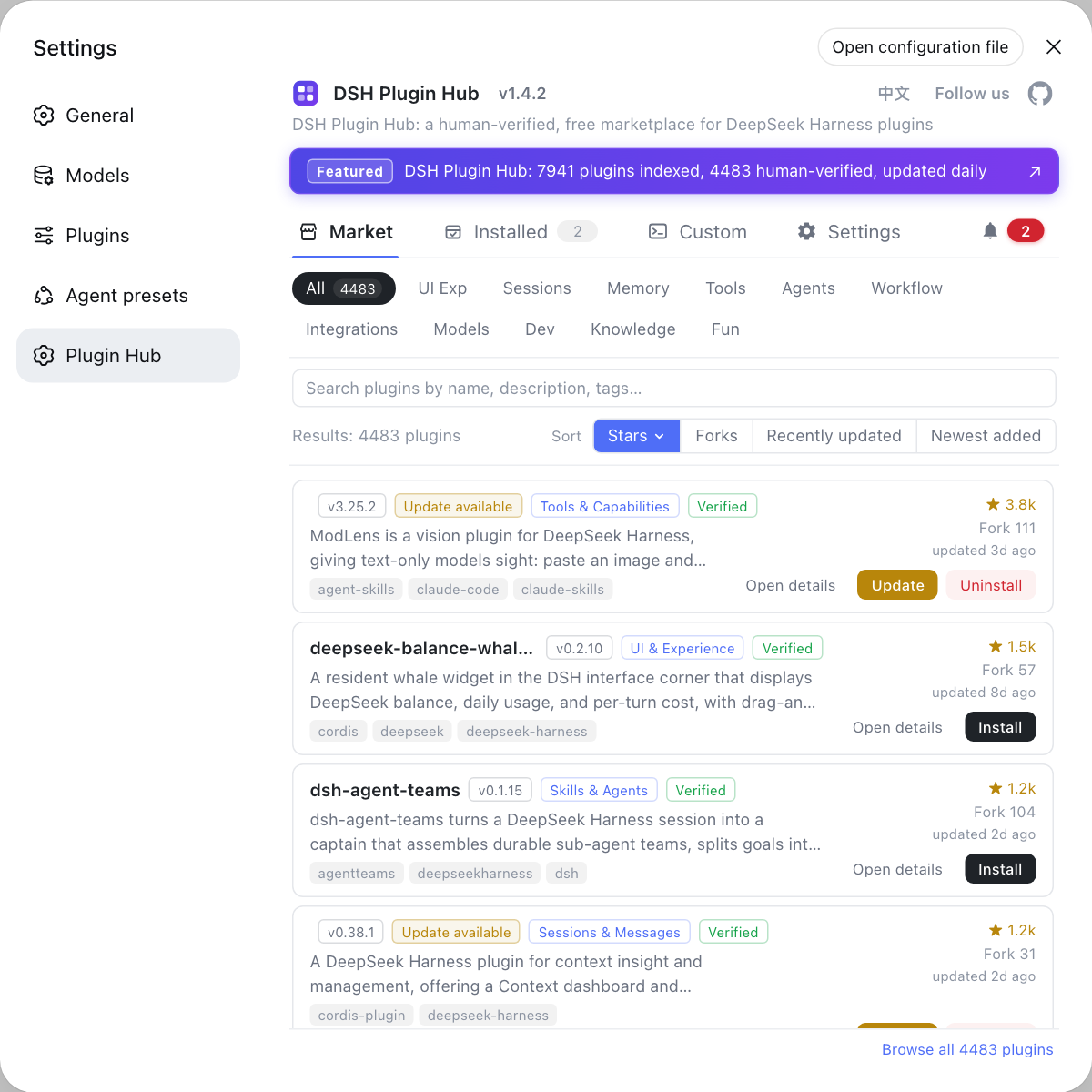
Launching is just the first step — DSH's power comes from plugins, and the easiest way to install them is Settings > Plugin market in DSH Plugin Hub. You can install one by one in the terminal with dsh plugin --profile web add <package>, but the mainstream route is installing DSH Plugin Hub and managing everything from its UI: install it with dsh plugin --profile web add dsh-plugin, restart dsh web, then open Settings > Plugin market, the DSH Plugin Hub market home — browse the catalog by category, with cards showing name, description, stars and last update:
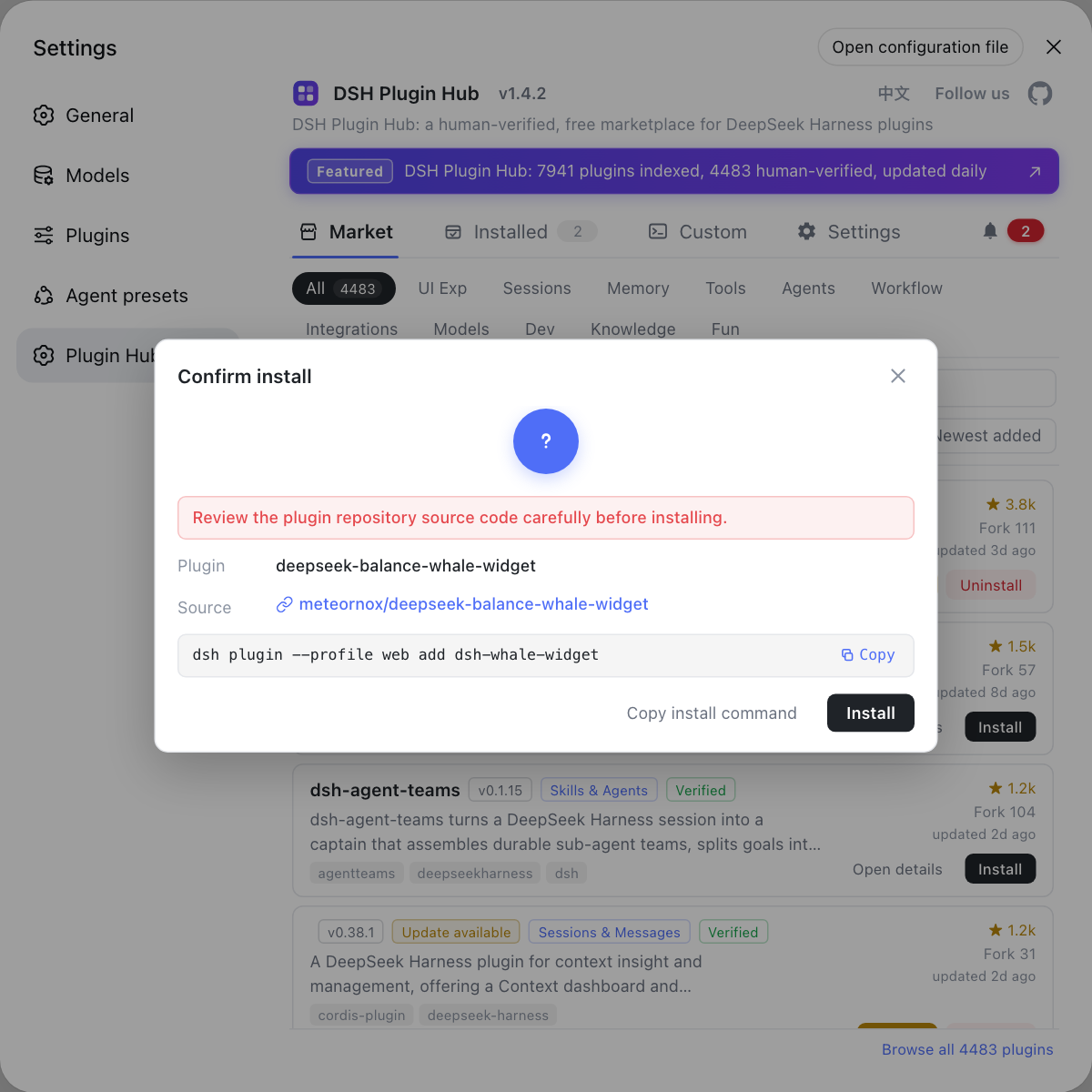
Click any plugin to one-click install; a serial queue runs in the background with live progress, and most plugins take effect after a page refresh:
Once Hub is in place, three steps get your first plugin working:
- Open Settings > Plugin market — after
npx @deepseek-ai/dsh webstarts, open the Web UI and go to Settings > Plugin market. Expected: the search box, categories and plugin cards appear. - Search and install — type a plugin name or feature word, click Install on the target, check the source and command in the confirmation dialog, then confirm. Expected: progress finishes and the card shows as installed.
- Restart and verify — restart
dsh web, then return to Settings > Plugin market > Installed to confirm the plugin is there. Expected: it loads without errors and works.
The full first-plugin walkthrough is in install your first plugin after npx DSH.
Now you understand what npx @deepseek-ai/dsh web does behind the scenes and how to wire up the plugin ecosystem. If you care about choosing among modes instead, see DeepSeek Harness run modes: web, headless and acp.
Sources: npm @deepseek-ai/dsh, dsh CLI README, official Quickstart
FAQ
It combines download and start in one step: npx pulls the latest @deepseek-ai/dsh package from npm and runs the dsh binary; web is an alias for dsh web (dsh --profile web), which boots the web app and prints its address.
The package is cached by npx; your user data and config live under $DSH_HOME (default ~/.dsh). The web profile auto-initializes from a shipped template on first use, holding package.json, the dsh.profile manifest and cordis.patch.yml.
npm install -g puts dsh in the global directory, needs global write permission and stays on disk; npx pulls it into the cache per run and discards it, needing no global permission and staying current. You need a global install only to type bare dsh commands.
The global default is a system directory that normal users cannot write to; sudo only worsens ownership. The safer route is npx for runs, or set the global prefix to a user dir (npm config set prefix ~/.npm-global) before installing.
It is the same dsh, differing only in where it runs from: npx uses the newest npm release out of the box; a source build needs git clone, pnpm install and pnpm run build, then pnpm dsh — for following dev builds or editing code, and a production run needs a build first.
Use dsh plugin, e.g. dsh plugin --profile web add dsh-plugin. The easiest route is installing DSH Plugin Hub and one-click installing from Settings > Plugin market, where source, version and progress are visible.
Related Terms
- npx
- npx is the package runner shipped with npm; it runs a package without a global install, pulling and caching it from npm, so npx @deepseek-ai/dsh web does not write anything into the global directory.— npm official docs
- --profile
- --profile is the dsh launcher flag that picks which profile to boot; web is one of its aliases (dsh web equals dsh --profile web), and it is parsed by the launcher while later arguments go to the booted app.— dsh CLI README
- $DSH_HOME
- $DSH_HOME is DeepSeek Harness's user data directory (default ~/.dsh), holding profiles, config and patch layers; with npx the program sits in the npm cache while user data stays in $DSH_HOME, the two kept apart.— dsh CLI README
Sources
- @deepseek-ai/dsh - npm· npm
- dsh CLI README· deepseek-ai
- DeepSeek Harness docs - Quickstart· deepseek-harness