DSH plugin themes: DeepSeek Harness skins and compatibility
dsh theme DSH plugins are a class of plugins that change only the appearance of DeepSeek Harness — colors, skins, background images and boot animations all count, and they touch neither model capability, tool behavior nor permission boundaries, only turning "what you see" into what you want (source). This article works through three directions — what they can change, which exist and how to install them, and their compatibility and performance — to help you pick the right appearance plugin.
DSH plugin overview: skins are the main ground
Theme DSH plugins centre on the running interface's skins and colors, and a boot animation is only a side branch. Compare them first:
| Type | Part changed | Examples | Weight here |
|---|---|---|---|
| Theme / skin | The running main interface | dsh-theme-gallery, dsh-skin-studio | The focus |
| Boot animation | Those few seconds at startup | dsh-opening-animation, dsh-boot-video | One paragraph only |
Remember this first: a skin decides what the main interface you stare at for hours looks like, and this article is about swapping skins and colors plus the compatibility and performance afterwards. A boot animation changes a few startup seconds and has its own tutorial, so here it gets one sentence; the directions are what they can change, which exist and how to install them, and compatibility and performance.
What DSH plugins change: colors and skins
The changes made by this class of DSH plugin all land on the interface layer, and here the focus is the skin and color levels. Level by level:
- Colors and tokens — replace a whole set of interface variables (colors, corner radius, shadow) to change the whole screen's style at once. Expected: the main interface palette switches as a whole and the look stays consistent.
- Background image and mask — upload your own background image and overlay a translucent mask with a frosted-glass effect, softening the background until it does not interfere with reading. Expected: the interface has a custom backdrop that follows light and dark themes automatically.
The boot animation in those few startup seconds (an image reveal or an mp4 intro) changes something other than the running interface, so it gets one sentence here; for that class see the DeepSeek Harness status-animation plugins tutorial.
What matters is not to overstate this class: they only change "what you see", never "what the model can do", so they have no effect on features, permissions or the sandbox — a safe-to-try interface patch you can uninstall if you dislike it. They are also not the same as status animation: a status animation (such as a usage or balance pulse) carries real data, whereas the theme skins and colors here carry only looks.
The practical upshot is that appearance plugins can be tried with almost no risk. Install one, restart, and look; if the palette fights your terminal colors or the background image is busier than you expected, uninstall and restart again. Nothing about your sessions, models or permissions moved in the meantime, so the cost of a wrong choice is a couple of restarts rather than a rollback plan.
DSH plugin roundup and install: theme gallery, skin studio, other builds
Walk the representative implementations, with the install entry going uniformly through the plugin market. Quick look:
- dsh-theme-gallery (theme gallery) — dsh-theme-gallery turns appearance palettes into switchable cards, ships skins as pure JSON data with the package, and adds skins with no code change, no restart and no reinstall; it includes two built-in skins, each covering the whole screen with 67 tokens and able to render an ambience decoration layer for the sidebar (source). Good for: people who want many skins in one install and can switch by clicking.
- dsh-skin-studio (background skin studio) — dsh-skin-studio puts your own background image on the interface without changing the theme service, softening it with a translucent mask and frosted glass; density and blur are separately adjustable, the colors, text and bubbles still follow the original theme, and the background image stays on the local machine with no network access by the plugin (source). Good for: people who only want a custom background and care about privacy.
- dsh-opening-animation (image intro) — dsh-opening-animation plays a chosen image animation or video over a full-screen overlay on every page load; the image supports four reveal animations, video plays muted and automatic, the ending transition speed is adjustable, a click or Esc skips it at any time, and on failure it removes the overlay without blocking the main interface (source). Good for: people who want a light opening ritual.
- dsh-boot-video (video intro) — dsh-boot-video replaces the loading screen that flashes past at startup with a full-screen mp4; the video fades out to reveal the interface, a click or Esc skips it, it accepts mp4 imports up to 512 MB, and it asks before automatically transcoding an unsupported codec to H.264 (source). Good for: people who want their own intro and a polished boot screen.
Unified install method, in four steps:
- Open the market — search DSH Plugin Hub by keywords such as theme, skin, boot or animation. Expected: a list of similar plugins with their compatibility state.
- Read the entry — check whether it changes the running interface or the startup phase, whether it needs extra assets, and whether it can be skipped. Expected: you know which part of the appearance it will change.
- One-click install and restart — click install, then restart
dsh web; you can also use the command linedsh plugin --profile web add <package>. Expected: the appearance takes effect after the restart. - Fine-tune in settings — go to the plugin's settings page (for example "Personalization › Opening animation") to upload assets, switch skins or adjust parameters. Expected: changes show immediately and can be reverted to default.
DSH plugin compatibility and performance notes
Appearance plugins follow changes in the core package, so evaluate compatibility and overhead before installing. Three angles:
- Version compatibility — themes and animations work by injecting into the interface structure, so after a core package upgrade the injection point may no longer line up, showing up as a dead skin or a garbled interface. Expected: check the compatible version noted on the entry before installing, and when something breaks after an upgrade look in the installed list for an update first.
- Performance and startup overhead — a pure-color skin is very cheap; implementations with a background image, frosted glass or a persistent animated decoration keep consuming render resources; a boot animation adds a stretch of playback time to startup, and a video intro weighs more than an image animation. Expected: if you are sensitive to startup speed, pick an implementation that supports skipping, or turn off the decoration layer.
- Assets and building — some implementations need the package packed into a profile by hand or assets imported, so the install method is not fully unified; follow each README. Expected: read the install section of a plugin before adding it, and do not assume every appearance plugin is "one-click and done".
Notes and limits for using DSH plugins
This kind of DSH plugin (DeepSeek plugin) sits at the interface layer, but a few points still apply. Item by item:
- Do not misread the layer: they change interface looks only; they do not affect model capability or permission boundaries.
- Prefer a switchable decoration layer: a skin with a background image and frosted glass keeps consuming render resources, so choose an implementation that can disable the decoration layer in one click.
- Keep assets to yourself: use background images and intro videos locally, and be careful not to place sensitive imagery anywhere that gets uploaded.
- Restart for both install and removal: appearance changes generally load after a
dsh webrestart, and so does uninstalling. - Verify the source: check inclusion and version on a legitimate market rather than installing interface patches from unknown repos.
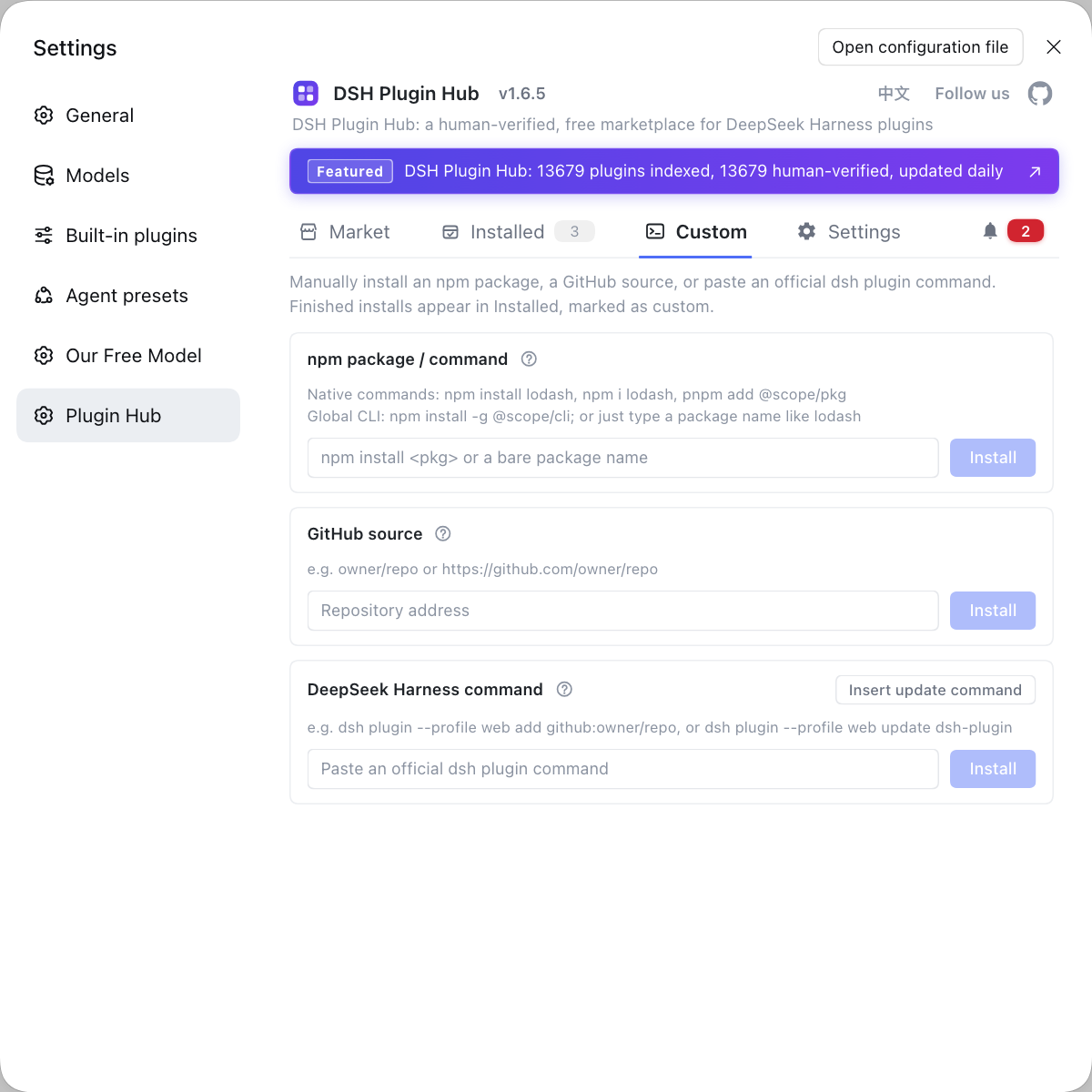
Installing appearance plugins is also, at heart, installing and managing plugins — rather than flipping through repos for themes and boot animations and noting each install method by hand, let DSH Plugin Hub, the official community market for DeepSeek Harness at https://dsh-plugin.org/, find them in one panel: and when the store does not carry what you want, Custom install lets you add it by npm package or GitHub source.
Sources: dsh-theme-gallery (dsh-plugin.org), dsh-opening-animation (dsh-plugin.org), dsh-boot-video (dsh-plugin.org), dsh CLI README.
FAQ
dsh theme DSH plugins change only the interface layer — colors, skins, background images and boot animations — and do not change model capability, tool behavior or permission boundaries. In other words they change what you see, not what the model can do; they are a look-and-feel patch on the interface layer that reverts the moment you uninstall.
They change the same layer with a different emphasis: a theme gallery swaps the whole set of interface color tokens (restyling the screen at once), while a skin studio swaps the background image (overlaying a translucent mask and frosted glass, with colors and text still following the original theme). Pick the gallery to restyle everything, and the studio when you only want a custom backdrop and care about privacy.
dsh theme DSH plugins usually install through the plugin market or dsh plugin add, and switching is a click in the settings or sidebar panel — most skin additions need no code edit and no reinstall. For example dsh-theme-gallery ships skins as JSON distributed with the package for instant sidebar switching, while dsh-boot-video takes effect after you restart dsh web and enable it on the settings page.
Theme DSH plugins render continuously, and the cost depends on whether there is a background image, frosted glass or animated decoration; a boot animation adds a stretch of playback time to startup. If you are sensitive to startup speed, choose an implementation that supports skipping, or turn off the decoration layer; a pure-color skin for the main interface is usually very cheap.
When a theme DSH plugin breaks it is usually a compatibility problem: after the core package upgrades, the interface structure shifts and the old skin or animation's injection point no longer lines up. First check the installed list for an update and upgrade the plugin; if it still misbehaves, disable the plugin temporarily to restore the default look, then check the compatible version noted on the entry.
Related Terms
- dsh theme
- dsh theme is the umbrella term in the DeepSeek Harness ecosystem for theme and skin class DSH plugins, which change the look by swapping interface tokens such as colors, background images and frosted-glass masks without altering model or tool behavior.— dsh-theme-gallery (dsh-plugin.org)
- dsh-theme-gallery
- dsh-theme-gallery is a theme-skin gallery DSH plugin for DeepSeek Harness; skins are distributed as pure JSON data with the package and switched by clicking a card in the sidebar panel, and each skin covers a whole screen with 67 tokens.— dsh-theme-gallery (dsh-plugin.org)
- boot animation
- A boot animation is a full-screen splash or transition played during the DeepSeek Harness startup phase, used to cover the loading process and unify the look. DSH plugins such as dsh-opening-animation and dsh-boot-video support both image reveal and mp4 video forms.— dsh-boot-video (dsh-plugin.org)
- token (interface design token)
- An interface design token is the smallest variable unit a theme uses to describe appearance such as color, corner radius and shadow. One dsh-theme-gallery skin is made of 67 tokens covering the full-screen palette and sidebar decoration.— dsh-theme-gallery (dsh-plugin.org)
Sources
- dsh-theme-gallery (dsh-plugin.org plugin entry)· dsh-plugin.org
- dsh-opening-animation (dsh-plugin.org plugin entry)· dsh-plugin.org
- dsh-boot-video (dsh-plugin.org plugin entry)· dsh-plugin.org
- dsh CLI README (plugin add semantics)· deepseek-ai