dsh-routing-suite: model routing DSH plugin for DeepSeek
dsh-routing-suite is a class of community DSH plugin that adds routing to DeepSeek Harness: it dispatches requests to different models or presets by task, cost or reasoning mode (source). This article covers what it solves, how it plugs into DeepSeek Harness, and the trade-off between cutting cost and keeping quality.
What the DSH plugin dsh-routing-suite is: a dispatch layer in front of your requests
The core job of a routing plugin is to insert a decision layer between "request" and "model", so not every task goes to the same model. It targets the waste that comes from a one-size-fits-all setup:
- Dispatch by task — light tasks go to a lightweight model or a lightweight reasoning mode, heavy ones to a strong model. Expected: heavy work is not skimped on, light work is not expensive.
- Dispatch by cost — set cost thresholds per model and steer cost-insensitive tasks to the more economical provider. Expected: overall spend goes down.
- Dispatch by capability — tasks needing long context, images or a specific tool call go to a model that has that capability. Expected: capability matches, fewer mistakes.
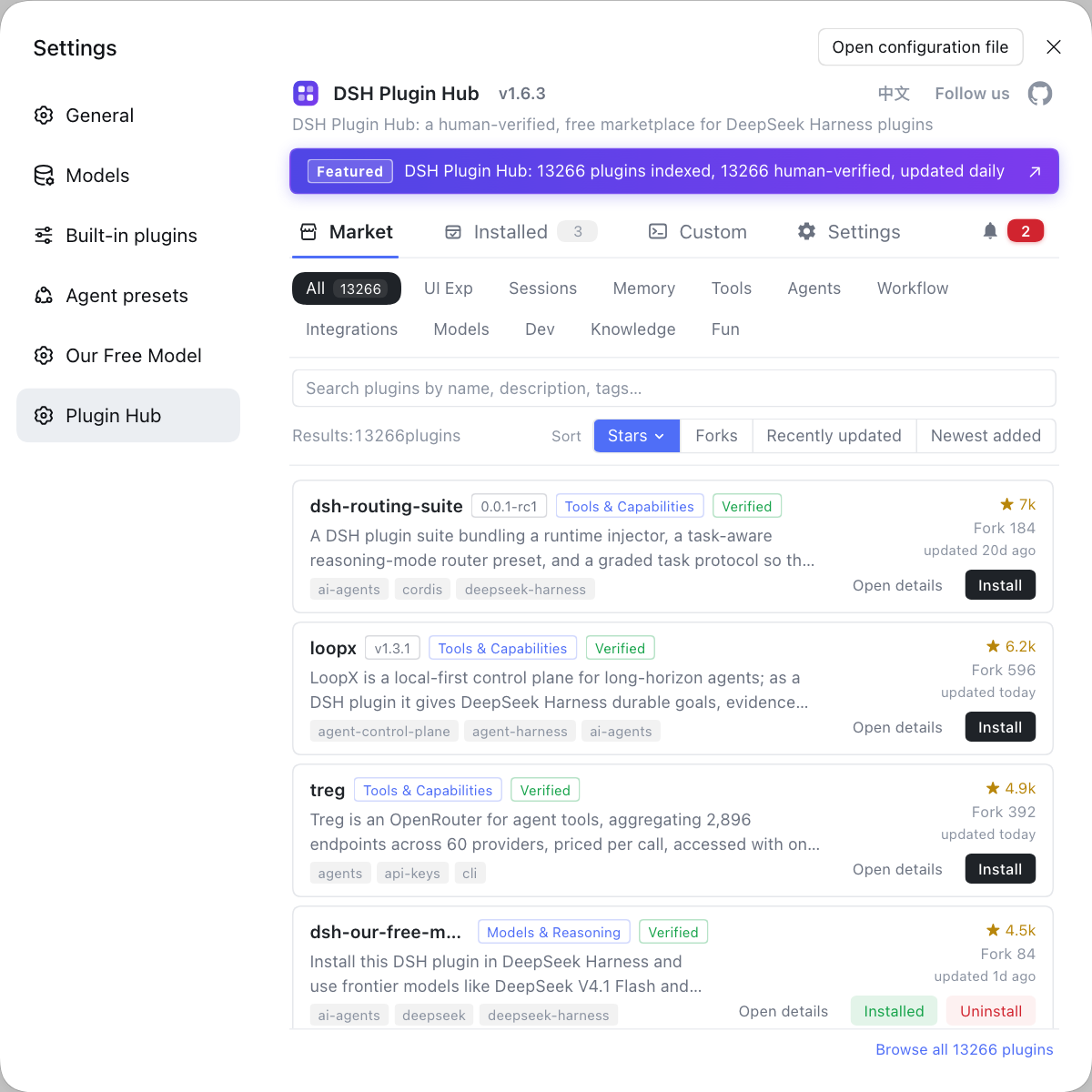
There is more than one implementation named dsh-routing-suite, and the routing dimensions differ slightly: some lean towards a "lightweight smart routing mode" that automatically picks between check-first and direct execution based on the first task; others are more of a "routing suite" bundling a runtime injector, a task-aware thinking-mode routing preset and a tiered task protocol (source). What they share: all of them sit on top of the official everything-is-a-plugin model integration and add one more layer of on-demand dispatch.
How it plugs into DeepSeek Harness
Routing is a layer on top of the official model configuration: configure providers first, then let the routing plugin choose which one to use. The official docs state that models are managed under Settings → Models, supporting built-in third-party providers (such as anthropic, openai and others) as well as custom model APIs (supply a Provider ID, base URL, protocol, credentials and model list); changes take effect on the next request, with no service restart (source). Plugging in a routing plugin takes four steps:
- Configure the model providers — add every model you will use under Settings → Models and fill in its key. Expected: each provider works on its own and can hold a conversation directly. The details of this step are in configure multiple model providers.
- Install the routing plugin — open DSH Plugin Hub and search with keywords such as routing or model scheduling, or run the command listed on the entry. Expected: the plugin joins the plugin tree of the web profile.
- Write the routing rules — specify the target model for each class of request, by task type / cost / capability. Expected: the rules cover your main task scenarios.
- Set a fallback model — name the one to use when no rule matches. Expected: the chain survives a missed rule.
- Validate on a small sample — run a few real task types and compare results against spend. Expected: you can tell whether the tiers are sensible.
Note that the routing plugin and the official model configuration are additive, not alternative: with no providers configured, routing has nothing to dispatch to; with no routing plugin installed, the official configuration still works.
DSH plugin fit and cost: do the savings and the quality gains hold up
Whether "cheaper" and "better" hold at the same time depends on your task mix and how accurate the rules are — the plugin makes no such guarantee. Do the arithmetic before deciding:
| Benefit | Condition for it to hold | Cost |
|---|---|---|
| Lower cost | Light tasks dominate the mix and the tiering is accurate | Maintaining multiple providers and rules |
| Stable quality | Complex tasks really are routed to a strong model | Quality drops when the rules misjudge |
| Flexible switching | You want to switch models per scenario without code changes | A longer chain that is harder to debug |
The trade-offs in detail:
- Savings are conditional — money is only saved when lightweight tasks are the majority and the routing judgment is reliable; if the rules misjudge a hard task as simple, the savings come back as a quality loss.
- The configuration complexity is real — you maintain several providers, a target model per task class, and a failure fallback; the more models and the finer the rules, the larger the maintenance surface.
- A fallback is mandatory — the chain becomes "request → routing → model", and a mistake anywhere can surface as an off-target answer or an error; without a fallback model, a missed rule takes the whole chain down.
DSH plugin notes
These are the DSH plugin points to settle before wiring routing into your config. Item by item:
- Configure providers before adding routing: routing builds on the official model configuration — do not reverse the order.
- Rules must be verifiable: run a real-task comparison before launch; do not set tiers by feel.
- Do not skip the fallback: always set a default model so a missed rule does not mean total failure.
- Remember the middle layer when debugging: besides checking the model, also check the routing rules themselves.
- Match the versions: for community plugins, verify the compatible core version and maintenance status; the sources are in configuration and configuration layers.
Sources: Configure models (official docs), dsh-routing-suite (dragonbaba), dsh-routing-suite (yjh051108), dsh-routing-suite (npm)
FAQ
dsh-routing-suite is a class of DSH plugin that adds routing to DeepSeek Harness, so different tasks go to different models or reasoning modes. It solves the waste of using one model for everything: light tasks go to a lightweight mode, heavy ones to a strong reasoning mode, or requests are dispatched by cost and capability. It is a community plugin, not a built-in feature.
Configure your model providers the official way first, then install the routing plugin and let it dispatch by rule. Official builds manage model providers and keys under Settings → Models, and the plugin chooses among them by task or mode; routing is therefore a layer on top of the model configuration — with no providers configured, there is nothing to route to.
Whether it cuts cost or raises quality depends on your task mix and on how accurate the routing rules are — the plugin itself guarantees neither. If most tasks are light, sending heavy work to a strong model and light work to an economical one does cut cost; but if the rules misclassify a batch, quality drops instead. Run a real-task comparison before you settle on rules.
The complexity comes mostly from the rules themselves: maintaining several providers, the target for each task type, and failure fallback. Worse, the chain grows longer — a request passes through routing before reaching a model, so a mistake anywhere shows up as an off-target answer or an error, and it is easy to overlook the middle layer while debugging. Always configure an explicit fallback model so the chain does not break when routing fails.
There is more than one implementation — besides dsh-routing-suite there are ones that switch by provider or dispatch by a cost threshold. When choosing, look first at which dimension it routes on (task / cost / capability / reasoning mode), whether it supports failure fallback, and whether it is compatible with the official model configuration. Browse the plugin market with keywords such as routing or model scheduling.
Related Terms
- dsh-routing-suite
- dsh-routing-suite is a community DSH plugin that adds routing to DeepSeek Harness, dispatching requests to different models or presets by task or reasoning mode. It is a layer on top of the official model configuration, not a replacement for it.— dsh-routing-suite (dsh-plugin.org)
- model provider
- A model provider is the unit of model configuration in DeepSeek Harness, added under Settings → Models with its key; the routing plugin selects among several providers by rule.— Configure models (official docs)
- routing rule
- A routing rule decides which model or mode a class of requests should use, usually judged by task type, cost threshold or capability requirement. How accurate the rules are decides whether cost savings and quality hold at the same time.— dsh-routing-suite (dsh-plugin.org)
- fallback model
- A fallback model is the default used when routing fails or no rule matches. Configuring an explicit fallback prevents a missed rule from taking the whole chain down.— Configure models (official docs)
Sources
- Configure models (DeepSeek Harness official docs)· deepseek-ai
- dsh-routing-suite (dragonbaba/dsh-routing-suite)· dsh-plugin.org
- dsh-routing-suite (yjh051108/dsh-routing-suite)· dsh-plugin.org
- dsh-routing-suite (npm package page)· npm