DSH plugin vs skill vs MCP: DeepSeek Harness extensions
A DSH plugin, a skill, and MCP are three extensions at different levels, not competitors at the same layer: a plugin is an installable unit, a skill is an instruction the model loads on demand, and MCP is a protocol that links external tools and data sources (source). This guide is a side-by-side comparison across three directions: what each one is, where the boundaries overlap, and the rule for choosing plus where each one lives.
Overview: one table to tell a DSH plugin, a skill, and MCP apart
Hold on to a single thread: a plugin is what gets installed, a skill is what gets written for the model, and MCP is the door that connects outward. Positioning at a glance:
| Dimension | DSH plugin | skill | MCP |
|---|---|---|---|
| Nature | installable extension unit | instruction loaded on demand | protocol link to external tools |
| Shape | a package with deps and settings | a reusable operating instruction | a connectable service |
| Consumed by | the framework (registers tools / commands) | the model (loads on demand) | the model (calls exposed tools) |
| Adds a process | not necessarily | no | usually (local spawn or remote) |
| Typical entry | marketplace and settings | plugin settings or workspace dir | MCP server entry in plugin config |
Once this table clicks, the other two directions—where the boundaries are and how to choose—follow naturally.
What each DSH plugin, skill, and MCP is: the carrier, the instruction, the connection
Give each a single sharp label first, then talk about overlap.
- DSH plugin = the installable extension unit. It registers tools and commands in
apply, declares its own settings namespace, and carries its dependencies;dsh plugininstalls it into a profile, and it stays uninstallable, updatable, and attributable (source). Expected: a manageable entry appears in the installed list. For what is inside one, see What is inside a dsh plugin. - skill = an instruction the model loads on demand. The key fact is that it is an optionally loaded instruction, not a session event, so its type definition is not in core; providers register local or bundled skills into
ctx.skills, and the model-facing skill tool loads them by working directory (source). Expected: the model pulls the instruction when needed instead of keeping it pinned in context. For usage details, see How to use DeepSeek Harness Skills. - MCP = a protocol link to external tools and data sources. DeepSeek Harness consumes MCP servers through the
@deepseek-ai/dsh-mcp-clientpackage: locally viatransport: stdiowith a command, remotely viastreamable-httpwith a URL, and every server tool is exposed asmcp__<serverName>__<tool>(source). Expected: tools prefixed withmcp__show up in the tool list. For configuration, see How to add a memory plugin via MCP.
Where the boundaries overlap: what to build as a DSH plugin, a skill, or MCP
When you are unsure, cut along one axis—does it actually execute or connect—and the boundary becomes obvious.
- It must register tools or commands, be reused, and be installable by others → make it a DSH plugin. It is the only one with a distribution shape: a package name, a version, install and uninstall.
- It only needs the model to remember "when you hit this kind of work, follow this" → write a skill. It adds no process, is light, travels with the workspace, and suits codifying operating rules and team conventions.
- You already have an external service, database, or API to reach → go through MCP. Do not rewrite an existing service into a plugin; wiring it in by protocol is less work, and its tools attach to the model side automatically.
The three are not mutually exclusive. In practice a plugin is the shell and skills and MCP are the content: one plugin can register tools in apply, ship a bundled skill, and act as an MCP client to reach a service. What you install from the marketplace is a plugin; it may bring you a skill and may connect you to an MCP server. The reverse does not hold—a skill or an MCP server is not an independently installable distribution unit (skills come with a provider, MCP with client config), which is exactly why they sit at different levels.
How to choose between a DSH plugin, a skill, and MCP: one rule and where each one lives
The rule: to add a capability look for a plugin, to add an instruction write a skill, to connect outward use MCP. In practice:
- A reusable tool or command → find a plugin. Search DSH Plugin Hub for an existing implementation and install it rather than writing your own. Expected: an entry shows up in the marketplace and installs in one click.
- A "how this kind of work is done" instruction → write a skill. Turn the steps and conventions into a document the model loads on demand, so you never restate it. Expected: the model pulls it in when needed, without pinning context.
- An external service or data source → configure MCP. Prefer an existing official or community server and add an entry in plugin config. Expected:
mcp__-prefixed tools appear in the tool list.
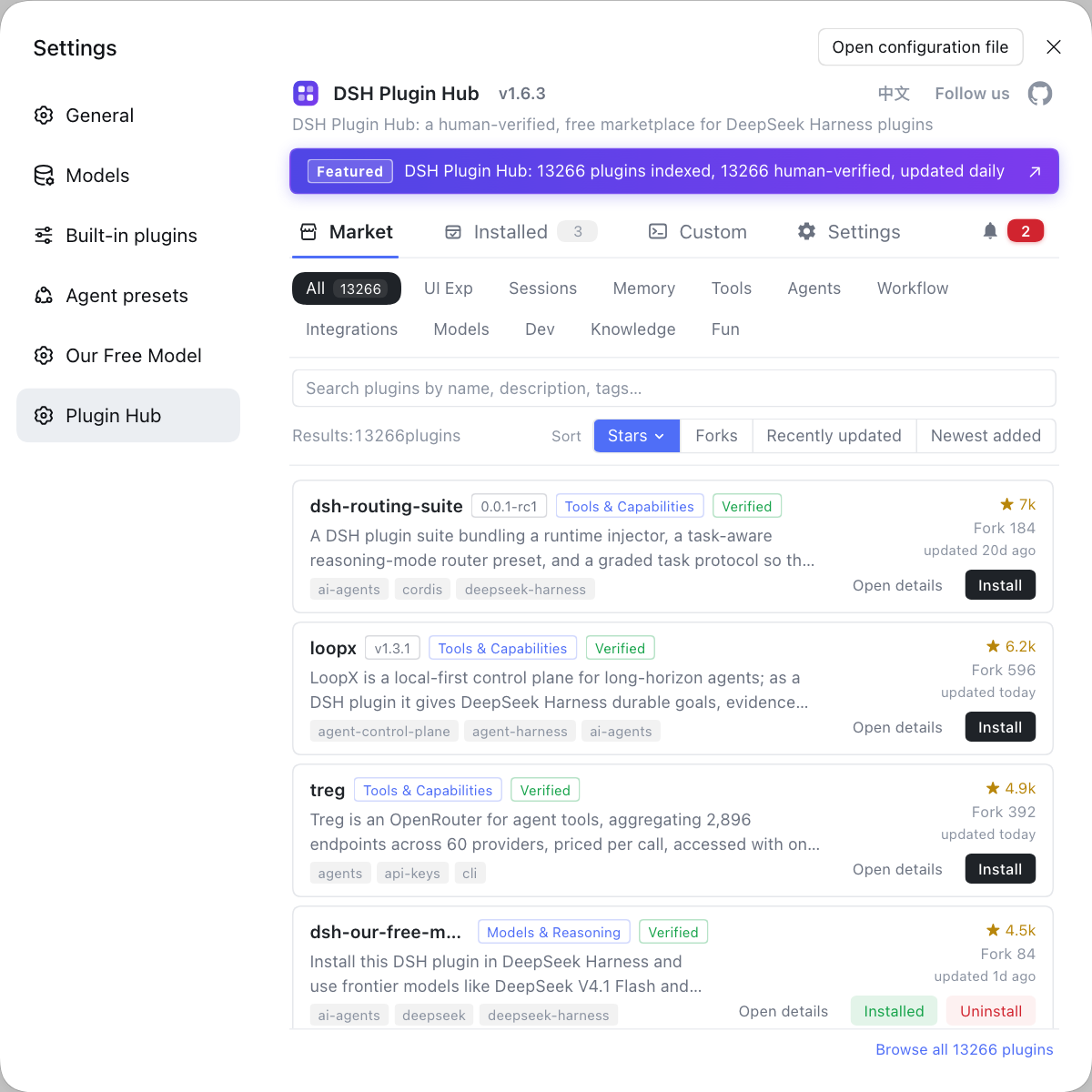
Management actually converges in one place: plugins are installed and configured in the marketplace and settings, skills are usually viewed in plugin settings or the workspace directory, and MCP servers appear as entries in plugin config—all under the plugin system, so you do not need three separate UIs.
Notes on using a DSH plugin, a skill, and MCP
- Do not treat MCP as a plugin: MCP is a protocol link, not a distribution unit; what you install is the client plugin that carries it, not "an MCP".
- A skill is not a plugin: a skill comes with a provider or workspace and cannot be installed or removed on its own, so do not expect to find it alone in the marketplace.
- Keep the core term intact: in English write
DSH pluginor "DeepSeek Harness plugin"; avoid droppingDSHin as a standalone noun. - Check permissions: MCP spawns a child process or connects to a remote address, so confirm its command and network boundary before installing and never allow an unknown server.
- Ask about the need before choosing: capability, instruction, and connection needs belong to different layers, and picking the wrong one multiplies maintenance cost later.
Sources: DeepSeek Harness Docs - Your first plugin, DeepSeek Harness Docs - Skills, DeepSeek Harness Docs - MCP memory
FAQ
They are not competitors at the same layer but three levels of extension: a DSH plugin is an installable unit, a skill is an instruction the model loads on demand, and MCP is a protocol that links external tools and data sources. A plugin is the carrier; both skills and MCP can be delivered inside a plugin. Ask whether you are adding a capability, an instruction, or an external connection, and the answer falls into one of the three.
Look at whether it must execute code or reach an external process: reusable tools or commands become a plugin; reusable operating instructions become a skill; an existing external service or data source is wired in through MCP. The three are often combined; one plugin can register tools, ship skills, and act as an MCP client at the same time.
All three are reached from DSH Plugin Hub (the plugin marketplace): settings shows installed plugins and their options, and the marketplace lets you search, compare, and install. Skills are usually viewed in plugin settings or the workspace directory, while MCP servers appear as entries in plugin config, all managed under the plugin system.
Prefer a skill when you want a lightweight, text-only, environment-free instruction, and reach for MCP only when you truly need to call an external program or service. A skill adds no process and travels with the workspace; MCP spawns a child process or connects to a remote service, which brings dependency and permission cost.
Related Terms
- plugin
- A plugin is the installable extension unit of DeepSeek Harness: it registers tools and commands in apply, declares a settings namespace, and brings its own dependencies; dsh plugin installs it into a profile, making it the smallest distributable unit that carries capability.— https://github.com/deepseek-ai/deepseek-harness/blob/master/docs/user/develop/basic/index.md
- skill
- A skill is an instruction in DeepSeek Harness that the model loads on demand rather than a session event: providers register local or bundled skills into ctx.skills, and the model-facing skill tool loads them by working directory.— https://deepseek-harness.github.io/deepseek-harness/reference/subsystems/skills
- MCP (Model Context Protocol)
- MCP is the open standard that connects external tools and data sources to a model through one protocol; DeepSeek Harness consumes MCP servers through the dsh-mcp-client package and exposes their tools as mcp__<serverName>__<tool>.— https://github.com/deepseek-ai/deepseek-harness/blob/master/docs/user/guide/mcp-memory.zh.md
- profile
- A profile is an ordered set of plugins and configuration in DeepSeek Harness; plugins install and take effect per profile, with the web app using the web profile and the desktop app owning its own.— https://github.com/deepseek-ai/deepseek-harness/blob/master/docs/user/develop/basic/index.md
Sources
- DeepSeek Harness Docs - Your first plugin· deepseek-ai
- DeepSeek Harness Docs - Skills· deepseek-harness
- DeepSeek Harness Docs - MCP memory· deepseek-ai