DeepSeek Harness IM bridges: DSH plugin picks and setup
DeepSeek Harness connects to instant-messaging platforms such as WeChat, QQ and Feishu through IM bridge DSH plugins — they build a two-way channel between the chat platform and a Harness session, where a chat message drives the agent and the agent's reply returns to the chat window (source). The community offers both aggregated builds such as dsh-im and single-channel builds for QQ, Feishu and Telegram; this article covers what they solve, how the implementations compare, and how to choose and deploy one — so you install the right plugin the first time.
DSH plugin overview: the three-part bridge and what this article covers
An IM bridge DSH plugin sits in the middle of the chain between the chat platform and the Harness host. Split the chain into three parts first:
| Part | Role | Typical form |
|---|---|---|
| Chat platform side | WeChat / QQ / Feishu / Telegram | A bot or app plus credentials |
| Bridge plugin | dsh-im, qq-bridge, dsh-feishu, dsh-telegram | DSH plugin middleware |
| Harness host | Sessions, tools, profile | The environment that runs plugins |
All three parts are needed: the platform must allow access, the plugin must connect, and the host must load it. Missing any one of them and the chain stays dark, which is why "installed but silent" problems usually come back to a credential, a permission scope or a wrong profile rather than to the plugin itself. This article works through three directions: what this class of plugin solves, how the implementations compare side by side, and how to select and deploy one.
What DSH plugins solve: connecting chat platforms to Harness sessions
In one sentence: IM bridge DSH plugins make "talking in your chat app" equal "operating DeepSeek Harness". They hit three real pain points:
- Use it away from the computer — when commuting or out, you want to dispatch a task or check progress without walking back to a browser; you send a message from the phone's chat window. Expected: you can drive Harness with the computer off your desk.
- Close the loop between message and result — session content and results should return to the chat tool you already use, not a separate interface. Expected: dispatching work and collecting results happen in one chat stream.
- Intercept risky operations — for high-risk actions such as deleting files or executing commands, the bridge should push an approval back to the chat window and wait for your go-ahead before running (source). Expected: dangerous actions get a second human confirmation.
How it differs from a "plain chatbot" is the layer: a plain bot is often just a standalone Q&A shell, while an IM bridge plugs the whole DeepSeek Harness session, tool and permission system into the chat, so the window behaves more like a remote console than a bot that only chats. It is also not a remote desktop or a screen-sharing tool: nothing is streamed pixel by pixel; only messages, results and approvals travel across the bridge, which keeps it light and lets it run from any phone.
What a bridge does not do matters just as much. It does not replicate your model configuration, your tools or your workspace: the chat message is routed into the same session the desktop would have opened, so the agent sees identical context and the same permission rules. That thinness is why deployment really comes down to credential hygiene and profile correctness rather than teaching the plugin how to reason — the intelligence still lives in DeepSeek Harness, and the bridge only carries the conversation to wherever you are.
DSH plugin comparison: what dsh-im, QQ, Feishu and Telegram each cover
Comparing them makes it clearer: aggregated builds connect many platforms at once, single-channel builds go deep on one. One by one:
- dsh-im (aggregated) — via QR code or bot credentials it connects nine channels — Feishu, WeChat, DingTalk, WeCom, QQ, Slack, Telegram, Discord and WhatsApp — to DeepSeek Harness, with unified management of multiple bot connections, session binding and file return (source). Good for: people who want several platforms at once without one plugin per channel. Install command
dsh plugin --profile web add @xmanrui/dsh-im. - QQ bridge (single channel) — represented by dsh-qq-onebot-bridge, which uses an OneBot v11 reverse WebSocket to deliver QQ group and private messages into a DSH session with replies sent back automatically, plus session grouping, persistent memory, scheduled reminders, voice and image recognition (source). Good for: people whose main ground is QQ and who want group management and bot features.
- Feishu bridge (single channel) — represented by dsh-feishu, which turns DSH sessions and commands into interactive cards inside Feishu chat, with slash commands as in-card buttons, approvals and questions handled inside the card, and QR-code one-click Feishu app configuration (source). Good for: teams on Feishu who want a card-style interaction.
- Telegram bridge (single channel) — represented by dsh-telegram, for remote conversation in Telegram private chat, managing workspaces, viewing and cancelling tasks, and allowing only specified users to operate (source). Good for: people with Telegram access who want lightweight remote control.
- WeChat bridge (single channel) — represented by dsh-plugin-wechat-bridge, which connects WeChat private chat into a DSH agent session with plain-text streaming replies, media send/receive, a whitelist and runtime hot-plugging (source). Good for: people who only use WeChat and care about whitelist control.
- dsh-im-bridge (approval-oriented bridge) — dsh-im-bridge turns Feishu, WeCom and Telegram into a remote console with chat-based task assignment, result notifications, dangerous-operation approval and session management, using approval buttons on Feishu and Telegram and text commands on WeCom and WeChat (source). Good for: people commanding Harness from a phone who especially want a second confirmation for risky operations.
A table reads more directly:
| Implementation | Coverage | Form traits | Install channel |
|---|---|---|---|
| dsh-im | Nine channels | Aggregated, unified multi-bot management, file return | npm |
| dsh-qq-onebot-bridge | OneBot v11, group management, voice and image | GitHub | |
| dsh-feishu | Feishu | Interactive cards, QR configuration | npm |
| dsh-telegram | Telegram | Private-chat remote, restricted users | GitHub |
| dsh-plugin-wechat-bridge | Streaming text, whitelist, hot-plug | GitHub | |
| dsh-im-bridge | Feishu / WeCom / Telegram | Approval buttons, notifications, session management | GitHub |
The takeaway from the table is not "the aggregated build wins" — it is that coverage and depth trade off. An aggregated build saves installation effort and keeps multi-platform management in one place, while a single-channel build tends to add platform-specific capability such as in-card approvals or group management. Count features, not channels.
Note the distinction: this article is about "how to choose between several bridge plugins", whereas the DSH plugin IM integration tutorial covers the generic configuration flow for the "IM access" category. The two have different jobs — do not read an overview as a selection guide.
How to choose and deploy a DSH plugin: accounts, permissions and stability
Pick by platform first; then watch three things in deployment — accounts, permissions and stability. Follow these five steps:
-
List the platforms you actually use — count only the chat tools you really use daily; do not turn on all nine channels for a rainy day. Expected: you have a "platforms that must be covered" list.
-
Pick an implementation from the list — if you need two or more platforms, prefer the aggregated dsh-im; if you use only one, pick that platform's single-channel build. Expected: one primary plugin chosen, with no two implementations on the same channel.
-
Prepare a bot account and credentials — create a dedicated bot or app on the platform side, obtain the Bot Token, app secret or webhook, and enable send/receive message permission. Expected: you hold working access credentials and know whether they belong in the plugin config or in a credential file.
-
Install and confirm the profile — search entries by keywords such as IM, bridge or bot inside DSH Plugin Hub, or run:
bashdsh plugin --profile web add @xmanrui/dsh-imExpected: the plugin enters the profile you are using, with no install error.
-
Restart, self-test, then watch stability — restart
dsh weband send the bot one message in chat; for long-connection channels watch for reconnection and heartbeats. Expected: you get a reply; run it for a few days to see whether the connection is stable, and when it misbehaves check credential expiry and network reachability first.
The meaning of --profile web is plain: the profile you install into is the only environment affected (source). With multiple profiles, make sure you installed in the right one — a wrong profile is a frequent cause of "installed but not working", and it is invisible until you look, because the plugin simply never loads in the environment you are running.
Notes and limits for using DSH plugins
This kind of DSH plugin (DeepSeek plugin) is not "set once and forget"; know these points up front. Item by item:
- Treat credentials as passwords: fill the Bot Token or webhook only into trusted plugins, never paste them into a chat window or a public repo, and revoke old credentials platform-side after uninstalling.
- Do not install twice on one channel: two bridge implementations on the same channel invite messages contended by two logic paths — avoid it at the source rather than debugging it later.
- Minimize permissions: grant only the permission needed to send and receive messages rather than opening everything, which narrows the surface for abuse.
- Stability depends on the platform: long-connection and polling implementations are affected by platform interfaces and the network; reconnection on a drop is expected — do not file it as a plugin bug.
- Feature ranges differ: aggregated builds cover more platforms, while single-channel builds may go deeper on one platform (in-card approvals, group management) — do not conclude from platform count alone.
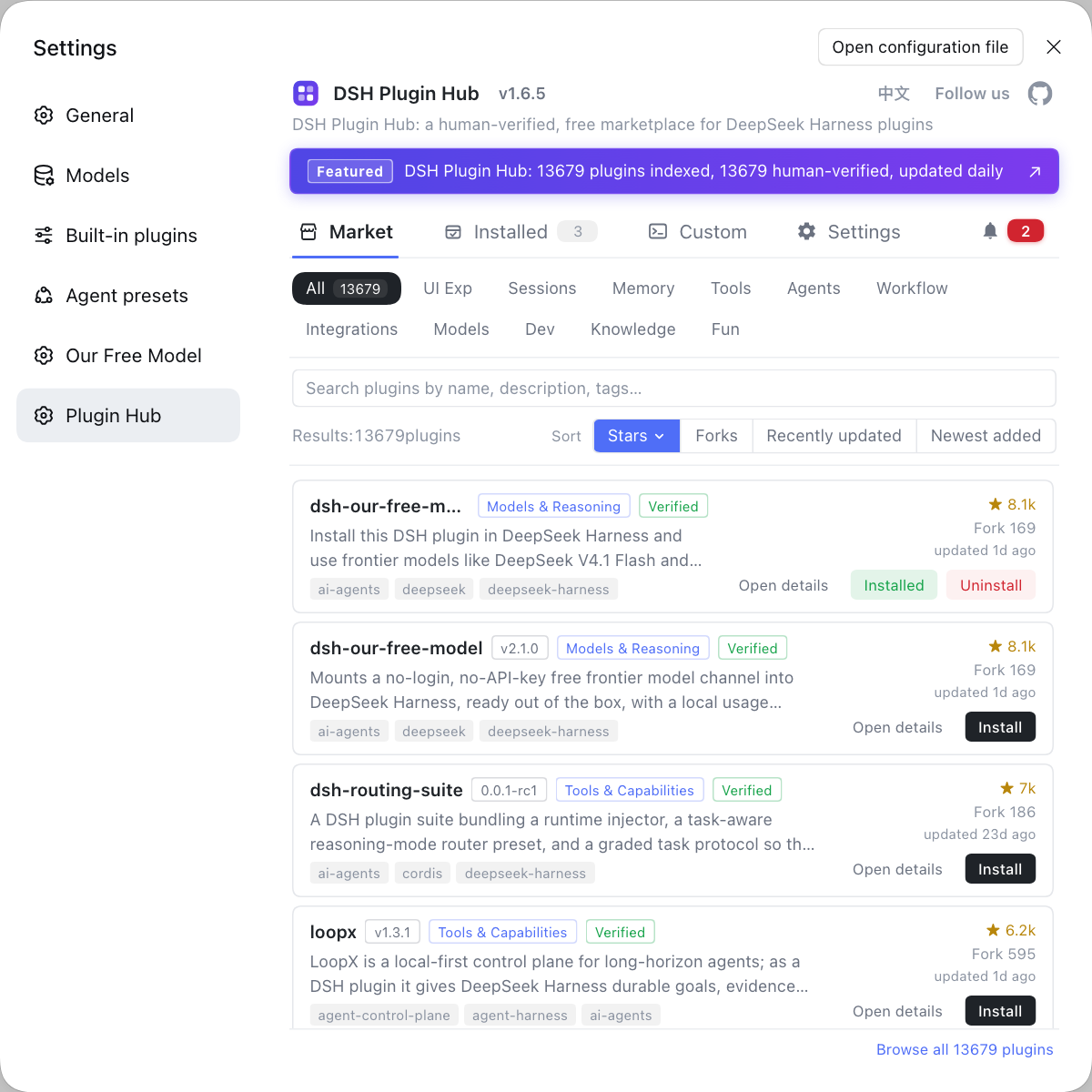
An IM bridge is still, at heart, installing and managing plugins — rather than tracking down each bridge repo and its install command by hand, you can gather them in one place with DSH Plugin Hub, the official community market for DeepSeek Harness at https://dsh-plugin.org/: browse, one-click install, uninstall and update detection in a single panel, a confirmation dialog before anything is installed, and centralized management in the installed list afterwards.
Sources: dsh-im (dsh-plugin.org), dsh-qq-onebot-bridge (dsh-plugin.org), dsh CLI README.
FAQ
IM bridge DSH plugins solve two-way interoperability between a chat platform and a DeepSeek Harness session: a message you send in WeChat, QQ or Feishu drives a Harness session, and the reply comes back to the chat window. That lets you dispatch work, collect results and approve risky actions from the chat app you already use instead of staying at the desk.
Their coverage differs: dsh-im is an aggregated nine-channel build that connects Feishu, WeChat, DingTalk, WeCom, QQ, Slack, Telegram, Discord and WhatsApp at once, while the qq-bridge family targets QQ, and dsh-feishu and dsh-telegram are single-channel builds for Feishu and Telegram respectively. Aggregated builds save you from installing many plugins; single-channel builds often go deeper on one platform.
Multiple IM bridge DSH plugins can usually coexist, but you should not install two implementations for the same channel, because messages may be contended by two logic paths. As a rule, pick an aggregated build such as dsh-im when you need several platforms without a pile of plugins, and pick the single-channel build when you focus on one platform.
Watch three things when deploying IM bridge plugins: create a dedicated bot account, grant the minimum permission needed to send and receive messages, and expect reconnection on long-connection channels. Store credentials in the plugin config or a credential file rather than plain text, confirm the plugin landed in the profile you actually use, restart dsh web, then send one test message to prove the link works.
For mobile remote control of DeepSeek Harness, prefer a bridge that supports approvals and notifications, such as dsh-im-bridge (shaobeichen/dsh-im-bridge), which covers Feishu, WeCom and Telegram and uses approval buttons on Feishu and Telegram. If you only want to chat inside WeChat, look at dsh-plugin-wechat-bridge; if you keep to one platform, choose that platform's single-channel build.
Related Terms
- IM bridge
- An IM bridge is a DSH plugin form that connects an instant-messaging platform two-way with a DeepSeek Harness session, so chat messages drive the agent and replies return to the chat window. It addresses remote use of Harness when you are away from the computer.— dsh-im (dsh-plugin.org)
- dsh-im
- dsh-im is an aggregated nine-channel IM bridge DSH plugin that connects Feishu, WeChat, DingTalk, WeCom, QQ, Slack, Telegram, Discord and WhatsApp to DeepSeek Harness via QR code or bot credentials, managing multiple bot connections in one place.— dsh-im (dsh-plugin.org)
- OneBot
- OneBot is a QQ bot communication protocol standard; plugins such as dsh-qq-onebot-bridge deliver QQ messages into a DeepSeek Harness session over an OneBot v11 reverse WebSocket. It unifies how different QQ bot implementations are connected behind one protocol.— dsh-qq-onebot-bridge (dsh-plugin.org)
- profile
- A profile is the configuration unit that separates runtime environments in DeepSeek Harness; a plugin installed into one profile affects only that environment. The command dsh plugin --profile web add installs a plugin into the web environment.— dsh CLI README
Sources
- dsh-im (dsh-plugin.org plugin entry)· dsh-plugin.org
- dsh-qq-onebot-bridge (dsh-plugin.org plugin entry)· dsh-plugin.org
- dsh CLI README (plugin add and profile semantics)· deepseek-ai