Why a removed DSH plugin still loads in DeepSeek Harness
A removed dsh plugin still loads most often not because the uninstall failed but because the config layer still references it: the profile's dsh.profile bundles list or cordis.patch.yml overlay points at it, or you only uninstalled the current profile while another still has it (source).
This guide covers three steps: why it stays, how to verify a true removal, and how to clear leftover references. Remove errors and hangs are covered in Troubleshooting DSH plugin uninstall failure and Fixing a hanging dsh plugin remove.
Why a removed dsh plugin still loads: config leftovers and multiple profiles
Inside a profile, the dsh.profile bundles list and the cordis.patch.yml overlay together decide which plugins load; removing the package from node_modules without clearing these two references can leave the plugin loaded (source).
Determine which kind of "still there" it is:
- Check for a leftover reference — Inspect whether the profile's dsh.profile still lists it under bundles. Expected: a listing means a config reference issue, not a surviving package.
- Check for an overlay leftover — Check whether cordis.patch.yml still references it. Expected: a reference in the overlay also revives the plugin.
- Check whether another profile installed it — List all profiles and check each. Expected: a clean current profile with another profile still holding it is the classic "only one was removed".
- Check whether the desktop has its own copy — The desktop owns profiles/desktop, separate from CLI profiles. Expected: check both sides separately and never infer one from the other.
Step 3 is the most missed: plugins install per profile and an uninstall affects only the one you operated on. The desktop's profiles/desktop and each CLI profile can each have a copy, so "still there after uninstall" is often just "another environment still has it".
How to verify a DeepSeek Harness plugin is truly removed
Verification looks at the merged configuration, not just the directory: use --dump-config to output the current profile's merged config tree and confirm the plugin is gone; then check the profile's package.json for a leftover dependency declaration; finally confirm in the installed list (source).
Cross-check in three steps, each with a verifiable expectation:
- Look at the merged config tree — Run
--dump-configand search for the plugin. Expected: nothing found means no reference remains after the layers combine. - Look at the profile's package.json — Check whether a dependency declaration remains. Expected: the declaration is gone, so the package-level dependency is cleared too.
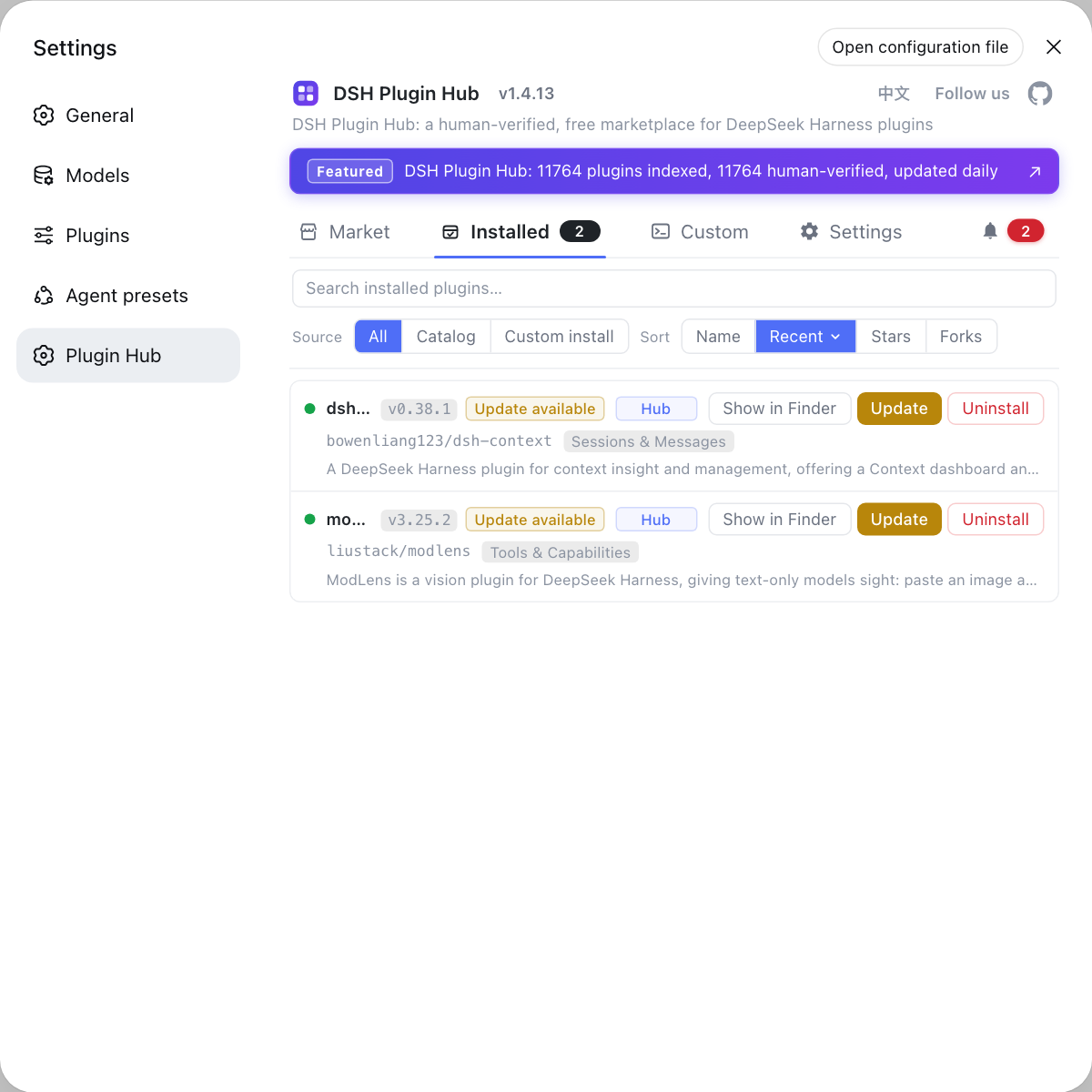
- Confirm in the installed list — On the desktop open the DSH Plugin Hub installed list. Expected: it is no longer listed, matching the config-layer conclusion.
- Verify on another profile — Repeat the first three steps for every profile that installed it. Expected: all profiles are clean, the only state of a full removal.
Step 1 is central: --dump-config shows the result after config layers combine, which says more about "whether it loads" than reading a single file. Gone from the directory but still in the config tree is the classic leftover reference and the reason repeated uninstalls do nothing.
Clearing leftover references, and not removing just one profile next time
The cleanup order is "locate the reference, clear bundles, clear cordis.patch.yml, then re-verify", and handle each profile because each has its own config and dependencies (source).
Run in order with an expectation each step:
- Locate the reference source — Use
--dump-configand file checks to find which layer references it. Expected: it is clear whether it is the bundles list or the overlay. - Clear the bundles reference — Remove the plugin from the dsh.profile bundles list. Expected: the manifest no longer declares it enabled.
- Clear the overlay reference — Remove the related patch from cordis.patch.yml. Expected: the overlay no longer modifies or references it.
- Re-verify — Run
--dump-configand check the installed list again. Expected: neither the config tree nor the list has the plugin, and it no longer loads. - Handle other profiles — Repeat the first three steps for each profile that installed it. Expected: all environments are consistently cleared with no "gone here, still there".
Step 5 is the cure: the easy answer to "still there after uninstall" is not repeated uninstalls but cleaning each profile once. Before next time, think about how many profiles it could be in and clear them all at once.
Notes on a DSH plugin still loading after uninstall
- Tell package from reference: moving the package out of node_modules is not clearing the reference; handle both.
- Check both references: a leftover in either dsh.profile.bundles or cordis.patch.yml revives the plugin.
- Clear profile by profile: each profile has its own config and dependencies, so clearing one is not enough.
- Trust --dump-config: the merged config tree is the final word on whether it loads.
- Repeated uninstall is useless: what remains is a reference, not the package, and remove does not clear it automatically.
To check whether a plugin is still present, the DSH Plugin Hub installed list is clearest on the desktop, while the CLI side follows the merged result of --dump-config; looking at both separately avoids the "installed per profile" trap.
Sources: DeepSeek Harness CLI README (official repository), DeepSeek Harness desktop README (official repository), DeepSeek Harness source repository
FAQ
A removed dsh plugin still loads most often because the config layer still references it. Inside a DeepSeek Harness profile, the dsh.profile bundles list and the cordis.patch.yml overlay together decide which plugins load; removing the package from node_modules without clearing those references can leave the plugin resolvable and loaded. Clear both the package and the references for a real removal.
Plugins install per profile. Each DeepSeek Harness profile has its own package.json and node_modules, so uninstalling in the current profile affects only that one; if another profile (such as the desktop-owned profiles/desktop or another CLI profile) also installed it, that side still loads it. Check and uninstall profile by profile for a full removal.
Verification looks at the merged configuration, not just the directory. Use --dump-config to output the current profile's merged config tree and confirm the plugin no longer appears; then check the profile's package.json for a leftover dependency declaration; finally confirm in the installed list. Only when all three are clean is it truly removed, rather than just the package directory deleted.
Both are config layers. dsh.profile is the profile manifest whose bundles list declares which plugin packages the profile enables, while cordis.patch.yml is an overlay that patches the configuration. When an uninstall is not fully clean, a leftover reference in either place can make the plugin reappear, so check both together.
Repeated uninstalling usually does not help because what remains is a config reference, not the package. The CLI remove handles the package and dependencies but does not automatically clear references you added to dsh.profile.bundles or cordis.patch.yml; while the reference exists, the plugin keeps loading. The right fix is to use --dump-config to find the reference source, clear it by hand and verify again.
Related Terms
- dsh.profile.bundles
- dsh.profile is the DeepSeek Harness profile manifest and its bundles list declares which plugin packages the profile enables; a leftover entry keeps an uninstalled plugin loading.— DeepSeek Harness CLI README
- cordis.patch.yml
- cordis.patch.yml is the config overlay inside a DeepSeek Harness profile used to patch the configuration; a leftover reference to a plugin there can also keep it loading after uninstall.— DeepSeek Harness CLI README
- --dump-config
- --dump-config is the entry to view the merged DeepSeek Harness config tree, used to confirm whether a plugin is still referenced after layers are combined, the key way to verify a true removal.— DeepSeek Harness CLI README
- profile
- A profile is an independent runtime environment in DeepSeek Harness, each with its own package.json, dsh.profile manifest and cordis.patch.yml; plugins install per profile, so an uninstall affects only the profile you operated on.— DeepSeek Harness CLI README
Sources
- DeepSeek Harness CLI README· deepseek-ai
- DeepSeek Harness desktop README· deepseek-ai
- DeepSeek Harness source repository· GitHub