Install dsh on an intranet or offline: tarball and mirror
There are two paths for installing dsh on a restricted network: if you have outbound access at all, use a mirror plus a proxy; if you are fully offline, move a tgz with npm pack. Plugins have one extra officially supported channel — the tarball. This article follows the order "restricted network → fully offline → dependency fallbacks → verification."
Overview: which kind of dsh offline install are you doing?
Decide which environment you're in before choosing a path — guessing wrong wastes the trip. The official docs give two distribution paths for plugins that need no build permission: publishing to npm and publishing a tarball, and the latter is exactly where intranet and offline scenarios land (source).
| Environment | Characteristics | Path |
|---|---|---|
| Restricted network | Outbound access exists but requires a proxy, or direct connections are slow | Mirror + proxy |
| Fully offline | Intranet machines cannot reach any public registry | Pre-downloaded tgz + local install |
dsh restricted network: mirror plus proxy in two steps
If you have outbound access, don't move files — configure a mirror and a proxy. Both steps apply to npx, git and pnpm alike (source).
- Switch the registry:
npm config set registry https://registry.npmmirror.com
Expect: packages now fetch through the mirror and speed improves noticeably (source);
2. Configure a terminal-level proxy. Expect: on macOS / Linux set http_proxy and https_proxy in the shell; in Windows PowerShell set $env:HTTP_PROXY;
3. Rerun the install command. Expect: it no longer hangs on downloads for minutes;
4. If it still times out, read the error: ETIMEDOUT, ECONNRESET, ECONNREFUSED point to the network or registry, so keep adjusting the proxy; an ERR_PNPM_FETCH_404 means a lagging mirror, so verify against the official registry temporarily:
dsh plugin --profile web add <package> --registry=https://registry.npmjs.org
Fully offline DeepSeek Harness install: carry a tgz in
When the intranet machine can't reach a registry, npx cannot work — switch to "download on a connected machine, install locally on the intranet." There is no separate official offline install document; this path uses npm's built-in packaging and local install capabilities (source).
- On a machine with outbound access, pack the package:
npm pack @deepseek-ai/dsh
Expect: a deepseek-ai-dsh-<version>.tgz file appears in the current directory;
2. Note the version number. Expect: the version in the filename matches what you intend to deploy, making it easy to verify later;
3. Copy the tgz onto the intranet machine (USB drive, internal file server — any means). Expect: the file sits on a local path on the target machine;
4. Install it locally on that machine:
npm install -g ./deepseek-ai-dsh-<version>.tgz
Expect: installation completes and a global dsh command appears;
5. Verify:
dsh --version
Expect: the printed version matches the tgz filename.
Fully offline DSH plugin install: the official tarball path
For plugins there is an officially supported offline route: the author runs pnpm pack to produce a tarball, and you carry it in and add it directly. The official docs list it as the second distribution method that needs no build permission, suited to internal distribution, offline installs and pre-release self-testing (source).
- Get the plugin tarball on a connected machine (the author supplies it, or you run
pnpm packyourself). Expect: aplugin-0.1.0.tgzfile; - Copy the tgz onto the intranet machine. Expect: the file is readable on a local path;
- Install it into the target profile:
dsh plugin --profile web add ./plugin-0.1.0.tgz
Expect: installation succeeds without any public registry access from the intranet; 4. Verify it took effect:
dsh --profile web --dump-config | grep -n "^# =="
Expect: the plugin appears in the list of active composed bundles (source).
A tarball carries only itself: DSH plugin dependencies still need a source
A tarball holds the plugin's own files; the npm dependencies it declares still need to resolve from a reachable source — this is the most common failure point in offline installs. Two fallbacks:
- Run your own registry: stand up a private npm registry or mirror inside the intranet and sync the required dependencies into it. Expect: dependencies resolve normally during install;
- Move the whole tree: prepare the plugin together with its dependencies on a connected machine and carry all of it in. Expect: dependencies are present locally and the install no longer needs the internet.
How to tell them apart: does the install report "package not found" or "network timeout"? The first means dependencies weren't synced; the second means the proxy or registry isn't configured.
How to verify a dsh intranet install: three commands that must line up
Offline environments most often produce "it installed but the version is wrong" or "it installed but nothing happened" — three commands line everything up. All three come from the dsh CLI (source).
dsh --version. Expect: the app version matches the tgz you carried in;dsh plugin --profile web list. Expect: the plugin appears under the target profile;dsh --profile web --dump-config | grep -n "^# ==". Expect: you can find it among the active composed bundles.
With all three matching, start dsh web (http://127.0.0.1:3080) and you're done.
Skip the CLI: DSH Plugin Hub custom install
You can install local plugins through the UI in an intranet environment too — the Hub's custom install accepts a pasted path (source). After installing DSH Plugin Hub, open Settings → Plugin Market → Custom install: the panel offers three install cards (npm package, GitHub source, DSH command line), each with an example and format validation hints:
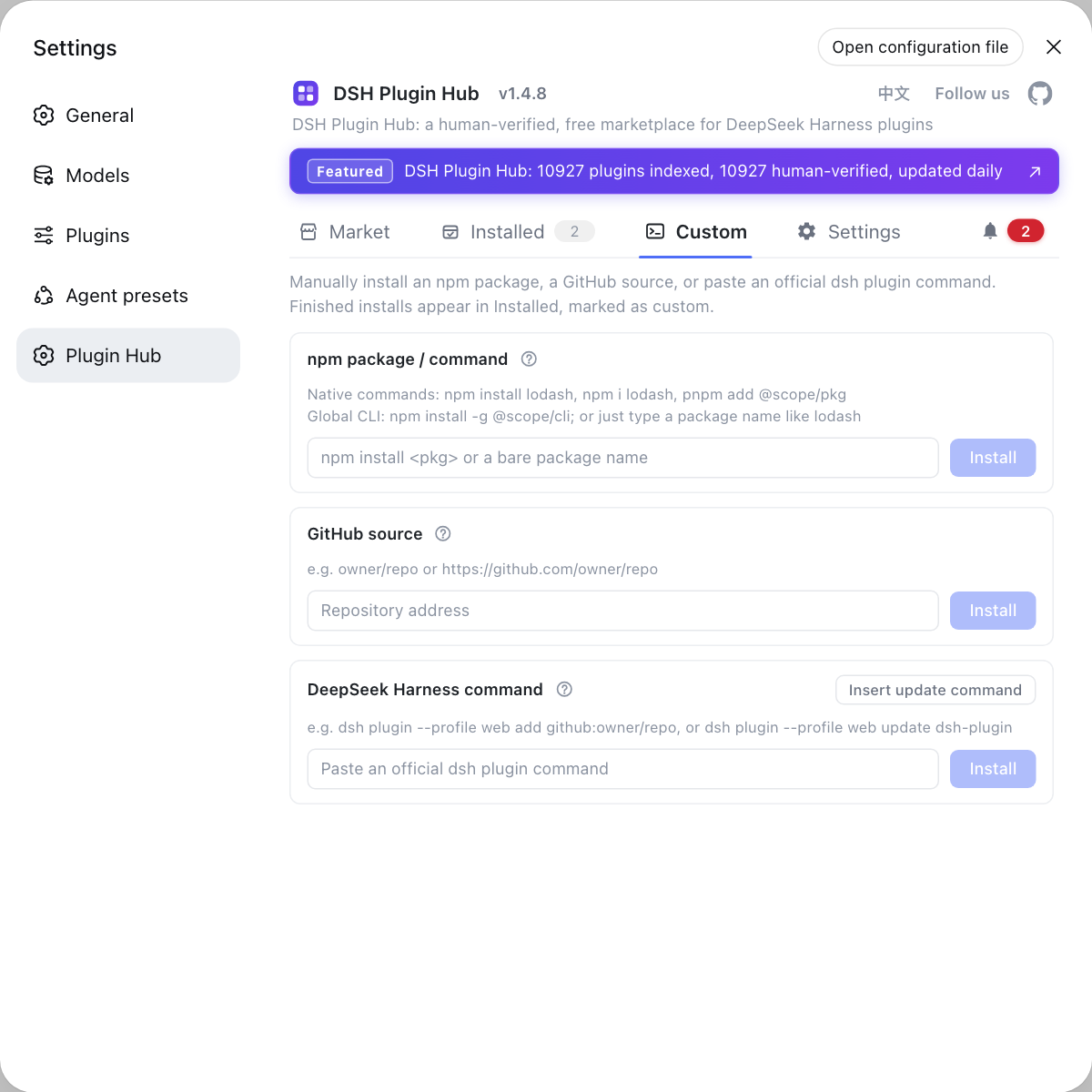
Instead of double-checking path syntax in the terminal, use the Hub's custom install panel — all three channels validate input, and a confirmation dialog shows the exact command before installing. Visit https://dsh-plugin.org/ to learn more.
Sources: DeepSeek Harness Docs - Publishing plugins, dsh CLI README, npm pack docs, npm package @deepseek-ai/dsh
FAQ
A dsh install on a restricted network usually fails because of network limits — take the two steps of mirror plus proxy: run npm config set registry https://registry.npmmirror.com to switch to a mirror, then configure a terminal-level proxy — http_proxy and https_proxy on macOS / Linux, $env:HTTP_PROXY in Windows PowerShell. Both apply to npx, git and pnpm, so just rerun the install command afterwards.
Installing DeepSeek Harness fully offline takes two machines: on a machine with outbound access run npm pack @deepseek-ai/dsh to download the tgz, copy the file onto the intranet machine and install it with npm install -g ./deepseek-ai-dsh-<version>.tgz, then verify with dsh --version. This path uses npm's built-in packaging and local install capabilities; there is no separate official offline install document.
An intranet install of a DSH plugin has an officially supported offline channel: the docs list two distribution paths that need no build permission — publishing to npm and publishing a tarball. The plugin author runs pnpm pack to produce the tarball, you carry the file onto the intranet machine and install it with dsh plugin --profile web add ./plugin-0.1.0.tgz — no public registry access required.
A DSH plugin tarball contains only the plugin's own files, and the npm dependencies it declares still have to resolve from a reachable registry. Fully isolated environments have two fallbacks: run a private npm registry or mirror inside the intranet and sync the dependencies into it, or prepare the plugin together with its dependencies on a connected machine and carry everything in. Carry a single tgz with many dependencies and the install fails on unresolvable packages.
Verify a dsh intranet install with three commands in order: dsh --version to confirm the app version matches the tgz you carried in; dsh plugin --profile web list to confirm the plugin sits under the target profile; and dsh --profile web --dump-config | grep -n "^# ==" to confirm it appears among the active composed bundles. Once all three line up, start dsh web and use it.
Related Terms
- tarball
- A tarball is a prebuilt archive (.tgz) produced by a packaging tool, created by the author with pnpm pack in the DSH ecosystem. Handing the file path to dsh installs it, and it is one of the officially documented distribution paths that need no build permission — well suited to internal distribution and offline installs.— DeepSeek Harness Docs - Publishing plugins
- npm pack
- npm pack is a built-in npm command that packages a published package or the current project into a .tgz archive. Running it on a connected machine lets you carry that file into an intranet environment that cannot reach a registry and install there.— npm official docs
- registry
- A registry is the server npm uses to resolve and download packages, registry.npmjs.org by default. Restricted or intranet environments can switch to a mirror, or point at one for a single command with the --registry flag.— npm official docs
- custom install
- Custom install is the manual install panel in DSH Plugin Hub that bypasses the store catalog. It offers three channels — npm package, GitHub source and DSH command line — and is the way to install plugins that are not in the catalog.— dshplugin/dsh-plugin-hub GitHub repository
Sources
- DeepSeek Harness Docs - Publishing plugins· deepseek-ai
- dsh CLI README· deepseek-ai
- npm CLI docs - npm pack· npm
- @deepseek-ai/dsh on npm· npm
- dshplugin/dsh-plugin-hub GitHub repository· GitHub