DeepSeek Harness Low integrity label: white icons, crashes
DeepSeek Harness (DSH)'s workspace-write does not just "restrict things inside the session" — it stamps an inheritable Low integrity label on the workspace directory and its whole tree, and that change persists on disk: removing the workspace, switching back to full access, or even restarting DSH does not undo it automatically. So you see a set of seemingly unrelated symptoms: .bat/.cmd/.exe inside the workspace show "publisher could not be verified" on double-click, Start-menu shortcut icons all go blank, an exe built inside the workspace still cannot write %TEMP% outside the sandbox, Electron programs in granted directories crash on launch (0x80000003), and the workspace root is writable while all existing subdirectories are not. These phenomena are split into 8 separate reports in this batch of threads, but the root cause is a single chain: the label is inheritable → Windows decides a process's integrity from the image's label → everything inside the inheritance scope is dropped in privilege, and the sandbox has no revoke entry point. This article spells out "how to confirm → how to restore → why it recurs", each with paste-ready commands.
DeepSeek Harness symptoms and mechanism: how one label becomes a dozen failures
In one line: the Low label is an inheritable, no-write-up mandatory integrity ACE on the SACL, and it decides not just permissions but "the integrity level of a process started from the labelled file" — Windows uses the label on the image file to set a process's level. According to the community's source review, this ACE is written by grantWrite()'s single SetNamedSecurityInfoW, carrying the two flags SUB_CONTAINERS_AND_OBJECTS_INHERIT and SYSTEM_MANDATORY_LABEL_NO_WRITE_UP, named S-1-16-4096; the introduction point is dsh-v0.1.7-alpha.1 (commit d5ad3baeb5, 2026-09-19), and the first tag containing the behavior is dsh-v0.1.7-alpha.1, while 0.1.6-alpha.2 does not have it (#9819).
The mechanism breaks into three steps:
- Write: when connecting the workspace, the sandbox writes an inheritable Low label on the workspace root (the same call also writes the capability allow ACE and the world delete-deny). The workspace root is a "deliberate standing grant"; dispose only revokes temporary grants and does not reclaim the label (#9819).
- Inherit: because it carries
(OI)(CI), the label propagates down to subdirectories and files; this is also why "newly created files" carry it (#9819). - Take effect: Windows reads the label on the image file when starting a program to decide the process's integrity. Launch from a Low image → the process is Low → it cannot write Medium locations (
%TEMP%,%LOCALAPPDATA%,\BaseNamedObjects); meanwhileIInternetSecurityManager::MapUrlToZonetreats files carrying the Low label as the Internet zone (zone 3), whereas Medium files are Local Machine (zone 0) (#9819).
DSH plugin: eight real-world scenes, different faces of one root cause
The test in every case reduces to "this directory/file was stamped Low", yet the symptoms look nothing alike. Summary:
| Scene | Typical symptom | Key point | Source |
|---|---|---|---|
| Executables inside the workspace | Double-clicking .bat/.cmd/.exe shows "Open File - Security Warning: The publisher could not be verified" | It is not Mark of the Web; the file has no Zone.Identifier alternate data stream | #9819 |
| Workspace covering the user home directory | All 51 Start-menu shortcuts turn into generic blank-page icons, rebuilding the icon cache does not help | Windows refuses to resolve icons for .lnk files carrying the Low label | #9569 |
| Workspace = the DSH install directory | The desktop app exits on launch (0x5), and plugin installs always EPERM | The Low label lands on DeepSeek Harness.exe, so processes started from it are dropped to Low and cannot write the implicitly Medium userData/profile | #9560 |
| Electron apps inside the workspace | Crash on launch, exit code 3 / EXCEPTION_BREAKPOINT (0x80000003), no dialog and no log | Chromium's alternate-window-station creation is denied under the Low token, so it reaches NOTREACHED() and kills itself | #9062, #9666 |
| Artifacts built inside the workspace | Still Low when launched outside the sandbox, writing %TEMP%/%LOCALAPPDATA% reports UnauthorizedAccessException | The label propagates with build artifacts to the exe; the revoke capability revokeWrite() is implemented but not exported | #9314 |
| A host program started from a granted directory | Cross-process drag-and-drop stops working, the WH_KEYBOARD_LL global keyboard hook stops working (RegisterHotKey still works) | The process is compressed to Low, and system-level features are tiered by integrity level | #9666 |
| Pre-existing subdirectories in the workspace | Simply unwritable (Access to the path … is denied); py_compile/mypy/git/node all fail; newly created directories are writable | Windows does not retroactively apply the inherited SACL to existing objects, and the grant idempotent short-circuit only checks the root | #9416, #9559 |
| Workspace covering the profile | Restricted commands in the session report temp-grant "materialize and cleanup both failed" | Once the whole user profile is labelled, the directory the temp root lives in is affected too | #9569 |
DeepSeek Harness: why "switching back to full access" does not save it
Because the label is not in the session, it is on disk. This is emphasized repeatedly in the threads: switching the permission mode to full access does not clear existing labels, the labels remain in force and recur; removing the workspace likewise does not revoke the label (#9819, #9666). In other words, the sandbox's change to the workspace is a cross-session persistent modification, and you must undo it yourself.
DSH plugin: numbered handling to confirm, remove and verify the label
Before acting, confirm "it really was stamped" — do not misread the MSBuild security policy, antivirus blocking or file corruption as the same thing. Do the four steps, then decide whether to change anything.
- Look at the label on the directory. In a non-confined PowerShell run
icacls "<directory>"and expect this line in the output:
Mandatory Label\Low Mandatory Level:(OI)(CI)(NW)
If there is no Mandatory Label line, this case does not hold — look elsewhere (#9819).
-
Look at the inherited label on a file. Run
icacls "<file>"on the suspicious.bat/.exeand expect an inherited entry carrying(I), such asMandatory Label\Low Mandatory Level:(I)(NW)—(I)means it was inherited, not written explicitly (#9819). -
Cross-check with the security-zone judgment (the most convincing). In PowerShell run:
[System.Security.Policy.Zone]::CreateFromUrl("file:///D:/your/workspace/app.exe").SecurityZone
#   -> 3 = Internet (stamped Low)
#   -> 0 = MyComputer (Medium, normal)
According to tests in the thread, the same file is judged zone 3 while carrying the Low label and returns to zone 0 after restoring Medium. This test is more intuitive than looking at the ACL and is better for proving the problem to others (#9819).
- Confirm it is inheritance, not something you set by hand. Run
Get-ChildItem -Force -Recurse "<directory>" | Select-Object FullNameand spot-check a few subdirectories; if they all carry the same label, it is almost certainly inherited propagation from the workspace root (#9819).
DeepSeek Harness: undo, set the whole tree back to Medium
The core of the restore is a single command — set the label to Medium, and it must carry (OI)(CI) and /T to cover the whole tree. Note that icacls /reset only rebuilds the DACL and cannot clear the label in the SACL — the most commonly hit trap (#9819).
- Close all DSH sessions using that directory (to avoid being re-granted during the restore).
- Run the restore command, replacing
<directory>with your real path:
icacls "<directory>" /setintegritylevel "(OI)(CI)Medium" /T /C
#   /T = recurse the whole tree; /C = continue on errors; "(OI)(CI)Medium" = both directories and files inherit Medium
- A large directory needs a wait: Windows propagates eagerly across the whole tree, which for a large size can take tens of seconds to several minutes (#9819).
- Verify: run
icacls "<directory>"again; theMandatory Labelline should becomeMedium Mandatory Level:(NW). Run theSecurityZonecheck from step 3 again; expect 0. - Double-click the launcher again and rebuild the Start-menu icon cache (or sign out and back in once); expect the "publisher could not be verified" dialog to stop and the icons to return to normal.
- If you only want to remove the label from a single file (for example one dropped-privilege build artifact), drop
(OI)(CI)and/Tand handle it alone:
icacls "D:\your\workspace\app.exe" /setintegritylevel Medium
Two cases that need administrator rights: the directory owner is not the current user, or you cannot get
WRITE_OWNER/WRITE_DACon the object. In both cases run the command in an elevated PowerShell first (#9819).
DSH plugin: existing subdirectories unwritable, apply one "retroactive propagation"
This class cannot be fixed by changing only the root, because the problem is precisely that "the root changed but the subdirectories did not follow". According to the community's source review: Windows does not retroactively apply an inheritable SACL to already-existing objects, and grantWrite()'s idempotent short-circuit only checks the granted object itself (once the root carries the label, later provisioning returns early), so existing subdirectories never get the label and capability ACE (#9416, #9559).
Handling steps (confirmed working by tests in the thread; a one-off run is enough):
- Confirm the symptom:
echo test > "<workspace>\old-dir\a.txt"reportsAccess to the path … is denied, whilemkdir "<workspace>\new-dir"then writing into it succeeds — "new writable, old not writable" is this case's fingerprint. - Apply one label propagation over the whole tree:
icacls "<workspace>" /setintegritylevel "(OI)(CI)L" /T
In the thread, a tree with 200 subdirectories was fully recovered by this (#9416).
- Verify: after reopening the session, write again into the directory that was unwritable; expect success.
- Directories created afterwards naturally inherit the inheritable label from the root, so you do not need to repeat this every time.
Ordering reminder relative to the previous section: if you hit both "blank icons / programs will not start" and "old subdirectories unwritable", note that the two fixes have opposite targets — the former sets the label to Medium (undo), the latter completes it to Low (fill in). First decide whether you want "files trustworthy" or "workspace writable", and do not run the two commands alternately.
DeepSeek Harness: why the Low label recurs, and how to make it recur less
In one line: the label is a combination of "standing + exact-match short-circuit", so after you manually set it back to Medium, opening that workspace again with workspace-write will very likely stamp it back to Low; and the outcome depends on whether the DACL at that moment has WRITE_OWNER. After reviewing the source, the community gives two possible paths (#9819):
- Has
WRITE_OWNER→ silently stamped back to Low, showing as "my fix got overwritten"; - No
WRITE_OWNER→ directlyERROR_ACCESS_DENIEDfail-closed, showing as "the workspace is completely unusable". The same family of whole-executor failure from unmet grant preconditions is covered in DeepSeek Harness command failures.
Four ways to reduce the recurrence probability:
- Do not use the user home directory,
C:\Usersor a drive root as the workspace: these three let the label propagate out of control (from "one project directory" to "the whole profile"), and are the main cause of self-inflicted symptoms such as blank shortcut icons and plugin-installEPERM(#9569, #9560). - Do not use DSH's own install directory as the workspace: the label landing on
DeepSeek Harness.exemakes the desktop app fail to start and plugins fail to install — the hardest-to-diagnose self-inflicted form (#9560). - Move build output out of the workspace: point
CARGO_TARGET_DIR,outDir, virtual-environment directories, etc. outside the workspace, avoiding artifacts inheriting Low and being dropped in privilege; the thread measured "artifacts inside the workspace always crash, moved out 8/8 succeed" (#9314). - Take directories that must stay trustworthy out of the workspace: for example directories you need for trusted-signature verification, or that a third-party installer must write to, do not keep them inside the workspace.
DSH plugin troubleshooting notes
The most common mistake here is "using one command to fix another symptom" — classify first, then act. Eight points:
- One-line diagnosis: whether
icacls "<directory>"has aMandatory Labelline is the only entry point for telling a "label problem" from "some other permission problem" (#9819). /resetdoes not work: it only rebuilds the DACL and cannot clear the label in the SACL — you must use/setintegritylevel(#9819).- It must carry
(OI)(CI)and/T:icacls <path> /setintegritylevel Lowwithout the inheritable markers only labels the directory itself and subdirectories do not inherit — which is why some "manual repros" cannot reproduce it (#9819). - Switching the permission mode does not clear the label: the most counter-intuitive point in this family; do not expect to recover with "full access" (#9666).
- Electron crashes in
NOTREACHED(): with0x80000003and no log, first do the "same exe, different directory" A/B rather than checking the app log (#9666). - "New writable, old not writable" is this family's own fingerprint: do not treat
Access to the path is denieduniformly as a misconfigured ACL (#9416). revokeWrite()not being exported is a genuine gap on the official side: the community's source review confirms the function has the ability to clear the label but no external entry point, so for now you can only undo it manually withicacls, rather than expecting "the official side to reclaim it automatically from config" (#9314).- State the fix status honestly: as of community reports for
0.2.0-rc.2/0.2.1-alpha.*, the label is still written and there is still no automatic revoke entry; all the commands in this article are user-side manual recovery, not an official fix.
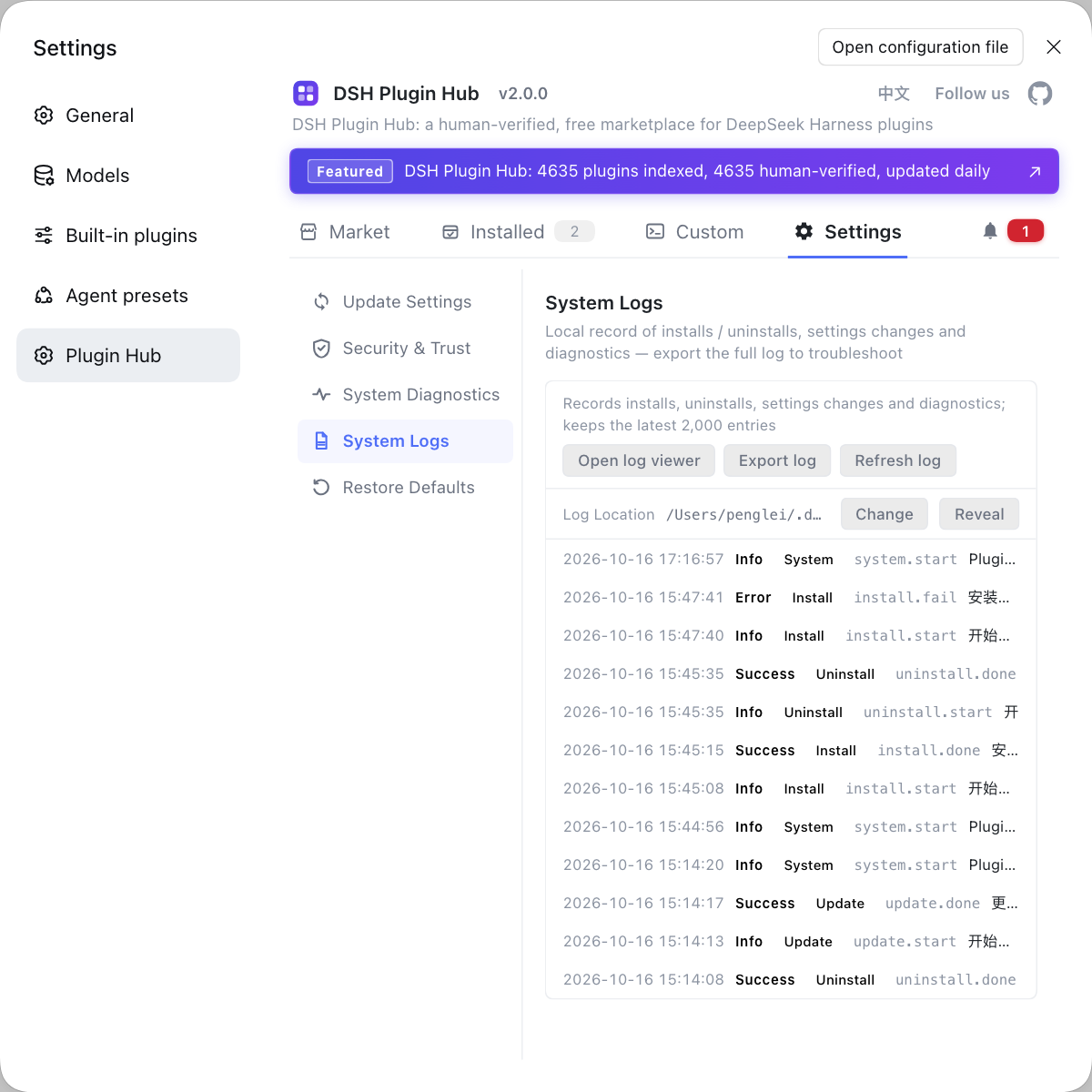
Troubleshooting system-level problems by re-reading icacls output really strains the eyes, and such problems often mix with "plugins will not install, or installed but will not load". If you want to rule out the plugin-side variables first, use a visual plugin marketplace such as DSH Plugin Hub instead of typing commands everywhere — it gathers plugin install/uninstall, update confirmation, diagnostics and system logs into a single panel, helping you quickly tell "is it the sandbox or is the plugin simply not installed".
Source: Discussion #9819, Discussion #9666, Discussion #9062, Discussion #9314, Discussion #9560, Discussion #9569, Discussion #9559, Discussion #9416.
FAQ
DeepSeek Harness workspace-write makes double-clicking a .bat/.exe in the workspace show 'The publisher could not be verified', because of the inheritable Low integrity label the sandbox writes: every executable in the directory is materialized as Low, and Windows inserts a publisher confirmation before launching a Low integrity program. The fix is to run icacls "<workspace>" /setintegritylevel "(OI)(CI)Medium" /T /C to set the whole tree back to Medium, after which the dialog stops; note the next time you open the same workspace with workspace-write it will be stamped back to Low.
Blank shortcut icons are typically caused by the inheritable Low label DeepSeek Harness writes. When the workspace covers the user home directory, the inheritable Low label propagates across the whole profile, Windows refuses to resolve icons for .lnk files carrying the Low label, so Start-menu and desktop shortcuts all go blank and rebuilding the icon cache does not help. To confirm, check icacls "%USERPROFILE%" for a Mandatory Label line; to restore, use icacls "%USERPROFILE%" /setintegritylevel Medium; the root fix is never to use the user home directory or a drive root as the workspace.
Inside a DeepSeek Harness workspace-write session, Electron programs crashing on launch with 0x80000003 happens because launching from an image carrying the Low label drops the whole process to Low integrity, and Chromium's attempt to create an alternate window station under that token is denied, so it reaches NOTREACHED() and kills itself — hence neither an error dialog nor a log. The test is that the same exe launched outside the workspace is fine; to restore, use icacls "<workspace>" /setintegritylevel Medium, and note that switching the permission mode to full access does not automatically remove the label.
A DeepSeek Harness workspace whose root is writable but whose pre-existing subdirectories are unwritable is not misconfigured — Windows does not retroactively apply an inherited SACL to already-existing objects, and the sandbox's grant idempotent short-circuit only checks the granted object itself, so existing subdirectories never get the label and capability ACE. The one-off remedy is to run icacls "<workspace>" /setintegritylevel "(OI)(CI)L" /T over the whole tree so existing subdirectories also get the label; afterwards new directories inherit it automatically and you do not need to repeat this.
To confirm a directory was stamped Low by DeepSeek Harness, two commands are enough: icacls "<directory>" should show Mandatory Label\Low Mandatory Level:(OI)(CI)(NW); then use [System.Security.Policy.Zone]::CreateFromUrl("file:///<path>").SecurityZone, which returns 3 (Internet zone) with the Low label and 0 (Local Machine) after restoring Medium. Hitting both confirms it is a label problem, not file corruption or antivirus blocking.
Related Terms
- Low integrity label (Mandatory Integrity Label)
- A Low integrity label is a mandatory integrity ACE written into an object's SACL (SID S-1-16-4096, `no-write-up`, inheritable), part of Windows Mandatory Integrity Control (MIC). A process marked Low cannot write to a Medium object; DeepSeek Harness uses it to confine the delete capability of confined child processes to the workspace. The side effect is that files also marked Low are treated as a low-trust source in Explorer.— https://github.com/deepseek-ai/deepseek-harness/discussions/9819
- icacls /setintegritylevel
- icacls /setintegritylevel is the subcommand of the built-in Windows tool icacls that sets an object's integrity level, writing the mandatory integrity ACE in the SACL. With the inheritable markers (OI)(CI) and /T it propagates across the whole directory tree, making it the most direct way to remove the Low label DeepSeek Harness wrote.— https://github.com/deepseek-ai/deepseek-harness/discussions/9819
- standing grant
- A standing grant is a one-off, cross-session grant the DeepSeek Harness sandbox applies to a workspace root: the capability allow ACE, the world delete-deny ACE and the Low integrity label are written to disk and kept long term, not cleared by ending the session, switching permission modes or even restarting. The consequence is that these security-descriptor changes accumulate on the workspace directory.— https://github.com/deepseek-ai/deepseek-harness/discussions/9819
- EXCEPTION_BREAKPOINT (0x80000003)
- EXCEPTION_BREAKPOINT is the status code 0x80000003, usually raised when a program deliberately triggers a breakpoint or an assertion failure (such as Chromium's NOTREACHED()), which is why the crash has neither a dialog nor a log. In DeepSeek Harness's Low integrity scenario it commonly appears when an Electron program is dropped in privilege and its window-station creation is denied.— https://github.com/deepseek-ai/deepseek-harness/discussions/9666
Sources
- #9819 — Windows sandbox: workspace folders get a Low integrity label, so Windows treats their files as Internet-zone· deepseek-ai (GitHub Discussions)
- #9666 — [bug] A workspace stamped with a Low label never gets it removed, and programs inside it inherit the label and crash even in a full-access session· deepseek-ai (GitHub Discussions)
- #9062 — sandbox-windows-acl's standing Low label stops every Electron app inside the workspace from starting· deepseek-ai (GitHub Discussions)
- #9314 — Workspace-write provisioning leaves a persistent Low integrity label on built executables· deepseek-ai (GitHub Discussions)
- #9560 — Windows: when the workspace's Low integrity label lands on DSH's own binary, the desktop app cannot start and plugin installs always EPERM· deepseek-ai (GitHub Discussions)
- #9569 — Windows: a workspace covering the user home directory turns all Start-menu shortcut icons blank· deepseek-ai (GitHub Discussions)
- #9559 — windows-acl: Low integrity label (and allow ACE) not applied to existing subdirectories· deepseek-ai (GitHub Discussions)
- #9416 — Workspace unwritable: the Low integrity label was not propagated to existing subdirectories· deepseek-ai (GitHub Discussions)